nisrulz/flutter-examples: a folder-per-concept Flutter sample collection
[Examples] Simple basic isolated apps, for budding flutter devs.
At a glance
- What is it?
- Each top-level folder in nisrulz/flutter-examples is a standalone Flutter app that demonstrates one widget, integration or pattern. The repository is a teaching resource, not a dependency, and the Makefile is what keeps dozens of apps from drifting apart.
- Who is it for?
- Adopt it as a reading and reference set if you are learning Flutter widgets, navigation or a specific integration such as biometrics, SQLite or Firebase, and clone the whole repository so make packages and make doctor work across every app. Do not adopt it as a dependency, a starter template for a product, or a source of version pins, because each folder carries its own pubspec and platform folders and nothing in the README promises they move together.
- Can I use it commercially?
- Yes. Apache-2.0 is a permissive licence: you can use, modify and sell software built on it, as long as you keep its copyright and licence notices.
- Is it still maintained?
- Yes. The repository last received commits 88 days ago.
- What is it written in?
- Mainly Dart, according to GitHub's language statistics.
Answers come from the project's GitHub data, last synced on November 13, 2026, and from our analysis. They are not legal advice.
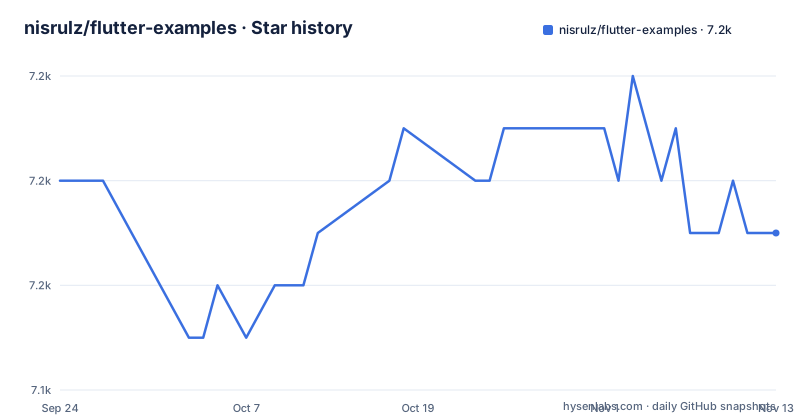
Star history
- nisrulz/flutter-examples7,151 ★ · -1
| Repository | 2026-09-24 | 2026-11-13 |
|---|---|---|
| nisrulz/flutter-examples | 7.2k | 7.2k |
-1 Stars in the last 50 days, measured from the daily GitHub snapshot. Compare with other projects
Editorial analysis
What nisrulz/flutter-examples actually is
The README describes the repository as "Example apps demonstrating features, functionality, and integrations in Flutter" and states that each folder is a standalone app you can run as-is. That sentence is the whole contract. There is no shared package, no plugin to add to pubspec.yaml, and no library surface to import. The top-level entries are the table of contents: stateless_widgets, stateful_widget, using_tabs, using_stepper, dropdown_button, bottom_sheet, sliver_app_bar_example, custom_home_drawer, and dozens more, alongside integration-focused folders such as biometrics, save_data_locally_with_sqlite, firebase_google_authentication, push_notifications, scan_qr_code and unit_testing.
The audience is explicit in the repository description: budding Flutter developers. A reader who wants a working counter app with a provider, a QR scanner, or a splash screen can open one folder and read a small amount of Dart rather than a full production codebase. The trade-off is that nothing here is designed to be copied wholesale into a product. A folder demonstrates a mechanism; it does not carry the error handling, state management or platform configuration a shipped app needs.
The repository is not archived, and the last push was on 2026-08-17, so the code is recent rather than abandoned. The repository has no published GitHub releases, which fits a sample collection: there is no version to install, only a branch to clone. The default branch is develop, not main, so a plain clone lands on develop and any link you share should say so.
The wrapper and example.dart split
The structural decision that makes this collection readable is the split described in the README: lib/main.dart sets up the MaterialApp, and lib/example.dart contains the code that demonstrates the concept. The README tells you directly to open lib/example.dart to see what the app teaches.
That means the boilerplate you already know (theme setup, route table, home widget wiring) is quarantined in main.dart, and the file you actually came for is short. If you are trying to understand how an ExpansionPanel list is assembled, or how a ListWheelScrollView is configured, you do not have to filter it out of a hundred lines of app scaffolding. For a beginner this is the difference between reading an example and reverse-engineering one.
The cost is duplication. Every folder repeats its own main.dart, its own pubspec.yaml, and its own android, ios and other platform directories. There is no shared package and no workspace-level resolution. If you fix a bug in one folder, you have fixed it in one folder. The Makefile exists precisely because this duplication becomes unmanageable by hand once the count passes a few dozen.
Cloning the repo and running your first example
The README's Getting started block is the canonical path. Clone the repository, run the Makefile target that fetches packages for every app, then change into a single example folder and run it. The make packages target calls ./scripts/get_packages.sh, which runs flutter packages get across the apps.
git clone https://github.com/nisrulz/flutter-examples.git
cd flutter-examples
make packages
cd <example-folder>
flutter run
Replace <example-folder> with a real top-level directory name, for example stateful_widget or using_bottom_nav_bar. After flutter run, you should see the demo app for that concept on your selected device or emulator.
If you clone and skip make packages, individual folders may fail to resolve dependencies until you run flutter packages get inside that folder. The README points new users to documentation/GETTING_STARTED.md for full setup and run instructions, including how to download a single example rather than the whole repository. That last option matters if you only want one concept and do not want fifty pubspec files on disk.
The Makefile is the real maintenance surface
Because each app is independent, the repository needs a way to operate on all of them at once. The Makefile provides it, and its help target lists the commands: make packages, make analyze, make test, make doctor, make clean-builds, make gradle-update and make docs.
The interesting one is make doctor, described in the Makefile as "Check all apps for configuration drift", which runs ./scripts/repo_doctor.sh. Configuration drift is the specific failure mode of a folder-per-app repository: one app gets a newer Gradle wrapper, another keeps an old compileSdk, and six months later you cannot tell whether a build failure is your change or the folder's age. A doctor script that checks every app for drift is a reasonable answer, and it is more than most sample repositories attempt.
make test runs flutter test only for apps that have tests, which is an honest admission that not every folder is covered. make clean-builds moves build folders to trash rather than deleting them, an uncommon choice that gives you a recovery path. make gradle-update takes VERSION=<x.y.z> and FORCE=1 options, with examples in the help text such as make gradle-update VERSION=9.7.0 FORCE=1. make docs regenerates documentation/EXAMPLES.md from the app folders, which is why that document can be trusted to list what actually exists rather than what existed at some past commit.
Where this collection stops being the right tool
The README does not document rollback, and there is no migration path between Flutter versions. If a folder was written against an older SDK and your local Flutter channel has moved, the example may not compile, and nothing in the repository tells you which Flutter version a given folder was verified against. The Makefile can analyze and test, but it does not pin a toolchain, and the repository has no published releases that could serve as version anchors.
This is the wrong tool when you need a maintained dependency. If you want a widget that you can upgrade on your schedule and file issues against, a published package is the right shape. An example folder that you copy into your project becomes your code, with your maintenance burden, and there is no upstream to pull fixes from.
It is also the wrong tool for judging production architecture. The examples demonstrate one concept each, deliberately. A folder showing push_notifications is not showing you how to structure a notification system across a large app. Reading several folders will teach you Flutter APIs; it will not teach you how a team of ten should organise a codebase. Confusing the two is the most likely way to misuse this repository.
How it compares to flutter/samples
The README notes that flutter-examples is featured in the Official Flutter Samples index, Flutter Weekly #11 and Awesome Flutter. The obvious alternative is flutter/samples itself, the repository maintained by the Flutter team.
The difference in approach is governance and scope rather than subject matter. flutter/samples is the official collection and moves with the framework; you would go there when you want the canonical, current demonstration of a feature. nisrulz/flutter-examples is a personal collection with a stated author, a PayPal support link, and a contributor list. Its strength is breadth of small, isolated apps, including integration demos such as biometrics, google_signin, image_editor and covid19_mobile_app that an official sample set may not cover in the same folder-per-concept form.
Practically, the two are complementary. Use the official samples to check the current recommended way to do something, and use this repository when you want a small runnable app for a specific integration. Neither replaces reading the Flutter API documentation.
Licence and upgrade cost
The repository is licensed under the Apache License, Version 2.0, with the full text in LICENSE.txt. That is a permissive licence that allows use in commercial and closed-source projects, and it includes an explicit patent grant. It also carries attribution and notice requirements: if you copy example code into your own project, you should preserve the applicable notices. That is a summary of the licence text, not legal advice, and the LICENSE.txt file is the authority.
Upgrade cost is the practical concern. There are around fifty apps, each with its own pubspec.yaml and platform folders, and no shared version constraints. A Flutter or Gradle upgrade can therefore break a subset of folders rather than all of them, and there is no lockstep release to wait for. The Makefile mitigates this with make doctor for drift detection and make gradle-update for wrappers, but the Dart dependency side is per-app. If you only need one or two examples, downloading those folders individually as the Getting Started documentation describes is cheaper than maintaining a full clone.
Editorial conclusion
Adopt it as a reading and reference set if you are learning Flutter widgets, navigation or a specific integration such as biometrics, SQLite or Firebase, and clone the whole repository so make packages and make doctor work across every app. Do not adopt it as a dependency, a starter template for a product, or a source of version pins, because each folder carries its own pubspec and platform folders and nothing in the README promises they move together. Before relying on any single example, open its lib/example.dart, check the pubspec against your Flutter channel, and run flutter run in that folder on the platform you actually target.
Frequently asked questions
Is nisrulz/flutter-examples still maintained?
The repository is not archived, and its last push was on 2026-08-17. The repository has no published GitHub releases, which is consistent with a sample collection that is cloned rather than installed.
How do I run one of the flutter-examples apps?
Clone the repository, run make packages at the root, then cd into the example folder and run flutter run. The README's Getting started block gives exactly this sequence.
Can I use nisrulz/flutter-examples as a package dependency?
No. Each folder is a standalone app, not a published package, so there is nothing to add to your pubspec.yaml. The README describes each folder as an app you can run as-is.
Which file in an example contains the code being demonstrated?
lib/example.dart holds the code that demonstrates the concept, while lib/main.dart sets up the MaterialApp. The README tells readers to open lib/example.dart to see what the app teaches.
What does make doctor do in nisrulz/flutter-examples?
It checks all apps for configuration drift by running ./scripts/repo_doctor.sh, according to the Makefile. That helps catch folders whose Gradle or platform configuration has fallen behind the rest.
What licence does nisrulz/flutter-examples use?
It is licensed under the Apache License, Version 2.0, with the text in LICENSE.txt. That is permissive, but it carries attribution and notice requirements when you reuse code.
Official sources
Add this badge to your README
If you maintain this project, the badge below links readers to this analysis and shows its maintenance status from the daily GitHub snapshot. Paste the markdown into your README; add ?metric=license or ?metric=stars to the image URL for a different field.

[](https://hysenlabs.com/projects/nisrulz-flutter-examples)Star history chart for your README
[](https://hysenlabs.com/projects/nisrulz-flutter-examples)Was this useful?