JXPhotoBrowser for UIKit and SwiftUI photo browsing
Lightweight, highly customizable iOS photo & video browser in Swift. Supports zoom transitions, drag-to-dismiss, pinch-to-zoom, infinite looping, custom cells and overlays. No third-party dependencies. Works with both UIKit and SwiftUI. 图片/视频媒体浏览器。
At a glance
- What is it?
- JXPhotoBrowser is an MIT-licensed iOS media browser built around UIKit and UICollectionView, with SwiftUI integration through a bridge layer. It suits applications that need custom image loading, zooming, looping, transitions, and drag-to-dismiss behavior without adding a third-party image-loading dependency.
- Who is it for?
- Adopt JXPhotoBrowser when an iOS application needs a customizable modal or embedded media browser and already owns its image-loading and video-playback logic. Do not choose it for per-item cell sizing, vertical drag-to-dismiss, older iOS targets without pinning an older release, or needs that assume the library includes image downloading.
- Can I use it commercially?
- Yes. MIT is a permissive licence: you can use, modify and sell software built on it, as long as you keep its copyright and licence notices.
- Is it still maintained?
- Yes. The repository last received commits 27 days ago.
- What is it written in?
- Mainly Swift, according to GitHub's language statistics.
Answers come from the project's GitHub data, last synced on October 23, 2026, and from our analysis. They are not legal advice.
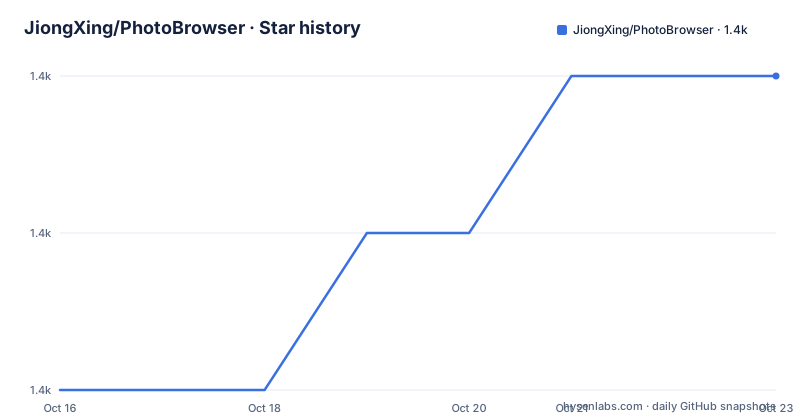
Star history
- JiongXing/PhotoBrowser1,437 ★ · +2
| Repository | 2026-10-16 | 2026-10-23 |
|---|---|---|
| JiongXing/PhotoBrowser | 1.4k | 1.4k |
2 Stars in the last 7 days, measured from the daily GitHub snapshot. Compare with other projects
Editorial analysis
JXPhotoBrowser's place in an iOS media flow
JXPhotoBrowser addresses the viewing layer of an iOS photo or video workflow. An application remains responsible for deciding what each item represents, loading its image, and any video playback behavior. The browser supplies the collection interface, gestures, transitions, paging, overlays, and cell lifecycle hooks needed after a user selects media.
This separation targets applications that already have an image library, such as a cache-backed loader, or a custom server response. It also fits teams that want the browser presentation independent from their thumbnail model. The README does not document an included network image loader, caching policy, or standardized media object. In practical terms, JXPhotoBrowser is closer to a presentation component than a complete gallery data package.
The intended platforms are explicit. JXPhotoBrowser supports iOS 15.0 and later with Swift 5.4 or later. Its SwiftUI example requires iOS 16.0 or later and uses Kingfisher 8.13 or later. Kingfisher is an example dependency rather than a dependency imposed by the framework itself. The core is available through CocoaPods, Swift Package Manager, and Carthage, with the same UIKit-oriented design exposed through a SwiftUI bridge layer.
UICollectionView data flow and delegate contract
The documented architecture places `JXPhotoBrowserViewController` at the center. It reports an item count through `JXPhotoBrowserDelegate`, dequeues a reusable cell for an `IndexPath`, and asks the delegate to configure that cell when it will be displayed. For a zoom transition, the delegate can also return a thumbnail `UIView` associated with an item.
This callback design keeps the browser independent from any application model. The delegate maps indexes from the browser to the caller's own array, archive, or remote resource collection. `initialIndex` selects the first visible item, while `isLoopingEnabled` enables infinite horizontal or vertical paging. Programmatic paging, automatic playback, page spacing, overlays, and transition selection are configured on the browser before presentation.
Cells fill the browser page. The README explicitly says that every cell uses a fixed full-browser size and that 4.1 no longer supports per-item size customization. If media data changes, callers must use `browser.reloadData()` or `browser.reloadData(preservingCurrentPage: false)`. The documentation warns against manipulating the internal collection view directly because the framework owns page bounds and reload behavior.
Installing JXPhotoBrowser with CocoaPods or SwiftPM
For CocoaPods, add the documented dependency to the Podfile. Version `4.2` is the version shown in the README's installation instructions.
pod 'JXPhotoBrowser', '~> 4.2'For Swift Package Manager, declare the package dependency in `Package.swift`.
dependencies: [
    .package(url: "https://github.com/JiongXing/PhotoBrowser", from: "4.2.0")
]
Carthage users can add the repository declaration and then update the project for iOS with XCFrameworks.
github "JiongXing/PhotoBrowser"carthage update --use-xcframeworks --platform iOSAll three documented integration routes include `PrivacyInfo.xcprivacy`. The README states that the framework does not track users, collect data, or use Required Reason APIs. That is a project declaration, not a substitute for examining the exact version included in an application's resolved dependency graph.
Presenting and configuring the first JXPhotoBrowser gallery
A minimal presentation configures the delegate, opening index, transition, looping, and optional overlay before calling `present(from:)`.
import JXPhotoBrowser

let browser = JXPhotoBrowserViewController()
 browser.delegate = self
 browser.initialIndex = indexPath.item
 browser.transitionType = .zoom
 browser.isLoopingEnabled = true
 browser.addOverlay(JXPageIndicatorOverlay())
 browser.present(from: self)
The delegate must provide the count and return a cell for every requested index. The standard image flow uses `JXZoomImageCell.reuseIdentifier` and then assigns the loaded image in `willDisplay`.
extension ViewController: JXPhotoBrowserDelegate {
    func numberOfItems(in browser: JXPhotoBrowserViewController) -> Int {
        items.count
    }

    func photoBrowser(
        _ browser: JXPhotoBrowserViewController,
        cellForItemAt index: Int,
        at indexPath: IndexPath
    ) -> JXPhotoBrowserAnyCell {
        browser.dequeueReusableCell(
            withReuseIdentifier: JXZoomImageCell.reuseIdentifier,
            for: indexPath
        )
    }
}
A second delegate method configures the displayed image cell. The README leaves the actual assignment to the application's chosen image-loading library, so no network request or placeholder policy is imposed by JXPhotoBrowser.
func photoBrowser(
    _ browser: JXPhotoBrowserViewController,
    willDisplay cell: JXPhotoBrowserAnyCell,
    at index: Int
) {
    guard let cell = cell as? JXZoomImageCell else { return }
    // 使用业务方选择的图片加载库设置 cell.imageView.image
}
Zoom transitions, thumbnails, and data reload behavior
A zoom transition needs a source thumbnail so the browser can connect the presentation view to the gallery. The delegate returns the caller's existing collection cell content view for the corresponding item.
func photoBrowser(
    _ browser: JXPhotoBrowserViewController,
    thumbnailViewAt index: Int
) -> UIView? {
    let indexPath = IndexPath(item: index, section: 0)
    return collectionView.cellForItem(at: indexPath)?.contentView
}
Returning `nil` is permitted by the method signature, although the README does not define the exact visual fallback. Applications should therefore verify thumbnail availability for every route that presents with `.zoom`. The transition can also be set to `.fade` or `.none`.
When the caller's data changes, the documented reload entry points differ in page handling. The first keeps the current page where possible and clamps it to a valid range. The second returns to `initialIndex`.
browser.reloadData()

browser.reloadData(preservingCurrentPage: false)
Using the internal collection view directly would bypass that contract. This is especially relevant when a deletion reduces the item count below the current index or when reordered data changes the mapping supplied by the delegate.
Embedded banners require containment and fixed configuration
JXPhotoBrowser also supports a banner-style browser embedded in an existing view hierarchy. The documented setup requires standard UIKit View Controller containment. It disables the pull-down dismissal gesture, selects the `.none` transition, and configures automatic playback.
let browser = JXPhotoBrowserViewController()
browser.delegate = self
browser.transitionType = .none
browser.isDismissGestureEnabled = false
browser.autoPlayInterval = 3
browser.isAutoPlayEnabled = true

addChild(browser)
containerView.addSubview(browser.view)
browser.didMove(toParent: self)
The application must also add constraints for `browser.view`, as stated in the README example. Removal follows the containment sequence: call `willMove(toParent: nil)`, remove the browser view, then call `removeFromParent()`. This is a UIKit host responsibility rather than a hidden behavior supplied by the package.
The browser defaults to portrait orientation, and the documented orientation fix does not change that default policy. Vertical scrolling also does not enable drag-to-dismiss. Full-page cell sizing means banners cannot use independently measured item dimensions through the documented customization model.
Upgrade scope, maintenance status, and the MIT boundary
The repository is not archived, and its last push was on 2026-09-26. That is the most concrete maintenance fact available. The listed releases are `4.0.0`, `4.0.1`, and `4.0.2`, dated in February 2026, while the README documents installation of the 4.2 line and describes 4.2 migration from 4.1.0. This means dependency resolution and the selected version should be checked during adoption rather than inferred from the release list alone.
The documented 4.2 compatibility change is the minimum deployment target moving from iOS 12 to iOS 15. Applications that must continue supporting iOS 12 through iOS 14 are told to pin `4.1.0`. The repository also includes separate `4.0` to `4.1` and `4.1` to `4.2` migration documents. Those files are the relevant first checks for an upgrade because cell sizing, API changes, and deployment-target changes can affect integration beyond package installation.
JXPhotoBrowser uses the MIT License. That license permits broad use, modification, distribution, and sublicensing subject to its conditions, but applications should inspect the repository's `LICENSE` file for the exact obligations and retain required notices. No paid runtime service or account is described.
Where JXPhotoBrowser differs from application-owned gallery code
The practical alternative is to build the gallery directly inside an application with `UICollectionView`, add paging and gesture recognizers, and connect each page to the app's loading library. That approach allows cell sizes, orientation changes, media models, and dismissal behavior to be defined by the application, but it leaves the developer responsible for reusable cells, looping boundaries, zoom and fade transitions, overlays, autoplay configuration, and delegate behavior.
JXPhotoBrowser moves those presentation concerns into a reusable package while preserving control over data mapping. Its trade-off is a fixed page-sized cell model, documented restrictions on drag-to-dismiss and orientation, and an explicit requirement that the host own media loading. A home-grown implementation can fit an unusual interaction model more directly. JXPhotoBrowser is the better fit when the desired model is a full-page browser with established gestures and transitions rather than a media component with a unique per-item layout.
Editorial conclusion
Adopt JXPhotoBrowser when an iOS application needs a customizable modal or embedded media browser and already owns its image-loading and video-playback logic. Do not choose it for per-item cell sizing, vertical drag-to-dismiss, older iOS targets without pinning an older release, or needs that assume the library includes image downloading. Verify first that your delegate can supply every cell and transition thumbnail, because the library deliberately does not define a business data model or image-loading backend.
Frequently asked questions
Does JXPhotoBrowser include an image-loading library?
No. The library does not include an image-loading library, so the application must configure cell images through the delegate with its chosen loader.
What is the minimum iOS version for JXPhotoBrowser 4.2?
JXPhotoBrowser 4.2 requires iOS 15.0 or later. Applications that must support iOS 12 through iOS 14 should pin version 4.1.0.
Can JXPhotoBrowser be embedded inside an existing UIKit screen?
Yes, but the host must use standard View Controller containment, add constraints for the browser view, and disable the pull-down dismissal gesture as shown in the embedded-banner guide.
Official sources
Add this badge to your README
If you maintain this project, the badge below links readers to this analysis and shows its maintenance status from the daily GitHub snapshot. Paste the markdown into your README; add ?metric=license or ?metric=stars to the image URL for a different field.

[](https://hysenlabs.com/projects/jiongxing-photobrowser)Star history chart for your README
[](https://hysenlabs.com/projects/jiongxing-photobrowser)Was this useful?