SLY Common Lisp IDE for Emacs: Features, Setup, and Limits
Sylvester the Cat's Common Lisp IDE
At a glance
- What is it?
- SLY is an Emacs-based Common Lisp IDE forked from SLIME, with a comint-based REPL, inspectors, completion support, and interactive tracing. It suits Common Lisp developers who want source editing and evaluation in one Emacs workflow.
- Who is it for?
- Adopt SLY if you develop Common Lisp in Emacs and value SLIME-derived REPL, inspector, and debugger workflows with additional SLY interfaces. Do not choose it solely for the portable stepper, because the README describes that feature as an early functional prototype.
- Can I use it commercially?
- Not without permission. GitHub finds no licence file in the repository, and without a licence all rights are reserved by default: you may read the code but not reuse it. Check the README, or ask the authors, before using it.
- Is it still maintained?
- Yes. The repository last received commits 11 days ago.
- What is it written in?
- Mainly Common Lisp, according to GitHub's language statistics.
Answers come from the project's GitHub data, last synced on November 6, 2026, and from our analysis. They are not legal advice.
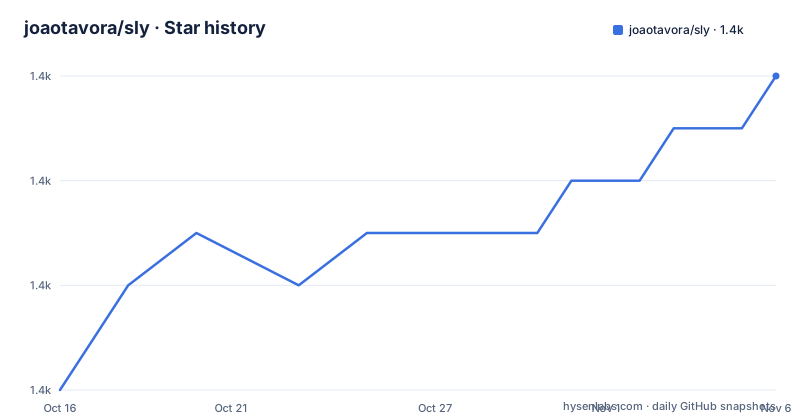
Star history
- joaotavora/sly1,446 ★ · +6
| Repository | 2026-10-16 | 2026-11-06 |
|---|---|---|
| joaotavora/sly | 1.4k | 1.4k |
6 Stars in the last 21 days, measured from the daily GitHub snapshot. Compare with other projects
Editorial analysis
What SLY adds to Emacs for Common Lisp
SLY addresses a specific Common Lisp development problem: keeping source editing, evaluation, inspection, debugging, and completion inside Emacs rather than switching between an editor and a separate REPL. It is aimed at Common Lisp programmers who already use Emacs or are willing to adopt its Lisp editing workflow. The README describes SLY as Sylvester the Cat's Common Lisp IDE and as a fork of SLIME, so the expected audience includes developers familiar with SLIME's debugger, inspector, xref, and REPL concepts.
The main difference from plain `comint.el` is not simply the ability to evaluate forms. SLY adds a development layer around that process. It supports multiple REPLs and inspectors, interactive backreferences that keep returned objects visually connected to REPL output, and a Trace Dialog. Completion can be presented through Emacs completion interfaces such as Company, Helm, Fido-mode, or SLY's own `sly-symbol-completion-mode`. That interface choice separates SLY's Lisp-side support from the completion frontend used in the editor.
The repository also includes contrib support enabled by default, and the README names separate packages for Quicklisp, named readtables, macrostep, stepper, ASDF support, and package-inferred behavior. These are optional pieces around the core IDE. SLY does not replace the Common Lisp implementation itself. The README's setup example points `inferior-lisp-program` at SBCL, but it also documents standalone `slynk` use, so the project can work with a running Common Lisp server rather than requiring one particular editor configuration.
How SLY connects Emacs to a Lisp process
SLY's documented REPL is based on Emacs's `comint.el`. The README says that everything can be copied to the REPL, which indicates that the REPL is intended to remain an ordinary interactive buffer rather than a closed inspection panel. Source editing and evaluation therefore stay within an Emacs workflow, while SLY connects Emacs actions to a Common Lisp implementation.
The connection has two documented forms. The normal path starts a Lisp process and then runs `M-x sly`. The standalone path loads the Common Lisp-side `slynk` system, creates a server on a selected port, and then uses `sly-connect` in Emacs. This separation gives developers a choice between an automatically launched inferior Lisp and an externally managed server. Startup time can also matter. The README points to the manual for faster startup methods, but does not describe those methods, so their exact commands cannot be assumed.
SLY's returned values are treated as interactive objects. The README describes presentations as replaced by backreferences that highlight the object and remain stable throughout the REPL session. That design is useful when a form returns a structure, condition, or other value that the developer wants to inspect repeatedly. The Trace Dialog provides a dedicated interface for controlling traces, while the inspectors provide places to examine live objects. The README names xrefs and the debugger among the inherited SLIME features, but it does not document their complete command set.
Installing SLY and starting the first REPL
The package path requires MELPA to be configured as usual. The README directs the user to invoke `M-x package-install` and install `sly`. After installation, `sly-mode` is said to appear automatically in `.lisp` files. Starting the IDE is done with `M-x sly`, which connects to a Lisp process and opens its REPL.
A source checkout is also documented. Clone the repository, add the checkout directory to `load-path`, require `sly-autoloads`, and set the Lisp executable. The example uses an absolute SBCL path, so readers must replace that path with one that exists on their machine.
(add-to-list 'load-path "~/dir/to/cloned/sly")
(require 'sly-autoloads)
(setq inferior-lisp-program "/opt/sbcl/bin/sbcl")
The repository says byte compilation is generally unnecessary. If a local build is desired, the documented command is:
make compile compile-contribThe Makefile defines compilation targets for SLY's Emacs Lisp files and its contrib files. It also exposes test targets, including `check`, `check-core`, and contrib-specific checks. The Makefile allows the build tools to be selected through `EMACS` and `LISP`, so a developer can use a local Lisp executable rather than the default `sbcl` value.
For a standalone server, the README starts SBCL and loads the ASDF system from the checkout. The server is created on port `4008`, after which `sly-connect` is used from Emacs:
(asdf:load-system :slynk)
(slynk:create-server :port 4008)
These commands should be entered in the running Common Lisp process. The README excerpt does not give a complete shell transcript for launching that process, so the exact SBCL invocation is left to the reader's local installation.
REPL inspection, completion, and tracing in practice
The most distinctive SLY feature is the combination of a standard `comint.el` REPL with live object references. A developer can evaluate code in a source buffer, inspect returned values, and retain a backreference to those values during the REPL session. The README specifically contrasts this with replacing presentations, indicating that object identity and navigation are central to the interface.
Completion is designed to work with several Emacs completion systems. The documented frontends include Company, Emacs 27's Fido-mode, Helm, and vanilla completion. By default, SLY uses `sly-symbol-completion-mode`, which gives users a fallback without requiring one of those packages. This is a practical integration choice. A developer can retain the SLY Lisp connection while changing how completion candidates are rendered in the minibuffer.
The Trace Dialog is separate from ordinary REPL input and is intended for interactive tracing. The README does not specify its exact key bindings or output format, so the manual is the necessary source for those details. The same applies to inspector commands. SLY includes inspectors, but the README does not explain how an individual slot is expanded or how a value is copied back into source.
The repository also lists support for `NAMED-READTABLES`, `macrostep.el`, and Quicklisp through separate contrib repositories. These integrations can reduce the friction of using specialized Common Lisp tooling, but they also expand the dependency surface. A project should enable only the contrib behavior it needs and account for package installation separately.
SLY's stepper is useful but not a settled feature
SLY advertises a portable, annotation-based stepper, but the README qualifies it as being in an early functional prototype stage. That distinction matters for adoption. A stepper is closely tied to evaluation state, source locations, and the behavior of a particular debugger or stepping implementation. A prototype can be useful for exploration while still leaving questions about edge cases, portability, and coverage.
The README does not document supported Common Lisp implementations for the stepper, the commands used to advance execution, or whether all forms and conditions are handled consistently. It also does not claim that the stepper replaces the inherited SLIME debugger. For that reason, a team should treat stepping as an experimental capability rather than a guaranteed reason to migrate from another Common Lisp IDE.
There is another practical limitation in the documented project history. The recent release list contains `1.0.0-beta` from 2015-03-30 and `1.0.0-alpha-3` from 2014-12-31. The repository is not archived and its last push was on 2026-10-13, but the available release history does not show a newer stable release. The README says SLY tracks SLIME bug fixes, particularly in implementation backends, yet it does not identify a current release cadence or compatibility matrix. Maintenance activity and packaged release freshness should therefore be checked separately.
SLY versus SLIME and other Common Lisp tooling
SLIME is the clearest alternative because SLY is explicitly a fork of it and retains familiar SLIME features such as the debugger, inspector, and xref. The architectural difference is the direction of change. SLY's fork adds features that the README says could not be realized cleanly through SLIME's contrib system, including stickers and multiple inspectors. The author also states that SLY targets Emacs 24.5 and newer and uses lexical binding, whereas the fork decision was partly associated with dropping support for Emacs 23.
That does not make SLY a drop-in replacement without checking configuration. The README says that if SLIME is already installed, SLY will ask and temporarily disable it for the Emacs session. Users therefore need to review how both packages load and avoid assuming that the two development environments can coexist unchanged.
Compared with a plain Emacs Lisp editing setup, SLY adds connection management, inspection, tracing, completion integration, and debugger workflows. Compared with a standalone editor or terminal REPL, its cost is the need to configure an Emacs package, a Common Lisp process, and sometimes a server connection. The repository's additional contrib projects, such as `sly-quicklisp` and `sly-named-readtables`, are extensions to SLY rather than independent full IDEs. A team that does not use Emacs should not select SLY based only on its Common Lisp tooling features, because the documented workflow is explicitly centered on Emacs.
Maintenance, licensing, and upgrade implications
The repository is not archived, and the last push was on 2026-10-13. That establishes repository activity, but it does not by itself guarantee compatibility with every Common Lisp implementation or Emacs release. The available release list still shows the 2015 `1.0.0-beta` and the 2014 `1.0.0-alpha-3`. The README directs users to `NEWS` and the manual for current information, so those files are the appropriate places to inspect before pinning an internal version.
The repository description marks the license as unknown, while the README says that SLY is free software and that all files, unless explicitly stated otherwise, are public domain. It separately notes that the ASCII artwork is copyright by Felix Lee, Joan G. Stark and Hayley Jane Wakenshaw. This is not legal advice, but it means an organization should preserve the artwork notice when redistributing the project and should check individual files for exceptions rather than treating every file identically.
Upgrade cost depends on installation method. MELPA users can receive package changes through their configured package workflow, while source-checkout users manage the checkout and may choose to run the documented compilation commands. Contrib packages are separate repositories, so upgrading core SLY does not automatically establish compatibility with each extension. Before upgrading a development environment, review `NEWS`, `PROBLEMS.md`, `CONTRIBUTING.md`, and the contrib repository documentation named in the README.
Editorial conclusion
Adopt SLY if you develop Common Lisp in Emacs and value SLIME-derived REPL, inspector, and debugger workflows with additional SLY interfaces. Do not choose it solely for the portable stepper, because the README describes that feature as an early functional prototype. Verify your Lisp implementation, Emacs configuration, MELPA setup, and the exact contrib packages you need before standardizing on it. The repository's last push was on 2026-10-13.
Frequently asked questions
How do I install SLY for Common Lisp development in Emacs?
Configure MELPA, invoke `M-x package-install`, and install `sly`. The README says `sly-mode` will then appear automatically in `.lisp` files.
How do I start a SLY REPL?
Run `M-x sly` to connect to a Lisp process and open the REPL. SLY's REPL is based on Emacs's `comint.el`.
Does SLY include a debugger and inspectors?
Yes. The README identifies the debugger and inspector among the familiar SLIME features retained by SLY, and it also lists multiple inspectors as an SLY highlight.
Can SLY connect to a standalone Common Lisp server?
Yes. The README documents loading `slynk` through ASDF, creating a server with `(slynk:create-server :port 4008)`, and connecting from Emacs with `sly-connect`.
Is SLY's portable stepper ready for production use?
The README calls the annotation-based stepper an early functional prototype. It does not document a complete production support or compatibility matrix for that feature.
Which completion systems can SLY use?
The README names Company, Emacs 27's Fido-mode, Helm, vanilla completion, and SLY's default `sly-symbol-completion-mode` as supported completion interfaces.
Official sources
Add this badge to your README
If you maintain this project, the badge below links readers to this analysis and shows its maintenance status from the daily GitHub snapshot. Paste the markdown into your README; add ?metric=license or ?metric=stars to the image URL for a different field.

[](https://hysenlabs.com/projects/joaotavora-sly)Star history chart for your README
[](https://hysenlabs.com/projects/joaotavora-sly)Was this useful?