JSONKit: A Strict, High-Speed Objective-C JSON Parser for Legacy Apple Platforms
GitHub describes it as Objective-C JSON. The repository metadata lists Objective-C as its primary language. This article stays within the project description and details documented in the GitHub repository README.
At a glance
- What is it?
- JSONKit is a dual-licensed Objective-C JSON library that prioritizes parsing speed and strict RFC 4627 conformance. It targets older Apple platforms where NSJSONSerialization may not be available or fast enough, but its age and design choices demand careful evaluation.
- Who is it for?
- Adopt JSONKit if you are maintaining a legacy Mac OS X 10.7 or iOS 5 codebase where NSJSONSerialization is unavailable or measurably slower, and you need strict RFC 4627 parsing. Do not adopt it for new projects; use NSJSONSerialization or a modern Swift-native library.
- Can I use it commercially?
- Not without permission. GitHub finds no licence file in the repository, and without a licence all rights are reserved by default: you may read the code but not reuse it. Check the README, or ask the authors, before using it.
- Is it still maintained?
- Probably not. The repository last received commits 72 months ago, on November 22, 2020.
- What is it written in?
- Mainly Objective-C, according to GitHub's language statistics.
Answers come from the project's GitHub data, last synced on October 22, 2026, and from our analysis. They are not legal advice.
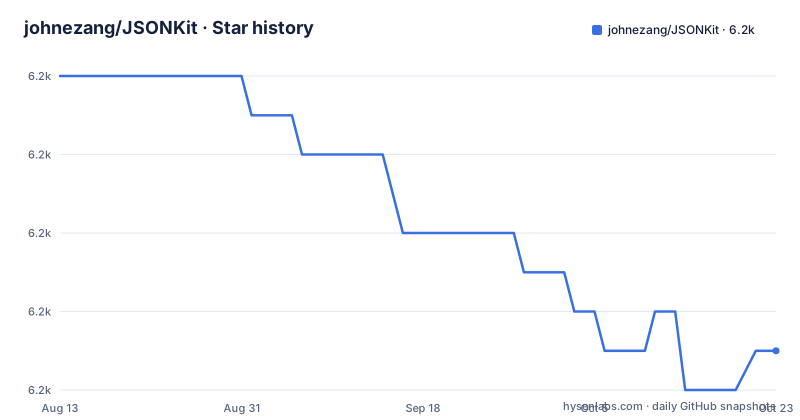
Star history
- johnezang/JSONKit6,169 ★ · -7
| Repository | 2026-08-13 | 2026-10-22 |
|---|---|---|
| johnezang/JSONKit | 6.2k | 6.2k |
-7 Stars in the last 70 days, measured from the daily GitHub snapshot. Compare with other projects
Editorial analysis
What JSONKit Solves and Who It Is For
JSONKit is an Objective-C library that parses and serializes JSON, mapping the JSON primitives to Foundation classes: NSNull, NSNumber, NSString, NSArray, and NSDictionary. It was written in 2011, before Apple introduced NSJSONSerialization in Mac OS X 10.7 and iOS 5. The primary problem it solved was performance: the README claims that JSONKit is approximately 25% to 40% faster than NSJSONSerialization, based on an external comparison. That speed matters for developers who were parsing large JSON payloads on the then-current hardware, such as a 2.66GHz Core 2 MacBook Pro. Today, JSONKit is relevant only to those maintaining legacy codebases that still target those operating systems or that cannot move away from a dependency that was already in place. New projects should not pick a library that has seen no visible activity since its 2011 update.
The Parsing Mechanism: Core Foundation and Strict Unicode
JSONKit uses Core Foundation internally, assuming that CFString is equivalent to NSString, CFArray to NSArray, and so on. That design choice avoids bridging overhead and directly manipulates Core Foundation objects. The parser is strict by default: it follows RFC 4627 and the Unicode Standard's Conformance chapter, rejecting any JSON that contains ill-formed Unicode. The README lists specific code points that are treated as ill-formed, including U+0000, the surrogate range U+D800 through U+DFFF, and the noncharacters U+FDD0 through U+FDEF. The rationale for rejecting U+0000 is security: C string handling code would stop at that null byte, potentially altering string semantics and creating an attack vector. This strictness is a double-edged sword. It gives predictable behavior, but it also means that JSON containing legitimate Unicode noncharacters, or a literal null character in a string, will fail to parse unless you enable the JKParseOptionLooseUnicode option.
Getting It Running: Commands and Configuration
The README does not provide a step-by-step installation guide, but it does give the essential API names. You would add the JSONKit source files to your Xcode project and then call methods like -JSONDataWithOptions:error: for serialization, and presumably -objectFromJSONData or similar for parsing, though the README only mentions the serialization method explicitly. The experimental branch introduces gzip support: JSONKit automatically links to libz.dylib at run time, so no manual linking is required. Parsing will decompress a buffer if it detects a gzip signature header. To compress serialized JSON, you pass JKSerializeOptionCompress to -JSONDataWithOptions:error:. The parsing options include JKParseOptionLooseUnicode, which substitutes U+FFFD for ill-formed Unicode sequences. The README also notes that the default strict behavior means JKParseOptionLooseUnicode is not enabled. There is no mention of a package manager like CocoaPods or Carthage, so integration is manual.
Performance Claims and Their Context
The README headlines performance with two bold claims: parsing is 23% faster than binary .plist, and serializing is 549% faster than binary .plist. Those numbers come from benchmarks run on a specific MacBook Pro with a 2.66GHz Core 2, compiled with gcc-4.2 -DNS_BLOCK_ASSERTIONS -O3 -arch x86_64, averaging 1,000 iterations of user plus system time from getrusage. The JSON used was twitter_public_timeline.json. The README itself notes that these benchmarks predate NSJSONSerialization, and it references an external site for the comparison against NSJSONSerialization. That means the 25% to 40% figure is not from JSONKit's own benchmarks; it is a back-of-the-envelope calculation from third-party numbers. You should treat all these performance numbers as historical artifacts. On modern hardware and with modern compilers, the relative performance could be very different. The lack of any benchmark updates since 2011 is a red flag for anyone considering JSONKit for a current project.
A Genuine Limitation: Age and Unmaintained Code
The most obvious limitation is that JSONKit appears to be unmaintained. The README's last update is dated 2011/12/18, and the repository shows no recent releases or pushes. That means it has not been updated for newer Objective-C runtimes, ARC changes, or the Swift era. It also means that any security vulnerabilities discovered after 2011 have not been patched. The strict Unicode handling is a design choice that reduces some attack surface, but it cannot address all potential issues in a parser that predates a decade of security research. For any new application, using JSONKit would mean inheriting an unmaintained dependency. Even for legacy projects, you need to weigh the risk of a known or unknown vulnerability against the benefit of a faster parser. The README's discussion of U+0000 and security suggests the author was security-conscious, but that does not replace ongoing maintenance.
The Alternative: NSJSONSerialization and Modern Libraries
The direct alternative is Apple's NSJSONSerialization, which became available in Mac OS X 10.7 and iOS 5. It is built into the OS, actively maintained by Apple, and handles Unicode according to the system's current standards. The difference in approach is that NSJSONSerialization is a general-purpose, Apple-supported API, whereas JSONKit is a third-party, single-purpose library with a strict interpretation of RFC 4627. For legacy projects that still target iOS 5 or earlier, NSJSONSerialization is not an option, so JSONKit might be the only high-performance choice. For anything newer, NSJSONSerialization is the safer default. If you need more modern features like streaming parsing or Swift Codable support, you would look at libraries like SwiftyJSON or Codable's built-in JSONDecoder, but those are for Swift and are not drop-in replacements for an Objective-C library.
Licensing and Maintenance Costs
JSONKit is dual licensed under the BSD License or the Apache License, Version 2.0, giving you a choice. That is a permissive license, so you can use it in commercial projects, but you must comply with the license terms, including preserving copyright notices. The README does not specify which version of the BSD license, so you should verify the exact terms in the source files. The maintenance cost is effectively zero because the project is not maintained. That is a cost in itself: you cannot expect bug fixes, security patches, or updates for new Apple platforms. If you adopt JSONKit, you are taking on the responsibility of maintaining it internally, which includes auditing the code for vulnerabilities and potentially patching it yourself. The gzip support in the experimental branch adds a feature, but it also adds a dependency on libz, which is a system library on Apple platforms, so that is not a heavy burden. Still, the lack of a formal release process means you need to track the repository manually.
Editorial conclusion
Adopt JSONKit if you are maintaining a legacy Mac OS X 10.7 or iOS 5 codebase where NSJSONSerialization is unavailable or measurably slower, and you need strict RFC 4627 parsing. Do not adopt it for new projects; use NSJSONSerialization or a modern Swift-native library. Before adopting, verify that the strict Unicode handling and the lack of active maintenance (the README is from 2011) align with your security and compatibility requirements. Check the experimental branch for gzip support if you need it, and confirm the dual BSD/Apache 2.0 license terms with your legal team.
Frequently asked questions
What is JSON, and what does JSONKit do with it?
JSON is a lightweight, text-based serialization format for structured data, used by many web-based services and APIs and defined by RFC 4627. JSONKit is an Objective-C implementation of that specification, mapping JSON types onto NSNull, NSNumber, NSString, NSArray and NSDictionary.
Do I need a separate JSON file to use JSONKit?
The repository ships no data files at all. Its root holds four entries, CHANGELOG.md, JSONKit.h, JSONKit.m and README.md, so what you vendor is one header and one source file, not a bundle of fixtures or schemas.
Is JSON just a text file?
It is defined as a text-based serialization format, and RFC 4627 requires that JSON text be encoded in Unicode. JSONKit treats that as binding: its default behaviour is strict conformance, so JSON that is not legal Unicode is rejected rather than accepted with repairs.
What is the JSON format used for in practice?
It is used by web-based services and APIs to serialize structured data. JSONKit exists so that Objective-C software can read and write that data without going through a third-party dependency, and its parser will also decompress a buffer when it detects a gzip signature header, though that behaviour sits on a branch named experimental.
Official sources
Add this badge to your README
If you maintain this project, the badge below links readers to this analysis and shows its maintenance status from the daily GitHub snapshot. Paste the markdown into your README; add ?metric=license or ?metric=stars to the image URL for a different field.

[](https://hysenlabs.com/projects/johnezang-jsonkit)Star history chart for your README
[](https://hysenlabs.com/projects/johnezang-jsonkit)