NebulaLogger keeps the log inside the Salesforce org
The most robust observability solution for Salesforce experts. Built 100% natively on the platform, and designed to work seamlessly with Apex, Lightning Components, Flow, OmniStudio, and integrations.
At a glance
- What is it?
- NebulaLogger is an observability framework for Salesforce that is built entirely out of platform features, Apex, Lightning components and Salesforce objects, with no external service to run. Log entries land in custom objects, an event-driven core publishes them as platform events, and the same API is available from Apex, from Flow, from Lightning and from OmniStudio, which is the part that makes it usable across a real org.
- Who is it for?
- NebulaLogger suits a Salesforce admin or architect who wants logging that works from Apex, from Flow and from the Lightning layer without running a log collector, and it suits a team that needs the log data to live in the org, where it can be reported on, retained and attached to records.
- Can I use it commercially?
- Yes. MIT is a permissive licence: you can use, modify and sell software built on it, as long as you keep its copyright and licence notices.
- Is it still maintained?
- Yes. The repository last received commits 1 day ago.
- What is it written in?
- Mainly Apex, according to GitHub's language statistics.
Answers come from the project's GitHub data, last synced on November 7, 2026, and from our analysis. They are not legal advice.
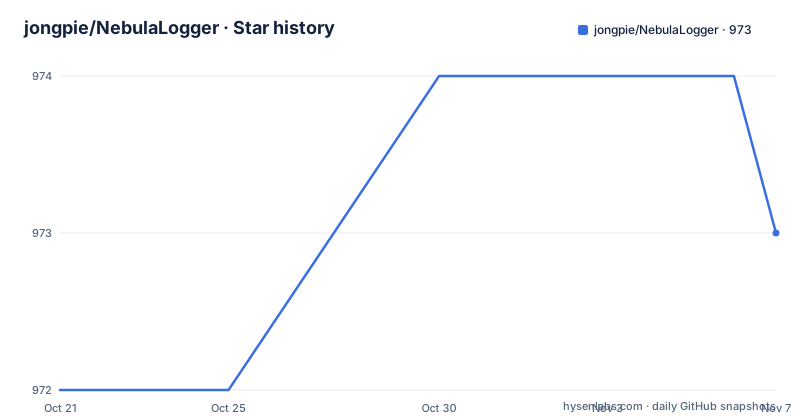
Star history
- jongpie/NebulaLogger973 ★ · +1
| Repository | 2026-10-21 | 2026-11-07 |
|---|---|---|
| jongpie/NebulaLogger | 972 | 973 |
1 Stars in the last 17 days, measured from the daily GitHub snapshot. Compare with other projects
Editorial analysis
A log that lives in the org, not in a collector
NebulaLogger is an observability and logging framework for Salesforce, and the defining decision is that everything is built on the platform itself. The README says it is built 100% natively, using Apex, Lightning components and various kinds of objects, with no required external dependencies. That sounds like a small detail until you consider what it means practically. There is no sidecar to deploy, no ingestion endpoint to keep alive, and no log shipper to pay for, and the log data ends up in the same org as the records it describes, where it can be queried with SOQL, retained under the org's own retention rules and deleted with the org. The cost of that choice is equally concrete, since the log data consumes platform storage, and a team that writes a lot of logs is using its own database to do it. There is also a design history worth reading, since the project links a long write-up on the Joys Of Apex blog about the design and the history of the project.
One logging surface across four programming models
The feature list starts with a unified logging tool that supports adding log entries across the platform, and the four places it reaches are the interesting part. In Apex it covers classes, triggers and anonymous Apex scripts, which means you can log from a console session as well as from production code. In the Lightning layer it covers both lightning web components and aura components, which is a rare combination since the two component models coexist in older orgs. In the automation layer it covers Flow and Process Builder, for any Flow type that supports invocable actions, so a record-triggered flow can write to the same log as an Apex trigger on the same record. And it covers OmniStudio, with omniscripts and Omni integration procedures. The reason this matters is not the count of integrations, it is that a single org can have all four in play, and a log that only exists in the code layer is a log that is blind to what the automation layer did.
An event-driven core and five custom objects
The architecture is described as an event-driven publish and subscribe messaging model built on `LogEntryEvent__e`, a Salesforce platform event, and the documentation points at the platform events developer guide for how to subscribe to them over CometD. So the logger does not only write rows, it also announces them, which is what makes a log entry something a Flow or a Lightning component can react to in near real time rather than something you poll for. The data itself lives in five included custom objects. `Log__c` is the log, the container. `LogEntry__c` is an individual entry. `LogEntryTag__c` and `LoggerTag__c` are the two tag objects, one for entries and one for loggers, which is how the tags are attached dynamically. `LoggerScenario__c` is the scenario object, which is how a log is grouped by the context it happened in. Five objects for one feature sounds like a lot, and it is the price of a design where tags, scenarios and entries are all queryable and reportable without a separate analytics store.
Settings, feature flags, masking and the related entries component
Four mechanisms shape how the logger behaves in a given org. Settings are customised per user and per profile with the `LoggerSettings__c` custom hierarchy settings object, which is the Salesforce way of giving the same configuration different values in different contexts. Global feature flags live in `LoggerParameter__mdt` custom metadata, and the README ties the claim that the framework scales in complex orgs with large data volumes to that flag mechanism rather than to any particular storage trick. Sensitive data is handled by automatic masking, with the rules configured in the `LogEntryDataMaskRule__mdt` custom metadata type, which means a field can be redacted centrally instead of at each call site. And the data is visible where people work, since the `relatedLogEntries` Lightning web component adds a Related Log Entries panel to any Lightning record page through App Builder. The last one is the feature that changes adoption, because a log you can see while looking at a record is a log people actually read.
Unlocked package or managed package, and the install commands
NebulaLogger ships in two forms, and the metadata is the same in both, with the difference being in the available functionality and the release cadence. The unlocked package has no namespace, and the README recommends it, while the managed package puts everything in the `Nebula` namespace. Installing the unlocked package is one command:
sf package install --wait 20 --security-type AdminsOnly --package 04tg7000000IzRdAAKAnd the managed package is the same shape with a different package id and a longer wait:
sf package install --wait 30 --security-type AdminsOnly --package 04tg7000000GZbJAAWThe security type is set to AdminsOnly in both, which is the right setting for a package that creates objects and runs Apex. The cadence difference is documented and matters for planning, since the unlocked package gets new patch versions such as the 4.4.x line for enhancements and bug fixes merged to the main branch, with a faster release cycle, while the managed package gets new minor versions on a slower cycle. All the examples in the README are written for the unlocked package, so if you use the managed one you add the `Nebula` namespace to the examples.
Three ways to depend on it, and a plugin framework
The framework is extendable with a built-in plugin system, where you build or install plugins that enhance Nebula Logger, written in Apex or in Flow, and the README notes that this is not currently available in the managed package. That is the kind of caveat that decides where a given team should install it. For software vendors and package developers there are three documented options for using Nebula Logger inside their own package. The optional dependency route dynamically uses it when it is present in a subscriber's org, through Apex's `Callable` interface and the included `CallableLogger` implementation, which requires version 4.14.10 or newer. The hard dependency route adds either the unlocked package or the managed package with the `Nebula` namespace as a dependency of your own package, so customers always have a version installed. The no dependency route bundles Nebula Logger's metadata into your own project, which the documentation says is fully open source, and that gives you full control over what is included. The third is the interesting one for anyone worried about a third party package appearing in their customers' orgs.
The repository is a Salesforce DX project with agent skills attached
The repository is a Salesforce developer project, with `sfdx-project.json` at the root, the metadata under `nebula-logger/`, a `config/` directory, `scripts/` for the build tasks, `docs/`, a jest configuration, an eslint configuration, a husky setup with lint-staged, and a dev container. The package manifest names the project `nebula-logger` at version 4.19.5, authored by Jonathan Gillespie, MIT licensed, and it requires Node 20.16.0 or later and npm 10.3.0 or later. The scripts are mostly developer ergonomics, with `sf apex tail log --color` for following the log in real time, a PowerShell script to regenerate the Apex and Lightning component documentation, a verification task that checks the documentation is current, a script to set the email service to run as the user, and a task that launches the logger recipes in a Lightning preview app. The most recent addition is agent skills, with `npx skills add jongpie/NebulaLogger` installing instructions for coding agents such as Claude Code, GitHub Copilot and Cursor. The release notes show the pace and the kind of work involved, with a fix for a null pointer exception on Flow logging actions, a change that captures the Apex cursor and pagination cursor transaction limits, and a fix for mixed DML operation errors in tests.
Editorial conclusion
NebulaLogger suits a Salesforce admin or architect who wants logging that works from Apex, from Flow and from the Lightning layer without running a log collector, and it suits a team that needs the log data to live in the org, where it can be reported on, retained and attached to records. It is a poor fit if you want a log pipeline that leaves Salesforce, since the design is native and the data stays where the platform stores it, and it is a poor fit if you cannot accept a platform package in your org, since even the unlocked package is installed metadata that changes your dependency picture. Before you install it, check three things: which of the two packages to take, since the unlocked one has no namespace and a faster release cycle, how much data your org will write, since the log objects grow inside a platform with its own storage limits, and what the managed package leaves out, since the plugin framework is documented as not currently available there.
Frequently asked questions
What is NebulaLogger?
An observability and logging framework for Salesforce that is built entirely on the platform, using Apex, Lightning components and Salesforce objects, with no required external dependencies. It writes log entries to five custom objects and publishes them as platform events through an event-driven core.
How do I install NebulaLogger in a Salesforce org?
With the Salesforce CLI. The unlocked package, which is the recommended one and has no namespace, is installed with `sf package install --wait 20 --security-type AdminsOnly --package 04tg7000000IzRdAAK`, and the managed package with `sf package install --wait 30 --security-type AdminsOnly --package 04tg7000000GZbJAAW`.
Where does NebulaLogger store its log data?
In five custom objects inside your org, `Log__c`, `LogEntry__c`, `LogEntryTag__c`, `LoggerTag__c` and `LoggerScenario__c`, with the entries also published as the `LogEntryEvent__e` platform event so other components can react to them.
What is the difference between the unlocked and managed NebulaLogger packages?
The metadata is the same, but the unlocked package has no namespace, is the recommended option, and gets new patch versions on a faster release cycle, while the managed package lives in the `Nebula` namespace and ships new minor versions on a slower cycle. The plugin framework is documented as not currently available in the managed package.
Can a software vendor depend on NebulaLogger without forcing it on customers?
Yes, in three documented ways. An optional dependency through Apex's Callable interface with the included CallableLogger, which needs version 4.14.10 or newer, a hard dependency on the unlocked or managed package, or bundling Nebula Logger's metadata into your own project, which the documentation says is fully open source.
Official sources
Add this badge to your README
If you maintain this project, the badge below links readers to this analysis and shows its maintenance status from the daily GitHub snapshot. Paste the markdown into your README; add ?metric=license or ?metric=stars to the image URL for a different field.

[](https://hysenlabs.com/projects/jongpie-nebulalogger)Star history chart for your README
[](https://hysenlabs.com/projects/jongpie-nebulalogger)Was this useful?