Joplin Plugin Repository: Installation and Repository Structure
Joplin official plugin repository
At a glance
- What is it?
- The Joplin official plugin repository is a catalog and distribution point for plugins installed through the Joplin desktop application. It exposes plugin identity, version, author, repository links, and downloadable .jpl files, while leaving plugin behavior and licensing largely to individual projects.
- Who is it for?
- Joplin users should adopt the repository as the catalog for discovering official Joplin integrations, while organizations should first verify the individual plugin's permissions, maintenance history, documentation, and license. The repository is not itself a plugin runtime and does not replace evaluating the linked plugin source.
- Can I use it commercially?
- Not without permission. GitHub finds no licence file in the repository, and without a licence all rights are reserved by default: you may read the code but not reuse it. Check the README, or ask the authors, before using it.
- Is it still maintained?
- Yes. The repository last received commits 1 day ago.
- What is it written in?
- GitHub does not report a main language for this repository.
Answers come from the project's GitHub data, last synced on November 6, 2026, and from our analysis. They are not legal advice.
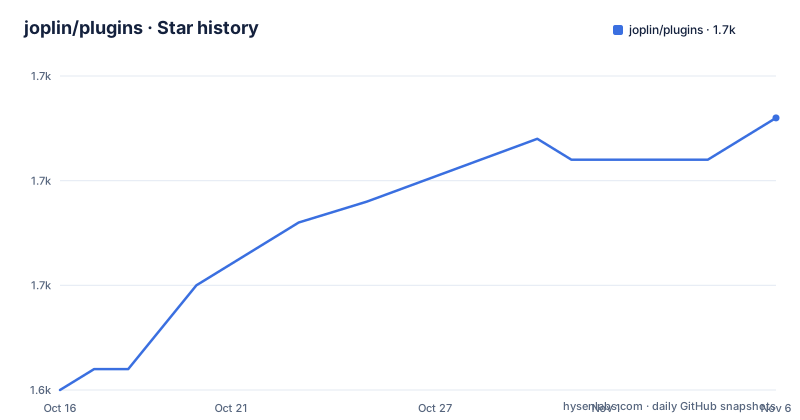
Star history
- joplin/plugins1,658 ★ · +13
| Repository | 2026-10-16 | 2026-11-06 |
|---|---|---|
| joplin/plugins | 1.6k | 1.7k |
13 Stars in the last 21 days, measured from the daily GitHub snapshot. Compare with other projects
Editorial analysis
What the Joplin Plugin Repository Solves
This repository solves the distribution and discovery problem around Joplin plugins. Joplin users do not need to locate every plugin's download page individually before they can add functionality through the desktop application. The repository provides a list of plugins, identifies each plugin by name and version, gives the author, and links to a downloadable `plugin.jpl` file. It also links selected plugins to their own source repositories or project pages.
The intended users are Joplin desktop users who want to extend note editing, import, export, reminders, organization, publishing, or related workflows. Plugin authors also have a place in the official catalog, although the README focuses more on users and repository maintenance than on a full submission or build workflow. The repository describes itself as official, but the displayed catalog contains plugins from many individual authors. That distinction matters. The repository provides the official listing and package links, not a single shared implementation or a single license.
The catalog is broad rather than narrowly focused. Examples include document export, sheet-music rendering, Markdown admonitions, AsciiDoc preview, reminders, tag rules, agenda views, AI integrations, note import, attachment updates, and visual changes. The entries describe advertised capabilities, but the catalog does not itself establish how thoroughly those capabilities have been validated.
How the Catalog and Plugin Packages Fit Together
The visible mechanism is catalog-driven. The repository stores plugin-related records and packages under the `plugins/` directory, while top-level files include `manifests.json`, `manifestOverrides.json`, and `stats.json`. The README says that the repository is updated every 30 minutes on the hour and half-hour. That statement describes the catalog refresh process, not a guarantee that every linked plugin is released or revised on the same schedule.
Each catalog row presents a plugin name, version, description, and author. Many rows include a source or homepage link marked by a home icon and a download link marked by a download icon. The download URLs point to `.jpl` files under the repository's `plugins/` path. A `.jpl` file is the package that the Joplin desktop application's plugin installation flow retrieves. The catalog therefore acts as metadata plus a distribution route, while the installed plugin remains a separate component with its own code and behavior.
The catalog also contains policy and maintenance documents under `readme/`. The README links to `readme/obsoletes.md`, `readme/superseded.md`, and `readme/recommended.md`. These file names indicate that the repository has procedures for removing obsolete plugins, recording replacements, and identifying recommended plugins. The README does not reproduce those procedures, so the exact review and replacement process must be checked in those files before making repository-wide or release-management decisions.
Installing a Plugin in Joplin Desktop
The documented installation path is through the Joplin desktop application rather than a command-line installer in this repository. Open the desktop application, access the Configuration screen, open the `Plugins` section, search for the desired plugin, and install it from the result. The repository's download links are useful for identifying or retrieving a package, but the README does not instruct users to install by pasting a URL into the application.
A first use should begin with a plugin whose function is easy to check against an existing note. For example, `2docx` is listed as a Microsoft Word export plugin, while `ABC Sheet Music Plugin` is listed as a converter from ABC text notation into sheet music. Install one plugin, apply it to a disposable or sample note, and compare the result with the source content before importing that plugin into a larger notebook. The README does not document command-line flags, environment variables, ports, or a repository-level installation script, so none can be prescribed from the documentation.
The catalog does not say whether installation is available on every Joplin platform. It specifically directs the reader to the desktop application. Mobile support, offline installation behavior, and rollback behavior are not documented in the README. Those details must be verified in the linked plugin's documentation and in the relevant Joplin desktop release documentation.
Repository Maintenance and Release Boundaries
The repository is not archived, and its last push was on 2026-10-16. That status supports calling the catalog recently updated, but it does not prove that every listed plugin is maintained. The README gives a catalog update cadence of every 30 minutes, while the recorded recent release is the `plugins` release dated 2021-05-31. The distinction is important. A fresh repository change can update metadata, package files, documentation, or the catalog without indicating that every plugin entry has a recent source release.
Maintenance cost for an adopter is therefore split across layers. The central repository appears to automate catalog refreshes, but the plugin author controls the implementation listed in the source repository. Users may need to check whether a plugin still works with their Joplin version, whether its `.jpl` download is current, and whether a replacement or obsolete status has been recorded. The repository's own documentation points to removal and superseded-plugin files, which means catalog cleanup is an explicit part of the project rather than an unmentioned assumption.
The repository license is unknown. The plugin catalog contains links to many separately authored projects, and the README does not state one license covering all of them. License implications should therefore be checked in each linked plugin's repository and package documentation. No legal conclusion can be drawn from inclusion in this catalog.
Limits of the Official Catalog
The largest limitation is that a catalog entry is not a full adoption review. The README supplies concise descriptions, but it does not provide permission details, security review, compatibility ranges, release notes, test evidence, or a rollback procedure for the listed plugins. An entry such as AI Chatbot Assistant or AI Writers Toolkit may describe an integration, but the catalog does not explain where note content is sent, how that service is configured, or what happens when an external service is unavailable.
The repository is also the wrong tool for building a plugin from source or managing a private plugin set. The README directs developers to additional repository documentation, but the documented user installation path remains the Joplin desktop application's `Plugins` section. Organizations that require offline-only operation, fixed plugin provenance, internal code review, or custom deployment should inspect the linked plugin repository directly. A `.jpl` link in the catalog does not establish that requirement is satisfied.
A practical wrong-tool case is choosing a plugin solely because it appears in the official catalog. For example, a user who needs to send confidential notes to a self-hosted AI platform must verify the plugin's configuration and data flow before installation. The catalog tells the user that such an integration exists. It does not replace the configuration documentation, security assessment, or compatibility check required by that use case.
Comparing Catalog Installation with Direct Plugin Development
The official repository follows a managed-catalog approach. A user searches through Joplin's desktop `Plugins` section, selects a listed package, and installs the associated `.jpl` file through the application. This is more convenient than collecting plugin artifacts manually, and the catalog gives a visible version and author for each item. The trade-off is that the catalog entry remains a summary, while the plugin's own repository and runtime behavior remain outside the central listing.
A direct plugin project follows a different approach. The developer or organization obtains the plugin source, reviews its build and packaging files, checks its dependencies, and decides how to distribute it. That process can fit private deployments and code review requirements better, but it removes the convenience of the official catalog and may require maintaining the plugin build or artifact process separately. The README does not document a command-line build for this repository, so the exact commands would have to come from the individual plugin project.
For ordinary Joplin users, the catalog is the lower-friction route. For controlled environments, direct inspection of the linked plugin source is the more defensible route. The deciding factor is not whether a plugin is popular or new. It is whether its package, permissions, compatibility, and licensing can be verified against the organization's requirements.
Editorial conclusion
Joplin users should adopt the repository as the catalog for discovering official Joplin integrations, while organizations should first verify the individual plugin's permissions, maintenance history, documentation, and license. The repository is not itself a plugin runtime and does not replace evaluating the linked plugin source.
Frequently asked questions
How do I install a plugin from the Joplin Plugin Repository?
Open the Joplin desktop application, go to the Configuration screen, open the `Plugins` section, search for the plugin, and install it from the result. The README identifies this as the documented installation path.
Does the Joplin Plugin Repository contain the source code for every listed plugin?
Not necessarily. The catalog links many plugins to their own repositories or project pages, while the repository also contains downloadable `.jpl` files. The README does not say that every linked plugin's source is included here.
How often is the Joplin Plugin Repository updated?
The README states that the repository is updated every 30 minutes on the hour and half-hour. This describes the repository update process and does not specify how often each individual plugin is released.
Can I find a plugin's license in the Joplin Plugin Repository?
The README does not state a repository-wide license or provide the license for every listed plugin. Check the linked plugin's repository or package documentation for its applicable license.
Does the Joplin Plugin Repository document mobile installation or rollback?
No. The README specifically directs installation through the Joplin desktop application and does not document mobile installation or rollback procedures. Those details need to be checked in the relevant Joplin and plugin documentation.
Official sources
Add this badge to your README
If you maintain this project, the badge below links readers to this analysis and shows its maintenance status from the daily GitHub snapshot. Paste the markdown into your README; add ?metric=license or ?metric=stars to the image URL for a different field.

[](https://hysenlabs.com/projects/joplin-plugins)Star history chart for your README
[](https://hysenlabs.com/projects/joplin-plugins)Was this useful?