JoshuaKGoldberg/create-typescript-app for TypeScript repository setup
Quickstart-friendly TypeScript template with comprehensive, configurable, opinionated tooling. 🎁
At a glance
- What is it?
- create-typescript-app is a configurable TypeScript project template for developers who want tooling for development, testing, releases, GitHub settings, and repository maintenance from one setup flow. Its opinionated defaults reduce initial configuration, but also require teams to accept or remove tools deliberately.
- Who is it for?
- Adopt create-typescript-app when you want an opinionated TypeScript repository setup and are willing to review its generated blocks. Do not adopt it as an unexamined starting point if your team needs a minimal toolchain or needs to retain incompatible existing tooling.
- Can I use it commercially?
- Yes. MIT is a permissive licence: you can use, modify and sell software built on it, as long as you keep its copyright and licence notices.
- Is it still maintained?
- Yes. The repository last received commits 1 day ago.
- What is it written in?
- Mainly TypeScript, according to GitHub's language statistics.
Answers come from the project's GitHub data, last synced on November 7, 2026, and from our analysis. They are not legal advice.
Star history
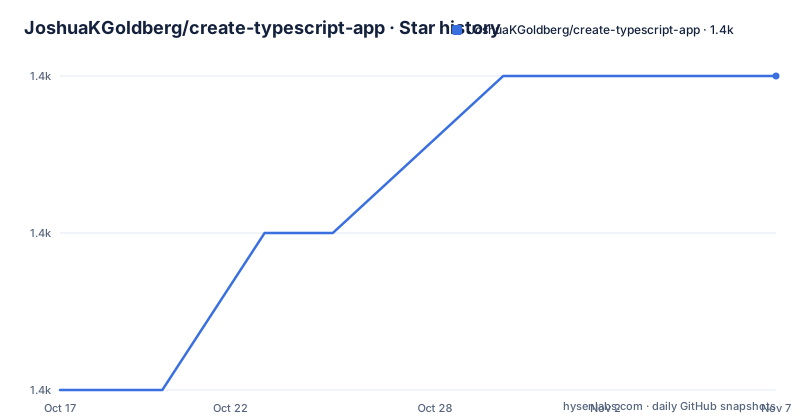
- JoshuaKGoldberg/create-typescript-app1,388 ★ · +2
| Repository | 2026-10-17 | 2026-11-07 |
|---|---|---|
| JoshuaKGoldberg/create-typescript-app | 1.4k | 1.4k |
2 Stars in the last 21 days, measured from the daily GitHub snapshot. Compare with other projects
Editorial analysis
What create-typescript-app sets up
create-typescript-app addresses the gap between installing TypeScript and maintaining a complete repository workflow. A new repository can begin without decisions about formatting, linting, testing, release management, contributor recognition, or GitHub repository settings. The README describes the project as a one-stop-shop for setting up a new or existing repository with current TypeScript tooling.
The intended users are developers who want a configurable starting point rather than a bare TypeScript package. It is also relevant to teams moving an existing repository toward a shared development setup, because the documentation includes a transition path for adding the template's tooling to an existing project. The project is explicitly opinionated and is not endorsed by the TypeScript team. That distinction matters: this is a template with selected defaults, not an official TypeScript distribution.
The repository layout shows that this is more than a compiler initializer. Configuration files include `eslint.config.ts`, `prettier.config.ts`, `vitest.config.ts`, `knip.config.ts`, and `tsdown.config.ts`. The package also contains release configuration, GitHub-related dependencies, spelling tooling, formatting, and test scripts. The result can be a broad repository foundation, but the breadth also increases the number of files and tools a maintainer must understand.
The configurable block-based setup model
The documentation organizes the tooling into blocks and points to `./docs/Blocks.md` for a breakdown. The exact contents of every block are not reproduced in the README, so the full list should be checked there before selecting a configuration. What can be established from the repository is that the project composes several concerns: TypeScript configuration, ESLint, Prettier, Vitest, Knip, spelling checks, release management, contributor recognition, and GitHub repository settings.
The package uses the `bingo`, `bingo-fs`, and `bingo-stratum` dependencies, which are consistent with a filesystem-oriented generation workflow. The package metadata also identifies `bin/index.js` as its executable entry point and exposes the built package through `./dist/index.mjs`. These details support treating the project as a CLI that generates or modifies repository files, not simply as a dependency library imported by application code.
The setup is configurable, but it is not neutral. The README tells users that they can remove any tool manually. That is an important operational characteristic: customization happens at least partly by editing the generated repository after the initial run. For teams with strong existing conventions, the practical question is whether the generated files can be reconciled without rewriting substantial parts of the template.
Terminal installation and first repository setup
The README lists Node.js and pnpm as prerequisites. GitHub CLI is optional but useful, and a logged-in GitHub CLI session is required for the GitHub-related paths described in the README. Run the documented command from an existing repository or from the directory where a new repository should be created:
npx create-typescript-appThis invokes the package through `npx`. The README links to `./docs/Setup.md` for the supported terminal modes, including local creation of a new repository. Since the complete interactive prompts and option names are not included in the README, they are intentionally not reproduced here. The reader should expect the CLI to offer choices based on the documentation's Blocks and CLI pages, then generate the selected repository tooling.
For a first real use, begin with a new or disposable directory and review the files created before committing them. The command is also suitable for an existing repository according to the README, but that use case should follow the separate guidance in `./docs/Transition.md`. The project also documents GitHub's `Use this template` button, which is a different distribution path from the terminal command.
Development scripts exposed by the template repository
The repository's `package.json` defines the commands used to maintain the template source. Building runs `tsdown`, while formatting runs Prettier over the repository. Linting runs ESLint with a zero-warning threshold. A separate Knip command checks for unused files, dependencies, and exports according to its configuration. Spelling is checked with cspell, and Vitest runs the test suite.
These scripts describe the development workflow of the template itself, not necessarily the final command set copied into every generated project. The README says the template supports tooling for building and testing, and the package scripts confirm how this repository itself builds, formats, lints, checks spelling, and tests. Users should inspect a generated `package.json` rather than assume these exact scripts are reproduced unchanged.
The package is an ES module, declares `sideEffects: false`, and has a build output directory named `dist/`. Its `lint-staged` configuration runs Prettier in write mode for staged files. These choices indicate a repository with automated formatting and static checks, although the README does not describe the complete generated script behavior or all CI integration details.
When the opinionated template is the wrong fit
The main limitation is the mismatch that can occur between a broad default setup and a repository with established constraints. The README explicitly warns that the template is opinionated and says users can remove tools manually. Removing a tool is simple in principle, but it may leave related scripts, configuration, dependencies, hooks, or documentation that also need review. The README does not document an automated rollback process, so it would be wrong to assume one exists.
It is also a poor fit for a deliberately minimal TypeScript project. A package that needs only a compiler and a test runner may acquire more configuration than its maintainers want to own. Existing monorepos, specialized lint rules, unusual release systems, or custom GitHub workflows may require integration work after generation. The project supports transitioning an existing repository, but the README does not claim that every existing configuration can be merged automatically.
The optional GitHub CLI dependency creates another boundary. It is helpful when the setup includes GitHub repository settings, but it adds an authentication and permission consideration for teams that only need local files. The README documents login as a requirement for the GitHub CLI paths, but does not specify which individual settings are applied in every run.
GitHub template use versus terminal generation
The project provides a real alternative path through GitHub's `Use this template` button, documented in `./docs/UseThisTemplate.md`. This differs from `npx create-typescript-app`: the GitHub route starts from the repository template interface, while the terminal command invokes the published CLI locally. The README presents terminal setup as the recommended path, but still treats the GitHub route as a supported way to create a new repository.
This distinction matters for automation and repository ownership. A terminal user can run the generator in an existing directory and review changes in the working tree. A GitHub template user creates a repository from the template interface, which can provide a familiar repository-based starting point. The documentation does not state that both routes expose identical prompts or generate identical file sets, so the route should be chosen according to the documented workflow rather than assumed to be interchangeable.
Compared with assembling a toolchain by hand, create-typescript-app packages build, test, formatting, release, contributor, and GitHub concerns into one selection process. The cost is that users inherit a broad opinionated baseline and may need to remove or reconcile parts of it.
Maintenance, upgrades, and the MIT license
The repository is not archived, and the last push was on 2026-10-15. The recent release history includes `2.74.2` on 2026-10-11, `2.74.1` on 2026-10-10, and `2.74.0` on 2026-10-07. These dates indicate recent repository activity, but they do not by themselves establish that every generated tool is compatible with every future dependency release.
Upgrading a project created from this template can involve more than upgrading application dependencies. Maintainers must review changes to generated configuration, GitHub settings, release management, hooks, and contributor tooling. The README does not document a supported migration command or rollback procedure, so the concrete upgrade behavior is not established. The repository's own release process also should not be confused with an upgrade process for projects created from it.
The package and repository are identified as MIT licensed. That permits use and modification under the terms of the license, while users remain responsible for reviewing those terms and any separate licenses that apply to generated or installed third-party tools.
Editorial conclusion
Adopt create-typescript-app when you want an opinionated TypeScript repository setup and are willing to review its generated blocks. Do not adopt it as an unexamined starting point if your team needs a minimal toolchain or needs to retain incompatible existing tooling. Before adoption, verify the generated blocks, CLI options, package-manager requirements, GitHub CLI permissions, and which tools your repository already contains.
Frequently asked questions
What does create-typescript-app set up?
It is a configurable TypeScript repository template covering areas such as building, testing, release management, contributor recognition, and GitHub repository settings. The README says unwanted tools can be removed manually.
How do I run create-typescript-app for a new repository?
Install Node.js and pnpm, then run `npx create-typescript-app` from the directory where the repository should be created. GitHub CLI is optional but useful for GitHub-related setup.
Can create-typescript-app be used on an existing repository?
Yes. The README documents transitioning an existing repository as a supported use case and links to `./docs/Transition.md` for that workflow.
Does create-typescript-app provide official TypeScript tooling?
No. The README states that the template is opinionated and is not endorsed by the TypeScript team.
Official sources
Add this badge to your README
If you maintain this project, the badge below links readers to this analysis and shows its maintenance status from the daily GitHub snapshot. Paste the markdown into your README; add ?metric=license or ?metric=stars to the image URL for a different field.

[](https://hysenlabs.com/projects/joshuakgoldberg-create-typescript-app)Star history chart for your README
[](https://hysenlabs.com/projects/joshuakgoldberg-create-typescript-app)Was this useful?