vim-slime: send Vim buffer text to any live REPL over tmux, screen or wezterm
A vim plugin to give you some slime. (Emacs)
At a glance
- What is it?
- vim-slime is a Vim plugin that lifts one specific feature from Emacs SLIME: the ability to send text from an editor buffer to a running REPL without switching focus or reloading code. It works with any REPL that accepts plain text input and supports 11 terminal and multiplexer targets.
- Who is it for?
- vim-slime is worth setting up for Vim users who work in REPLs regularly and want to stay in their editor without switching windows. The ctrl-c ctrl-c keybinding follows Emacs SLIME convention, and the 11 targets cover most modern terminal multiplexers and emulators.
- Can I use it commercially?
- Yes. MIT is a permissive licence: you can use, modify and sell software built on it, as long as you keep its copyright and licence notices.
- Is it still maintained?
- Yes. The repository last received commits 84 days ago.
- What is it written in?
- Mainly Vim Script, according to GitHub's language statistics.
Answers come from the project's GitHub data, last synced on November 6, 2026, and from our analysis. They are not legal advice.
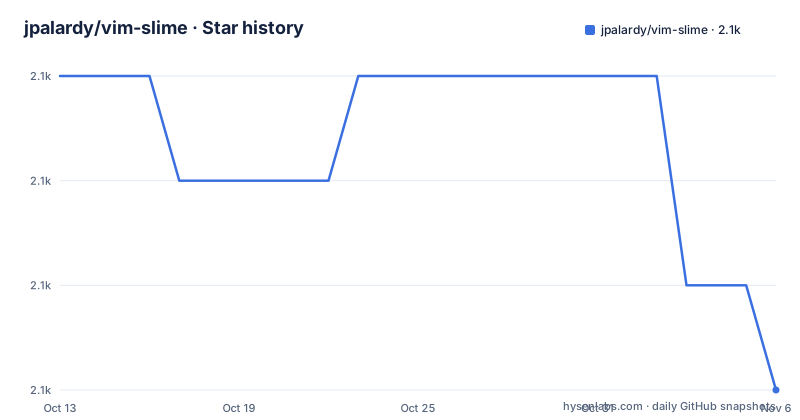
Star history
- jpalardy/vim-slime2,068 ★ · -3
| Repository | 2026-10-13 | 2026-11-06 |
|---|---|---|
| jpalardy/vim-slime | 2.1k | 2.1k |
-3 Stars in the last 24 days, measured from the daily GitHub snapshot. Compare with other projects
Editorial analysis
vim-slime narrows the SLIME idea to one action: send text to a live REPL
SLIME is an Emacs plugin that turns Emacs into a Lisp IDE. Its most imitated feature is the ability to send buffer text to a running REPL and see the result without reloading all of your code. vim-slime takes that one capability and ports it to Vim.
The README describes it as a humble attempt at getting some of the SLIME features into Vim, and that word 'some' is honest. vim-slime does not try to reproduce the Emacs SLIME inspector, debugger or symbol completion. What it does is give you the text-sending direction: from your Vim buffer, through a configurable target, into a running REPL.
The original blog post about the plugin is from 2007, making vim-slime one of the older Vim REPL-integration plugins still in use. Clojure, R and Python are named as example targets, but the actual scope is wider: the ftplugin directory alone contains tweaks for 10 distinct languages, from elm and fsharp to scala and stata.
screen is the default target; 11 options cover tmux, wezterm, neovim terminal and more
Every send operation goes through a target, which is the terminal multiplexer or emulator that holds the REPL. Configuring a target is the first thing to do after installation. Setting one globally or per buffer looks like this:
" for all buffers
let g:slime_target = "tmux"

" and/or as a buffer-level override
let b:slime_target = "wezterm"

" if not explicitly configured, it defaults to `screen`
The g:slime_target variable applies across all buffers. The b:slime_target variable overrides it for a specific buffer, which matters when one Vim session connects to different REPLs for different files.
With the default unset, vim-slime falls back to screen. The 11 supported targets are: conemu, dtach, kitty, neovim, screen, tmux, vimterminal, wezterm, whimrepl, x11 and zellij. Each has its own documentation file under assets/doc/targets/. A workable way to think about what qualifies as a target: any terminal session that accepts keyboard input is a candidate.
git clone into ~/.vim/pack/plugins/start adds vim-slime in 3 shell commands
Vim's built-in package loading, available since Vim 7.4.1528, is the path the README documents for manual installation:
mkdir -p ~/.vim/pack/plugins/start
cd ~/.vim/pack/plugins/start
git clone https://github.com/jpalardy/vim-slime.git
Once the clone is in the start/ directory, Vim loads it automatically on startup. The README also says to use your favorite package manager for alternatives, without naming specific managers.
A Docker environment for trying vim-slime is documented at blog.jpalardy.com. Using it before modifying a working Vim configuration is practical, since the target configuration is where most first-time failures occur: screen is the default but fewer setups run screen in 2026 than in 2007.
ctrl-c ctrl-c sends the current paragraph; ctrl-c v reconfigures the target
Sending text uses the same keybinding as Emacs SLIME: ctrl-c followed by ctrl-c. Holding ctrl and double-tapping c is the practical equivalent. With the cursor positioned anywhere in a paragraph, this sends the paragraph to the configured REPL, where a paragraph is defined as what Vim's vip command would select.
For more precise control, select the text manually in visual mode before pressing ctrl-c ctrl-c. vim-slime sends whatever is visually selected.
When vim-slime runs for the first time, it prompts for target configuration and stores the answer. To reconfigure, press ctrl-c v or run :SlimeConfig. The README notes the mnemonic: v stands for variables. Both routes update the stored configuration for the current session.
Vim-style motions are also documented: assets/doc/advanced.md covers operator-plus-motion and operator-plus-text-object combinations that let you send a specific function body or named block without pre-selecting it in visual mode.
10 languages have ftplugin tweaks; others send text unmodified
vim-slime sends text as typed for most languages, but some REPLs expect specific formatting or escape sequences that the plain text would not include. The plugin ships ftplugin files for those cases.
Languages with built-in tweaks are: coffee-script, elm, fsharp, haskell (including lhaskell), matlab, ocaml, python (including ipython), scala (including ammonite), sml and stata. Each has a .vim file under ftplugin/ that runs when a buffer of that filetype is opened.
Python and Haskell have their own README files inside ftplugin/ that document what the tweak does. The scala ftplugin README is also present. For languages not on that list, vim-slime sends text as-is and trusts the REPL to handle it.
Many languages work with no ftplugin at all. Others silently produce wrong results or no output at all when the REPL rejects improperly formatted text. The consequence of a missing tweak is rarely an error message; it is just silence or garbled output. Looking up whether your language has an entry under ftplugin/ is the first diagnostic step when vim-slime sends nothing to the REPL.
The 'any REPL' claim holds only for targets that accept raw text input
vim-slime's description says it works with any REPL, but the actual constraint is more specific: the target must be a terminal or multiplexer that accepts text written to it as stdin or as keyboard input replay. Browser-based notebooks, rich protocol REPLs like Jupyter's kernel protocol, and proprietary IDE REPLs are not targets vim-slime can reach.
The 11 supported targets are all terminal-side tools: tmux, screen, wezterm, kitty, vimterminal and similar. A Python session running in a terminal qualifies. A Jupyter notebook running in a browser does not.
This constraint means vim-slime is a terminal-workflow tool. If your REPL lives inside a browser or an IDE with its own protocol, vim-slime has nothing to offer, and a native integration for that environment is the right path.
neoterm or iron.nvim are alternatives that offer two-way REPL communication
The most direct alternative depends on whether you use Vim or Neovim and how much bidirectional integration you want. neoterm is a Neovim plugin that manages terminal buffers and sends text to them, similar in concept but with a terminal buffer that lives inside the editor window rather than in an external multiplexer. iron.nvim also manages REPL sessions inside Neovim and adds history and command queuing.
The key difference from vim-slime is directionality. vim-slime sends text out to wherever the target lives, and that is it. The REPL output stays in the target pane. neoterm and iron.nvim embed the REPL inside Neovim, so both editor and REPL live in the same process and the output is navigable from Vim.
vim-slime's architecture decouples the REPL from the editor entirely. An R session in tmux persists across Vim restarts; closing and reopening the editor does not end the session. That specific property, REPL state outliving the editor process, is what you trade away if you switch to an embedded alternative like neoterm or iron.nvim.
Editorial conclusion
vim-slime is worth setting up for Vim users who work in REPLs regularly and want to stay in their editor without switching windows. The ctrl-c ctrl-c keybinding follows Emacs SLIME convention, and the 11 targets cover most modern terminal multiplexers and emulators. Skip it if your REPL does not accept plain text input, or if your primary workflow is a browser-based notebook. Before using, set g:slime_target in your vimrc to match your terminal environment, since screen is the default but most current users run tmux or wezterm.
Frequently asked questions
What is vim-slime?
vim-slime is a Vim plugin that sends text from a Vim buffer to a running REPL. It supports 11 targets including tmux, screen, wezterm and neovim terminal, and works with any REPL that accepts plain text input.
How do I install vim-slime?
Clone the repository into ~/.vim/pack/plugins/start using git clone https://github.com/jpalardy/vim-slime.git. Vim loads plugins from that directory automatically since Vim 7.4.1528. Alternatively, the README says to use any Vim package manager you prefer.
How do I send text to the REPL with vim-slime?
Position the cursor in a paragraph and press ctrl-c twice. This sends the current paragraph, defined the same way as Vim's vip command. For precise control, select text in visual mode first, then press ctrl-c ctrl-c.
Which terminal multiplexers does vim-slime support?
vim-slime supports 11 targets: conemu, dtach, kitty, neovim, screen, tmux, vimterminal, wezterm, whimrepl, x11 and zellij. Screen is the default if no target is configured. Each target has a documentation file under assets/doc/targets/ in the repository.
Does vim-slime work with Python and Jupyter?
vim-slime works with Python sessions running in a supported terminal target such as tmux or screen, and ships a built-in ftplugin tweak for Python and IPython. It does not support Jupyter notebooks running in a browser, because those use a different protocol rather than plain text input.
Official sources
Add this badge to your README
If you maintain this project, the badge below links readers to this analysis and shows its maintenance status from the daily GitHub snapshot. Paste the markdown into your README; add ?metric=license or ?metric=stars to the image URL for a different field.

[](https://hysenlabs.com/projects/jpalardy-vim-slime)Star history chart for your README
[](https://hysenlabs.com/projects/jpalardy-vim-slime)Was this useful?