Cloud Torrent's Go rewrite: a single-binary remote torrent client with an outbound address policy, shipped only as prereleases
☁️ Cloud Torrent: a self-hosted remote torrent client
At a glance
- What is it?
- jpillora/cloud-torrent is a self-hosted torrent client that downloads to a server's disk and serves the files back over HTTP, rebuilt in Go with a Vue 3 frontend embedded in one binary. Its network hardening is more careful than most tools in this space; its release channel and default access settings need attention before you expose it.
- Who is it for?
- Cloud Torrent fits someone who wants torrents downloading on a home server or VPS and the results browsable and streamable from a phone, and who is comfortable running v0.10.0 release candidates or building the binary. It does not fit anyone who needs a published Docker image, a stable release line, or anonymity for peer traffic, since peer and DHT connections expose the server.
- Can I use it commercially?
- Not without permission. GitHub finds no licence file in the repository, and without a licence all rights are reserved by default: you may read the code but not reuse it. Check the README, or ask the authors, before using it.
- Is it still maintained?
- Yes. The repository last received commits 1 day ago.
- What is it written in?
- Mainly Go, according to GitHub's language statistics.
Answers come from the project's GitHub data, last synced on November 15, 2026, and from our analysis. They are not legal advice.
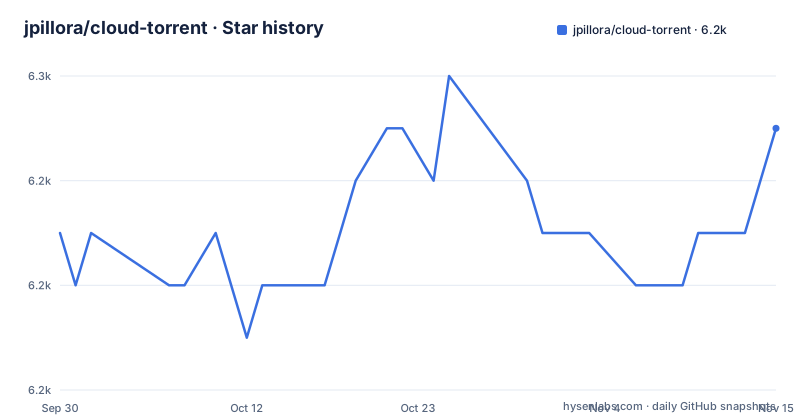
Star history
- jpillora/cloud-torrent6,249 ★ · +2
| Repository | 2026-09-30 | 2026-11-15 |
|---|---|---|
| jpillora/cloud-torrent | 6.2k | 6.2k |
2 Stars in the last 46 days, measured from the daily GitHub snapshot. Compare with other projects
Editorial analysis
Torrents land on the server's disk and come back over HTTP
Cloud Torrent separates where a torrent downloads from where you use the result. You add a torrent from a browser, the server fetches it to its own disk as a set of files, and you browse or stream those files over HTTP. Torrents can be added by magnet link, by .torrent URL or by dragging a file into the page, and there is an embedded torrent search built on jpillora/scraper.
This version is a ground-up rewrite of the original cloud-torrent, which was itself a rewrite of a Node project, node-torrent-cloud. The backend is Go, with anacrolix/torrent v1.59.1 as the engine and jpillora/velox for realtime sync, so progress updates arrive without a page refresh. The frontend is Vue 3, Vite and TypeScript. Both are compiled into one binary.
File serving goes through Go's net/http ServeContent, which is what allows streaming a file while it is still downloading. The UI adds inline previews for audio, images and video, with the spacebar toggling playback, and the layout is meant to work on a phone. The intended user is someone with a box that has disk and bandwidth, and a device that has neither.
No Docker image is published, so the container is yours to build
Binaries for Linux, macOS and Windows are on GitHub Releases, and new releases go out as prereleases. The three most recent are v0.10.0-rc.1 on 2026-10-22, v0.10.0-rc.2 on 2026-10-23 and v0.10.0-rc.3 on 2026-10-26, which is also the date of the last push. Anyone who wants a stable tag to pin will not find one among the recent releases.
Docker image publishing is disabled. To run it in a container you build the image from the repository's .dev/Dockerfile yourself:
docker build -f .dev/Dockerfile -t cloud-torrent .
docker run -d -p 3000:3000 -v /path/to/downloads:/downloads cloud-torrent
The first command builds an image tagged cloud-torrent from the current source; the second runs it detached, publishes port 3000 and mounts a host folder at /downloads. That one mount covers downloaded files only. Settings and torrent session state are a separate question, covered below, and the run line does not mount anything for them.
Building from source needs Go 1.27.3, Node 24 and Bun 1.4.4
The source build has three toolchain requirements: Go 1.27.3 or newer, Node 24 or newer and Bun 1.4.4 or newer. Build commands go through Take, wrapped by ./dev.ts:
git clone https://github.com/jpillora/cloud-torrent
cd cloud-torrent
./dev.ts build                   # builds the SPA and dist/cloud-torrent
./dist/cloud-torrent --port 3000
The build step produces the single-page app and the dist/cloud-torrent binary; the last line starts it on port 3000, which is also the default. Running ./dev.ts --help lists the other commands, and build and release configuration lives in .dev/.
One inconsistency is worth checking before you start. The go.mod on master declares go 1.25.4, and the root of the default branch lists engine/, server/, static/ and main.go, while the build instructions refer to dev.ts, a frontend/ directory and Go 1.27.3. Confirm that your checkout contains ./dev.ts before following the steps; if it does not, you are on a different layout from the one the build instructions describe.
Go structs are the single source of truth for data shapes, and tygo generates the TypeScript types from them; ./dev.ts check-types fails CI when the generated files are stale.
Optional basic auth and all interfaces by default
The command line is short. --port sets the listening port (default 3000) and --host the interface, which defaults to all. --auth takes optional basic auth in the form 'user:password'. --key-path and --cert-path point at a TLS key and certificate. --config-path names the settings file, cloud-torrent.json by default, and --title, --log and --open cover the instance title, request logging and opening a browser on start.
The defaults matter. Out of the box the server listens on every interface with no authentication, so anyone who can reach port 3000 can add torrents, browse the download folder and stream from it. On a VPS that is the whole internet. Set --auth, bind --host to a private interface or put the server behind a reverse proxy with its own access control before it is reachable from outside.
The download directory and engine options are not flags at all. They are set in the UI behind the gear icon and written to cloud-torrent.json. Settings writes use owner-only permissions.
Outbound fetches refuse private addresses, but peers see your server
Cloud Torrent fetches URLs on a user's behalf (torrent files, magnet HTTP sources, web seeds, HTTP trackers, search providers), and that is a classic route for a remote client to be turned against the network it runs in. Outbound HTTP follows a public-destination policy: loopback, private, link-local, metadata and reserved addresses are denied, including after DNS resolution and after redirects. An operator who needs to reach a LAN host grants it explicitly, for example with --outbound-allow-cidrs '192.168.1.10/32'. Redirects are capped at five hops for application fetches.
Two consequences follow. Ambient HTTP proxy variables are not used, so setting HTTP_PROXY in the environment will not route these fetches through a proxy. Peer TCP and uTP connections and DHT discovery are outside that policy and are not an anonymity boundary. Peers and trackers see the server's address. If the reason you want a remote client is to keep torrent traffic away from an identifiable machine, this tool does not provide that.
Raw upstream diagnostics are suppressed because they can contain tracker passkeys, so errors show typed status without URLs or headers.
Search providers share a 15-second deadline and four slots
The embedded search is bounded. List and detail requests to search providers share a 15-second deadline and four concurrent slots, and responses are capped at 2 MiB of decoded content and 500 results, gzip included. Requests beyond the slots get HTTP 429. A browser disconnect cancels the upstream work.
Failures return an error rather than an empty result list. That is the correct behaviour, and it means a slow or blocked provider shows up as an error in the UI rather than as "no results", which is easier to diagnose. It also means search on a slow link will hit the deadline instead of waiting.
Sessions survive restarts only if the state directory does
Torrent sessions persist across process restarts, including pending magnets, running or paused intent, metainfo and file selections. By default that state lives in a private store named .<settings-filename>.state beside the settings file. --state-directory moves it, and the directory must be writable by the server and outside the download tree; overlapping directories are rejected.
For container users this is the part to get right. If the settings file and its state file sit inside a container that is recreated, the sessions go with it. Point --state-directory at a persistent volume. Operational files (the settings file, TLS key and certificate and the state directory) are excluded from download listings and archives and cannot be fetched or deleted through the download API, with aliases and parent-folder removal checked as well.
The test suite reflects the same care. ./dev.ts e2e runs a Playwright test against a locally generated CC0 torrent with a throttled loopback web seed, so it needs no public torrent service. An opt-in ./dev.ts e2e --public-fixture downloads only Big Buck Bunny's poster.jpg (310,380 bytes) and checks its pinned SHA-256. Developers who only want the BitTorrent engine without a UI can use anacrolix/torrent directly as a Go library; Cloud Torrent is that engine plus the web server, search, storage policy and frontend.
Editorial conclusion
Cloud Torrent fits someone who wants torrents downloading on a home server or VPS and the results browsable and streamable from a phone, and who is comfortable running v0.10.0 release candidates or building the binary. It does not fit anyone who needs a published Docker image, a stable release line, or anonymity for peer traffic, since peer and DHT connections expose the server. Before exposing it, set --auth or put it behind your own TLS and access control, move session state onto a persistent volume with --state-directory, and read the LICENSE file, because GitHub does not identify its licence.
Frequently asked questions
Is there an official Cloud Torrent Docker image?
No. Docker image publishing is disabled, and you build the image locally from .dev/Dockerfile, then run it with port 3000 published and a downloads folder mounted.
Does Cloud Torrent require a password?
No. Basic auth is optional through --auth in the form 'user:password', and the server listens on all interfaces by default, so you should set it before exposing the port.
Does Cloud Torrent hide the server's IP from torrent peers?
No. Peer TCP and uTP sockets and DHT discovery are not an anonymity boundary, and ambient HTTP proxy variables are not used for outbound HTTP.
What is needed to build Cloud Torrent from source?
Go 1.27.3 or newer, Node 24 or newer and Bun 1.4.4 or newer. The ./dev.ts build command builds the frontend and the dist/cloud-torrent binary.
Official sources
Add this badge to your README
If you maintain this project, the badge below links readers to this analysis and shows its maintenance status from the daily GitHub snapshot. Paste the markdown into your README; add ?metric=license or ?metric=stars to the image URL for a different field.

[](https://hysenlabs.com/projects/jpillora-cloud-torrent)Star history chart for your README
[](https://hysenlabs.com/projects/jpillora-cloud-torrent)Was this useful?