immich-go: one Go binary for Takeout, iCloud and folder imports
An alternative to the immich-CLI command that doesn't depend on nodejs installation. It tries its best for importing google photos takeout archives.
At a glance
- What is it?
- immich-go is a Go client that pushes photo libraries into a self-hosted Immich server without NodeJS or Docker, reading the sidecar formats each export format ships with. It is an early version with a seven-month gap between its last two releases, and it needs a server and an API key before it can do anything.
- Who is it for?
- Adopt immich-go if your library already lives in a Takeout zip, an iCloud export, a Picasa folder or another Immich instance, and you want albums and metadata restored without setting up NodeJS. Do not adopt it as a replacement for the Immich server itself, and do not point it at a library you have not backed up, because the project calls itself an early version that is not yet extensively tested.
- Can I use it commercially?
- Yes, with strict conditions. AGPL-3.0 is a network copyleft licence: if people use a modified version over a network, for example as a hosted service, you must offer them its source code under the same licence.
- Is it still maintained?
- Yes. The repository last received commits 1 day ago.
- What is it written in?
- Mainly Go, according to GitHub's language statistics.
Answers come from the project's GitHub data, last synced on November 15, 2026, and from our analysis. They are not legal advice.
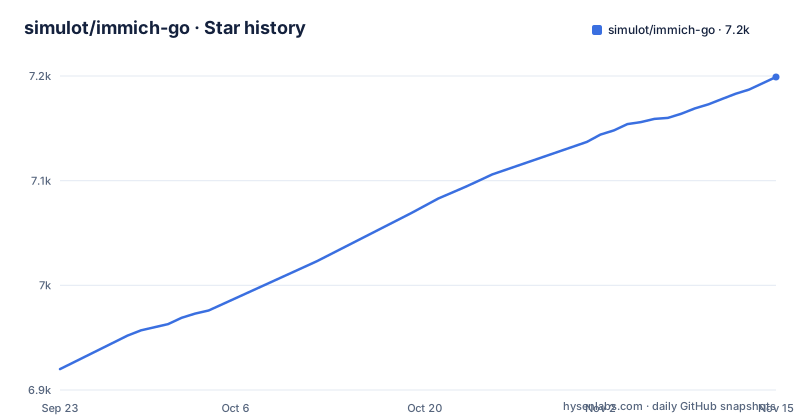
Star history
- simulot/immich-go7,199 ★ · +279
| Repository | 2026-09-23 | 2026-11-15 |
|---|---|---|
| simulot/immich-go | 6.9k | 7.2k |
279 Stars in the last 53 days, measured from the daily GitHub snapshot. Compare with other projects
Editorial analysis
A Go module that skips the nodejs dependency
The repository description is blunt about the point: this is an alternative to the immich-CLI command that does not depend on a nodejs installation. The module path in go.mod is `github.com/simulot/immich-go` and it asks for Go 1.26.0:
module github.com/simulot/immich-go

go 1.26.0
Command parsing comes from `github.com/spf13/cobra`, and the dependency list tells you what kind of program this is. `github.com/rivo/tview`, `github.com/gdamore/tcell/v2` and `github.com/navidys/tvxwidgets` are terminal interface libraries, so the interactive parts are drawn in a terminal window rather than a native one. `github.com/rwcarlsen/goexif` reads EXIF, and `github.com/clbanning/mxj/v2` parses the XML sidecars that travel with XMP. `github.com/pelletier/go-toml/v2` plus `github.com/joho/godotenv` are there for configuration. The top-level tree splits into `adapters/`, `app/`, `immich/` and `internal/`.
Five upload commands and the sidecar each one reads
Every source has its own subcommand because every export format wraps its photos in a different sidecar. `from-folder` is the plain one: it uploads a directory, can build albums from the directory structure, and reads XMP sidecar files. `from-google-photos` pairs each photo with its JSON metadata so albums, descriptions and locations survive the move. `from-picasa` is a variant of `from-folder` that reads `.picasa.ini` files to put albums back where they were. `from-icloud` pulls creation dates and album structure out of the CSV files an iCloud export includes. `from-immich` is the server-to-server case.
Installation is a binary from the releases page, and the first run needs a server URL, an API key and a path:
immich-go upload from-folder --server=http://your-ip:2283 --api-key=your-api-key /path/to/your/photos

immich-go upload from-google-photos --server=http://your-ip:2283 --api-key=your-api-key /path/to/takeout-*.zip

immich-go archive from-immich --from-server=http://your-ip:2283 --from-api-key=your-api-key --write-to-folder=/path/to/archive
Note the third line pulls the other way. `upload` sends assets in, `archive from-immich` writes them back out to a folder, with a separate key for the source server.
Albums, stacks and duplicate checks happen server-side
An uploader that only pushes files gives you a flat timeline. immich-go spends its effort on the structure around them. Albums and tags are created on the server to match the source layout, so a Takeout album becomes an Immich album rather than a folder name in a caption. Stacking groups related frames into a single stack entry, which is how a RAW plus JPEG pair or a burst shot stays one photo in the viewer. Duplicate detection compares against what the server already holds, so re-running an interrupted import does not double the library.
One behaviour deserves a decision from you rather than a default. The tool can pause Immich's background jobs, thumbnailing among them, while an upload runs, and resume them afterwards. Fewer background jobs means less work competing with the upload on the same machine, at the cost of a server that is not generating previews while the transfer is in flight. The README names this as an efficiency feature without stating how to turn it on, so the flag has to come from the command reference under `docs/commands/` before you rely on it.
--ban-file is where you decide what counts as clutter
Imports fail in the boring way: a Takeout zip contains thousands of files that are not photographs, and a NAS export contains thumbnails from three different backup products. `--ban-file` is the filter, and its syntax has one rule that catches people out. A pattern ending in `/` applies to a directory, so `--ban-file .Spotlight-V100/` skips that whole tree. A pattern with no trailing slash applies to single files, so `--ban-file .DS_Store` skips one file wherever it appears.
The defaults already cover the usual suspects, and the list is worth reading before you add anything: `@eaDir/`, `@__thumb/`, `SYNOFILE_THUMB_*.*`, `Lightroom Catalog/`, `thumbnails/`, `.DS_Store`, `/._*`, `.Spotlight-V100/`, `.photostructure/` and `Recently Deleted/`. The Synology and Lightroom entries are the interesting ones, since they skip whole catalog structures rather than individual images. Patterns are passed on the upload command line:
immich-go upload from-folder --ban-file .DS_Store --ban-file .Spotlight-V100/ --server=http://your-ip:2283 --api-key=your-api-key /path/to/your/photosThe trade-off is that a ban list is a guess made before the run. Exclude too much and wanted files are skipped, so the project's own warning about keeping a backup copy is worth reading first.
v0.32.0 removed ReplaceAsset and points at asset.copy
The most recent release carries a breaking change that will bite an existing script. `ReplaceAsset` has been removed from the API surface, and the `asset.replace` permission is no longer needed. If your API key still carries it, the server ignores it. For duplication work the release names `asset.copy` as the method to use instead.
That is a small sentence with a large consequence for automation. A pipeline that relied on replacing an asset in place now has no method to call, and the fix is a different endpoint rather than a version bump. The permission reference lives in `docs/installation.md#api-permissions`, which is also where to confirm what the other subcommands need before a long import starts.
Licensing is the other thing to read before adopting this into a pipeline. The project is AGPL-3.0, which is a different obligation from the MIT or Apache terms most Go utilities carry. Nothing here is legal advice; it is enough to know that the copyleft terms travel with the binary you download, and that the LICENSE file in the repository is the text that applies.
A client with no server, no phone app and no Docker image
The scope is narrow, and the gaps are worth naming before anyone tries to stretch it. immich-go is not an Immich server. Requirements are a running Immich server with API access and an API key with the right permissions, so the first thing you do is not install anything: it is point an existing server at your library.
There is no mobile client here and no desktop application. The interactive parts run in a terminal, since go.mod depends on tview and tcell, and the releases are the pre-built binaries. The README's install step is a download, and it never mentions a container image or a compose file, so anyone searching for an immich-go Docker deployment is looking for something the project does not publish. Install instructions for every platform live in `docs/installation.md`, and binaries are described as available for Windows, macOS, Linux and FreeBSD.
Log files are the other blind spot. The README says nothing about a log file, a log level or a log path. If you need an audit trail for a first import, capture stdout yourself.
Two releases in 2025, one in 2026, and an early version label
The release history is short enough to read in full. v0.30.0 came out on 2025-11-16, v0.31.0 on 2025-11-23, and v0.32.0 on 2026-06-25, the release whose notes are titled for Immich V3 compatibility. The last push to the repository was on 2026-10-31. Between the first two tags there is a week; between the second and the third there are seven months.
That gap is what a buyer should weigh, not the star count. Immich itself changes shape between versions, and a tool that speaks to its API has to move with it. v0.32.0 exists because the server side moved, and the next such move will need a new immich-go release.
The README labels the project an early version that is not yet extensively tested, and asks you to keep a backup copy of your files for safety. Both warnings are load-bearing for a tool that rewrites a photo library. The claim that it handles collections of 100,000 or more photos appears without a benchmark, an input listing or a report behind it, so treat it as an intention rather than a measurement until you see one.
The docs/ tree is where the rest lives: commands, configuration, examples, best practices, technical details, an upload command overview and release notes, all linked from a table in the README.
Editorial conclusion
Adopt immich-go if your library already lives in a Takeout zip, an iCloud export, a Picasa folder or another Immich instance, and you want albums and metadata restored without setting up NodeJS. Do not adopt it as a replacement for the Immich server itself, and do not point it at a library you have not backed up, because the project calls itself an early version that is not yet extensively tested. Verify three things before the first run: that your API key holds the permissions listed in docs/installation.md, that the ban patterns in --ban-file cover the junk your export contains, and that the server is on the Immich V2 or V3 the v0.32.0 release targets.
Frequently asked questions
What is Immich Go?
It is a Go client for a self-hosted Immich server that does not need a nodejs installation. It uploads photos from folders, Google Photos Takeouts, iCloud exports, Picasa folders and other Immich servers, and it ships as a single pre-built binary.
How do I install immich-go?
Download the pre-built binary for your system from the GitHub releases page. Binaries are described as available for Windows, macOS, Linux and FreeBSD, and per-platform instructions sit in the installation document.
Can I import photos from Google Takeout into Immich?
Yes, through the from-google-photos command, which matches each photo with its JSON metadata so albums, descriptions and locations survive. You point it at the takeout zips with the same --server and --api-key flags the other upload commands use.
Is immich-go safe to run on my photo library?
The README labels the project an early version that is not yet extensively tested and tells you to keep a backup copy of your files for safety. Back up before the first import.
Where is the immich-go log file?
The README does not document a log file, a log level or a log path. If you need a record of an import, capture the command output yourself.
How does immich-go differ from the official immich CLI?
The repository describes itself as an alternative to the immich-CLI command that does not depend on a nodejs installation. Beyond that, immich-go ships as one binary and offers source-specific commands such as from-google-photos, from-picasa, from-icloud and from-immich.
Official sources
Add this badge to your README
If you maintain this project, the badge below links readers to this analysis and shows its maintenance status from the daily GitHub snapshot. Paste the markdown into your README; add ?metric=license or ?metric=stars to the image URL for a different field.

[](https://hysenlabs.com/projects/simulot-immich-go)Star history chart for your README
[](https://hysenlabs.com/projects/simulot-immich-go)Was this useful?