jQuery 4.0.0: What the New Wave Actually Changes for Your Build
GitHub describes it as jQuery JavaScript Library. The repository metadata lists JavaScript as its primary language. The metadata lists the MIT license. This article stays within the project description and details documented in the GitHub repository README.
At a glance
- What is it?
- jQuery 4.0.0 has a build script that can exclude modules, with the selector module swappable for a small querySelectorAll wrapper, and a clear support table for older branches. This review covers building, customizing, and adopting the new release.
- Who is it for?
- Adopt jQuery 4.0.0 if you are starting a new project or can afford a full regression pass, because the 3.x branch is now critical-only and 2.x/1.x are unsupported. Do not upgrade if your team has no time to test against 4.x, including any module exclusions you choose.
- Can I use it commercially?
- Yes. MIT is a permissive licence: you can use, modify and sell software built on it, as long as you keep its copyright and licence notices.
- Is it still maintained?
- Yes. The repository last received commits 13 days ago.
- What is it written in?
- Mainly JavaScript, according to GitHub's language statistics.
Answers come from the project's GitHub data, last synced on November 15, 2026, and from our analysis. They are not legal advice.
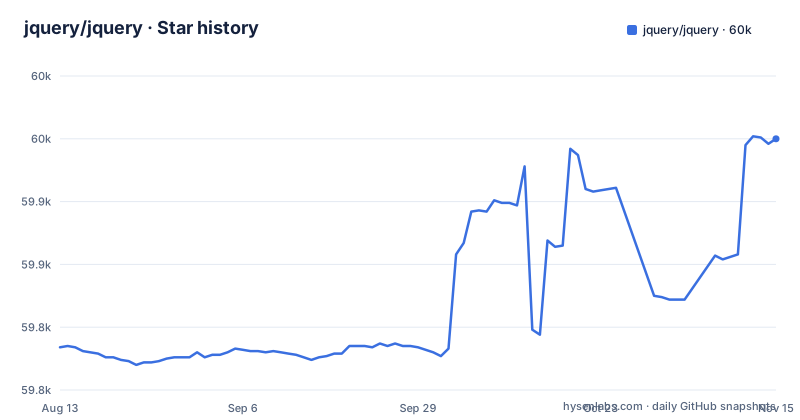
Star history
- jquery/jquery59,950 ★ · +166
| Repository | 2026-08-13 | 2026-11-15 |
|---|---|---|
| jquery/jquery | 59.8k | 60k |
166 Stars in the last 94 days, measured from the daily GitHub snapshot. Compare with other projects
Editorial analysis
The Problem jQuery 4.0.0 Solves
jQuery has always carried a reputation for being a kitchen-sink library, and for years that was fine. The README's custom-build section addresses a simple question: why ship every animation shorthand when a page only needs events and a few DOM helpers? The build system lets you exclude entire modules, including ajax, effects, and even the selector engine, which is replaced by a thin wrapper around native querySelectorAll. The target audience is clear: developers who want the convenience of jQuery's API without paying for features they never call. It is also aimed at maintainers of legacy code who need a supported path forward, because the support table in the README puts 3.x on critical-only status and drops 2.x and 1.x entirely.
How the Modular Build Actually Works
The mechanism is a build script that takes module paths as arguments. You run npm run build -- --help to see the full list of options. The README gives two key flags: --exclude and --include. With --exclude, you pass paths relative to the src folder, without the .js extension. For example, excluding css removes all modules that depend on it, including effects, dimensions, and offset. That dependency tracking is the important part. It is not a simple file deletion. The build script understands that removing one module can break others, so it cascades. The README warns that excluding selector does not actually remove it; instead, it swaps in a small wrapper around native querySelectorAll. That is a deliberate trade-off: you lose jQuery's complex selector syntax, but you keep the API shape. The build output lands in dist/ for regular files and dist-module/ for ECMAScript module versions. The module files, jquery.module.js and jquery.slim.module.js, export jQuery and $ as named exports.
Getting It Running: Commands and Output
The README is concrete about the build steps. You clone the repository, then run three commands: cd jquery, npm install, and npm run build. That produces the built version in dist/, along with a minified copy and a sourcemap. If you want every release variant, you run npm run build:all, which creates jquery.js, jquery.slim.js, jquery.module.js, and jquery.slim.module.js, plus their minified versions and sourcemaps. The module files go to dist-module/ instead of dist/. For a custom build, you pass --exclude or --include. The README lists example modules: ajax, ajax/xhr, ajax/script, ajax/jsonp, css, css/showHide, deprecated, dimensions, effects, event, event/trigger, offset, wrap, core/ready, deferred, exports/global, exports/amd, and selector. The --include option drops the default set and builds only what you list.
The Selector Engine Trade-Off
The most interesting design choice in the build script is how the selector module is handled. The README says that when you exclude selector, it is not removed but replaced with a small wrapper around native querySelectorAll. That means you cannot fully strip out selector logic. The reason is probably that too much of jQuery's internal code depends on the selector API, even for simple operations like $(element). The result is a smaller library, but not a selector-free one. If your project relies on complex selectors, like attribute selectors with custom pseudo-classes, you will need to keep the full selector module. If you only use ID and class selectors, the native wrapper will be smaller. This is a genuine trade-off, and the README is honest about it. It is also a limitation for anyone who wanted a zero-selector jQuery, which is not an option.
Support Status: A Hard Line in the Sand
The version support table in the README is blunt. 4.x on the main branch gets full support. 3.x on the 3.x-stable branch gets critical-only updates. 2.x and 1.x get none. The README recommends that all users upgrade to the latest version for 'best performance, security, and features'. That is a strong statement, but the underlying message is practical: if you are on 1.x or 2.x, you are on your own. The project even points to HeroDevs for commercial support of previous versions, which is a clear sign that the core team will not maintain those branches. For organizations with long-lived legacy code, this is the most important fact in the repository. The 3.x branch will still receive critical updates, but new features and non-critical bug fixes will not land there. That means any project on 3.x is in a maintenance holding pattern.
Deprecated Methods and the Removal Path
The README includes a module called deprecated, described as 'Methods documented as deprecated but not yet removed.' That is a telling detail. It means jQuery 4.0.0 still carries deprecated APIs, but they are isolated in a module that can be excluded from a custom build. Developers who want to avoid deprecated code can exclude that module and get a cleaner API surface. Developers who need backward compatibility can keep it. Check the source or documentation to see which methods the module contains. The existence of the deprecated module shows that the project is not ripping out old APIs overnight. It is giving users a choice, which is a reasonable middle ground.
A Real Alternative: Native DOM APIs and Other Libraries
If you are considering jQuery 4.0.0, the obvious alternative is to drop jQuery entirely and use native browser APIs. Modern browsers support querySelectorAll, fetch, addEventListener, and classList, which cover most of what jQuery does. The difference in approach is that native APIs require you to write more verbose code and handle cross-browser quirks yourself. jQuery's value is in its consistent API and its handling of edge cases, which is why it still exists after all these years. Another alternative is a lighter library like Umbrella JS or cash, which mimic jQuery's syntax but with a smaller footprint. The key difference is that those libraries are not drop-in replacements; they have their own quirks and may not support every jQuery method. The build script lets you trim jQuery itself instead of switching to a different library.
Maintenance and Upgrade Cost
The repository shows a clear maintenance model. The main branch is active, with a 4.0.0 release dated January 2026. The build process requires Node.js and git, which is standard. For upgrade cost, the support table tells you that moving from 3.x to 4.x is necessary for full support. Read the blog post linked in the README, changelog.md, or the release notes on GitHub for breaking changes. The license is MIT, which means you can use it in commercial projects with few restrictions, and you can modify the source. That is a low legal barrier. The main cost is the time to test your existing code against the new version..
Editorial conclusion
Adopt jQuery 4.0.0 if you are starting a new project or can afford a full regression pass, because the 3.x branch is now critical-only and 2.x/1.x are unsupported. Do not upgrade if your team has no time to test against 4.x, including any module exclusions you choose. Before committing, verify which modules your code actually uses, especially ajax, effects, and selector, and run the build with your exclude list to check for missing dependencies. The branch support table makes the support status of 3.x, 2.x and 1.x explicit.
Frequently asked questions
What is jQuery used for?
package.json describes it as a JavaScript library for DOM operations, and the module list shows the working surface: the ajax module with $.ajax(), $.get() and $.post(), effects with .animate() and its shorthands, offset for .offset() and .position(), and the event module with .on() and .off(). Everything is built from the sources in src/ into the files in dist/ and dist-module/.
What is jQuery vs JavaScript?
jQuery is written in JavaScript and runs inside it, not instead of it. What it adds on top of the language is a selector and event layer, AJAX transports, a Deferred object, animation methods and the global $ and jQuery variables, all assembled from the modules in src/ by the build script.
Is jQuery good in 2026?
The support table is the useful answer: 4.x on main has full support, 3.x on 3.x-stable receives critical updates only, and 2.x and 1.x receive none. jQuery 4.0.0 was released on 2026-01-18, the project recommends upgrading to the latest version, and commercial support for older lines is offered by HeroDevs and TuxCare.
Is jQuery front-end or backend?
It is a DOM library, so front-end by nature, but the project states that jQuery also supports Node, browser extensions and other non-browser environments, with browser support documented on its own page. The package's exports map carries a node condition that resolves to a node module wrapper, so the file you get depends on the environment rather than the import path alone.
how to install jquery
The current version is downloaded from jquery.com/download/. To build it yourself you need the latest Node.js/npm and git 1.7 or later, then run npm install and npm run build inside the jquery directory, which places the built file in dist/ along with a minified copy and a sourcemap.
how to use jquery
Choose a variant. A full build produces jquery.js, jquery.slim.js, jquery.module.js and jquery.slim.module.js, with the two ECMAScript module builds placed in dist-module/ exporting jQuery and $ as named exports. To carry less than the whole library, pass module paths relative to src to the --exclude option, or name only what you want with --include.
Official sources
Add this badge to your README
If you maintain this project, the badge below links readers to this analysis and shows its maintenance status from the daily GitHub snapshot. Paste the markdown into your README; add ?metric=license or ?metric=stars to the image URL for a different field.

[](https://hysenlabs.com/projects/jquery-jquery)Star history chart for your README
[](https://hysenlabs.com/projects/jquery-jquery)Was this useful?