pgTAP: a unit testing framework that lives inside PostgreSQL
PostgreSQL Unit Testing Suite
At a glance
- What is it?
- pgTAP is a unit testing framework for PostgreSQL written in PL/pgSQL and PL/SQL, with a collection of TAP-emitting assertion functions that can also be used in an xUnit style and can sit alongside other TAP-emitting test frameworks. Installing it is more involved than most extensions because the build needs a local PostgreSQL and the test suite needs the contributed modules.
- Who is it for?
- Adopt pgTAP if your PostgreSQL code is the thing that needs testing, because assertions written in SQL run against a real server and can check behaviour that a client-side test never sees. Do not adopt it if you are only testing queries from an application, since the value here comes from testing inside the database, and do not skip the build steps, because the test suite needs the contributed modules and a superuser.
- Can I use it commercially?
- Not without permission. GitHub finds no licence file in the repository, and without a licence all rights are reserved by default: you may read the code but not reuse it. Check the README, or ask the authors, before using it.
- Is it still maintained?
- Yes. The repository last received commits 41 days ago.
- What is it written in?
- Mainly PLpgSQL, according to GitHub's language statistics.
Answers come from the project's GitHub data, last synced on November 7, 2026, and from our analysis. They are not legal advice.
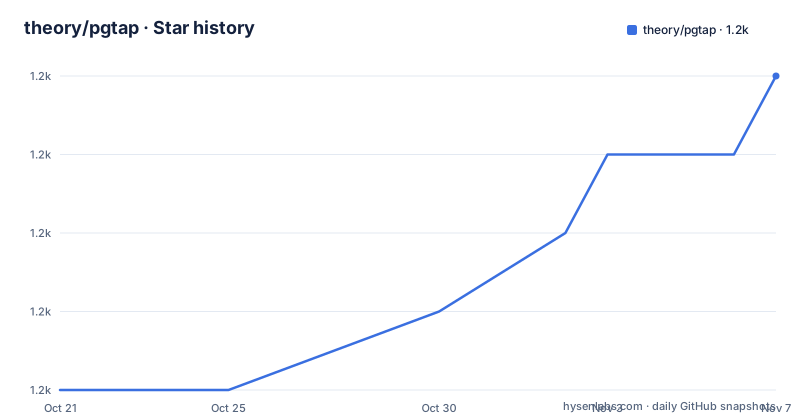
Star history
- theory/pgtap1,175 ★ · +4
| Repository | 2026-10-21 | 2026-11-07 |
|---|---|---|
| theory/pgtap | 1.2k | 1.2k |
4 Stars in the last 17 days, measured from the daily GitHub snapshot. Compare with other projects
Editorial analysis
Assertions that speak TAP, in SQL
pgTAP is a unit testing framework for PostgreSQL written in PL/pgSQL and PL/SQL. It includes a comprehensive collection of TAP-emitting assertion functions, as well as the ability to integrate with other TAP-emitting test frameworks. It can also be used in the xUnit testing style.
TAP is the Test Anything Protocol, the line-based format that most language test runners emit, and the choice of it is what makes pgTAP composable. A test that produces TAP can be run by a Perl harness, a Python harness, a shell harness or anything else that understands the format, and a pgTAP test file looks like any other TAP producer to those tools.
The xUnit alternative matters for a specific audience. If your team is used to asserting with a familiar function-per-assertion style, the same framework can present itself that way, and the documentation covers both.
For detailed documentation, the repository points at the documentation in doc/pgtap.md and at the online version at pgtap.org/documentation.html. The primary language in the repository listing is PLpgSQL, which is the honest answer for a project that is a PostgreSQL extension whose logic lives in the database.
The project is by David E. Wheeler, the site is pgtap.org, and the repository is not archived, with the last push on 2026-09-27.
The build needs a local PostgreSQL, and it is not optional
There is a constraint in the README that surprises people, and it is stated before the build instructions: pgTAP must be installed on a host with a PostgreSQL server running, it cannot be installed remotely.
That is a consequence of what the extension is. It is a set of functions and types that the build system has to install into a real cluster, so there has to be a cluster to install into.
The build itself is three targets:
make
make install
make installcheck
And then there is a chain of troubleshooting notes, which is where the practical detail lives.
If you hit an error saying Makefile, line 8: Need an operator, you need GNU make, which may well be installed on your system as gmake, so the commands become gmake, gmake install and gmake installcheck. If you hit make: pg_config: Command not found, you need pg_config installed and in your path, and if you installed PostgreSQL with a package manager such as RPM you need the -devel package as well, or you can point the build at it with env PG_CONFIG=/path/to/pg_config make && make install && make installcheck. And if all that fails, the answer is to copy the entire distribution directory into the contrib/ subdirectory of the PostgreSQL source tree and build it there without pg_config, using env NO_PGXS=1 make && make install && make installcheck.
The last one is the interesting fallback, because building inside the source tree is how PostgreSQL extensions have always been built when the PGXS build system was not available.
There is also a version floor in the error text itself: pgTAP requires PostgreSQL 9.1 or later.
Running the test suite, and the modules it needs
The test step has two separate requirements, and both are stated as troubleshooting notes rather than as prerequisites, which is how people end up discovering them late.
The first is ownership. If you hit an error saying you must be owner of database regression, you need to run the test suite using a super user, such as the default postgres super user:
make installcheck PGUSER=postgresThe second is the contributed modules. If you hit an error saying that extensions required for testing are missing, with citext and ltree named, you need to install the PostgreSQL additional supplied modules, which are required to run the tests, and on an RPM-based system that means the -contrib package.
That requirement exists because the test suite exercises the extension's own dependencies, and a test run against a cluster without them reports a missing extension rather than a passing suite, which is the right behaviour but an annoying one to debug.
There is also a newer wrinkle for custom prefixes. To install the extension in a custom prefix on PostgreSQL 18 or later, you pass the prefix argument to install, and no other make target:
make install prefix=/usr/local/extrasAnd then you have to make the server aware of that prefix, with two settings in postgresql.conf:
extension_control_path = '/usr/local/extras/postgresql/share:$system'
dynamic_library_path   = '/usr/local/extras/postgresql/lib:$libdir'
The extension_control_path setting is how the server finds the extension control file in a non-default location, and dynamic_library_path is how it finds the shared library.
Creating the extension in a database
Once pgTAP is installed on the host, the extension is added to a database by connecting as a super user and running:
CREATE EXTENSION pgtap;There are two variants of that statement, and both exist for a reason.
If you have upgraded your cluster to PostgreSQL 9.1 and already had pgTAP installed, you can upgrade it to a properly packaged extension with:
CREATE EXTENSION pgtap FROM unpackaged;The unpackaged form is the mechanism for turning a set of loose objects that were installed by hand into a proper extension, which is what makes them relocatable and properly tracked by the extension machinery.
The second variant is about placement. If you want to install pgTAP and all of its supporting objects into a specific schema, use the SCHEMA clause:
CREATE EXTENSION pgtap SCHEMA tap;Putting an extension in its own schema is good practice in a database that holds more than one thing, because the functions and types stop polluting the public namespace, and the schema is a natural place to revoke access from.
The dependency statement in the documentation is the one to remember: pgTAP requires PostgreSQL 9.1 or higher. That is a very old floor by PostgreSQL standards, and it tells you something about the age of the codebase and about how conservative the project has been about raising the bar.
What the Makefile is doing under the hood
The Makefile is a normal PostgreSQL extension build file with a few unusual details, and reading it tells you how the project is versioned and tested.
The extension name and version are derived rather than written down. The version comes from grepping default_version out of pgtap.control, and the distribution version comes from the version field in META.json, with a numeric version truncated for comparison. The version is then used to name the SQL files, with sql/pgtap--VERSION.sql, sql/pgtap-core--VERSION.sql and sql/pgtap-schema--VERSION.sql as the versioned sources, and sql/pgtap.sql, sql/pgtap-core.sql and sql/pgtap-schema.sql as the generated ones, plus sql/uninstall_pgtap.sql. The EXTRA_CLEAN target removes all of them along with the generated documentation.
The test configuration is set before PGXS is included, which the comment explains is a requirement, and there are three knobs worth knowing about. REGRESS_CONF can be passed to pg_regress. PARALLEL_CONN can be set to 1 to force serial test execution, otherwise it is determined from the maximum connections of the server. And UPDATE_FROM controls which version the update check upgrades from, defaulting to 0.95.0.
That last one is the interesting detail for a PostgreSQL extension. The extension is upgraded in place, so the test suite has to prove that an upgrade from an older version leaves the database in the right state, and the UPDATE_FROM variable says which older version it starts from when it does that.
The repository, the licence and the release state
The top-level entries are the standard set for a PostgreSQL extension. There is the sql/ directory with the extension SQL, test/ for the test suite, doc/ for the documentation including pgtap.md, contrib/ and compat/ for packaging variants, tools/ for helper scripts, and the extension metadata in pgtap.control and META.json, with Changes and release.md recording the history. The .github directory holds the test workflow whose badge is in the README.
The licence is unusual enough to quote. The copyright is 2008 to 2026 David E. Wheeler, and the permission grant is to use, copy, modify and distribute the software and its documentation for any purpose, without fee and without a written agreement, provided that the copyright notice and the following two paragraphs appear in all copies. The disclaimer of liability follows, and the final paragraph is the one that stands out, because the author specifically disclaims warranties including the implied warranties of merchantability and fitness for a particular purpose, states that the software is provided on an as is basis, and says the author has no obligations to provide maintenance, support, updates, enhancements or modifications.
That last sentence is unusual in an open source licence and it is a deliberate statement of what you are getting. GitHub reports the licence as one it cannot categorise, which is consistent with the text being a custom rather than a standard licence.
The release history is the last piece. Version 1.3.2 came on 2024-02-04, 1.3.3 on 2024-04-08 and 1.3.4 on 2025-10-04, and the README title says pgTAP 1.3.5, so the branch is ahead of the last tag. The project is not archived, and given the PostgreSQL 9.1 floor, the odds are good that it will still be installable long after the frameworks around it have changed.
Editorial conclusion
Adopt pgTAP if your PostgreSQL code is the thing that needs testing, because assertions written in SQL run against a real server and can check behaviour that a client-side test never sees. Do not adopt it if you are only testing queries from an application, since the value here comes from testing inside the database, and do not skip the build steps, because the test suite needs the contributed modules and a superuser. Before you start, check that you have a local PostgreSQL with pg_config on the path, install the citext and ltree modules, and plan to run the tests as the postgres super user with make installcheck PGUSER=postgres.
Frequently asked questions
What is pgTAP?
It is a unit testing framework for PostgreSQL written in PL/pgSQL and PL/SQL, with a comprehensive collection of TAP-emitting assertion functions, the ability to integrate with other TAP-emitting test frameworks, and support for the xUnit testing style. The documentation is in doc/pgtap.md and on pgtap.org.
How do I build and install pgTAP?
pgTAP must be installed on a host with a PostgreSQL server running, it cannot be installed remotely. You run make, make install and make installcheck, using gmake if you do not have GNU make, and if pg_config is missing you need the -devel package or you point the build at it with env PG_CONFIG=/path/to/pg_config, or you build inside the contrib/ directory of the PostgreSQL source tree with NO_PGXS=1.
What do I need to run the pgTAP test suite?
You need to run it as a super user, with make installcheck PGUSER=postgres, and you need the contributed PostgreSQL modules, since the tests fail with a missing extensions error for citext and ltree if they are not installed. PostgreSQL 9.1 or later is required.
How do I add pgTAP to a database?
Connect as a super user and run CREATE EXTENSION pgtap. If you had pgTAP installed by hand on a cluster upgraded to PostgreSQL 9.1, use CREATE EXTENSION pgtap FROM unpackaged to convert it to a properly packaged extension, and you can add the SCHEMA clause to install it and its supporting objects into a schema of your choice.
How current is pgTAP?
The tagged releases are v1.3.2 from 2024-02-04, v1.3.3 from 2024-04-08 and v1.3.4 from 2025-10-04, the README title refers to pgTAP 1.3.5, and the last push was on 2026-09-27. The licence is a custom permissive grant from David E. Wheeler that disclaims warranties and states there is no obligation to provide maintenance or updates.
Official sources
Add this badge to your README
If you maintain this project, the badge below links readers to this analysis and shows its maintenance status from the daily GitHub snapshot. Paste the markdown into your README; add ?metric=license or ?metric=stars to the image URL for a different field.

[](https://hysenlabs.com/projects/theory-pgtap)Star history chart for your README
[](https://hysenlabs.com/projects/theory-pgtap)Was this useful?