eslint-plugin-react: React-Specific Linting Rules for ESLint
React-specific linting rules for ESLint
At a glance
- What is it?
- eslint-plugin-react supplies React-specific lint rules for ESLint, from JSX usage to prop type checks. It installs from npm, ships presets for both config systems, and its accuracy depends on how much of the shared settings block you fill in.
- Who is it for?
- Adopt eslint-plugin-react if your codebase is plain React with JSX and you already run ESLint, since the plugin is the plugin object itself and the presets get you a sane rule set in two lines. Do not adopt it expecting hook correctness: that comes from eslint-plugin-react-hooks.
- Can I use it commercially?
- Yes. MIT is a permissive licence: you can use, modify and sell software built on it, as long as you keep its copyright and licence notices.
- Is it still maintained?
- Yes. The repository last received commits 11 days ago.
- What is it written in?
- Mainly JavaScript, according to GitHub's language statistics.
Answers come from the project's GitHub data, last synced on November 15, 2026, and from our analysis. They are not legal advice.
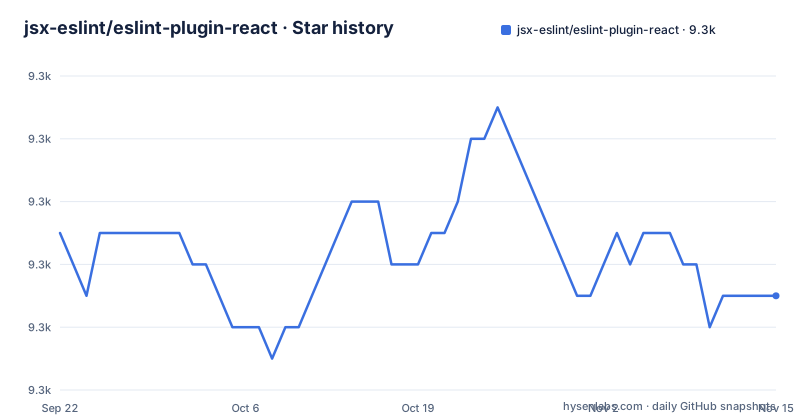
Star history
- jsx-eslint/eslint-plugin-react9,291 ★ · -2
| Repository | 2026-09-22 | 2026-11-15 |
|---|---|---|
| jsx-eslint/eslint-plugin-react | 9.3k | 9.3k |
-2 Stars in the last 54 days, measured from the daily GitHub snapshot. Compare with other projects
Editorial analysis
What eslint-plugin-react actually adds to ESLint
ESLint on its own understands JavaScript syntax, not React semantics. It cannot tell that a variable is only used inside JSX, that a component declares a propType it never reads, or that a prop named class should be className. eslint-plugin-react is the rule package that teaches it those things. The package.json describes it plainly as React specific linting rules for ESLint, and the README opens the same way.
The audience is narrow and obvious: teams writing React with JSX who already run ESLint. If you use TypeScript without JSX, most of the value disappears, because the rules are about JSX usage, prop types and component structure.
How the rules decide what a component is
The mechanism is a settings block shared across every rule in the plugin. The README lists the keys: react.pragma (default React), react.fragment (default Fragment), react.createClass (default createReactClass), and react.version, set to detect in the example, which picks the installed React version. These are not cosmetic. A rule that looks for JSX must know which identifier opens it; a rule that checks fragments must know which name means fragment.
Configuration arrives in two shapes. The legacy .eslintrc* system uses extends with plugin:react/recommended or plugin:react/all. The flat config system, default from ESLint v9, exports the plugin object as the default export, which you place under plugins. The README notes that from ESLint v8.21.0 the new system was announced and that v9 supports only the new system.
Installing eslint-plugin-react and running it once
The README gives one install command, and it installs ESLint alongside the plugin. The note that follows is worth reading: installing ESLint globally is possible but not recommended, and plugins must be installed locally either way.
npm install eslint eslint-plugin-react --save-devFor the legacy config format, the README shows extending the preset. The recommended preset pairs with eslint:recommended. If you use the React 17 JSX transform, the README says to also extend plugin:react/jsx-runtime to disable the rules that no longer apply.
{
  "extends": [
    "eslint:recommended",
    "plugin:react/recommended"
  ]
}
For the flat config format, the plugin is the default export. The README's example registers it under plugins, enables JSX in parserOptions, and sets globals from the globals package. Note the file globs and the two rules it enables by hand.
const react = require('eslint-plugin-react');
const globals = require('globals');

module.exports = [
  {
    files: ['**/*.{js,jsx,mjs,cjs,ts,tsx}'],
    plugins: { react },
    languageOptions: {
      parserOptions: { ecmaFeatures: { jsx: true } },
      globals: { ...globals.browser },
    },
    rules: {
      'react/jsx-uses-react': 'error',
      'react/jsx-uses-vars': 'error',
    },
  },
];
If you skip the presets, the README says you must add react to the plugins array, enable JSX in parserOptions.ecmaFeatures.jsx, and then turn rules on individually, with react/jsx-uses-react and react/jsx-uses-vars given as the two examples. After any of these setups, run your lint script and expect diagnostics to appear on JSX files; if nothing appears, the settings block is the first place to look.
The settings block is where the plugin quietly fails
The README's settings example is long, and it is easy to paste only part of it. The key to get right is react.version. The README says detect picks the installed version automatically and that you can pin it to values like 16.0 or 16.3.
There is also a scope limit worth stating plainly: this plugin checks React usage patterns. It does not check hook dependency arrays. That responsibility sits with a separate plugin. Teams that install this one and assume hooks are covered are the clearest case of the wrong tool.
eslint-plugin-react versus the newer React lint plugins
Next to newer packages such as @eslint-react/eslint-plugin, the useful point about eslint-plugin-react is its structure. eslint-plugin-react is a plugin object consumed through the standard ESLint plugin interface: you register it, extend a preset or list rules, and configure behaviour through a shared settings.react block. That design is why it works with both .eslintrc* and eslint.config.js and why it has no opinions about your parser or your TypeScript setup.
A second comparison worth making is against ESLint itself. The recommended preset here is meant to be extended next to eslint:recommended, not instead of it. Dropping the core preset leaves you with React rules and no baseline JavaScript rules.
Maintenance, versioning and the MIT licence
The repository is not archived. The last push was on 2026-11-02, which is recent enough that describing the project as maintained is fair. The release history is slower: v7.37.5 shipped on 2025-04-03, v7.37.4 on 2025-01-12, and v7.37.3 on 2024-12-23. Patch releases at that cadence suggest a stable rule set rather than rapid feature work, and the version line has stayed in 7.x across all three.
Upgrade cost is mostly configuration drift. Moving from .eslintrc* to eslint.config.js means rewriting how the plugin is registered, since the flat system uses the default export under plugins. The README points at the ESLint blog posts and docs for that migration rather than documenting it here. Preset changes between minor versions can surface new diagnostics in existing code, so a version bump is a lint run you should expect to triage.
The package is MIT licensed, which per the repository's LICENSE file permits commercial use and modification. That is a statement about the licence text, not legal advice; if your organization has a policy on dependency licences, route it through the people who own that policy.
Editorial conclusion
Adopt eslint-plugin-react if your codebase is plain React with JSX and you already run ESLint, since the plugin is the plugin object itself and the presets get you a sane rule set in two lines. Do not adopt it expecting hook correctness: that comes from eslint-plugin-react-hooks. Before rollout, verify your ESLint major against the flat config example in the README and confirm your React version resolves through settings.react.version.
Frequently asked questions
What does eslint-plugin-react do?
It is a package of React specific linting rules for ESLint. It teaches ESLint about JSX usage, prop types, fragments and component structure, and it exposes recommended and all presets plus a shared settings block under settings.react.
How do I install eslint-plugin-react?
The README gives one command, npm install eslint eslint-plugin-react --save-dev, which installs ESLint and the plugin locally. It notes that installing ESLint globally is possible but not recommended, and that plugins must be installed locally either way.
Is there an ESLint plugin for React that is compatible with ESLint 10?
The README documents the flat config system, says the new config file is the default from ESLint v8.23.0 onward, and that ESLint v9 supports only the new system, so verify your ESLint major against the flat config example before upgrading.
Is eslint-plugin-react deprecated?
The repository is not archived, and the last push was on 2026-11-02. The README documents current installation and configuration for both the legacy and flat config systems, so it is not presented as deprecated.
How do I use the eslint plugin react hooks rules?
Hook dependency checking belongs to a separate plugin, eslint-plugin-react-hooks; this package's documented presets and settings cover JSX usage, pragma, fragment and React version detection.
Official sources
Where developers are discussing it
Posts on Hacker News, dev.to and Lobsters that link to this repository, found by our scan of those communities. 0 in the last 30 days; newest first.
- This Week In React #301 : TanStack Start, React Aria, Base UI, Next.js | RN Web, Tamagui, One, Skia | Deno, Bun, TS, JPEG XLdev.to · Oct 16, 2026 · 2 points · 0 comments
Add this badge to your README
If you maintain this project, the badge below links readers to this analysis and shows its maintenance status from the daily GitHub snapshot. Paste the markdown into your README; add ?metric=license or ?metric=stars to the image URL for a different field.

[](https://hysenlabs.com/projects/jsx-eslint-eslint-plugin-react)Star history chart for your README
[](https://hysenlabs.com/projects/jsx-eslint-eslint-plugin-react)Was this useful?