ws defaults to HyBi 13 and does not run in a browser
Simple to use, blazing fast and thoroughly tested WebSocket client and server for Node.js
At a glance
- What is it?
- A look at the Node.js WebSocket library by its wiring rather than its pitch: two HyBi protocol versions, two optional native addons with their own security switches, compression defaults that differ between client and server, and a hard module resolution boundary that keeps it off the browser.
- Who is it for?
- A Node.js service that needs a WebSocket endpoint should take ws: MIT licensed, HyBi 13 by default, last pushed on 2026-10-31 with 8.22.1. Teams whose client has to run inside a browser need isomorphic-ws or the native WebSocket object, because the browser condition in this package resolves to browser.js.
- Can I use it commercially?
- Yes. MIT is a permissive licence: you can use, modify and sell software built on it, as long as you keep its copyright and licence notices.
- Is it still maintained?
- Yes. The repository last received commits 2 days ago.
- What is it written in?
- Mainly JavaScript, according to GitHub's language statistics.
Answers come from the project's GitHub data, last synced on November 15, 2026, and from our analysis. They are not legal advice.
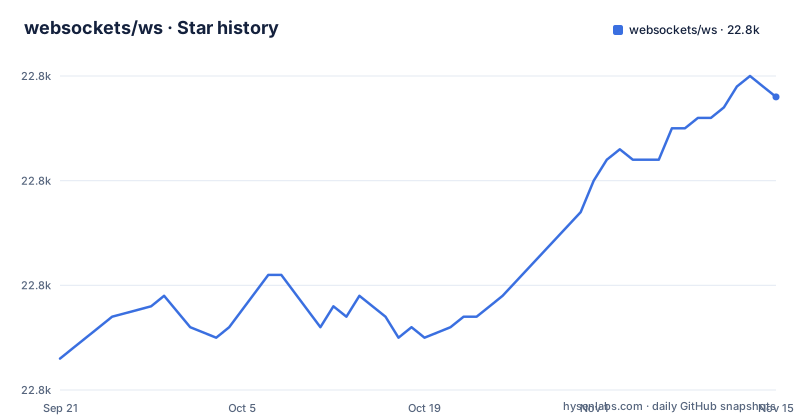
Star history
- websockets/ws22,828 ★ · +25
| Repository | 2026-09-21 | 2026-11-15 |
|---|---|---|
| websockets/ws | 22.8k | 22.8k |
25 Stars in the last 55 days, measured from the daily GitHub snapshot. Compare with other projects
Editorial analysis
The browser boundary is decided by the exports map, not by your code
The split happens in package.json before a single line of yours runs. The exports map sends require to index.js, import to wrapper.mjs, and any bundler that honours the browser key to browser.js, and the files array publishes browser.js, index.js, lib/*.js and wrapper.mjs. The warning that goes with that layout is direct. This module does not work in the browser, and the client in the documentation is a backend holding the client role, not a browser tab.
So anything built on WebSocketServer belongs on the Node.js side of your tree, and a file shared with browser code cannot import ws unconditionally. Browser code is told to use the native WebSocket object instead, and isomorphic-ws is named as one of the wrappers available on npm when you want a single implementation that runs in both places. What you cannot do is assume one import statement resolves to the same module on both sides. The resolver picks the file.
protocolVersion 13 is the default and 8 is the older wire format
Two ranges of the protocol are supported and each has its own option. HyBi drafts 07 to 12 need protocolVersion: 8. HyBi drafts 13 to 17 are the current default, with protocolVersion: 13 offered as the explicit alternative. The default is the newer branch, so a server started with no protocol option at all speaks draft 13 framing.
The consequence shows up when a peer predates draft 13: someone has to set a value on both ends rather than rely on the default, and that value has to match. The full API surface sits in doc/ws.md instead of on the README. Read the two-version statement as the whole of the claim about protocol coverage, then open doc/ws.md before concluding that a knob is missing from the library.
bufferutil is opt-in and WS_NO_BUFFER_UTIL exists for the reason you would not guess
Masking and unmasking frame payloads is the work the native addon takes over. bufferutil is declared in peerDependencies as ^4.0.1 and marked optional, so nothing pulls it in until you ask:
npm install --save-optional bufferutilpackage.json also carries an allowScripts entry set to true for bufferutil.
The switch runs in reverse as well. WS_NO_BUFFER_UTIL keeps ws from loading the addon, and the reason given is not speed. Where another user can place a package in the package search path of your application, the Node.js resolver algorithm can pull native code into your process that you never installed. Set that variable on shared build hosts and anywhere the filesystem is not yours alone.
utf-8-validate is scoped to Node before v18.14.0 while engines still allows 10.0.0
engines in package.json reads node >=10.0.0, but the second performance addon is aimed at older runtimes only. On Node prior to v18.14.0, utf-8-validate supplies a binary polyfill for buffer.isUtf8(), installed the same optional way:
npm install --save-optional utf-8-validateIt is an optional peer dependency at >=5.0.2, and WS_NO_UTF_8_VALIDATE keeps ws from loading it at runtime. The gap worth noticing sits between the declared floor and the documented need. A service that still has to run on anything from Node 10 to 18.13 carries an optional native module on exactly those runtimes, and it stops needing it the day that constraint is lifted, which leaves one question the project does not answer: what validation costs when the package is absent. If you are deciding whether to keep the dependency, test your own invalid UTF-8 handling instead of assuming the fallback is free.
permessage-deflate is on for clients, off for servers, and zlib can fragment memory
The compression defaults are asymmetric and the reason is cost. The extension is enabled by default on the client and disabled by default on the server, because applying it adds significant overhead in terms of performance and memory consumption. The client uses it only when the server supports and enables it, and the suggestion is to turn it on only if it is really needed. Forcing it off on the client takes one option:
import WebSocket from 'ws';

const ws = new WebSocket('ws://www.host.com/path', {
  perMessageDeflate: false
});
Tuning runs through zlibDeflateOptions and zlibInflateOptions, handed straight to the raw deflate and inflate streams, plus clientNoContextTakeover, serverNoContextTakeover and serverMaxWindowBits, each defaulting to the negotiated value. The warning matters more than the knobs: Node.js has high-performance compression issues where increased concurrency, especially on Linux, leads to catastrophic memory fragmentation and slow performance. Enable it in production only after a test representative of your own workload.
The smallest server is thirteen lines and it can share your HTTP listener
Installation is one command, and the server example binds its own port:
npm install wsimport { WebSocketServer } from 'ws';
const wss = new WebSocketServer({ port: 8080 });
wss.on('connection', function connection(ws) {
ws.on('error', console.error);
ws.on('message', function message(data) {
console.log('received: %s', data);
});
ws.send('something');
});Every client arrives through wss.on('connection'), the server sends as soon as the socket exists, and both sides attach ws.on('error', console.error) so a failed connection prints rather than surfacing as an unhandled error event. Binary payloads use that same send call: a Float32Array(5) filled with i / 2 values goes straight to ws.send(array).
The server does not have to own that port. Instead of { port: 8080 }, WebSocketServer accepts an existing server object, so one listener serves ordinary requests and upgrade requests together. The secure case builds it with Node's own https module, reading a certificate and key from disk with readFileSync, passing both to createServer, then handing the result to WebSocketServer. examples/ssl.js is in the repository's examples directory. The trade is ownership: the WebSocket server now inherits the HTTP server's lifetime, and shutdown ordering plus certificate file permissions are yours to get right.
The client mirrors the server, dialing a URL, waiting for open before sending, and logging what arrives:
import WebSocket from 'ws';

const ws = new WebSocket('ws://www.host.com/path');

ws.on('error', console.error);

ws.on('open', function open() {
  ws.send('something');
});

ws.on('message', function message(data) {
  console.log('received: %s', data);
});
Keep the ordering and the error handler, drop the demonstration. Neither snippet reconnects, neither sets a heartbeat, and for broken connections the documented path is the close logic in the FAQ rather than a retry helper.
The published file list carries no declaration file and the FAQ stops at three questions
The files array publishes browser.js, index.js, lib/*.js and wrapper.mjs. There is no declaration file in that list, and package.json declares no types field, so a TypeScript codebase cannot take its WebSocket definitions from this package and has to get them elsewhere. JavaScript projects are unaffected by that gap.
The second limit is scope rather than missing code. The table of contents ends with three operational questions: how to get the IP address of the client, how to detect and close broken connections, and how to connect via a proxy. There is no entry for reconnect policy, backoff, delivery guarantees or message ordering, and the examples list ends with round-trip time measurement and the Node.js streams API before pointing elsewhere. If you are building a mobile client that loses its network for a minute, the answers are not published here, and the contents list is an honest measure of what the project chose to document.
Autobahn conformance is claimed and the repository ships its own benchmarks
The claim made at the top is conformance: ws passes the Autobahn test suite, with separate reports for the server and the client. The repository backs that with tooling rather than prose. package.json runs mocha under nyc for coverage across test/*.test.js, keeps a separate integration script that runs the .integration.js files without the coverage wrapper, and passes --throw-deprecation so a deprecation warning fails the run instead of scrolling past. bench/ sits at the top level, and the examples directory holds ssl.js, server-stats/ and express-session-parse/.
The release line moves quickly. Version 8.22.1 shipped on 2026-10-31, after 8.22.0 on 2026-09-26 and 8.21.3 on 2026-08-06, and the last push to master is dated 2026-10-31. Licence is MIT, with FUNDING.json and SECURITY.md at the root for sponsorship and disclosure. What that means for an adopter is cadence rather than risk: stay on the 8.x line, and re-read doc/ws.md when a minor moves, since the API reference lives there rather than in the README.
Editorial conclusion
A Node.js service that needs a WebSocket endpoint should take ws: MIT licensed, HyBi 13 by default, last pushed on 2026-10-31 with 8.22.1. Teams whose client has to run inside a browser need isomorphic-ws or the native WebSocket object, because the browser condition in this package resolves to browser.js. Set WS_NO_BUFFER_UTIL on any shared host where another user can write to your package search path, and leave permessage-deflate off until a workload test on your own concurrency level says Node.js zlib holds up.
Frequently asked questions
When connecting with ws, what is the difference between WS and WSS?
The client examples in the project dial ws://www.host.com/path. For the secure case, the server example reads a certificate and a key with readFileSync, passes both to createServer from https, and hands that server to WebSocketServer, which is the shape a wss listener takes. The README does not spell out the scheme comparison itself.
Is the ws connection over HTTP?
The examples open ws://www.host.com/path from the client, and the server either owns a port with new WebSocketServer({ port: 8080 }) or attaches to an HTTP or HTTPS server you already run through new WebSocketServer({ server }). The relationship between the WebSocket handshake and HTTP is not discussed at the protocol level in the documentation.
What does "ws server" mean in this library?
It means the WebSocketServer class: new WebSocketServer({ port: 8080 }) creates one, and wss.on('connection', function connection(ws) {...}) hands you a socket for every client that connects. The client side is the WebSocket class, which dials a URL such as ws://www.host.com/path.
Official sources
Add this badge to your README
If you maintain this project, the badge below links readers to this analysis and shows its maintenance status from the daily GitHub snapshot. Paste the markdown into your README; add ?metric=license or ?metric=stars to the image URL for a different field.

[](https://hysenlabs.com/projects/websockets-ws)Star history chart for your README
[](https://hysenlabs.com/projects/websockets-ws)Was this useful?