Zero to JupyterHub with Kubernetes: Helm Deployment Guide
Helm Chart & Documentation for deploying JupyterHub on Kubernetes
At a glance
- What is it?
- Zero to JupyterHub with Kubernetes packages JupyterHub as a Helm chart and supplies deployment documentation for organizations serving many users from a Kubernetes cluster. It is a strong fit for institutions that want repeatable infrastructure configuration, but it assumes Helm, Kubernetes, and cluster administration are already available.
- Who is it for?
- Organizations expecting many JupyterHub users should evaluate this project when their platform team already manages Kubernetes and Helm. Smaller deployments or teams that need a complete installation recipe should first confirm that the linked guide covers their cluster, identity, storage, networking, and operational requirements, because this repository's README does not provide those commands or configuration details.
- Can I use it commercially?
- Check first. The repository uses a licence we do not classify automatically, so read its LICENSE file before any commercial use.
- Is it still maintained?
- Yes. The repository last received commits 1 day ago.
- What is it written in?
- Mainly Python, according to GitHub's language statistics.
Answers come from the project's GitHub data, last synced on November 6, 2026, and from our analysis. They are not legal advice.
Star history
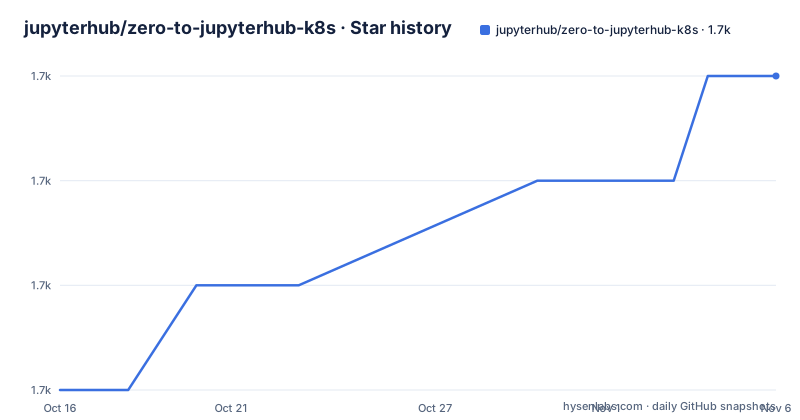
- jupyterhub/zero-to-jupyterhub-k8s1,726 ★ · +3
| Repository | 2026-10-16 | 2026-11-06 |
|---|---|---|
| jupyterhub/zero-to-jupyterhub-k8s | 1.7k | 1.7k |
3 Stars in the last 21 days, measured from the daily GitHub snapshot. Compare with other projects
Editorial analysis
Zero to JupyterHub's multi-user Kubernetes target
Zero to JupyterHub with Kubernetes addresses the gap between installing a notebook server for one person and operating JupyterHub for a large group. The repository explicitly positions the deployment as suitable for staff and students at a university, although its Helm chart is not limited to academic use. Any organization that needs separate JupyterHub accounts, shared access to a Kubernetes platform, and infrastructure configuration that can be reproduced is the relevant audience.
The repository combines two related assets. The first is a Helm chart for JupyterHub. The second is a deployment guide hosted at z2jh.jupyter.org. The guide provides user-facing deployment steps, while the chart turns the deployment into a versioned Helm artifact published through the JupyterHub Helm chart repository. This division matters because operators do not need to treat documentation and deployment artifacts as the same thing.
It is not a general Kubernetes application bundle, nor is it a replacement for JupyterHub itself. Its purpose is to package and document a JupyterHub deployment on Kubernetes. That narrow scope is useful for platform teams, but it also means access to Kubernetes and Helm is part of the assumed environment rather than something this repository installs for the reader.
Helm chart architecture and configuration boundary
According to the repository layout and README, the chart source lives in the `jupyterhub/` directory. Supporting material includes `chartpress.yaml`, development configuration files, tests, release documentation, and documentation sources under `docs/`. This structure indicates a chart development process with configuration fixtures and automated checks rather than a collection of manual shell scripts.
The Helm repository at `https://jupyterhub.github.io/helm-chart` is the published distribution location for released charts. The README describes this as the place where a user can obtain a reproducible and maintainable JupyterHub deployment. That makes the chart repository the relevant installation source, while the source repository provides chart development, release history, tests, and deployment documentation.
The documented architecture also assumes a cloud Kubernetes environment. Users should not interpret the name "Zero to JupyterHub" as a promise that a blank workstation becomes a complete production platform through one package. Kubernetes performs the workload orchestration, Helm manages the Kubernetes resources described by the chart, and JupyterHub provides the multi-user service. The repository does not document the chart's resource templates or default values in the README, so the exact generated Kubernetes objects should be checked in the chart version selected for an installation.
Deploying through the linked Kubernetes guide
The shortest documented route is the Zero to JupyterHub with Kubernetes guide at `https://z2jh.jupyter.org`. The repository README says that this guide provides user-friendly steps for deploying JupyterHub on a cloud using Kubernetes and Helm. It also links the JupyterHub documentation as complementary material for understanding the application itself.
A first deployment therefore begins by reading the guide for the cluster preparation, installation commands, and configuration steps applicable to the intended environment. Helm then supplies the released chart, and the chart manages the JupyterHub deployment on Kubernetes. After that, the reader should follow the guide for any cluster-specific setup and use the JupyterHub documentation for service configuration beyond the deployment layer.
The README does not include the guide's actual commands, repository-addition syntax, release values, namespace commands, or configuration examples. Readers should use the linked guide as the authoritative installation path, then confirm which chart version that guide selects. The README also links release information for stable, pre-release, and development chart versions, so a first-time operator should not assume that the development version is the appropriate choice.
Cluster requirements absent from the README
The clearest operational limitation is also the clearest adoption boundary: this README does not document Kubernetes prerequisites, supported Kubernetes distributions, Helm version requirements, ingress configuration, storage classes, container images, identity providers, resource requests, or production sizing. It states that deployment occurs on a cloud using Kubernetes and Helm, but it does not enumerate the capabilities the cluster must provide.
That omission does not make the chart unsuitable. It means the repository is not, by itself, a complete infrastructure specification. A platform engineer must consult the linked deployment guide for those details. The project is also the wrong tool for someone who expects Kubernetes cluster provisioning. Its scope begins with deploying JupyterHub on Kubernetes, not creating the cluster, installing Kubernetes, or teaching every Kubernetes control-plane concept.
Resource-heavy notebook workloads can make capacity planning important, but the README supplies no performance figures or sizing formula. It also does not document rollback, backup, observability, upgrade testing, or recovery procedures. Those topics should not be inferred from the existence of a Helm chart. Helm can represent Kubernetes deployment configuration, but the chart's release history alone does not prove that an upgrade path for an existing JupyterHub installation is safe for a particular cluster.
Release cadence, maintenance, and upgrade work
The repository is not archived, and the last push was on 2026-10-16. Recent releases include version 4.4.2 on 2026-09-01, version 4.4.1 on 2026-08-10, and version 4.4.0 on 2026-06-10. Those facts support a current maintenance assessment, but they do not say whether every chart upgrade is backward compatible or how long a production upgrade takes.
For an operator, upgrades involve more than changing a version label. JupyterHub configuration, Kubernetes manifests, Helm values, storage, authentication, and cluster compatibility can all affect the resulting deployment. The README points to released chart versions and the documentation site, while the repository layout includes `CHANGELOG.md` and `RELEASE.md`. Those are the first project-specific files to inspect when determining what changed and how a release is intended to be adopted.
The README does not document an automated upgrade service or a migration service. Maintenance cost therefore depends on the operator's ability to review Helm changes and validate JupyterHub in a Kubernetes environment. A team without cluster administration capacity should price that operational work before treating the chart as a low-maintenance deployment method.
Apache 2.0 and 3-clause BSD licensing
The README says that this repository is dual licensed under the Apache 2.0 license, matching the upstream Kubernetes charts repository, and the 3-clause BSD license, matching other Project Jupyter repositories. The `LICENSE` file is identified as the place to review the licensing information.
This dual-license statement applies to the repository represented by the project. An operator must still review the `LICENSE` file and consider the separate components pulled into the deployed environment, including JupyterHub, Kubernetes, container images, storage drivers, and identity integrations. The README does not state that every runtime dependency inherits this dual-license choice.
No legal conclusion can be drawn from the repository description alone. The practical adoption record should include the exact `LICENSE` file revision and the separate licensing records for any third-party images or components selected during configuration. That is especially relevant when the resulting JupyterHub deployment distributes software beyond one organization.
Helm packaging versus a manual Kubernetes setup
A real alternative is to deploy and maintain JupyterHub on Kubernetes without adopting this project's Helm chart, using Kubernetes manifests or another configuration-management workflow instead. Both approaches can place JupyterHub on a cluster, but they manage the deployment differently.
The Zero to JupyterHub approach packages the desired state as a released Helm chart. That gives operators a versioned artifact, documented values, and a reusable installation path. A manual or separately managed manifest setup can offer tighter control over individual Kubernetes resources, but the repository README does not claim such a setup is inferior. It makes no comparative performance or security claim.
Choose this project when the value of a JupyterHub-specific deployment guide and published chart outweighs accepting its Kubernetes and Helm assumptions. Choose a different deployment method when an organization needs resource templates outside the chart's supported configuration, requires an integration this project does not document, or has platform standards that make direct manifest management more appropriate. The decision should be based on the selected chart version and the linked guide, not on the release count.
Editorial conclusion
Organizations expecting many JupyterHub users should evaluate this project when their platform team already manages Kubernetes and Helm. Smaller deployments or teams that need a complete installation recipe should first confirm that the linked guide covers their cluster, identity, storage, networking, and operational requirements, because this repository's README does not provide those commands or configuration details.
Frequently asked questions
What is Zero to JupyterHub with Kubernetes?
It is a Helm chart plus deployment guide for making JupyterHub available to many users on a cloud Kubernetes cluster. The README identifies staff and students at a university as an example audience.
Where are released Zero to JupyterHub Helm charts available?
The README points to the JupyterHub Helm chart repository at `https://jupyterhub.github.io/helm-chart`. It also links separate information for stable, pre-release, and development releases.
Does the README provide complete installation commands?
No. The README directs readers to the guide at `https://z2jh.jupyter.org` for user-friendly Kubernetes and Helm deployment steps. It does not reproduce those commands in the repository excerpt.
Official sources
Add this badge to your README
If you maintain this project, the badge below links readers to this analysis and shows its maintenance status from the daily GitHub snapshot. Paste the markdown into your README; add ?metric=license or ?metric=stars to the image URL for a different field.

[](https://hysenlabs.com/projects/jupyterhub-zero-to-jupyterhub-k8s)Star history chart for your README
[](https://hysenlabs.com/projects/jupyterhub-zero-to-jupyterhub-k8s)Was this useful?