Alejandra Nix Code Formatter: Installation, Formatting, and Configuration
The Uncompromising Nix Code Formatter
At a glance
- What is it?
- Alejandra is a Rust-based formatter for the Nix expression language with a defined style guide, CLI distribution options, editor integrations, and experimental TOML configuration. It fits teams that want a consistent Nix formatting policy, while its opinionated style and experimental configuration require review before adoption.
- Who is it for?
- Adopt Alejandra when a team wants a documented, opinionated Nix style and can accept formatting changes across its `.nix` files. Do not adopt it if the required style conflicts with an existing formatting policy or if experimental configuration is unacceptable.
- Can I use it commercially?
- Yes. Unlicense is a permissive licence: you can use, modify and sell software built on it, as long as you keep its copyright and licence notices.
- Is it still maintained?
- Yes. The repository last received commits 6 days ago.
- What is it written in?
- Mainly Nix, according to GitHub's language statistics.
Answers come from the project's GitHub data, last synced on October 24, 2026, and from our analysis. They are not legal advice.
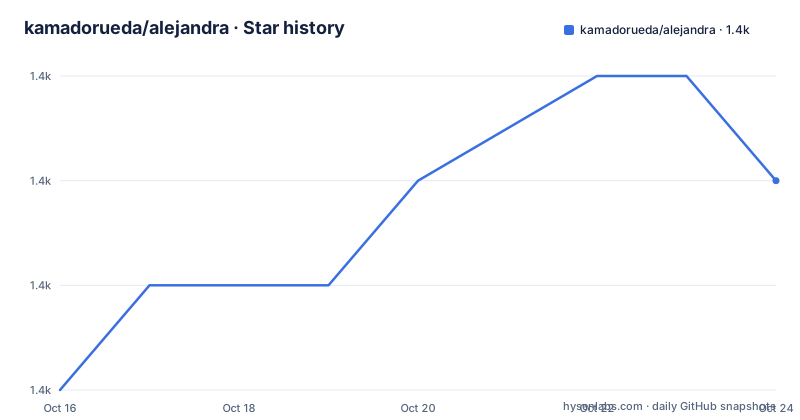
Star history
- kamadorueda/alejandra1,415 ★ · +2
| Repository | 2026-10-16 | 2026-10-24 |
|---|---|---|
| kamadorueda/alejandra | 1.4k | 1.4k |
2 Stars in the last 8 days, measured from the daily GitHub snapshot. Compare with other projects
Editorial analysis
Alejandra’s target problem: consistent Nix source formatting
Alejandra addresses a specific operational problem in the Nix ecosystem: source files can be syntactically valid while using inconsistent indentation, attribute layout, list structure, and other formatting choices. That inconsistency creates avoidable review noise and makes it harder for developers to focus on the meaning of a Nix expression. The README presents Alejandra as “The Uncompromising Nix Code Formatter,” and it defines a style for combinations of the Nix expression language.
The intended users are developers working directly with Nix code, including maintainers of Nix packages, configuration repositories, and larger projects with multiple contributors. Teams that already have an established formatting policy may find the opinionated style useful because it supplies a common target. Teams with a different established policy face a migration decision. Alejandra does not present a configurable policy for every possible formatting preference. The README says that some pieces beyond the documented style are configurable, but it labels configuration as experimental.
The project also targets workflows rather than only an interactive editor. Its integrations list includes Visual Studio Code, Neovim, Vim, GNU Emacs, Doom Emacs, Pre-commit, and Pre-commit-hooks.nix. The available web editor provides another route for trying the formatter without first installing a binary.
How Alejandra parses and rewrites Nix files
Alejandra is written in Rust and is designed as a formatter for the Nix expression language. The repository includes `src/`, a Cargo workspace definition in `Cargo.toml`, and a Nix-facing formatter package. The README describes the formatter’s goal in terms of preserving the meaning of Nix code while applying its style. Its semantic-preservation claim is specifically presented as “From Nix's eyes, code is just the same,” so the relevant expectation is formatting output, not transformation of the expression’s intended behavior.
The repository also includes `STYLE.md`, which is the central style reference. The README says the style began with the original Nixpkgs style and was shaped by feedback from developers who had used Nix at scale. That distinction matters. Alejandra is not simply invoking a general-purpose pretty printer with a few indentation settings. Its formatting rules define how Nix expressions should be laid out, and those rules form part of the project’s public API according to the versioning section.
Configuration is detected through `alejandra.toml` when that file is in the directory from which Alejandra is run. A different file can be selected with `--experimental-config`. The exact supported options are documented in the repository’s `alejandra.toml`; the README does not reproduce them, so users should inspect that file before assuming that a particular style can be changed. Experimental behavior is also excluded from the project’s stated stable public API, alongside other features explicitly marked experimental.
Installing Alejandra for a first Nix formatting run
The README offers several installation paths. For a quick first use, a prebuilt binary is available for `aarch64-unknown-linux-musl` and `x86_64-unknown-linux-musl`. Download the binary for the relevant platform, make it executable, and inspect the command-line help. The command below is copied from the README.
$ chmod +x
$ ./alejandra --help
The README also shows a Homebrew installation for platforms supported by that package manager.
$ brew install alejandraFor Nix users, the README gives both a stable-channel command and a Flakes command. The stable-channel installation uses the 4.0.0 tarball, while the Flakes form installs the same release as a GitHub reference.
$ nix-env -ivf https://github.com/kamadorueda/alejandra/tarball/4.0.0$ nix profile install github:kamadorueda/alejandra/4.0.0After installation through Nix, the README instructs users to run `alejandra --help`. This confirms that the executable is available on the command path before any repository changes are made. The README does not document a dedicated command for formatting a single file or a directory in the displayed text, so a first real formatting run should begin by checking the CLI help available from the installed version.
For NixOS, the repository provides `default.nix` and `flake.nix` configurations for adding Alejandra to `environment.systemPackages`. The documented systems are `aarch64-darwin`, `aarch64-linux`, `i686-linux`, `x86_64-darwin`, and `x86_64-linux`. The README’s NixOS example uses `x86_64-linux`, but users must select the system corresponding to their configuration.
Alejandra configuration and editor workflow boundaries
Alejandra’s automatic configuration lookup is intentionally narrow. It looks for `alejandra.toml` in the same directory where the command is run. Running the command from a different directory can therefore change which configuration file is considered relevant. Projects that need an explicit file can pass `--experimental-config ./path/to/alejandra.toml`.
The README links to the repository’s complete `alejandra.toml` and supported options, rather than claiming that configuration is stable across all releases. This is a meaningful adoption boundary. A team can standardize formatting through the core style, but changing the layout requires checking which options are supported and accepting that the feature is marked experimental. The versioning section states that the public API includes the formatting rules, CLI tool, command-line flags, positional arguments, exit codes, and stdout, except for explicitly experimental features.
Editor support is broad, but integration documentation is stored under the repository’s `integrations/` directory. The README lists Visual Studio Code, Neovim, Vim, GNU Emacs, Doom Emacs, Pre-commit, and Pre-commit-hooks.nix, and the top-level repository also contains `.pre-commit-entry.sh`, `.pre-commit-hooks.yaml`, and `treefmt.toml`. These files indicate that the project is designed to fit repository automation rather than remain a manual command. The README does not document a universal editor key binding, so users should follow the relevant integration file for their editor.
This design also means configuration ownership is a project decision. A repository-level `alejandra.toml` can express the team’s accepted options, but the README does not state whether unrelated nested directories receive separate configuration files. Running from the expected project directory and reviewing the detected file are the concrete checks supported by the documentation.
Alejandra versus nixfmt and other Nix formatters
The README lists `NixOS/nixfmt`, `serokell/nixfmt`, and `nixpkgs-fmt` as alternatives. The concrete difference available here is Alejandra’s documented approach: it provides a comprehensive style guide, offers several experimental configuration options, and explicitly lists formatting rules as part of its public API. The README does not provide equivalent style or configuration details for the alternatives, so it does not support claims that one formatter is faster, more correct, or more configurable than another.
For a project that has already chosen another formatter, the migration question is practical. Applying Alejandra can change formatting across many `.nix` files even when the Nix meaning remains unchanged according to the project’s claim. That can create a large review diff. A team should inspect `STYLE.md` and compare its expected layout with existing files before selecting Alejandra as the project standard. The project’s own alternatives are useful comparison points, but the README does not describe their installation commands or behavioral trade-offs.
Alejandra is also not a general Nix evaluator, package manager, or code-analysis engine. The README and repository contents describe it as a formatter with CLI, style, and workflow integration concerns. Using it for semantic refactoring, expression simplification, or evaluation would exceed its documented purpose.
Maintenance, releases, and the Unlicense
The repository is not archived, and its last push was on 2026-09-11. Recent releases listed in the repository are 4.0.0 on 2025-04-10, 3.1.0 on 2024-11-04, and 3.0.0 on 2022-08-15. These dates show that releases are not uniformly spaced, so adoption planning should account for the project’s actual release history rather than assume a fixed cadence.
Alejandra uses semantic versioning. Its public API includes the formatting rules, the `alejandra` CLI, flags, positional arguments, exit codes, and stdout, with experimental features excluded. This gives users a concrete compatibility boundary to track. Style changes can affect review output, while changes to the CLI can affect scripts and editor integrations. The README points to `CHANGELOG.md` for release details, so that file is the appropriate first place to check when upgrading an automation pipeline.
The repository identifies its license as `Unlicense`, represented by the `UNLICENSE` file. The README does not provide legal guidance or additional licensing terms beyond that identifier. Organizations should review the repository license file alongside their own policy before redistribution or incorporation into a controlled toolchain.
A practical upgrade check is therefore version-specific: compare the current formatter output with the release’s `CHANGELOG.md`, review `STYLE.md`, and rerun the project’s pre-commit or editor checks. The documentation supports these project-specific checks, but it does not promise that every upgrade is formatting-neutral.
Editorial conclusion
Adopt Alejandra when a team wants a documented, opinionated Nix style and can accept formatting changes across its `.nix` files. Do not adopt it if the required style conflicts with an existing formatting policy or if experimental configuration is unacceptable. Verify the selected installation source, review `STYLE.md`, and test formatting on representative files before enforcing `alejandra` in editor or pre-commit workflows.
Frequently asked questions
How do I install Alejandra on Nix?
With stable Nix, the README documents `nix-env -ivf` with the 4.0.0 tarball. With Flakes, it documents `nix profile install github:kamadorueda/alejandra/4.0.0`.
How does Alejandra configure its formatting style?
Alejandra automatically detects `alejandra.toml` in the directory from which it is run, or it can use a different file through `--experimental-config`. The README labels this configuration experimental and points to the repository’s `alejandra.toml` for supported options.
Does Alejandra provide editor and pre-commit integrations?
Yes. The README lists integrations for Visual Studio Code, Neovim, Vim, GNU Emacs, Doom Emacs, Pre-commit, and Pre-commit-hooks.nix. Integration-specific instructions are kept in the repository’s `integrations/` directory.
Official sources
Add this badge to your README
If you maintain this project, the badge below links readers to this analysis and shows its maintenance status from the daily GitHub snapshot. Paste the markdown into your README; add ?metric=license or ?metric=stars to the image URL for a different field.

[](https://hysenlabs.com/projects/kamadorueda-alejandra)Star history chart for your README
[](https://hysenlabs.com/projects/kamadorueda-alejandra)Was this useful?