learn-go: A Free, Chapter-Based Go Course for Programmers
Master the fundamentals and advanced features of the Go programming language
At a glance
- What is it?
- karanpratapsingh/learn-go is a free repository-based course that progresses from Go syntax and modules to interfaces, testing, concurrency, and context. It is best treated as a structured reference for programmers who already understand basic programming, not as a production service or a formally versioned curriculum.
- Who is it for?
- Adopt learn-go as a free written reference if you want one repository to cover Go syntax, data structures, interfaces, testing, and concurrent programming. Do not treat it as a complete substitute for version-specific Go documentation or as proof that a particular toolchain is supported.
- Can I use it commercially?
- Check first. The repository uses a licence we do not classify automatically, so read its LICENSE file before any commercial use.
- Is it still maintained?
- Yes. The repository last received commits 77 days ago.
- What is it written in?
- Mainly Go, according to GitHub's language statistics.
Answers come from the project's GitHub data, last synced on November 6, 2026, and from our analysis. They are not legal advice.
Star history
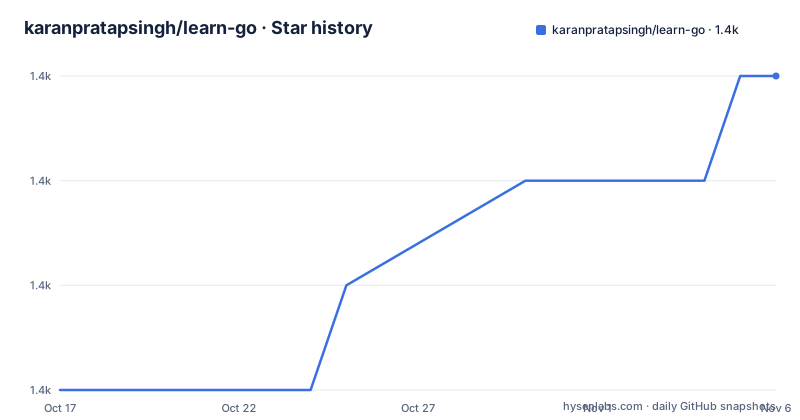
- karanpratapsingh/learn-go1,379 ★ · +3
| Repository | 2026-10-17 | 2026-11-06 |
|---|---|---|
| karanpratapsingh/learn-go | 1.4k | 1.4k |
3 Stars in the last 20 days, measured from the daily GitHub snapshot. Compare with other projects
Editorial analysis
What learn-go covers and who it is designed for
learn-go solves a specific instructional problem: it collects a Go curriculum in one GitHub repository instead of scattering syntax notes, concurrency examples, and build instructions across separate documents. The table of contents moves from installation and basic language constructs into modules, packages, and workspaces, then covers pointers, structs, methods, arrays, slices, and maps. Its later chapters address interfaces, errors, panic and recover, testing, generics, goroutines, channels, select, the sync package, advanced concurrency patterns, and context.
The intended reader appears to be a programmer who can already work with variables, functions, and control flow but wants a compact path through Go. The first program starts by initializing a module, so learners are expected to connect syntax with the tooling used by Go projects. The README also discusses backend development, cloud computing, and data science as application areas, but it does not provide a production architecture lesson for any of them.
This is a course repository rather than a library imported by applications. Its top-level structure includes `main.go`, diagrams, contribution files, and the course README. Based on that layout, the useful artifact is the written sequence, not an API exposed as a Go package. The course is also available through the author's website and Leanpub, but the repository is the version under review here.
How the Go course builds from syntax to concurrent execution
The curriculum follows dependency order rather than presenting disconnected feature lists. Early lessons establish Hello World, variables and data types, string formatting, flow control, and functions. Those sections establish the syntax required to read the later material. Modules and packages follow functions, while workspaces extend the same progression into multi-package development. The useful commands and build lessons then connect source files to Go's command-line workflow.
The second chapter changes from basic control flow to Go's representation of data and behavior. Pointers appear before structs and methods, which gives learners the reference model needed to reason about receiver-based methods. Arrays and slices are grouped together, then maps are introduced as a separate collection type. This structure reflects a course designed to make individual language mechanisms easier to locate by name.
The third and fourth chapters assume the basics have been established. Interfaces and errors describe contracts and failure handling, while panic and recover, testing, and generics address separate language concerns. Concurrency then builds through goroutines, channels, select, the sync package, advanced patterns, and context. In that sequence, goroutines represent concurrent work, channels communicate values between them, select coordinates channel operations, and sync supplies synchronization primitives. The README lists those topics, but it does not show the complete example programs or explain when one concurrency mechanism should be selected over another.
For this repository, the strongest study method is therefore path order. Selecting only the generics chapter may omit the interface and type-system context that precedes it. Selecting only the concurrency chapter may leave gaps in functions, packages, and errors. The table of contents is explicit about that progression, even though the lesson depth cannot be confirmed beyond the README.
Installing Go on macOS, Linux, and Windows
The README sends readers to the official Go downloads page and then provides operating-system-specific installation steps. On macOS, the downloaded package installs the distribution under `/usr/local/go` and is expected to add `/usr/local/go/bin` to `PATH`. A terminal restart may be required before the new path is visible.
On Windows, the downloaded MSI file provides an installer. The README says Go is installed under Program Files or Program Files (x86) by default, although the destination can be changed. As with the macOS workflow, an existing command prompt must be closed and reopened before it reflects the installed environment.
After either graphical installation, this command checks whether the `go` executable is available. It should print the installed Go version.
$ go versionThe Linux instructions use a version-specific archive name. The documented command removes an existing installation, extracts the archive into `/usr/local`, and may require root privileges:
$ rm -rf /usr/local/go && tar -C /usr/local -xzf go1.18.1.linux-amd64.tar.gzThe command should not be copied blindly for a different architecture or Go release. It names both `linux-amd64` and `go1.18.1`, while the README also warns against extracting into an existing `/usr/local/go` tree. If the documented Linux installation is used, add its binary directory to `PATH`.
export PATH=$PATH:/usr/local/go/binThe README says this line can be added to `$HOME/.profile` or `/etc/profile`. A new login may be required before a profile change becomes active. This is installation guidance for the language, not installation of learn-go itself.
Starting the first module with the go command
The first repository exercise starts a Go module with `go mod init`. Run this from the directory where you want the module's Go files to live:
$ go mod init exampleThe README describes a module, in simplified terms, as a collection of Go packages. The `example` value becomes the module name supplied by this tutorial, although the README does not explain module-path selection rules or publication requirements.
The course then instructs learners to create `main.go` and begin a Hello World program. Its displayed source begins with the standard program structure and the `fmt` import, but the README text stops partway through the source block. It would be misleading to reconstruct the missing code and present it as a documented example. The repository itself has a top-level `main.go`, but its complete contents are not documented in the README.
That limitation makes `go mod init` the only fully reproducible first command supplied by the README. A reader following the tutorial still needs an editor and must complete the Hello World example from an appropriate current Go source before attempting to execute it. The course uses VS Code by default and recommends its Go extension, while explicitly allowing another editor. The relevant next check remains `go version`, because the module command cannot help if the executable and `PATH` were not configured correctly.
Reading concurrency chapters without conflating mechanisms
The concurrency section is the most substantial part of the curriculum by topic count. It includes goroutines, channels, `select`, the sync package, advanced concurrency patterns, and context. That grouping is useful because concurrent Go code often requires several mechanisms together, but the README does not supply enough source code to determine how the author structures the exercises or which APIs the course recommends.
Goroutines and channels should not be treated as interchangeable. The chapter list supports that distinction only at a structural level: it presents goroutines before channels, then uses `select` and `sync` in later lessons. The table of contents does not state that every program requires both, nor does it establish a rule for choosing buffered channels, mutexes, wait groups, cancellation, or context. Those implementation choices would need confirmation from the full corresponding lesson files.
Context is also listed only as a final concurrency topic. The README does not document cancellation behavior, context propagation, deadlines, or error handling in this course. Consequently, readers with production Go experience should use the sequence as a checklist and verify the actual examples against current Go documentation. Readers without concurrency experience may gain an organizational map, but the README is insufficient to assess the depth of those advanced patterns.
Where learn-go falls short of a versioned learning platform
The repository does not have GitHub releases. It also does not state a supported Go version, define a curriculum release scheme, or list dependencies for the course as a runnable environment. The lack of releases is not proof of poor maintenance, but it does mean there is no documented release boundary for matching lessons to a Go toolchain. The last push was on 2026-08-22, which is the only repository activity date available for assessing recency.
The Linux command is a concrete compatibility warning. It installs `go1.18.1`, while modules and workspaces appear elsewhere in the same curriculum. The README does not explain which lessons were updated for which Go release. That makes Go's version itself the first item to check before following every command in sequence.
A second limitation is the editorial depth visible in the README. Large parts of the table of contents name lessons, but the README does not show their examples, expected output, exercises, or failure cases. The repository may contain more detail in chapter files, but the top-level repository listing does not identify them as entries. Claims about exercise quality or completeness would therefore exceed what the README confirms.
The custom license is another boundary. GitHub classifies it as `Other`, and the README does not reproduce the `LICENSE` text. The license may affect redistribution, modification, or incorporation of course material, so repository access alone should not be treated as permission equivalent to a standard open source license. This is a license-review point, not legal advice.
How learn-go compares with official documentation and a paid ebook
learn-go differs from official Go documentation in structure and purpose. The repository arranges selected language mechanisms as a course with a linear table of contents, while the official documentation is the canonical source for installation, language behavior, standard-library APIs, and release-specific changes. The README itself points installation instructions to `https://go.dev/doc/install`, which acknowledges that official documentation remains the installation reference.
The repository also differs from its Leanpub edition because it is presented as a repository with a README, contribution files, diagrams, and example source. The README says the course is also available on the author's website and as an ebook on Leanpub. It does not state whether the repository and ebook are identical, whether updates are synchronized, or whether the ebook adds content. Readers should not assume that using one format guarantees immediate parity with the other.
Compared with applying for a specific job, this course offers a compact language curriculum rather than a projects portfolio or an assessment. The README mentions career opportunities and projects written in Go, including Kubernetes and Docker, but it does not connect those examples to exercises in this repository. The practical choice is straightforward: use learn-go for ordered study and revision, then consult official versioned documentation when exact syntax, standard-library behavior, or tooling semantics matter.
Editorial conclusion
Adopt learn-go as a free written reference if you want one repository to cover Go syntax, data structures, interfaces, testing, and concurrent programming. Do not treat it as a complete substitute for version-specific Go documentation or as proof that a particular toolchain is supported. Verify first that your installed Go release matches the course, especially because the README's Linux archive command names Go 1.18.1 while the repository has no GitHub releases or stated compatibility policy for the entire curriculum.
Frequently asked questions
What does karanpratapsingh/learn-go teach?
It teaches Go from installation and basic syntax through modules, packages, structs, interfaces, errors, testing, generics, goroutines, channels, synchronization patterns, and context.
Which Go version does the learn-go installation guide use?
The documented Linux extraction command names `go1.18.1` in `go1.18.1.linux-amd64.tar.gz`. The README does not provide a compatibility statement for the entire course.
Does learn-go release versioned course materials on GitHub?
No GitHub releases are listed for the repository. The README therefore provides no formal release history for the course or its Go compatibility.
Can I use learn-go in an editor other than VS Code?
Yes. The README uses VS Code and recommends its Go extension, but it explicitly says learners may use another code editor.
Is learn-go available outside its GitHub repository?
The README says the course is available on the author's website and as an ebook on Leanpub. It does not state whether all formats have identical content or synchronized updates.
Official sources
Add this badge to your README
If you maintain this project, the badge below links readers to this analysis and shows its maintenance status from the daily GitHub snapshot. Paste the markdown into your README; add ?metric=license or ?metric=stars to the image URL for a different field.

[](https://hysenlabs.com/projects/karanpratapsingh-learn-go)Star history chart for your README
[](https://hysenlabs.com/projects/karanpratapsingh-learn-go)Was this useful?