CloudflareSpeedTest solves a routing problem, and its README warns against proxy use
Test Cloudflare CDN latency and speed to pick your own best IP and get the fastest one. Also supports other CDNs and sites with multiple resolved IPs.
At a glance
- What is it?
- XIU2/CloudflareSpeedTest measures Cloudflare CDN latency and download speed across every address in Cloudflare's published ranges, then writes the results to result.csv. The output is more subtle than it looks, and before any instructions the README carries a notice that Cloudflare has banned proxy use of its CDN.
- Who is it for?
- CloudflareSpeedTest fits a user behind a poor route to Cloudflare who wants to pick a better address by measurement rather than by reputation. Do not use it as a general speed test, since it measures the path to a CDN rather than your bandwidth, and do not lean on it as a long-term arrangement, because the README says Cloudflare has explicitly prohibited proxy use.
- Can I use it commercially?
- Yes, with conditions. GPL-3.0 is a copyleft licence: if you distribute software that includes it, you must release that software's source code under the same licence. Running it internally without distributing it does not trigger that obligation.
- Is it still maintained?
- Yes. The repository last received commits 60 days ago.
- What is it written in?
- Mainly Go, according to GitHub's language statistics.
Answers come from the project's GitHub data, last synced on November 12, 2026, and from our analysis. They are not legal advice.
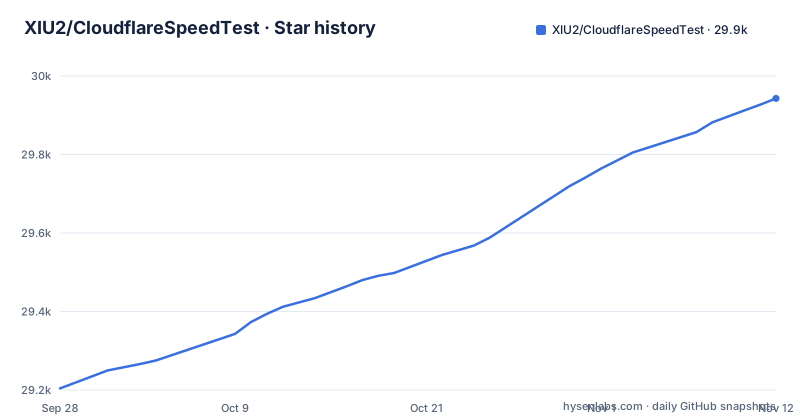
Star history
- XIU2/CloudflareSpeedTest29,943 ★ · +739
| Repository | 2026-09-28 | 2026-11-12 |
|---|---|---|
| XIU2/CloudflareSpeedTest | 29.2k | 29.9k |
739 Stars in the last 45 days, measured from the daily GitHub snapshot. Compare with other projects
Editorial analysis
It solves a routing problem, not a bandwidth problem
The premise is stated in the opening paragraph. Many overseas sites use the Cloudflare CDN, but the addresses assigned to visitors in mainland China are not friendly: high latency, packet loss and slow speed.
Cloudflare does publish all of its IP ranges. The problem is the size of the search space, and the README frames it as exhaustion rather than impossibility: finding the one that suits you among all those addresses would be exhausting, so this software exists.
That defines the scope precisely. The tool does not make your connection faster. It takes a list of candidate addresses, measures each one, and tells you which to use. The measurement has two stages, a latency test and a download test, and the download test is the one that decides the ranking.
It also goes beyond Cloudflare. The project supports latency testing for other CDNs and for sites with multiple resolved IP addresses, but the README is explicit that you then have to find the download test address yourself. Latency testing is generic; download testing is not.
The first notice in the README bans the main use case
Before any instructions, there is a callout, and it is about legality rather than configuration.
The Cloudflare CDN has explicitly prohibited use in proxy form. Anyone using a proxy over the CDN bears the risk themselves, and the README asks you not to rely on it too heavily, linking two discussions on the subject.
This is unusual to find in a tool's own README and it changes how you should read the rest of the document. The tool does what it does well, and the README itself warns that proxy use over the CDN is something the upstream provider has ruled out. A tool can be technically sound and inadvisable at the same time, and this one is both.
The same pattern shows up in scope. A second note says the software is only for websites and does not support optimising addresses for Cloudflare WARP, because WARP uses UDP. The links point to another discussion thread, so the boundary is documented rather than assumed.
The default test URL is not guaranteed to be available
Both test stages need an address to hit, and the default one is flagged as a liability.
The -url parameter sets the address used for the latency test and the download test. Its default is https://cf.xiu2.xyz/url, and the README says the default address is not guaranteed to be available and recommends hosting your own.
That recommendation has a second effect which is easy to miss. During the download test, the software reads the IP's current region code from the HTTP response headers, and the README notes support for Cloudflare and AWS among the providers it recognises. A URL that does not answer, or answers from a host that does not set those headers, costs you both the measurement and the location column.
The output format makes that column concrete. Results are shown as a table with the IP address, packets sent, packets received, packet loss rate, average latency, download speed in MB per second, and a region code such as LAX, SEA, SJC or N/A. The complete run is written to result.csv in the current directory, in the same seven columns, comma separated.
If the average latency reads 0.xx you are testing through a proxy
Two caveats decide whether your results mean anything, and both are about your own network rather than Cloudflare's.
The first is a diagnostic. If the average latency comes out very low, at 0.xx, the test went through a proxy, and the instruction is to turn the proxy software off and test again. A proxied measurement reports the latency to your proxy, which is fast, rather than the latency to the address, which is what you are trying to measure.
The second is about running the tool on a router. The README suggests turning off the router's own proxy, or excluding it, before testing. Otherwise the results may be inaccurate or unusable.
That second point is not hypothetical for the hardware this runs on. The parameter documentation explicitly warns that weak devices such as routers should not push the latency test thread count too high, which puts a router user directly in the path of both caveats.
Nine usable addresses becoming three is filtering, not failure
The longest section of the README exists because the output confuses people, and it is worth reading before you trust a number on screen.
The worked example passes -tll 40 -tl 150 -sl 1 -dn 5. The latency stage reports 321 addresses tested and 30 available. That available count means only that the address did not time out; it has nothing to do with the latency bounds or the packet loss condition. Once filtering by the 40 to 150 ms range and the loss limit is applied, ten addresses survive, and that ten is the download queue.
The download stage then shows 3 / 5. The three is the number of addresses that beat the 1 MB per second floor, and the five is what was requested with -dn 5. If the requested count is larger than the queue, the second number shows the queue size instead.
The queue is a queue because download testing is single threaded and works through addresses one at a time. And a bar that appears stuck at X / 5 is not stuck: it only advances when a qualifying address is found, which is the program telling you your target is above what is actually available.
Six flags, and the thread count is the one that breaks routers
Running the binary with no arguments uses the defaults. The help output is where the tuning lives:
-n 200
-t 4
-dn 10
-dt 10
-tp 443
-url https://cf.xiu2.xyz/url
-n is the number of latency test threads, defaulting to 200 with a maximum of 1000; more threads means a faster latency stage, and the warning attached to it is that weak devices such as routers should not set it too high. -t is the number of latency measurements per address, 4 by default.
-dn is how many addresses go to the download stage after sorting by latency, 10 by default. -dt is the maximum time spent on each address in the download stage, 10 seconds by default, with the note that it cannot be too short. -tp sets the port used for both stages, 443 by default. -url sets the address, as described above.
The install story is a compiled binary. Windows users download it from GitHub Releases or a file host, extract it and run cfst.exe. Linux and macOS users create a folder, change into it and download a tarball for their architecture, with several mirror prefixes offered for networks where GitHub downloads are slow. On macOS it still has to be run from a terminal with execute permission granted. Scoop users can add a third-party bucket and install from it.
Three dependencies, a Go 1.18 directive and two address lists
The repository is small, and go.mod explains why it is small. There are three direct dependencies: an exponentially weighted moving average library, a progress bar library, and a colour library for terminal output. Five more are indirect and exist to support those three.
The Go directive reads 1.18, which is a floor rather than a target.
The address lists are committed as files: ip.txt and ipv6.txt at the repository root, next to main.go, with script/, task/ and utils/ holding the supporting code.
The three most recent releases are all small fixes with readable titles. v2.3.5 on 2026-04-29 makes the program release a link faster after each HTTPing and download test. v2.3.4 on 2025-07-22 updates dependency versions and fixes an anomaly in coloured text output. v2.3.3 on 2025-07-21 fixes an incorrect number of results being printed when no download speed lower bound was set. The last push was on 2026-09-15 and the licence is GPL-3.0.
Editorial conclusion
CloudflareSpeedTest fits a user behind a poor route to Cloudflare who wants to pick a better address by measurement rather than by reputation. Do not use it as a general speed test, since it measures the path to a CDN rather than your bandwidth, and do not lean on it as a long-term arrangement, because the README says Cloudflare has explicitly prohibited proxy use. Before you trust a result, check that your average latency is not absurdly low, since that means the test went through a proxy and the numbers are about the proxy rather than the address. Then run it yourself with a test URL you host, because the default is not guaranteed to be available.
Frequently asked questions
What is Cloudflare speed test in XIU2/CloudflareSpeedTest?
It measures latency and download speed across the IP addresses in Cloudflare's published ranges, for both IPv4 and IPv6, and reports the fastest one. Results are shown on screen and written to result.csv with columns for packets sent and received, packet loss, average latency, download speed and region code.
Is Cloudflare speedtest reliable?
The README carries three conditions on it. If the average latency comes out very low, such as 0.xx, the test went through a proxy and the numbers describe the proxy rather than the address. Running it on a router needs the router's own proxy turned off or excluded. And the default test URL is not guaranteed to be available, so the README recommends hosting your own.
What is an alternative to Cloudflare speed test for other CDNs?
The project also tests latency for other CDNs and for sites that resolve to several IP addresses, using the -url parameter. For download testing on those, the README says you have to find the download test address yourself.
Official sources
Add this badge to your README
If you maintain this project, the badge below links readers to this analysis and shows its maintenance status from the daily GitHub snapshot. Paste the markdown into your README; add ?metric=license or ?metric=stars to the image URL for a different field.

[](https://hysenlabs.com/projects/xiu2-cloudflarespeedtest)Star history chart for your README
[](https://hysenlabs.com/projects/xiu2-cloudflarespeedtest)Was this useful?