KeePassium Password Manager for KeePass Databases on Apple Devices
KeePass-compatible password manager for iOS and macOS
At a glance
- What is it?
- KeePassium is an open source, KeePass-compatible password manager for iOS and macOS. It combines local database files with Apple storage integrations, AutoFill, biometrics, and flexible KeePass format support, although several providers offer only manual transfer.
- Who is it for?
- KeePassium fits users who want to retain KeePass database files and manage them through Apple platform integrations, especially when AutoFill, Face ID, Touch ID, and TOTP support matter. It is a poorer fit for people who require first-party Android or Windows clients, universal background sync across every provider, or a clearly open code-contribution process.
- Can I use it commercially?
- Check first. The repository uses a licence we do not classify automatically, so read its LICENSE file before any commercial use.
- Is it still maintained?
- Yes. The repository last received commits 168 days ago.
- What is it written in?
- Mainly Swift, according to GitHub's language statistics.
Answers come from the project's GitHub data, last synced on November 6, 2026, and from our analysis. They are not legal advice.
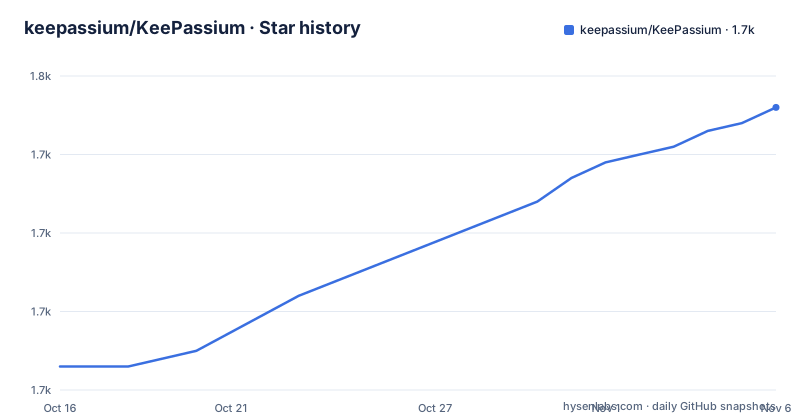
Star history
- keepassium/KeePassium1,746 ★ · +33
| Repository | 2026-10-16 | 2026-11-06 |
|---|---|---|
| keepassium/KeePassium | 1.7k | 1.7k |
33 Stars in the last 21 days, measured from the daily GitHub snapshot. Compare with other projects
Editorial analysis
KeePassium's Apple-Focused KeePass Database Model
KeePassium is built for people who already use KeePass-compatible databases, or who want password storage without handing the database to a separate proprietary account system. The application supports the `.kdbx4`, `.kdbx3`, and `.kdb` formats. The README identifies `.kdbx4` with KeePass 2.35 and later, `.kdbx3` with KeePass 2.x, and `.kdb` with KeePass 1.x. It also lists ChaCha20, Argon2, AES, Salsa20, and Twofish among supported algorithms. That format coverage makes the app relevant to users moving between KeePass databases and Apple devices rather than starting with an empty Apple-specific vault.
The project is aimed at iOS users first, with macOS support indicated by the repository description and application scope. Its feature set covers the parts of password management that matter after a database already exists: opening and switching databases, Password AutoFill, attachments, custom fields, custom icons, TOTP codes, and YubiKey challenge-response support. The README also says database names and app settings can be protected, which extends access control beyond the records inside the database.
The central design choice is local database control combined with system-managed storage integrations. KeePassium does not require the user to enter storage provider credentials into its own synchronization layer. Instead, it relies on integration exposed through the operating system, including providers that appear in the iOS Files app. That approach reduces one class of configuration work, but it also makes provider behavior, background settings, and operating-system support part of the reliability boundary.
How KeePassium Synchronizes Through Files App Providers
The synchronization model is based on the operating system's document-provider integration. The README distinguishes full support from limited and untested provider categories. Full support includes iCloud Drive, Box, Dropbox, Google Drive, OneDrive, Resilio Sync, Nextcloud, and SFTP or WebDAV through third-party apps. In these cases, the documentation describes files as automatically downloaded and uploaded when they change.
The distinction is important. KeePassium is not presenting synchronization as a private cloud service with its own account database. It works with the storage provider selected by the operating system. The user therefore needs a provider app that can operate in the background. The README specifically directs users to check device settings and enable Background App Refresh for services such as Dropbox or OneDrive when automatic sync does not work.
Mega and Cryptomator are documented as limited support. Their files have to be imported and exported manually, and Cryptomator is described as supporting only import and export operations. ownCloud and Tresorit are marked as not tested yet. Those labels are more useful than a general claim that KeePassium works with cloud storage because they identify where the automatic behavior is documented and where it is not. The Nextcloud entry also carries a parenthetical warning about hiccups, so a provider appearing in the supported list should not be treated as proof that every background or conflict scenario is solved.
The practical data flow is therefore: the database file remains a KeePass file, the operating system and provider app make that file available, and KeePassium opens or updates it through the platform integration. The README does not specify a conflict-resolution policy, lock protocol for simultaneous edits, or rollback procedure. Those details should be checked against the current application documentation before using the same database concurrently from multiple devices.
KeePassium AutoFill and Apple Platform Protection
Password AutoFill is documented for iOS 12 and later. The setup path is through the device's system settings: Passwords & Accounts, AutoFill Passwords, then KeePassium in the provider list. This is an operating-system integration rather than a separate KeePassium account configuration. The application can fill passwords through that system interface, and the README says the feature can be synchronized.
Protection is layered. App Lock covers the application's screens, including the database list, unlocked database view, and settings. Database Lock closes open databases after a timeout or after a failed AppLock attempt and removes remembered master keys from the keychain. The application also provides configurable timeouts for the app, database, and clipboard. These controls address different exposure points: one protects the interface, one closes database access, and one limits how copied data can remain available.
By default, App Lock requires a device passcode of any complexity. Face ID or Touch ID can be configured instead for convenience. The README does not claim that biometrics replace database encryption, and the listed encryption protections remain tied to the contents of the database file. The app uses CommonCrypto for AES and SHA, with reference implementations credited for other cryptographic algorithms. That is an implementation statement, not a security audit.
The limitation is that protection still depends on correct device settings and supported operating-system behavior. The README does not document what happens when biometrics change, when passcode access is revoked, or how recovery works after a lost device. It also does not describe a documented emergency or database recovery workflow. Users should decide whether the available App Lock, database timeout, and master-key removal settings match their device-loss and shared-device policy.
Installing KeePassium and Opening the First Database
The README offers two installation paths. The standard route is the App Store, while the current beta is available through TestFlight. For a self-build, the project says to download the source and open it in Xcode 10.2 or above. It states that all dependencies are already included, and the repository contains `KeePassium.xcodeproj`, `KeePassium.xcworkspace`, the `KeePassium` application directory, `KeePassiumLib`, and `KeePassiumTests`. The project does not document a command-line build command, so no `xcodebuild` invocation should be inferred from those instructions.
For the first real use, install KeePassium from the App Store, open it, and select or import a KeePass database. The README does not spell out the exact import menu sequence, so the next concrete step is the application's own database-opening interface. If the database is stored in iCloud Drive, Dropbox, OneDrive, Google Drive, Box, Nextcloud, or another supported provider, select the provider through the operating system integration rather than expecting KeePassium to maintain a separate account.
After the database is available, verify that its records, groups, and attachments can be viewed. Then enable Password AutoFill through the documented device settings and test it with a non-critical account before relying on it for daily access. Finally, configure App Lock, Database Lock, and clipboard timeouts according to the device-sharing policy. The documentation does not provide a rollback procedure, so the first database opening should be treated as a compatibility check rather than an irreversible migration.
TOTP, Attachments, and Multiple-Database Workflows
KeePassium includes several features associated with active password-management use rather than basic record storage. The README lists RFC 6238 TOTP codes and Steam TOTP. It also supports file attachments, custom fields, and custom icons. Multiple databases can be opened, and switching between them is presented as a standard feature. Together, these capabilities cover cases where credentials depend on time-based codes or where a KeePass database carries more than simple username and password fields.
YubiKey challenge-response support is also listed. The README does not explain the supported YubiKey generations, configuration steps, or interaction with a particular database entry. It therefore supports treating hardware challenge-response as a documented feature, but not making assumptions about device compatibility. Users who depend on that mechanism would need to consult KeePassium's current support documentation before depending on it for access recovery.
The combination of format support and Apple-specific features is the main reason to consider KeePassium over a generic password manager. A KeePass database can remain the central file, while iOS supplies AutoFill and device protection. However, the README does not document database search syntax, bulk editing, password generation, import conflict handling, or browser integration beyond Password AutoFill. This is a meaningful limitation for users whose selection process depends on those particular workflows.
KeePassium's Custom Licensing and Contribution Boundaries
The repository describes KeePassium as a commercial open source app. The README says the free version can be used without charge, while an optional premium subscription enables several convenience and time-saving features and supports the project. It also says users can take the source code and build a personal premium version for free, but the README asks that those personal builds not request premium support. That distinction separates app distribution and support from the ability to inspect and build the source, as described by the project.
The licensing metadata labels the repository as using a custom license that GitHub cannot classify, and the repository contains `LICENSE.txt`. The README does not reproduce the license text or explain its grant, redistribution conditions, trademark terms, or commercial-use limits. No legal interpretation should be made from the phrase "open source" alone. Users who intend to redistribute a build, modify it for an organization, or combine it with other software need to read `LICENSE.txt` directly.
Contribution is another boundary. The README states that code contributions cannot be accepted because of formalities. It still invites bug reports, feature suggestions, translation contributions through the separate KeePassium-L10n repository, App Store reviews, and premium subscriptions. That arrangement gives users ways to report problems and support localization without providing the normal path for submitting code changes to this repository. The separate translation project may therefore be the relevant place to assess translation work, while source-code contribution policy remains governed by the main repository's license and formalities.
Release History, Maintenance Signals, and Upgrade Costs
The repository is not archived, and its last recorded push was on 2026-05-23. The recent release list includes 1.54.157 on 2024-12-09, 1.54.156 on 2024-11-28, and 1.53.154 on 2024-09-12. Those dates show release history, but the release list alone does not establish how frequently Apple platform support changes, whether every storage provider is retested, or whether the current App Store build matches the latest repository source. Those are separate upgrade questions for an Apple password manager.
The repository has separate application, library, test, workspace, configuration, and script entries. Based on that layout, an upgrade can involve more than replacing a single password database. The README does not state the supported database migration policy, compatibility matrix for operating-system versions, or process for recovering from a failed synchronization update. It also does not provide a command for building a reproducible release from source.
KeePassium's operational cost is tied to Apple distribution and storage-provider behavior. Users who want local KeePass files, system AutoFill, and Apple device integration may accept that boundary. Users who need a documented Linux or Android client, an explicit multi-device conflict policy, or a fully open code-contribution process should compare a tool whose published model matches those requirements before moving an important database. The next project-specific check is whether the current provider supports automatic background transfer and whether the existing database opens without requiring format changes.
Editorial conclusion
KeePassium fits users who want to retain KeePass database files and manage them through Apple platform integrations, especially when AutoFill, Face ID, Touch ID, and TOTP support matter. It is a poorer fit for people who require first-party Android or Windows clients, universal background sync across every provider, or a clearly open code-contribution process. Before adopting it, verify the custom `LICENSE.txt` terms, confirm that the chosen storage provider supports the required background behavior, and test opening and synchronizing an existing database in the current App Store version.
Frequently asked questions
Does KeePassium support KeePass database files?
Yes. The README lists read and write support for `.kdbx4`, `.kdbx3`, and `.kdb` files, along with ChaCha20, Argon2, AES, Salsa20, and Twofish algorithms.
Which storage providers support automatic sync in KeePassium?
The README lists full support for iCloud Drive, Box, Dropbox, Google Drive, OneDrive, Resilio Sync, Nextcloud, and SFTP or WebDAV through third-party apps. Mega and Cryptomator have limited manual import and export support, while ownCloud and Tresorit are marked as not tested yet.
How do I enable KeePassium Password AutoFill?
The documented path is device settings, then Passwords & Accounts, then AutoFill Passwords, where KeePassium can be selected from the list.
Can KeePassium be built from source?
The README says to download the project and open it in Xcode 10.2 or above. It also states that all dependencies are included, but it does not document a command-line build command.
Official sources
Add this badge to your README
If you maintain this project, the badge below links readers to this analysis and shows its maintenance status from the daily GitHub snapshot. Paste the markdown into your README; add ?metric=license or ?metric=stars to the image URL for a different field.

[](https://hysenlabs.com/projects/keepassium-keepassium)Star history chart for your README
[](https://hysenlabs.com/projects/keepassium-keepassium)Was this useful?