xtool: the Xcode replacement that still needs Xcode on macOS
Cross-platform Xcode replacement. Build and deploy iOS apps with SwiftPM on Linux, Windows, macOS.
At a glance
- What is it?
- xtool builds, signs and installs iOS apps from a SwiftPM package on Linux, WSL and macOS, using open standards instead of Xcode. It is a small Swift command line tool with three configuration subcommands, an embeddable library called XKit, and a Linux container that relaxes process isolation to make the toolchain work.
- Who is it for?
- xtool fits a team that has decided not to run macOS for its iOS builds, or that wants Apple Developer Services work driven from a script rather than a GUI. It does not fit someone who needs a simulator or a debugger, since neither appears in the README.
- Can I use it commercially?
- Yes. MIT is a permissive licence: you can use, modify and sell software built on it, as long as you keep its copyright and licence notices.
- Is it still maintained?
- Yes. The repository last received commits 5 days ago.
- What is it written in?
- Mainly Swift, according to GitHub's language statistics.
Answers come from the project's GitHub data, last synced on November 13, 2026, and from our analysis. They are not legal advice.
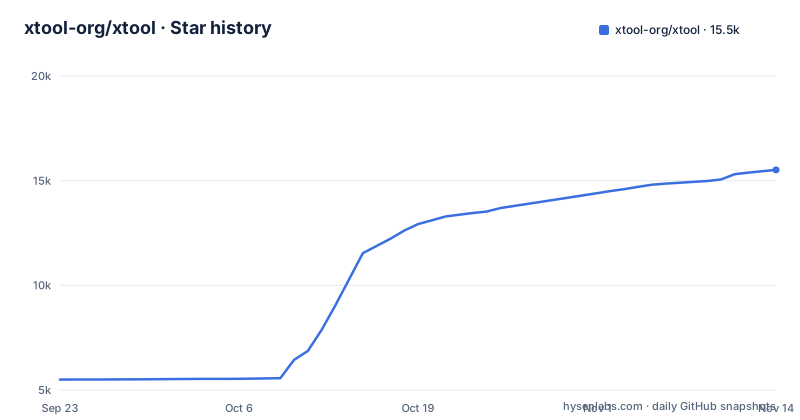
Star history
- xtool-org/xtool15,452 ★ · +9,956
| Repository | 2026-09-23 | 2026-11-13 |
|---|---|---|
| xtool-org/xtool | 5.5k | 15.5k |
9,956 Stars in the last 51 days, measured from the daily GitHub snapshot. Compare with other projects
Editorial analysis
The help output groups setup, auth and sdk ahead of any build
xtool describes itself in one line as a cross platform Xcode replacement, and its command line is organised by when you need a subcommand rather than by feature area. The whole surface fits on one screen:
$ xtool --help
OVERVIEW: Cross-platform Xcode replacement

USAGE: xtool <subcommand>

OPTIONS:
  -h, --help              Show help information.

CONFIGURATION SUBCOMMANDS:
  setup                   Set up xtool for iOS development
  auth                    Manage Apple Developer Services authentication
  sdk                     Manage the Darwin Swift SDK

DEVELOPMENT SUBCOMMANDS:
  new                     Create a new xtool SwiftPM project
  dev                     Build and run an xtool SwiftPM project
  ds                      Interact with Apple Developer Services
Configuration comes first, and those three subcommands are the setup layer. Development comes second, and the README's help listing ends at a heading beginning DEVICE SUBCOMMAN, without listing the device commands.
Windows is reached through WSL, not a native build
The short pitch names Linux, Windows and macOS. The overview line underneath is more precise, naming Linux, WSL and macOS, and the getting started links split into an installation page for Linux and Windows plus a separate page for macOS. So on Windows the documented route runs through the Windows Subsystem for Linux rather than a native installer, which is the first thing to settle before budgeting time for this. The repository layout follows the same split, with a Linux directory, a macOS directory, a Documentation directory and a Makefile whose top level target branches on the output of uname to choose between mac and linux. Outside macOS, every capability the tool claims for iOS therefore happens on a Linux userspace.
XKit is embeddable, and its example still pins 1.2.0
xtool is not only a binary. A library called XKit can be added as a SwiftPM dependency to interact with Apple Developer Services, iOS devices and more from your own code, and the snippet gives both halves you need:
// package dependency:
.package(url: "https://github.com/xtool-org/xtool", .upToNextMinor(from: "1.2.0"))
// target dependency:
.product(name: "XKit", package: "xtool")
The version in that example is the catch. It asks for upToNextMinor from 1.2.0, while the recent releases are 1.22.2, 1.23.0 and 1.24.0, published in October 2026. An upToNextMinor range starting at 1.2.0 will not resolve to any of those tags, so the snippet illustrates the shape of the dependency rather than working as copy and paste. Write the range yourself against the release you mean to build against.
Three subcommands have to run before dev can produce anything
The order of the subcommands is the workflow. setup configures xtool for iOS development, auth handles Apple Developer Services credentials, and sdk manages the Darwin Swift SDK, which is the toolchain layer that lets a Swift build target Apple platforms from a machine that is not an Apple machine. Only after those three do new and dev make sense: new creates a SwiftPM project shaped for xtool, dev builds and runs it. ds sits beside them for talking to Apple Developer Services directly. The descriptions say nothing about a simulator or a source level debugger, so anyone arriving with Xcode habits for those workflows should expect to learn them from the tutorial instead.
The compose file turns off ptrace and seccomp isolation
A compose file is checked in so you can work on the Linux build without installing a toolchain on the host. The xtool service builds the dev target from the repository root, bind mounts the checkout at /xtool, and separately maps .build/linux to /xtool/.build so build products survive a container rebuild. It sets stdin_open and tty, which is what an interactive dev command needs. Two settings deserve a pause: the service adds the sys_ptrace capability and sets seccomp:unconfined, and both relax the container's default restrictions. It also maps host.docker.internal to host-gateway, with a comment noting that the name does not exist by default on Linux hosts. A second service, xtool-test, extends the first and swaps the build target to dev-test.
Four libimobiledevice dependencies are pinned, the fifth tracks master
The Linux image is built from a Swift 6.4.2 base on jammy, and the comment at the top explains that 22.04 is deliberate because the AppImage is recommended to be built on the oldest configuration still supported. The autotools dependencies are compiled from source rather than taken from the distribution, and each is fetched by tag, except one:
ARG SWIFT_VERSION=6.4.2
FROM swift:${SWIFT_VERSION}-jammy AS build-base
ADD --keep-git-dir=true https://github.com/libimobiledevice/libplist.git#2.6.0 /libplist
ADD --keep-git-dir=true https://github.com/libimobiledevice/libimobiledevice.git#master /libimobiledevice
So libplist sits at 2.6.0, libimobiledevice-glue at 1.3.1, libusbmuxd at 2.1.0 and libtatsu at 1.0.4, each installed twice, once into the system prefix and once into a DESTDIR at /prefix for packaging. The fifth is the exception: libimobiledevice itself is fetched from master rather than from a tag, so the image that builds xtool this week is not guaranteed to contain the same sources as the one built next week. The libplist and libimobiledevice builds pass --without-cython, which matters if you expected the Python bindings to be present.
The macOS target still shells out to xcodebuild
On macOS the project is not independent of the tool it replaces. The mac target depends on a project step, clears the install directory, then runs xcodebuild install with skipMacroValidation and skipPackagePluginValidation, the scheme XToolMac, a generic macOS destination and a derived data path under macOS/Build, and finally symlinks the built binary to macOS/Build/xtool. So building on macOS still means having a working Xcode install, which is a fair trade on the platform that has one and a contradiction only if you expected one script to behave the same everywhere. The Linux side is the opposite, a plain Swift build, and the distribution targets wrap both:
swift build --product xtool $(ALL_SWIFTFLAGS)
docker compose run --build --rm xtool Linux/build.sh
docker build . -t ghcr.io/xtool-org/xtool:latest
Output formatting is conditional as well: when uname reports Darwin and VERBOSE is not 1, the build pipes through xcbeautify if that binary is on the path. The mac distribution target is annotated as needing secrets in the environment.
Editorial conclusion
xtool fits a team that has decided not to run macOS for its iOS builds, or that wants Apple Developer Services work driven from a script rather than a GUI. It does not fit someone who needs a simulator or a debugger, since neither appears in the README. Before adopting it, read the installation page for your platform rather than the one line overview, check that the XKit version range you pin matches the release you intend to build against, and remember that the container build pulls libimobiledevice from master, so two builds of the same commit are not guaranteed to contain the same sources.
Frequently asked questions
How do you use xtool for a first iOS build?
Run the three configuration subcommands first: setup for iOS development, auth for Apple Developer Services authentication, and sdk for the Darwin Swift SDK. Then new creates a SwiftPM project, dev builds and runs it, and ds interacts with Apple Developer Services directly.
Does xtool run natively on Windows?
The supported platforms are Linux, WSL and macOS. The getting started links split into an installation page for Linux and Windows and a separate one for macOS, and the Makefile branches on uname between its mac and linux targets, so Windows is documented through the subsystem rather than a native build.
What is XKit in xtool?
XKit is a library you add as a SwiftPM dependency to interact with Apple Developer Services, iOS devices and more from your own app. The snippet shows a package line with an upToNextMinor range and a product line naming XKit, though the version in that example is 1.2.0 while published releases include 1.24.0 and 1.23.0.
How is the xtool Linux container configured?
The compose file builds the dev target, mounts the checkout at /xtool, maps .build/linux into it, keeps a tty, adds the sys_ptrace capability, sets seccomp:unconfined and maps host.docker.internal to host-gateway. A second service extends it and builds the dev-test target.
Official sources
Where developers are discussing it
Posts on Hacker News, dev.to and Lobsters that link to this repository, found by our scan of those communities. 0 in the last 30 days; newest first.
- Xcode replacement – Build and deploy iOS apps on Linux, Windows, macOSHacker News · Oct 12, 2026 · 2 points · 0 comments
Add this badge to your README
If you maintain this project, the badge below links readers to this analysis and shows its maintenance status from the daily GitHub snapshot. Paste the markdown into your README; add ?metric=license or ?metric=stars to the image URL for a different field.

[](https://hysenlabs.com/projects/xtool-org-xtool)
[](https://hysenlabs.com/projects/xtool-org-xtool)Star history chart for your README
[](https://hysenlabs.com/projects/xtool-org-xtool)Was this useful?