OpenHaystack makes Find My tags on a Mac, with one privacy catch
Build your own 'AirTags' 🏷 today! Framework for tracking personal Bluetooth devices via Apple's massive Find My network.
At a glance
- What is it?
- OpenHaystack turns a BBC micro:bit or any Bluetooth device into a tracker on Apple's Find My network, using a macOS app that pulls encrypted location reports through an Apple Mail plugin. The project calls itself experimental, and its own disclaimer documents the catch.
- Who is it for?
- OpenHaystack suits a Mac owner who wants to track their own keys or bags without buying a tag, and it does not suit anyone who needs their location history kept private from nearby devices, because the current firmware broadcasts a fixed public key.
- Can I use it commercially?
- Yes, with strict conditions. AGPL-3.0 is a network copyleft licence: if people use a modified version over a network, for example as a hosted service, you must offer them its source code under the same licence.
- Is it still maintained?
- Yes. The repository last received commits 89 days ago.
- What is it written in?
- Mainly Swift, according to GitHub's language statistics.
Answers come from the project's GitHub data, last synced on November 14, 2026, and from our analysis. They are not legal advice.
Star history
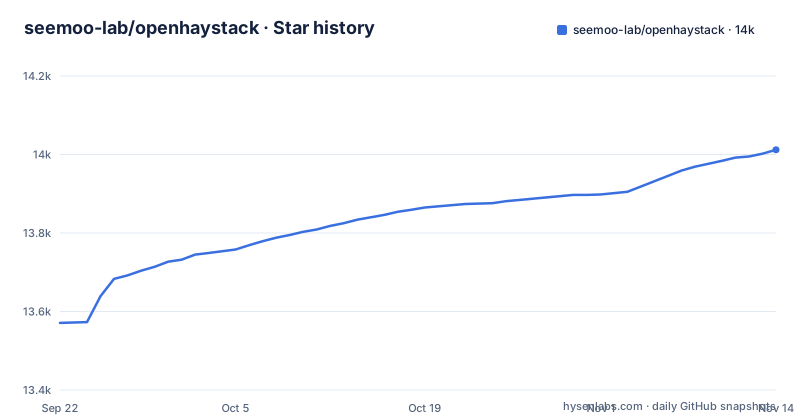
- seemoo-lab/openhaystack14,012 ★ · +441
| Repository | 2026-09-22 | 2026-11-14 |
|---|---|---|
| seemoo-lab/openhaystack | 13.6k | 14k |
441 Stars in the last 53 days, measured from the daily GitHub snapshot. Compare with other projects
Editorial analysis
Nearby iPhones cannot tell your tag from an Apple one
The README describes the mechanism in four steps: pairing, losing, finding and searching. Pairing is a key pair on the elliptic curve P-224, generated on your Mac: the private key stays in the keychain, and the public key goes onto the accessory. Losing is the advertisement step, where the accessory broadcasts its public key as a Bluetooth Low Energy advertisement. Finding happens on somebody else's phone. When a nearby iPhone receives the advertisement it fetches its own GPS location, encrypts it with the public key from that advertisement, and uploads the encrypted report to Apple's server, and all iPhones on iOS 13 or newer do this by default without being asked. OpenHaystack's role ends at the advertisement and resumes when your Mac reads the reports back, which is why no OpenHaystack code runs on the phones doing the work.
The firmware broadcasts a fixed public key, so a tag is trackable up close
Here is the flaw the project documents about itself, in its own disclaimer: accessories using the OpenHaystack firmware broadcast a fixed public key and are therefore trackable by other devices in proximity. A public key does not change between advertisements, so anyone with Bluetooth equipment nearby can watch the same identifier go by and later match it to a location you already reported. The README adds that this might change in a future release, which tells you the behaviour is current rather than intended forever. Read alongside the surrounding sentence, the scale of the software is stated plainly: OpenHaystack is experimental, and the code is untested and incomplete. The project is also explicit that it is not affiliated with or endorsed by Apple Inc., which matters if you were considering this for anything that ships to other people.
Reports come back through an Apple Mail plugin
Reading the encrypted location reports is the part that needs a Mac and a private API. The application requires a custom plugin for Apple Mail, and the reason is technical rather than cosmetic: the plugin inherits Apple Mail's entitlements, which are what allow it to use the private API that downloads location reports from Apple's servers. On first launch the app asks to install that plugin into ~/Library/Mail/Bundle, and the README states the plugin does not access any other private data such as emails. The consequence of the design is worth naming plainly. The download path depends on entitlements Apple grants to Mail and on a private interface, neither of which is a contract the project controls, so a macOS update can change the ground under it without a release from this repository. It also means location history arrives through your mail client process, which is a design reviewers should be told about rather than discover.
Installing means switching Gatekeeper off, then back on
The setup sequence is six steps, and two of them are system-wide security toggles. Start from a precompiled binary release on the GitHub page, or build the application from source with Xcode. The project requires macOS 11 (Big Sur) or newer. Opening OpenHaystack offers to install the Mail plugin into ~/Library/Mail/Bundle, then you disable Gatekeeper so the plugin can load:
sudo spctl --master-disableIn Mail, open Preferences, then General, then Manage Plug-Ins... and tick the box next to OpenHaystackMail.mailbundle. If that button is missing, the README gives you the preference that reveals it:
sudo defaults write "/Library/Preferences/com.apple.mail" EnableBundles 1Allow access, restart Mail, then put Gatekeeper back:
sudo spctl --master-enableThe window between the two spctl commands is the whole Mail configuration step. Abandon the walkthrough halfway and your machine keeps Gatekeeper disabled until you run the second command yourself.
Reports can take 30 minutes, and the map keeps one point per item
Nothing is live here. The README says it can take up to 30 minutes until you see the first location report on the map, and the map always shows the most recent location for all of your items. Clicking an item tells you when the last update arrived, and the reload button fetches newer reports. Read that carefully and the product shape is clear: the map shows each item at its most recent reported location, and clicking it shows when the last update was received. Creating a tag is the part that is fully under your control. You enter a name and optionally pick an icon and a colour, and the app generates the key pair used to encrypt and decrypt the reports, keeping the private key in your Mac's keychain rather than in the project.
USB deploy, or copy the advertising key by hand
Putting the public key onto hardware has two routes and they leave you with different amounts of work. The integrated route is to connect a supported device to your Mac over USB, hit the Deploy button next to the accessory's name, and choose the matching device. The manual route is to right click the accessory, copy the public key used for advertising, and deploy it yourself. The starting point for either is a BBC micro:bit or any other Bluetooth-capable device, and the README keeps a section for tracking other devices beyond the micro:bit. What the manual route means in practice is that the firmware flashing step belongs to you: OpenHaystack hands you a key and gets out of the way. There is also no key rotation described anywhere in this flow, which is the same fixed-identifier problem the disclaimer raises, now on the deployment side rather than the advertising side.
macOS 11, a 2023 tag, and commits that arrived after it
Platform and activity do not line up. The application requires macOS 11 (Big Sur), and the newest tagged release is v0.5.3 from 2023-10-09, named for a macOS 13 build, with v0.5.2 from 2022-06-01 and v0.5.1 from 2022-01-04 before it. The last push to main was 2026-08-17 and the repository is not archived, so work continues on the branch without producing new tags. Anyone installing by tag is therefore installing code from 2023, while anyone reading the default branch is reading something more recent and untagged. The licence is AGPL-3.0, with LICENSE at the repository root and CITATION.cff beside it, so read that file before you build anything on top. Contributor tooling is thin and visible in the Makefile: install-hooks copies .pre-commit into .git/hooks/pre-commit, and app-autoformat runs swift-format and clang-format over the app directory. There is no test target in that Makefile. The root also carries a Firmware directory, Resources, a README.Reproducibility.md, and a CVE-2020-9986 directory documenting the vulnerability the lab found and Apple fixed.
Editorial conclusion
OpenHaystack suits a Mac owner who wants to track their own keys or bags without buying a tag, and it does not suit anyone who needs their location history kept private from nearby devices, because the current firmware broadcasts a fixed public key. Before you install it, check three things: that you are willing to run sudo spctl --master-disable during setup, that the newest tagged release v0.5.3 from 2023-10-09 matches the macOS version you run even though the last push was 2026-08-17, and that the AGPL-3.0 licence in the repository root suits what you plan to build on top of it.
Frequently asked questions
What is OpenHaystack?
OpenHaystack is a framework for tracking personal Bluetooth devices through Apple's Find My network, created by the Secure Mobile Networking Lab at TU Darmstadt after reverse engineering and security analysis of that system. It has two parts: a macOS application that shows the last reported location of your devices, and a firmware image that makes Bluetooth devices broadcast beacons that iPhones pick up.
Does OpenHaystack need a Mac?
Yes for the path the README documents. The macOS application requires macOS 11 (Big Sur), and it depends on a custom Apple Mail plugin that inherits Mail's entitlements to reach a private API for downloading location reports. The README's installation and usage instructions cover the Mac application and the firmware; the README also has a separate OpenHaystack Mobile section, and the repository has an openhaystack-mobile directory.
What hardware can I use as an OpenHaystack tag?
A BBC micro:bit or any other Bluetooth-capable device, and the README gives keyrings, backpacks and notebooks as the objects you might attach one to. You deploy over USB with the Deploy button next to the accessory's name, or copy the public key used for advertising and deploy it manually.
Is OpenHaystack safe for private tracking?
The project describes itself as experimental software with untested and incomplete code, and states that accessories using its firmware broadcast a fixed public key and are therefore trackable by other devices in proximity, which might change in a future release. It is also not affiliated with or endorsed by Apple Inc.
How long does OpenHaystack take to show a location?
Up to 30 minutes before the first location report appears on the map. The map shows the most recent location of every item, clicking an item shows when the last update was received, and the reload button fetches newer reports.
Which licence does OpenHaystack use?
AGPL-3.0, with the licence file at the root of the repository and CITATION.cff alongside it for citation. The project also records the vulnerability it disclosed, CVE-2020-9986, in a directory of the same name at the repository root.
Official sources
Where developers are discussing it
Posts on Hacker News, dev.to and Lobsters that link to this repository, found by our scan of those communities. 0 in the last 30 days; newest first.
- OpenHaystack is a framework for tracking personal Bluetooth devicesHacker News · Sep 13, 2026 · 2 points · 0 comments
Add this badge to your README
If you maintain this project, the badge below links readers to this analysis and shows its maintenance status from the daily GitHub snapshot. Paste the markdown into your README; add ?metric=license or ?metric=stars to the image URL for a different field.

[](https://hysenlabs.com/projects/seemoo-lab-openhaystack)Star history chart for your README
[](https://hysenlabs.com/projects/seemoo-lab-openhaystack)Was this useful?