bkcrack: the known plaintext attack on ZipCrypto, properly explained
Crack legacy zip encryption with Biham and Kocher's known plaintext attack.
At a glance
- What is it?
- A command line tool that recovers the internal keys of a traditionally encrypted ZIP file from twelve bytes of known plaintext, then decrypts, re-encrypts or unlocks archives without the password.
- Who is it for?
- bkcrack is the rare security tool whose documentation explains the attack well enough that you can use it on an archive you are locked out of without guessing at flags. The requirement is specific, twelve bytes of known plaintext with eight contiguous, and everything else in the README exists to help you satisfy that.
- Can I use it commercially?
- Yes. Zlib is a permissive licence: you can use, modify and sell software built on it, as long as you keep its copyright and licence notices.
- Is it still maintained?
- Yes. The repository last received commits 28 days ago.
- What is it written in?
- Mainly C++, according to GitHub's language statistics.
Answers come from the project's GitHub data, last synced on October 24, 2026, and from our analysis. They are not legal advice.
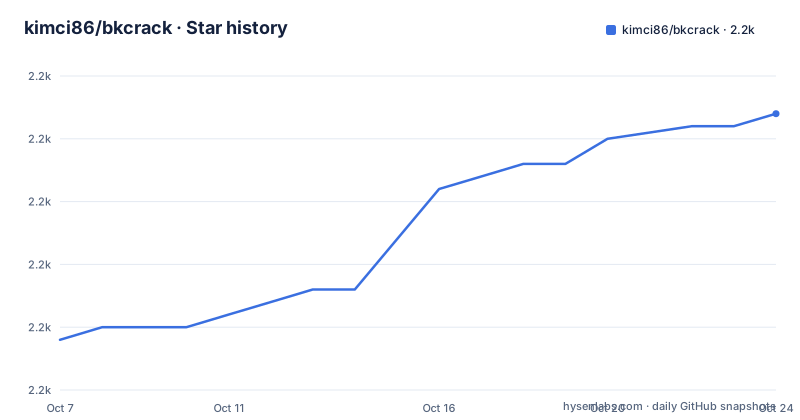
Star history
- kimci86/bkcrack2,227 ★ · +18
| Repository | 2026-10-07 | 2026-10-24 |
|---|---|---|
| kimci86/bkcrack | 2.2k | 2.2k |
18 Stars in the last 17 days, measured from the daily GitHub snapshot. Compare with other projects
Editorial analysis
The attack in the author's own words
The README explains the cryptography before it explains the tool, which is the right order and is rare enough to be worth reading on its own.
A ZIP archive may contain many entries whose content can be compressed and encrypted. Entries encrypted with a password-based symmetric algorithm are referred to as traditional PKWARE encryption, legacy encryption, or ZipCrypto. That algorithm generates a pseudo-random byte stream, the keystream, which is XORed with the entry content to produce ciphertext. The generator's state is three 32-bit integers, initialised from the password and then continuously updated with plaintext as encryption proceeds.
That last detail is the vulnerability. The keystream depends on the plaintext already processed, which means ciphertext alone does not contain everything you need, but ciphertext paired with the matching plaintext does. The attack, from Eli Biham and Paul C. Kocher, recovers the internal state given the ciphertext and twelve or more bytes of the corresponding plaintext. That state is sufficient to decrypt the ciphertext entirely, and also any other entries encrypted with the same password.
The README also states the fallback honestly: the internal state can be used to brute-force the password with a complexity of n^(l-6), where n is the character set size and l is the password length. Six characters of the password are effectively given away by the attack.
Building it and getting a binary
Precompiled packages for Ubuntu, macOS and Windows are published on GitHub releases, which is the route most people should take. On Windows the Microsoft runtime libraries are needed; if they are not already installed you need the Microsoft Visual C++ Redistributable package.
Building from source takes three commands, because the project uses CMake and installs into a folder you choose:
cmake -S . -B build -DCMAKE_INSTALL_PREFIX=install
cmake --build build --config Release
cmake --build build --config Release --target install
Third-party packages exist across a range of Linux distributions, tracked through repology, and those are maintained outside this repository. Worth knowing if you are packaging rather than using: those are not the project's packages to fix.
The newest release is v1.8.1 from 2025-10-25, which fixed a bug preventing mask-based password recovery from being parallelised under MSVC and made minor simplifications and documentation updates. Before that, v1.8.0 in August 2025 implemented the mask-based password recovery, which is the feature that makes targeted password search practical. v1.7.1 from December 2024 was mostly typos and password recovery optimisation.
The repository is Zlib licensed, has 2,205 stars and 191 forks, and was last pushed on 2026-09-26. The tree is small and conventional: `include/`, `src/`, `tests/`, `tools/`, `doc/`, `example/` and a `gcovr.cfg` for coverage reporting.
The attack needs twelve bytes, and eight of them contiguous
This is the requirement that decides whether the tool is useful to you, so it is worth stating exactly. The attack requires at least 12 bytes of known plaintext, and at least 8 of them must be contiguous. The larger the contiguous known plaintext, the faster the attack runs.
Twelve bytes is a low bar in one sense and a high one in another. ZIP headers are a common source because their structure is predictable in ways you can often reconstruct, which is why the tool offers several ways to supply them.
From archive files, you give it the ciphertext entry and the plaintext entry:
bkcrack -C encrypted.zip -c cipher -P plain.zip -p plainFrom loose files, the ciphertext file must begin with the 12 bytes corresponding to the encryption header, which is a detail worth checking before you wonder why the attack fails:
bkcrack -c cipherfile -p plainfileIf the plaintext corresponds to a position other than the start of the ciphertext, an offset handles it, and the offset may be negative when the known plaintext includes part of the encryption header.
The sparse plaintext flag is the escape hatch for the awkward case. If you have between 8 and 11 contiguous bytes plus some known bytes at other offsets, you can top up to the 12-byte requirement:
bkcrack -c cipherfile -p plainfile -x 25 4b4f -x 30 21Each `-x` takes an offset and then the known bytes in hexadecimal, and the flag can be repeated as many times as needed. In practice the plaintext you have tends to be scattered: a few bytes of a predictable header, a known marker further into the file, a file extension at a fixed position.
Listing entries and recovering keys from an archive
The first command you should run is not the attack. Listing entries tells you which entries exist and their metadata, and it tells you which of them use ZipCrypto and are therefore vulnerable in the first place.
bkcrack -L archive.zipThat distinction matters because a ZIP archive can mix entries: some deflate-compressed and unencrypted, some compressed and encrypted, and encryption can also be AES-based rather than ZipCrypto. Only ZipCrypto entries respond to this attack, so confirming the archive is the kind you think it is comes before any key recovery.
The README is also clear that the remove and change password operations assume every entry in the archive was originally encrypted with the same password. That assumption is inherited from the attack itself, since recovering keys from one entry recovers keys for the password, not for a specific entry. If an archive has entries under different passwords, the tool does not solve that case.
One detail that will save you a wasted run: if the attack succeeds, the deciphered data is still compressed if deflate was used at creation time. Decompression is a separate step, and the README provides a Python 3 script for it in the `tools` folder.
What you can do with recovered keys
Recovering the keys is the interesting part; what follows is a set of operations that are each one flag away.
Decrypting data from the attack itself uses `-d` with the ciphertext input. If the keys are already known from a previous run, you can skip the attack and decrypt directly by passing them as three 32-bit values:
bkcrack -c cipherfile -k 12345678 23456789 34567890 -d decipheredfileRemoving encryption from a whole archive writes a new one with identical content and no encryption, again assuming a single shared password:
bkcrack -C encrypted.zip -k 12345678 23456789 34567890 -D decrypted.zipChanging the password produces a new encrypted archive with a password you choose:
bkcrack -C encrypted.zip -k 12345678 23456789 34567890 -U unlocked.zip new_passwordAnd there is a lower-level variant that sets the new password by its internal representation rather than the string, which is what you want when you need a specific key state. The README also describes a workflow combining the two: make a copy encrypted with a password of your choice, edit that copy in an archive manager with the chosen password, then re-encrypt the modified archive with the original keys.
Recovering the original password from the keys is the last operation, and it supports character set based search plus the mask-based method added in v1.8.0. The repository ships a `tutorial.md` and a `secrets.zip` in `example/`, which is the fastest way to see the full sequence end to end before pointing it at a real archive.
Editorial conclusion
bkcrack is the rare security tool whose documentation explains the attack well enough that you can use it on an archive you are locked out of without guessing at flags. The requirement is specific, twelve bytes of known plaintext with eight contiguous, and everything else in the README exists to help you satisfy that. The decrypted output is still deflate-compressed, so `tools/inflate.py` is a required step rather than an optional one. Three flags carry most of the work: `-L` to inspect, `-x` to supply scattered known bytes, and `-k` once the keys are known.
Frequently asked questions
How does bkcrack decrypt a ZIP file?
It implements the known plaintext attack on the ZipCrypto stream cipher rather than guessing passwords. Give it ciphertext plus at least 12 bytes of the matching plaintext, 8 of them contiguous, and it recovers the three internal state values that generated the keystream. Those values then decrypt the archive without the password.
What can I do once bkcrack has the internal keys?
You can decrypt data directly with `-d`, strip encryption from a whole archive into a new file with `-D`, write a new archive with a password of your choice using `-U`, set the internal state directly with `--change-keys`, and search for the original password. All of these assume every entry shared the same password.
Why is my decrypted output still compressed?
Because the archive was deflate-compressed at creation time, and compression happens before encryption. The attack only reverses the encryption layer. A Python 3 inflate script in the tools folder handles the decompression step separately.
Does bkcrack work on AES-encrypted ZIP files?
No. The attack targets the traditional PKWARE cipher, also called ZipCrypto or legacy encryption, which the README identifies as the encryption making an entry vulnerable. List entries with `-L` first to see which entries use that scheme before spending time on an attack that cannot apply.
Official sources
Add this badge to your README
If you maintain this project, the badge below links readers to this analysis and shows its maintenance status from the daily GitHub snapshot. Paste the markdown into your README; add ?metric=license or ?metric=stars to the image URL for a different field.

[](https://hysenlabs.com/projects/kimci86-bkcrack)Star history chart for your README
[](https://hysenlabs.com/projects/kimci86-bkcrack)Was this useful?