Doco-CD GitOps Deployment for Docker Compose and Swarm
Docker Compose Continuous Deployment
At a glance
- What is it?
- Doco-CD is a Go-based deployment controller that turns Git polling or webhooks into Docker Compose and Swarm deployments. It fits operators that want GitOps for Docker without adopting a Kubernetes-oriented platform.
- Who is it for?
- Adopt Doco-CD when Git is the source of truth for Compose projects or Swarm stacks and the deployment target is Docker rather than Kubernetes. Do not choose it merely because it offers a lightweight image, since access to `/var/run/docker.sock`, webhook exposure, secret handling, and upgrade coordination are operational responsibilities.
- Can I use it commercially?
- Yes. Apache-2.0 is a permissive licence: you can use, modify and sell software built on it, as long as you keep its copyright and licence notices.
- Is it still maintained?
- Yes. The repository received new commits within the last day.
- What is it written in?
- Mainly Go, according to GitHub's language statistics.
Answers come from the project's GitHub data, last synced on November 7, 2026, and from our analysis. They are not legal advice.
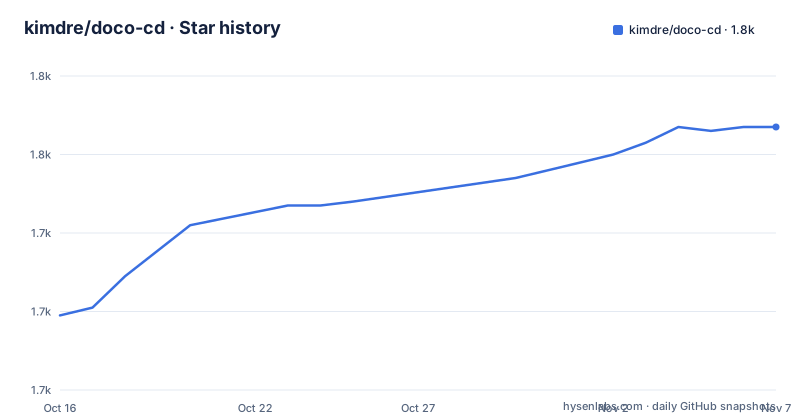
Star history
- kimdre/doco-cd1,767 ★ · +48
| Repository | 2026-10-16 | 2026-11-07 |
|---|---|---|
| kimdre/doco-cd | 1.7k | 1.8k |
48 Stars in the last 22 days, measured from the daily GitHub snapshot. Compare with other projects
Editorial analysis
Doco-CD's GitOps Deployment Scope
Doco-CD addresses a specific gap between a Compose repository and running Docker workloads. An operator can keep deployment configuration in Git, then have Doco-CD deploy or update Docker Compose projects and Docker Swarm stacks after a polling interval or a webhook event. The intended users are teams already using Docker Compose, Docker Swarm, or Docker Contexts and wanting repository-driven deployment without introducing Kubernetes.
The project describes itself as a simpler alternative to Portainer or ArgoCD for Docker. That comparison identifies its scope rather than presenting Doco-CD as a general continuous delivery suite. The repository is written in Go, but users normally consume its container image rather than compile the application. Its Compose file runs `ghcr.io/kimdre/doco-cd:latest`, persists `/data`, mounts the Docker socket, and includes an image-provided health check.
Doco-CD also covers operational needs that basic Compose does not address by itself: Git provider integrations, OCI artifacts, external secret providers, SOPS encryption, timezone-aware sync windows, notifications, Prometheus metrics, scheduled jobs, deployment scripts, a REST API, and an MCP server. These features broaden its role from a pull-and-deploy helper into a Docker-oriented deployment controller.
Polling, Webhooks, and Git-Driven Reconciliation
Two delivery triggers are documented. Polling makes Doco-CD inspect a configured Git repository at a specified interval, which is useful when repository providers cannot reliably deliver events or when deployments should be evaluated on a schedule. The Compose example represents polling as `POLL_CONFIG`, containing a Git URL, a `main` reference, and an `interval: 180`. The documentation also describes cron-scheduled polling, so interval polling is not the only scheduling form.
Webhook deployment provides the lower-latency path. Enabling it requires `WEBHOOK_SECRET`, while the Compose comments advise publishing `HTTP_PORT` only to a trusted HTTPS reverse proxy. That boundary matters: Doco-CD needs a reachable endpoint for provider events, but the repository does not show TLS termination inside the container. The example binds the optional published ports to host loopback rather than exposing them directly across the network.
The deployment target can be either a Compose project or a Swarm stack. Docker Contexts allow one controller to address multiple Docker hosts. Git repositories and OCI artifacts are both listed as deployment sources, which means a team can choose a source format supported by its release process instead of converting every artifact into the same transport. The repository files do not expose the internal reconciliation algorithm, so the exact comparison behavior and retry policy should be checked in the linked documentation before production use.
Compose Installation and First Deployment Configuration
The README directs users to the documentation at `https://doco.cd/latest/` for setup details. The repository provides `docker-compose.yml`, but the README does not give a complete installation command, image pull command, or first-deployment command. Those instructions should therefore be taken from the linked documentation rather than inferred. The example below reproduces the repository configuration without adding undocumented flags.
The central service configuration is:
image: ghcr.io/kimdre/doco-cd:latest
restart: unless-stopped
environment:
  TZ: Europe/Berlin
  GIT_ACCESS_TOKEN: ${GIT_ACCESS_TOKEN:-}
volumes:
  - /var/run/docker.sock:/var/run/docker.sock
  - data:/data
The socket mount gives the container access to the Docker engine API. The `data` volume preserves controller data between container replacements. `GIT_ACCESS_TOKEN` is optional in the example, but private repositories will have provider-specific access requirements that the README does not detail.
For a first real use, keep polling disabled until the Git URL and deployment layout are known. Add the documented repository URL to `POLL_CONFIG`, use a non-production Compose project, and inspect the documentation for the exact deployment configuration format. The repository includes `examples/single-repo-single-env/`, `examples/single-repo-two-envs/`, `examples/deployments-repo/`, and `examples/self-updating/`, so the example chosen should match the intended repository model. The Compose file also supplies a health check that calls the image's built-in `/healthcheck` command, which gives operators a visible starting point for container health.
Secrets, OCI Sources, and Docker Target Boundaries
Doco-CD supports external secret providers and encrypted deployment material through SOPS. The repository dependency list includes SDKs or clients for 1Password Connect, Azure Key Vault, AWS Secrets Manager, Bitwarden, Infisical, and OpenBao. That breadth is useful when an organization already standardizes on one provider, but it also creates configuration and upgrade work. Enabling a provider requires credentials, permissions, and provider-specific documentation that the README does not reproduce.
Git repositories and OCI artifacts are separate deployment source paths. OCI support can fit release workflows that publish signed or versioned artifacts, while Git remains useful for human-reviewed Compose files. The project documentation also describes encryption with SOPS, which changes the source handling story because deployment files may need to be decrypted before Docker receives them. The repository files do not document key rotation, failure recovery, or rollback, so those details require checking the encryption and deployment documentation.
Docker Contexts are another boundary. They enable deployments to multiple Docker hosts, but they do not mean that Doco-CD is a scheduler, backup system, or container orchestrator. It delegates workload execution to Docker. A team should verify Docker Context configuration, permissions, target Compose files, and whether each destination is a normal Compose engine or a Swarm manager before connecting a production repository.
Scheduling, Monitoring, and Automation Controls
Deployment timing is controllable through timezone-aware sync windows and cron-scheduled polling. This is more useful than unconditional deployment on every detected Git change when maintenance windows, approval periods, or operational staffing constraints exist. The documentation links also mention job scheduling and pre/post-deployment scripts. Those features indicate that Doco-CD can run deployment-related automation around the Docker action, but the README does not specify script permissions, execution context, or failure handling.
Monitoring is addressed through Prometheus metrics, notifications, and health checks. Notifications are useful for signaling failed or completed deployment operations, while metrics allow an existing monitoring system to observe the controller. The repository's Compose file keeps the metrics port private by commenting out its publication. That is a sensible default because deployment status and operational details should not automatically be exposed on a public interface.
For automation beyond the documented polling and webhook paths, the project lists a REST API and MCP Server. Their existence suggests integration paths for external systems, but the README does not document authentication, endpoint semantics, rate limits, or authorization boundaries. Treat those endpoints as separate operational interfaces that require review, rather than assuming that Git credentials automatically define their access model.
Operational Limits, Alternatives, and Upgrade Cost
The clearest constraint is Docker engine access. The example mounts `/var/run/docker.sock`, which grants the controller a highly privileged path to the host Docker API. The Compose file drops Linux capabilities with `cap_drop: ALL`, but the socket mount remains the central security boundary. The README does not document a remote engine authentication model or permission-restricted socket, so operators should review the linked security and Docker Context documentation before exposing Doco-CD outside a trusted host.
Doco-CD is also not the right tool when Kubernetes manifests are the required deployment format, or when the team needs application-level rollout analysis, traffic management, and Kubernetes-native reconciliation. The difference is approach: Doco-CD focuses on polling or webhooks and Docker Compose or Swarm deployment, whereas a platform with broader workload management exposes additional controls and operational complexity.
Maintenance cost includes container image upgrades, Go dependency changes, Git provider credentials, Docker Context changes, and secret provider configuration. The last push was on 2026-10-16, and releases v0.127.0, v0.126.0, and v0.125.1 were published in October 2026. The repository is not archived. The `go.mod` file requires Go 1.27.2 and includes Docker Compose v5 libraries, which raises the toolchain requirement for contributors building from source. The Apache-2.0 license governs use and modification under its terms, but organizations still need to review those terms as part of their own compliance process.
Editorial conclusion
Adopt Doco-CD when Git is the source of truth for Compose projects or Swarm stacks and the deployment target is Docker rather than Kubernetes. Do not choose it merely because it offers a lightweight image, since access to `/var/run/docker.sock`, webhook exposure, secret handling, and upgrade coordination are operational responsibilities. Before adoption, verify that the required Git provider, Docker Context, storage path, synchronization window, and notification destination match the deployment environment. The first concrete checkpoint is a non-production Compose project using the repository's `docker-compose.yml` settings and its documented health check.
Frequently asked questions
What is Doco-CD used for?
Doco-CD automatically deploys and updates Docker Compose projects and Docker Swarm stacks from Git or supported OCI artifacts. It supports polling and webhook-triggered deployment.
Does Doco-CD support Docker Swarm and multiple Docker hosts?
Yes. The README lists Swarm stacks and Docker Contexts, including deployment to multiple Docker hosts. It also supports scheduled polling and timezone-aware sync windows.
How do I configure polling in Doco-CD?
The repository's `docker-compose.yml` documents a `POLL_CONFIG` environment variable with a repository URL, Git reference, and interval. The example shows `https://github.com/your-user/your-deploy-repo.git`, `main`, and `180` as values to replace.
Does Doco-CD support secrets and SOPS?
Yes. The README lists external secret providers and encryption with SOPS as supported features. The repository dependencies include AWS Secrets Manager, Azure Key Vault, 1Password Connect, Bitwarden, Infisical, and OpenBao.
What is the difference between Doco-CD and ArgoCD?
Doco-CD targets Docker Compose projects and Swarm stacks, with Git polling or webhooks and Docker Context support. The README names ArgoCD as a comparison point but does not provide a feature-by-feature comparison.
How is Doco-CD installed?
The README points to `https://doco.cd/latest/` for setup instructions and supplies a `docker-compose.yml` example. The README does not include a complete installation command or first-launch command.
Official sources
Add this badge to your README
If you maintain this project, the badge below links readers to this analysis and shows its maintenance status from the daily GitHub snapshot. Paste the markdown into your README; add ?metric=license or ?metric=stars to the image URL for a different field.

[](https://hysenlabs.com/projects/kimdre-doco-cd)Star history chart for your README
[](https://hysenlabs.com/projects/kimdre-doco-cd)Was this useful?