AI-Coding-Guide-Zh: a Chinese course for Claude Code, Codex, OpenClaw and WorkBuddy built around tasks you can check
Chinese-language tutorials for Claude Code, OpenClaw, Codex and WorkBuddy: 50 full tutorials plus a cheat sheet, over 800k words, 1500+ hands-on examples, covering a four-track AI coding/agent learning path (programming, assistants, agents, office work).
At a glance
- What is it?
- KimYx0207's AI-Coding-Guide-Zh is an MIT-licensed set of Chinese tutorials, 50 in total plus a cheat sheet, covering four AI tools: Claude Code for programming, the Codex App, the OpenClaw assistant and Tencent's WorkBuddy for office work. Its approach is to have you finish one small, checkable task before reading further.
- Who is it for?
- Read AI-Coding-Guide-Zh if you or your team learn best in Chinese and want to use Claude Code, the Codex App, OpenClaw or WorkBuddy on real work rather than read about them. Pick one row from the starter table, do the exercise with the bundled material, and check the version baselines against your own install before following any step that depends on a specific release.
- Can I use it commercially?
- Yes. MIT is a permissive licence: you can use, modify and sell software built on it, as long as you keep its copyright and licence notices.
- Is it still maintained?
- Yes. The repository last received commits 6 days ago.
- What is it written in?
- GitHub does not report a main language for this repository.
Answers come from the project's GitHub data, last synced on November 15, 2026, and from our analysis. They are not legal advice.
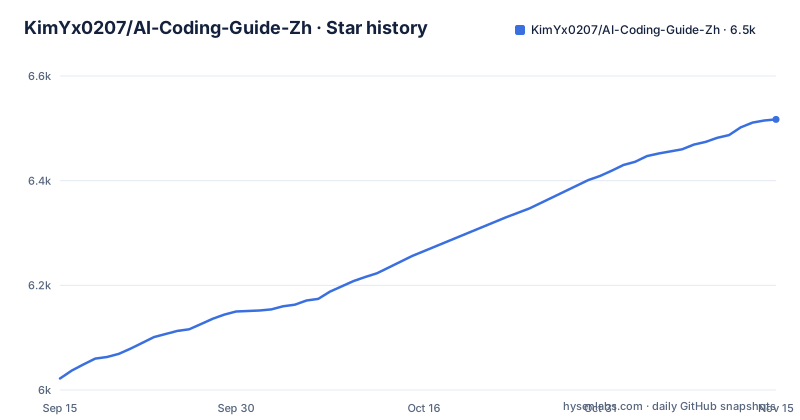
Star history
- KimYx0207/AI-Coding-Guide-Zh6,517 ★ · +495
| Repository | 2026-09-15 | 2026-11-15 |
|---|---|---|
| KimYx0207/AI-Coding-Guide-Zh | 6k | 6.5k |
495 Stars in the last 61 days, measured from the daily GitHub snapshot. Compare with other projects
Editorial analysis
What the guide covers and who it is written for
AI-Coding-Guide-Zh is a Chinese-language course on AI coding and agent workflows, not a piece of software. The description counts 50 complete tutorials and one quick-reference card, and the README splits them across four tools, each with its own focus. Claude Code, Anthropic's command-line coding tool, is the programming track, with 13 tutorials and the cheat sheet. OpenClaw, an open-source personal assistant framework, has 12 tutorials on to-do lists, research, messaging platforms and scheduled jobs. The Codex track, 14 tutorials, centres on the Codex App and treats the CLI, web, SDK and GitHub Action as supplements. WorkBuddy, Tencent's desktop AI office assistant, has 11 tutorials on documents, spreadsheets and reports.
The author, who goes by Laojin, describes more than 15 years in game development, from design to running whole projects, with a background in team management, milestones, data analysis and delivery risk. That shows in the choice of examples: progress calculations, weekly reports, spreadsheets, meeting notes and to-do lists rather than toy programs. The readers it suits are Chinese-speaking developers, team leads and non-programming colleagues who want to put these tools into everyday work.
Start with one task: the four entry routes
The README's first instruction is to pick just one row of a table and finish it. Each row pairs an installation guide with a first exercise and says what you should have at the end.
In the Claude Code row you install the tool, then reproduce a bug where an empty task list shows NaN for progress, fix it, pass the check and solve a variation on your own. The Codex App row makes a small change in the desktop app that can be read in review and checked by running it. The WorkBuddy row turns scattered notes into a short weekly report and a Word draft that keeps unfinished items and rescheduling. The OpenClaw row produces a daily to-do briefing that removes duplicates, drops finished items and keeps tasks with no known time.
The practice material lives in the repository's examples/ directory, with a progress-lab and an office-lab: code, work notes, a seven-row order table and three old and new instruction documents, all with made-up data. The README suggests doing one round as written, then changing one condition and checking whether you can predict the result. That habit, verifying the output rather than trusting it, is the thread running through the whole course.
Finding a tutorial by the problem in front of you
A second table indexes the course by everyday problems rather than by tool. Just took over a repository and do not know where to start: the Claude Code chapter on read-only project analysis. A bug keeps coming back after fixes: the small-bug exercises in Claude Code or the Codex App, which teach reproducing first and limiting the change. The AI changed a lot of code and you cannot tell whether it is reliable: the Codex chapter on a four-layer way of reading a review, by file scope, behaviour change and check results.
The office rows are just as concrete. A weekly report that reads well but leaves out risks, a spreadsheet with duplicates, blanks and refunds, old and new documents that contradict each other, a meeting that ended without owners: each points to a WorkBuddy chapter that teaches separating finished from unfinished work, fixing definitions before cleaning data, checking effective dates and extracting actions with their source. For repeated daily checks, the guide sends you to WorkBuddy scheduled tasks or Codex Automations, with the advice to get the manual process working first.
Team leads are pointed to the Claude Code enterprise chapter and the Codex security and enterprise baseline. For trainers, the README suggests having each learner finish one entry route and explain one change before moving on.
The Claude Code track in detail
The Claude Code part is the most developed. Its table gives each tutorial an estimated study time, a difficulty and an importance rating. It runs from installation, with environment setup, API configuration and IDE integration, to basic use starting from the small-bug exercise.
Installation is estimated at two to three hours and the basics at four to six, and both carry the highest importance rating. The README also notes that the Claude Code chapters include an enterprise guide aimed at team conventions.
Version baselines and how current it is
Tutorials about fast-moving tools go stale quickly, and the guide addresses this directly. It says all 50 tutorials and the cheat sheet were fully checked on 2026-10-03, with a chapter-by-chapter checklist. The README says key version numbers and app and CLI behaviour are revised against official release notes and documentation first, but warns that details may still change upstream and that your local version is what counts.
The release history shows active maintenance. The latest releases, v5.3, v5.4 and v5.5, all came out on 2026-10-03: a full check and hands-on corrections across the four tracks, a second review of the text, current features and exercises, and a pass filling gaps in the four tools' teaching and reviewing recent changes. The repository keeps a CHANGELOG.md and a NOTICE file alongside the MIT licence.
Limits worth knowing
The course is written in Chinese, so it is of limited use to readers who do not read it. It is also broad rather than neutral. The author picked four tools, one of them a Tencent product tied to Tencent's ecosystem, and anyone standardising on a different set will get less from the WorkBuddy and OpenClaw tracks.
The size cuts both ways. Fifty tutorials with study estimates of several hours each is a long course, and the README's own advice is to finish one entry route and go further only as needed. Taken that way, with one tool, one exercise and one checked result at a time, it is a practical path into AI coding tools for a Chinese-speaking team.
Editorial conclusion
Read AI-Coding-Guide-Zh if you or your team learn best in Chinese and want to use Claude Code, the Codex App, OpenClaw or WorkBuddy on real work rather than read about them. Pick one row from the starter table, do the exercise with the bundled material, and check the version baselines against your own install before following any step that depends on a specific release.
Frequently asked questions
What is AI-Coding-Guide-Zh?
It is an MIT-licensed collection of 50 Chinese tutorials plus a cheat sheet by KimYx0207, covering Claude Code for programming, the Codex App, the OpenClaw assistant and Tencent's WorkBuddy for office work.
Where should a beginner start in AI-Coding-Guide-Zh?
Pick one row of the README's starter table: install the tool in that row, then do its first exercise with the practice files in examples/, such as fixing the NaN progress bug in Claude Code or writing a weekly report in WorkBuddy.
Which tool versions does the guide cover?
The README says key version numbers and App/CLI behaviour are checked against official release notes and documentation, and that all 50 tutorials and the cheat sheet were fully checked on 2026-10-03. Details may still change upstream, so your local version is what counts.
Official sources
Add this badge to your README
If you maintain this project, the badge below links readers to this analysis and shows its maintenance status from the daily GitHub snapshot. Paste the markdown into your README; add ?metric=license or ?metric=stars to the image URL for a different field.

[](https://hysenlabs.com/projects/kimyx0207-ai-coding-guide-zh)Star history chart for your README
[](https://hysenlabs.com/projects/kimyx0207-ai-coding-guide-zh)Was this useful?