kmscon: a userspace console that takes over the DRM device from the kernel VT
Linux KMS/DRM based virtual Console Emulator
At a glance
- What is it?
- kmscon is a terminal emulator built on kernel mode setting that replaces the in-kernel VT implementation with a userspace console, with swappable video, font and seat backends. It suits people running a GPU console without a display server, and it does not suit machines that still rely on the kernel text console.
- Who is it for?
- Adopt kmscon when you want a graphical console on a DRM device without running a display server, and when you can live with the fact that it owns the GPU outright. Do not adopt it on a machine that still boots to a kernel text console, since loadkeys and setfont do not work, and be careful with seat handling because libseat gives you unprivileged operation at the cost of blocking kmscon-launch-gui.
- Can I use it commercially?
- Check first. The repository uses a licence we do not classify automatically, so read its LICENSE file before any commercial use.
- Is it still maintained?
- Yes. The repository last received commits 3 days ago.
- What is it written in?
- Mainly C, according to GitHub's language statistics.
Answers come from the project's GitHub data, last synced on November 7, 2026, and from our analysis. They are not legal advice.
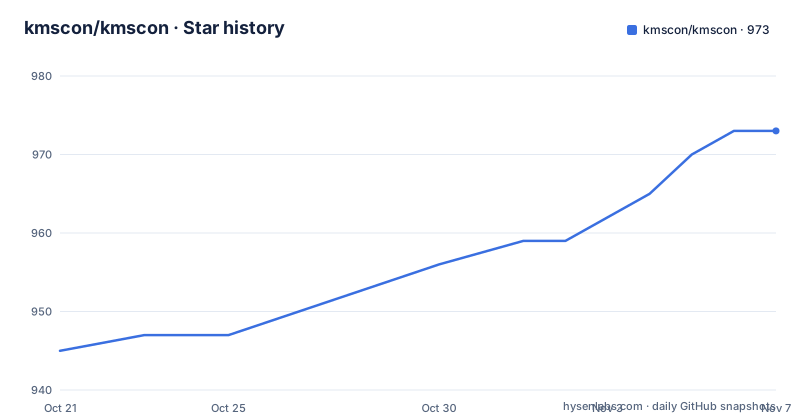
Star history
- kmscon/kmscon973 ★ · +28
| Repository | 2026-10-21 | 2026-11-07 |
|---|---|---|
| kmscon/kmscon | 945 | 973 |
28 Stars in the last 17 days, measured from the daily GitHub snapshot. Compare with other projects
Editorial analysis
kmscon replaces the kernel VT implementation rather than wrapping it
kmscon is described as a simple terminal emulator based on linux kernel mode setting, and the stated goal is precise: it is an attempt to replace the in-kernel VT implementation with a userspace console. That framing sets it apart from the alternatives. A traditional console sits inside the kernel, with the VT layer owning the tty and the font, and the kernel framebuffer console or fbcon handling the pixels. kmscon moves the terminal state machine out into userspace and puts it directly on the DRM device.
The people who care are the ones running a machine with a GPU but no display server: a rescue system, a minimal appliance, a kiosk-style terminal, a boot-time shell, or a machine where you want a text console that renders with modern hardware acceleration rather than a 80x25 text mode. A second group is developers who need the console on a DRM device for testing, where running X or Wayland would be overkill.
The project also has a history worth knowing. It was maintained in Aetf's fork for 11 years before coming back to the upstream repository in 2025, and the current release line, v10.0.x, shows releases in August and September 2026. The home page is still the freedesktop.org wiki entry for kmscon, and the reference documentation is the kmscon(1) man page rather than a separate manual.
The dependency list is where the design decisions live
The mandatory dependencies are few and tell you the shape of the program. libtsm is the terminal emulator state machine, and it is the part that interprets escape sequences and maintains the screen contents. libudev, at version 172 or newer, provides device hotplug support for input and video devices. libxkbcommon handles internationalized keyboard input. And linux-headers are needed for the ABI definitions, because kmscon talks to the kernel interface directly.
Everything else is optional, and the optional list is where the interesting choices sit. For video output you need at least one of three back ends. libdrm gives unaccelerated DRM output, with the library installed and reachable through pkg-config. OpenGLESv2 adds accelerated output and pulls in libdrm, libgbm, egl and glesv2, that is Mesa. Or fbdev, the classic framebuffer route, which needs kernel headers on the default include path and a kernel built with fbdev device support, something that is disabled on some distributions.
Font handling is similarly layered, from a built-in 8x16 static font that needs nothing external, through psf bitmap fonts where you supply a path to a psf file, to unifont embedded at build time, to freetype for scalable rendering using freetype2 and fontconfig, and finally pango, which needs glib, pango, fontconfig, freetype2 and more. For keyboard layout the terminfo entry needs the tic executable from ncurses to build kmscon.ti into a binary terminfo definition.
That many combinations is a flexibility story and a support story at the same time, and the meson options table lets you turn each one off explicitly when a build-time dependency is missing.
Building with meson, and the option table that decides your back ends
The build is standard meson, and the documentation is brief about it.
meson setup builddir/By default this installs into /usr/local, and you can change the prefix with --prefix=/usr, or afterwards with meson configure builddir/ -Dprefix=/usr. Building and installing then needs ninja.
meson install -C builddir/On a Debian based system you also need systemd-dev installed first, so the systemd service files are installed in the right location. Building the manpages and documentation additionally needs xsltproc, packaged as libxslt in Fedora and as xsltproc in Ubuntu and Debian, plus the docbook stylesheets from docbook-style-xsl in Fedora or docbook-xsl in Ubuntu and Debian.
The meson options table is the most useful part of the setup, because every subsystem can be selected independently. The defaults are mostly auto, meaning an option is switched off automatically if its build-time dependencies cannot be satisfied, unless you force it on the command line. The video choices are video_fbdev, video_drm2d for software rendering and video_drm3d for hardware rendering. The font choices are font_psf, font_unifont, font_freetype and font_pango. renderer_gltex turns on the OpenGLESv2 accelerated renderer, and extra_debug adds debug output. Two options matter for security and privilege: libseat, off by default, and term, which sets the default $TERM value and defaults to kmscon.
Released tarballs are published on the project's releases page, so if you would rather not build, that is where to get them.
Running it: kmscon, a config file, and locale handling
The binary is run with the usual options.
kmscon --helpThe usage information lives in the kmscon(1) man page, and the man page is the real reference for this project.
The default configuration file is /etc/kmscon/kmscon.conf. Any command line option can be placed in the config file in its long form without the leading double dash, and there is an example file at scripts/etc/kmscon.conf.example in the repository.
font-engine=freetype
font-size=18
# font-name is only for freetype/pango. Unifont and 8x16 uses their own bitmap.
font-name=Hack Nerd Font
Locale handling has a built-in path and a manual one. Kmscon queries and sets up the system locale before starting if it was built with dbus enabled. Otherwise you set the layout yourself with the --xkb-model, --xkb-layout, --xkb-variant and --xkb-options command line options. If dbus support is present you can also change the layout at runtime with localectl set-keymap, which is the closest thing to the loadkeys workflow a kernel console has.
loadkeys and setfont do not work, and the GPU is gone while kmscon runs
The documentation has a section on differences from fbcon, and two of those differences are absolute rather than cosmetic.
loadkeys does not work, because kmscon does not use the kernel tty for input. The layout is configured in kmscon.conf or on the command line instead. setfont does not work either, because it sets the kernel font, and again the font is chosen in kmscon.conf. If you are migrating a system that relied on loadkeys, that migration is manual by definition.
The third difference is the one that shapes what you can do next. As kmscon is already using the GPU, starting a desktop environment or a graphical application will not work, because it cannot take the GPU. There is a helper for this: kmscon-launch-gui puts kmscon in the background and starts a GUI application, and the documented invocation passes the application name and a delay.
kmscon-launch-gui kmscube -c 100Some applications need more. For mpv, for example, you need an additional wayland compositor, or the keyboard input will not work, and the documented way to supply one is a cage session.
kmscon-launch-gui cage -- mpv test.mp4So the practical shape is a console you can escape from into a compositor-hosted application, not a desktop that coexists with the console.
libseat gives you unprivileged operation and takes the seat away from anything else
Device access is the security decision in this project, and kmscon offers two paths.
With libseat present, kmscon can take a seat through it. That requires systemd-logind, elogind or seatd to be configured. The benefit is that you can run kmscon as a regular user and configure which GPU and input devices are allowed for it. The drawback is explicit and easy to miss: kmscon-launch-gui will not work to launch another GUI that uses libseat, because the seat is already in use. So the seat option and the launch helper are mutually exclusive.
Without libseat, kmscon falls back to its own VT handling, or to a fake backend if VT is disabled in the kernel. That fallback is what makes kmscon usable on a system with no virtual terminals at all, and it is also the path where the privilege requirements bite, since a userspace console that owns the DRM device generally needs elevated rights to open it.
The meson option makes the choice explicit, with libseat defaulting to false. Turning it on is a deliberate step that trades a restriction on what else can use the seat for the ability to run without root.
MIT-like terms in COPYING, and a project that moved home in 2025
The project states that the software is licensed under the terms of an MIT-like licence, and points to the COPYING file in the repository root for the full text. The licence field on the repository itself is not a standard identifier and points to a custom licence, so COPYING is the file to read rather than the badge or the metadata. This is not legal advice, but for a component that sits in the boot path of a machine, reading the actual terms is worth the two minutes.
On maintenance, the picture is clear and recent. The repository is not archived, the last push was on 2026-10-19, and the release line is active: v10.0.2 on 2026-08-20, v10.0.3 on 2026-09-01, and v10.0.4 on 2026-09-25. Three point releases inside six weeks is a sign of ordinary maintenance rather than a rewrite, and the patch version numbers say the meson option set and the config file format are not expected to move.
The unusual part is the history. The project spent eleven years in Aetf's fork before returning to this repository in 2025. That means the release numbering carries a decade of continuity from elsewhere, and it also means documentation, packaging and downstream distribution recipes for the old fork may point at a different URL than the one you are reading. If you are following an older tutorial, the clone URL and the release tarball location are the two things most likely to have changed.
Editorial conclusion
Adopt kmscon when you want a graphical console on a DRM device without running a display server, and when you can live with the fact that it owns the GPU outright. Do not adopt it on a machine that still boots to a kernel text console, since loadkeys and setfont do not work, and be careful with seat handling because libseat gives you unprivileged operation at the cost of blocking kmscon-launch-gui. Before building, install systemd-dev on Debian so the service files land correctly, confirm your video backend choice from the meson options table, and check the COPYING file, since the project states an MIT-like licence and the repository licence field points to a custom one.
Frequently asked questions
How do I build and install kmscon?
Use the standard meson commands: meson setup builddir/ to configure, then meson install -C builddir/ to build and install, which requires ninja. The default prefix is /usr/local, and on Debian based systems you need systemd-dev installed first so the service files land in the right place.
Why do loadkeys and setfont not work with kmscon?
loadkeys does not work because kmscon does not use the kernel tty for input, and setfont does not work because it sets the kernel font. The keyboard layout and the font are configured in /etc/kmscon/kmscon.conf or on the command line instead, and with dbus support you can switch keymaps at runtime using localectl set-keymap.
Can I run a graphical application from kmscon?
Not directly, because kmscon already holds the GPU. The kmscon-launch-gui script puts kmscon in the background and starts the application, and for applications such as mpv you also need a wayland compositor, for example kmscon-launch-gui cage -- mpv test.mp4.
What is the trade-off in enabling libseat support?
With libseat you can run kmscon as a regular user and restrict which GPU and input devices it may use, but you need systemd-logind, elogind or seatd configured, and kmscon-launch-gui will no longer work because the seat is already in use. The meson option libseat defaults to false.
Which video and font backends does kmscon support?
Video output can use libdrm for unaccelerated DRM, OpenGLESv2 for accelerated output through Mesa components, or fbdev with kernel headers and fbdev support enabled. Font handling ranges from the built-in 8x16 font through psf and unifont to freetype and pango, and each is a separate meson option that can be turned off explicitly.
Official sources
Add this badge to your README
If you maintain this project, the badge below links readers to this analysis and shows its maintenance status from the daily GitHub snapshot. Paste the markdown into your README; add ?metric=license or ?metric=stars to the image URL for a different field.

[](https://hysenlabs.com/projects/kmscon-kmscon)Star history chart for your README
[](https://hysenlabs.com/projects/kmscon-kmscon)Was this useful?