konstruktoid/hardening for Ubuntu servers: use, limits, and review points
Hardening Ubuntu. Systemd edition.
At a glance
- What is it?
- konstruktoid/hardening is a Shell-based hardening script for Ubuntu servers using systemd-managed configuration. It applies broad host changes, but the README explicitly says it is not idempotent and is no longer actively maintained.
- Who is it for?
- Adopt this project only for a disposable Ubuntu Server installation where you can inspect every change and rebuild the host from a tested baseline. Do not choose it for routine fleet management, repeat executions, or systems needing predictable upgrades.
- Can I use it commercially?
- Yes. Apache-2.0 is a permissive licence: you can use, modify and sell software built on it, as long as you keep its copyright and licence notices.
- Is it still maintained?
- Yes. The repository last received commits 1 day ago.
- What is it written in?
- Mainly Shell, according to GitHub's language statistics.
Answers come from the project's GitHub data, last synced on October 23, 2026, and from our analysis. They are not legal advice.
Star history
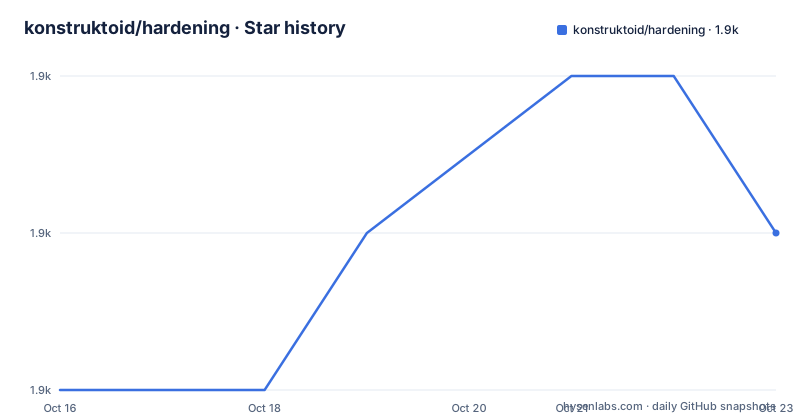
- konstruktoid/hardening1,858 ★ · +1
| Repository | 2026-10-16 | 2026-10-23 |
|---|---|---|
| konstruktoid/hardening | 1.9k | 1.9k |
1 Stars in the last 7 days, measured from the daily GitHub snapshot. Compare with other projects
Editorial analysis
What konstruktoid/hardening changes on an Ubuntu server
konstruktoid/hardening is intended to turn a minimal Ubuntu Server installation into a more restrictive baseline for systems that can be recreated as a reference image. The intended users are administrators who install Ubuntu themselves, understand the host configuration, and can test the result outside an operational environment. Its scope is broad: kernel parameters, firewall access, disabled modules, audit rules, PAM files, SSH configuration, systemd settings, log rotation, time synchronization, account controls, and related security files.
The README says the project was tested on Ubuntu 22.04, identified as Jammy Jellyfish, and Ubuntu 24.04, identified as Noble Numbat. That is a narrower compatibility claim than an unqualified promise for every Ubuntu release. The documentation also recommends using the newly configured system as a golden image and checking future installations against relevant benchmarks and policies with configuration management.
This is a host-wide change set, not a narrowly scoped application security tool. A successful execution can produce a materially different system configuration. The README therefore gives a direct warning: read the code and do not run the script without first testing in a non-operational environment. That warning is central to evaluating the project, because automation does not remove the administrator's responsibility for judging whether each change is appropriate.
Installation sequence for the documented Ubuntu path
The documented path begins during installation of Ubuntu Server. Select "Ubuntu Server (minimized)", configure networking and partitions, and do not install OpenSSH server, "Featured Server Snaps", or other packages at that stage. The README recommends several filesystem mount options, but the commands below come directly from its installation sequence.
After the first reboot, install the packages required to retrieve and inspect the repository. The documentation specifies `git`, `net-tools`, and `procps`, using `--no-install-recommends`.
sudo apt-get -y install git net-tools procps --no-install-recommendsThe command should complete without an installation error before continuing. It does not apply hardening. Its stated purpose is to provide the tools needed for the documented download and inspection workflow.
Clone the repository into the current working directory. The reader should see the `hardening` directory created by Git.
git clone https://github.com/konstruktoid/hardening.gitBefore execution, change `ubuntu.cfg`. At minimum, `CHANGEME` must contain a value chosen by the administrator. The README states that the script fails while `CHANGEME` is empty. After changing configuration, run the entry script with root privileges and then reboot. The reader should expect host configuration changes rather than ordinary command output.
sudo bash ubuntu.shThe README gives “Reboot” as the final step but does not provide a separate reboot command. It also points to `README.adoc#tests` for host-setting tests rather than documenting them in the visible installation section.
ubuntu.cfg decisions that control remote access
The main configuration file contains operational choices as well as file paths. `FW_ADMIN` lists IP addresses permitted to connect over SSH, `SSH_GRPS` identifies groups whose members may access SSH, and `SSH_PORT` selects the configured port. These values can become access barriers if they do not match the administrator's actual client and account model.
The configuration shown in the README uses `127.0.0.1` as `FW_ADMIN`, `sudo` as `SSH_GRPS`, and `22` as `SSH_PORT`. That is an example of the repository's configuration, not a recommendation for a public server. Setting `AUTOFILL='N'` leaves manual choices in place. According to the configuration notes, changing it lets the script guess `FW_ADMIN` and `SSH_GRPS`, which reduces operator control over a security-sensitive step.
Other visible controls govern notification, packages, output, time, and audit behavior. `ADMINEMAIL` is used by PSAD for notifications, so the documented value `root@localhost` is mainly a placeholder until a valid address is supplied. `KEEP_SNAPD='Y'` holds the `snapd` package to prevent removal. `VERBOSE` controls detailed output, while `TIMEDATECTL` can select a time zone or remain empty for the system default.
`AUDITD_MODE` accepts `0` for silent operation, `1` for `printk`, or `2` for `panic`. The associated `AUDITD_RULES` setting points to base, aggressive, and Docker rule files. `SYSCTL_CONF` selects the stricter sysctl configuration. These defaults span administration, monitoring, and networking, so they need review against the host's services rather than blind acceptance.
The README requires `CHANGEME` to be changed before execution. Its comment describes this as verification that the operator has glanced at the code. That check confirms only that the sentinel was changed, not that every configuration value or Shell function is understood.
The hardening run is an ordered systemd configuration sequence
The repository is organized around an entry script, `ubuntu.sh`, configuration under `ubuntu.cfg` and `config`, supporting rules under `misc`, and separate Shell functions under `scripts`. The README documents function execution order and describes each function by the files or settings it changes.
The first documented function, `pre`, sets apt flags and performs a basic permission check. The `kernel` function changes `nf_conntrack` `hashsize` to `1048576` when the parameter exists and is writable. It also attempts to set `/sys/kernel/security/lockdown` to `confidentiality` when that setting exists and is writable. The wording “if exists and is writable” matters because those checks allow the script to proceed on kernels that do not expose the same controls.
The `firewall` function configures UFW when it is installed. It allows SSH connections from addresses in `FW_ADMIN` to `SSH_PORT`, enables logging, and assigns `IPT_SYSCTL=/etc/sysctl.conf`. This creates a direct relationship between access-list configuration and the selected SSH port. An incorrect value can deny legitimate administration or expose access at a different endpoint, depending on the resulting firewall and SSH configuration.
The script then disables selected kernel modules. `disablenet` covers `dccp`, `sctp`, `rds`, and `tipc`. `disablefs` covers `cramfs`, `freevxfs`, `jffs2`, `ksmbd`, `hfs`, `hfsplus`, and `udf`. `disablemod` covers a longer list that includes Bluetooth, FireWire, audio, camera, and USB storage modules. The README identifies separate files such as `scripts/disablenet`, `scripts/disablefs`, `scripts/disablemod`, and `scripts/ufw`, confirming that the hardening logic is split into scripts rather than kept in one unreadable function.
The visible function list continues into `systemdconf`, which starts by setting `CrashShell=`. Since the README excerpt ends there, it does not expose the full ordering or behavior of the remaining systemd changes. The repository layout supports inspection, but a complete review requires reading all scripts and referenced configuration files before execution.
Non-idempotence and disabled modules define the operating boundary
The most consequential limitation is stated directly in the README: the code is not idempotent. A second execution should not be assumed to produce the same result as the first or to behave as a routine configuration reconciliation tool. This makes the project unsuitable for conventional configuration-management workflows that repeatedly converge a host toward a declared state.
Kernel module removal creates additional workload-specific failure modes. The README warns that disabling `usb-storage` prevents USB storage devices from being used. It says administrators who need those devices should configure `USBGuard` accordingly and remove `usb-storage` from the `disablemod` function. The same review is needed for any listed module that supports an expected service or hardware path. The documentation does not provide a hardware inventory or automated method for determining those dependencies.
The script is also a one-time system preparation project rather than a small hardening layer. It changes PAM and SSH files, systemd configuration, audit behavior, logging, time synchronization, firewall rules, kernel settings, and module availability. There is no rollback procedure in the visible README. Without image-level recovery or a separately validated restoration plan, troubleshooting may involve rebuilding from the tested installation media.
The README points users who require an idempotent and maintainable approach to `konstruktoid/ansible-collection-hardening`. It also lists an Ansible playbook repository at `konstruktoid/ansible-role-hardening`. This is a meaningful design difference: the Shell project applies a predefined sequence directly, while an Ansible-based approach models configuration as managed automation. The latter is the documented path for repeatable environments, although the visible material does not compare every rule or guarantee feature parity.
Maintenance, release history, and Apache-2.0 implications
The repository is not archived, and the last push was on 2026-10-15. However, the README explicitly describes the script as “no longer actively maintained.” Maintenance status should therefore not be inferred from the recent push alone. Code changes can still occur, but the project itself directs users toward the Ansible collection for a more maintainable alternative.
The listed releases are `v2.2.0` on 2025-07-31, `v2.1.0` on 2023-01-01, and `v2.0.0`, described as “The Jammy September release,” on 2022-09-19. The gaps between release dates mean an administrator should identify the exact revision being used and review its files rather than assuming that the README from another revision matches the deployed script. The project also notes a SLSA artifact under the `slsa.yml` workflow for file checksum verification. That supports integrity checking of the artifact, but the visible text does not describe how to reproduce the workflow or validate every generated file.
The repository is licensed under `Apache-2.0`. The `LICENSE` file is present at the repository root. For organizations adopting or modifying the script, the license file is the starting point for checking permitted use, modification, distribution, and notice obligations. That is a repository-level statement, not legal advice about a particular deployment.
Upgrade cost is higher than for a package with declarative idempotent behavior because changes touch many host layers. The README does not document compatibility for Ubuntu releases other than 22.04 and 24.04, nor does it provide a migration script for an existing host. Rebuilding a reference image is the documented direction.
Choosing between direct Shell hardening and managed configuration
The closest documented alternative is `konstruktoid/ansible-collection-hardening`, with the README also directing readers to `konstruktoid/ansible-role-hardening` for an Ansible playbook. The distinction is not merely installation convenience. The Shell project is a direct, ordered modification process and explicitly lacks idempotence. An Ansible collection is described by the README as the more idempotent and maintainable choice, making it the more credible candidate for a fleet or for repeated reconciliation.
The direct script may still fit a controlled image-building exercise. An administrator can install a minimized Ubuntu Server, inspect the full code, run it in a non-operational environment, examine the resulting system, and then preserve that installation as a golden image. The benefit of this approach is that the output is itself a concrete baseline. The cost is that future changes depend on rebuilding or externally managing that image, because the script does not advertise repeatable convergence.
The Ansible route changes the adoption boundary. Organizations that already use configuration management need the hardening rules to fit their control model, variable handling, inventory, secrets, and change process. The visible README does not state that the Ansible collection implements exactly the same functions as `ubuntu.sh`, so feature equivalence must be checked rather than assumed.
Regardless of route, first use should be limited to Ubuntu 22.04 or 24.04 because those are the only releases named as tested. Administrators should verify remote access, required kernel modules, service accounts, time settings, audit policy, and filesystem mount options against the intended host role.
Editorial conclusion
Adopt this project only for a disposable Ubuntu Server installation where you can inspect every change and rebuild the host from a tested baseline. Do not choose it for routine fleet management, repeat executions, or systems needing predictable upgrades. The first verification points are the CHANGEME value, selected kernel modules, SSH and firewall rules, and whether Ubuntu 22.04 or 24.04 matches the intended deployment.
Frequently asked questions
Which Ubuntu versions does konstruktoid/hardening support?
The README says the project was tested on Ubuntu 22.04 (Jammy Jellyfish) and Ubuntu 24.04 (Noble Numbat). It does not claim compatibility with other Ubuntu releases.
Can konstruktoid/hardening be run more than once on the same server?
The README explicitly states that the code is not idempotent. It warns against execution without prior testing and points to an Ansible collection for a more idempotent and maintainable approach.
What must be changed before running konstruktoid/hardening?
Edit `ubuntu.cfg` and replace the empty `CHANGEME` value, otherwise the script fails. The README also requires reading the code and testing it in a non-operational environment.
Does konstruktoid/hardening disable USB storage?
Yes. The documented `disablemod` function includes `usb-storage`, and the README warns that this disables USB storage devices. It says to configure `USBGuard` and remove `usb-storage` from the function when such devices are required.
Official sources
Add this badge to your README
If you maintain this project, the badge below links readers to this analysis and shows its maintenance status from the daily GitHub snapshot. Paste the markdown into your README; add ?metric=license or ?metric=stars to the image URL for a different field.

[](https://hysenlabs.com/projects/konstruktoid-hardening)Star history chart for your README
[](https://hysenlabs.com/projects/konstruktoid-hardening)Was this useful?