react-konva: React components for the Konva 2D canvas scene graph
React components for the Konva 2d canvas library. Build interactive graphics, design editors, and whiteboards with JSX.
At a glance
- What is it?
- react-konva maps Konva's canvas scene graph onto JSX so React state and React events drive shapes, layers and drag interactions. It is a renderer, not an editor: you still build selection, history and UI yourself, and the strict-mode toggle decides whether manual drags survive a re-render.
- Who is it for?
- Adopt react-konva when you want Konva's canvas scene graph driven by React state, events and context, and you accept that selection, history and toolbars are yours to build. Skip it if you need a complete editor out of the box.
- Can I use it commercially?
- Yes. MIT is a permissive licence: you can use, modify and sell software built on it, as long as you keep its copyright and licence notices.
- Is it still maintained?
- Yes. The repository last received commits 32 days ago.
- What is it written in?
- Mainly TypeScript, according to GitHub's language statistics.
Answers come from the project's GitHub data, last synced on November 15, 2026, and from our analysis. They are not legal advice.
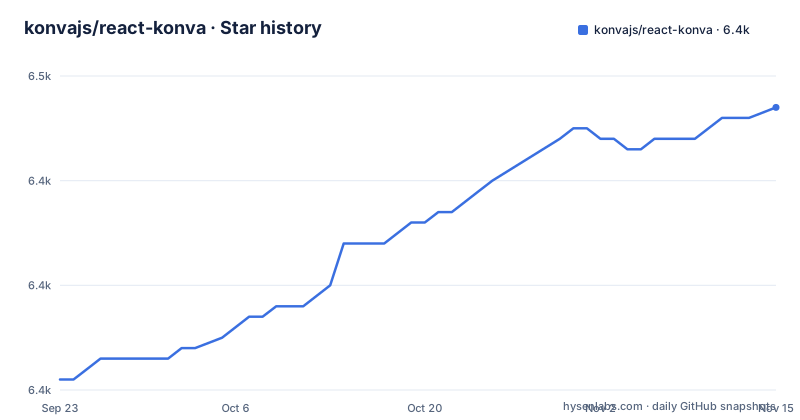
Star history
- konvajs/react-konva6,447 ★ · +26
| Repository | 2026-09-23 | 2026-11-15 |
|---|---|---|
| konvajs/react-konva | 6.4k | 6.4k |
26 Stars in the last 53 days, measured from the daily GitHub snapshot. Compare with other projects
Editorial analysis
Which problem react-konva takes off your plate
Konva gives you a canvas scene graph: stages, layers, shapes, transformers, filters. Driving that imperatively from React means holding node references, subscribing to events by hand, and keeping node state in sync with component state. react-konva removes that glue. It exposes Konva shapes as React components with the same names, so a Rect is a Rect, and event props use React names such as onClick, onTouchMove and onDragEnd. The README states plainly that react-konva follows the Konva API and points to the Konva overview for the scene graph, properties and events.
The intended audience is narrow and specific: people building design editors, whiteboards, diagrams and annotation tools, which is also what the package keywords list (canvas-editor, design-editor, whiteboard, transformer). If your UI is forms and tables, a canvas renderer buys you nothing. The README also states a hard boundary: React Native is not supported.
How the JSX becomes a canvas scene graph
react-konva is a custom React renderer. The package.json dependencies confirm the mechanism: react-reconciler, scheduler, @types/react-reconciler and its-fine. React reconciles your JSX tree; react-konva translates that tree into Konva nodes instead of DOM nodes. That single fact explains most of the oddities in the README.
Stage creates a separate canvas root, so the README says to place error and Suspense boundaries inside Stage, with Konva elements as fallbacks. Components inside Stage still use React hooks and inherit context from the surrounding React tree, and the README points to a separate React compatibility matrix for hook support and renderer limits.
One detail deserves attention. The default export path is lib/ReactKonva.js, which pulls in full Konva with all shapes and filters. The minimal entry is react-konva/lib/ReactKonvaCore, and the README says to use it with individually imported shapes, such as konva/lib/shapes/Rect, while the default package includes all Konva shapes and filters. That is a real bundle-size decision, not a footnote.
Installing react-konva and drawing your first draggable shape
The README gives one install command and it installs two packages, because react-konva declares konva as a peer dependency:
npm install react-konva konvaVersion pairing is the first thing to check. React Konva 19.3 requires React and React DOM ^19.3.0. For React 19.2 you install the latest React Konva 19.2 release; for React 18 you install the latest React Konva 18 release.
The README's quick example is a Stage containing a Layer and a Rect. The Rect is draggable and switches fill color on click, with the color held in useState:
import {useState} from 'react';
import {Stage, Layer, Rect} from 'react-konva';

export default function App() {
  const [color, setColor] = useState('#00a8e8');
  return (
    <Stage width={600} height={400}>
      <Layer>
        <Rect
          x={50} y={50} width={120} height={80}
          fill={color} draggable
          onClick={() => setColor(color === '#00a8e8' ? '#ff7a00' : '#00a8e8')}
        />
      </Layer>
    </Stage>
  );
}
What you should see: a 600 by 400 canvas with an 80-pixel-tall rectangle at (50, 50) that you can drag, and that changes fill between #00a8e8 and #ff7a00 when clicked. That is the whole first-use loop. Everything after it (selection outlines, transformers, undo) is composition you write.
For Next.js, Konva 10 and later work without extra canvas setup as long as the component is a Client Component with 'use client'. Konva 9 and earlier need extra setup such as installing canvas or disabling SSR for the canvas component.
Strict mode decides whether a drag survives a re-render
This is the design trade-off worth understanding before you write any editor code. By default react-konva runs in non-strict mode: it updates only the properties that changed in render(). If a property was changed manually, or by a user action such as drag and drop, the node keeps that value and React does not overwrite it. In strict mode react-konva updates all properties to the values you passed in render(), whether they changed or not.
The README's circle example makes the consequence concrete. A circle declares x={0} and y={0}. In strict mode it returns to that position after a drag and a React update, because that is what render says. In non-strict mode the circle keeps its new position, because x and y were not changed in render.
Neither mode is wrong, but the choice is not free. Non-strict mode lets Konva own transient geometry, which is what you want for direct manipulation, and it means your React state is not the single source of truth for position. Strict mode makes render() authoritative, which suits controlled components and undo stacks, at the cost of fighting the canvas over every property you did not lift into state. You enable strict mode globally with useStrictMode(true) from react-konva, or per component with the _useStrictMode prop on a shape. Pick one deliberately; mixing them across a codebase produces position bugs that look random.
Where react-konva is the wrong tool
The renderer boundary is the failure mode. Anything that assumes DOM nodes inside a Stage will not work the way you expect: Stage creates a separate canvas root, so error and Suspense boundaries have to sit inside Stage with Konva elements as fallbacks. If your architecture leans on those primitives, you are working against the renderer rather than with it.
Server rendering is the second limit. The README's Next.js section treats canvas setup or disabled SSR as the workaround for Konva 9 and earlier, and even with Konva 10 and later the requirement is a Client Component.
Third, react-konva is not an editor. The README points readers who want a full design editor at Polotno, a commercial SDK built on Konva by the Konva maintainers that ships templates, text editing and export. That link is effectively the maintainers telling you the open source package stops at rendering. Text editing, snapping, alignment guides, history and export are not in this package.
Finally, the version coupling is a real operational cost. React Konva 19.3 tracks React 19.3 specifically, and the README routes React 19.2 and React 18 users to older release lines. A React upgrade can force a react-konva upgrade, and the peer range for konva spans ^7.2.5 through ^10.0.0, so the konva version you pin matters too.
react-konva against Fabric.js and React Flow
The comparison people search for most is react-konva versus Fabric.js, and the difference is architectural. Fabric.js is an imperative canvas object model with its own event system and its own selection and transform controls; you drive it through method calls and it does not care which UI framework wraps it. react-konva is a React renderer for Konva, so your shapes are React elements and your updates flow through reconciliation. If your application state already lives in React, react-konva keeps one model instead of two. If you want a canvas library you can call from anywhere, including outside React, Fabric.js imposes less framework coupling.
Against React Flow, the split is about what the canvas represents. React Flow is built around nodes and edges on a graph, with the interaction model that implies. react-konva gives you a general scene graph: arbitrary shapes, transformers, filters, free drawing. A node graph is a subset of what you can draw with react-konva, and you would build the graph semantics yourself.
Both alternatives exist because the underlying question is different. react-konva answers "how do I render Konva from React state". It does not answer "how do I edit a design" or "how do I lay out a flowchart". The README's own framing supports that reading: it points you to the Konva overview first, and it points to a commercial SDK for the editor layer.
Licence, maintenance and upgrade cost
react-konva is MIT licensed, and the LICENSE file sits at the repository root alongside package.json, which also declares "license": "MIT". MIT is permissive: you can use it commercially, modify it and redistribute it, provided the copyright notice and permission notice are retained. That is the standard grant, not legal advice; read the file for the exact wording. Note that the README promotes a commercial SDK built on Konva, and the repository lists Patreon, Open Collective and GitHub Sponsors funding links. Neither changes the licence of react-konva itself.
The project is not archived, and the last push to master was on 2026-10-15, the same day v19.3.1 and v19.3.2 were released. Recent releases are close together: v19.3.0 for React 19.3 support on 2026-09-15, then v19.3.1 and v19.3.2 on 2026-10-15. The practical upgrade cost is the React pairing described above. The package ships both lib and es builds with an exports map covering ./lib/*, ./es/* and the minimal core entry, so bundler configuration is usually untouched. The dependency list is short and pinned: react-reconciler at 0.34.0, scheduler at 0.28.0, its-fine ^2.1.1. Those pins are what make a React major upgrade a react-konva upgrade rather than a patch.
Editorial conclusion
Adopt react-konva when you want Konva's canvas scene graph driven by React state, events and context, and you accept that selection, history and toolbars are yours to build. Skip it if you need a complete editor out of the box. Before committing, verify the version pairing your React release needs (19.3 wants React and React DOM ^19.3.0, 19.2 for React 19.2, the 18 line for React 18), and decide strict versus non-strict mode by checking whether a drag survives a re-render in your own component.
Frequently asked questions
What is react-konva?
It is a set of declarative React components for the Konva 2D canvas scene graph, used to build design editors, whiteboards, diagrams and annotations. It supports Konva shapes and events but does not support React Native.
How do I install react-konva?
Run npm install react-konva konva, since konva is a peer dependency. Then check the React pairing: React Konva 19.3 requires React and React DOM ^19.3.0, React 19.2 uses the latest 19.2 release, and React 18 uses the 18 line.
Is react-konva free and open source?
Yes. The repository is MIT licensed, with the LICENSE file at the root and "license": "MIT" in package.json. The README does separately promote Polotno, a commercial design editor SDK built on Konva by the Konva maintainers.
What is the difference between react-konva and Fabric.js?
Fabric.js is an imperative canvas object model with its own events and transform controls, callable from any framework. react-konva is a React renderer for Konva, so shapes are React elements and updates go through reconciliation, which keeps a single state model when your app is already React.
Official sources
Add this badge to your README
If you maintain this project, the badge below links readers to this analysis and shows its maintenance status from the daily GitHub snapshot. Paste the markdown into your README; add ?metric=license or ?metric=stars to the image URL for a different field.

[](https://hysenlabs.com/projects/konvajs-react-konva)Star history chart for your README
[](https://hysenlabs.com/projects/konvajs-react-konva)Was this useful?