Vue Konva: Declarative 2D Canvas Graphics in Vue
Vue components for the Konva 2d canvas library. Build interactive graphics, design editors, and whiteboards in Vue.
At a glance
- What is it?
- Vue Konva exposes Konva's canvas scene graph as Vue components for building editors, whiteboards, diagrams, and annotations. It supports Vue 3, template refs, custom nodes, strict property synchronization, and an optional core build for smaller bundles.
- Who is it for?
- Vue Konva fits teams that want direct control over a canvas scene graph inside Vue 3 and are prepared to assemble editor behavior from Konva nodes, events, and application code. It is a poor fit for Vue 2 projects on the current package, or for applications that need a complete design editor immediately.
- Can I use it commercially?
- Yes. MIT is a permissive licence: you can use, modify and sell software built on it, as long as you keep its copyright and licence notices.
- Is it still maintained?
- Yes. The repository last received commits 64 days ago.
- What is it written in?
- Mainly TypeScript, according to GitHub's language statistics.
Answers come from the project's GitHub data, last synced on November 7, 2026, and from our analysis. They are not legal advice.
Star history
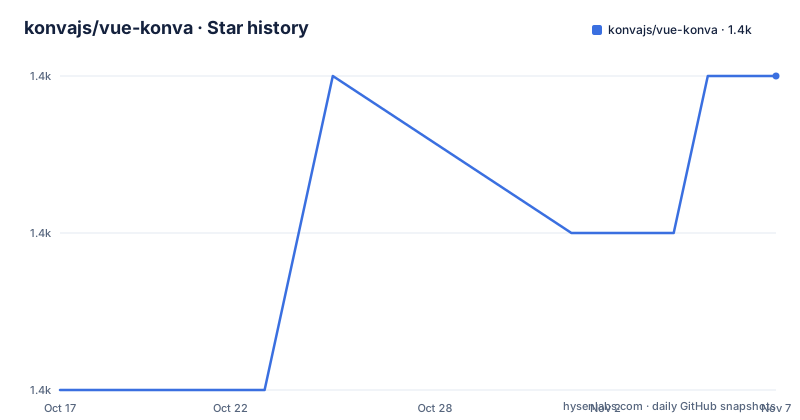
- konvajs/vue-konva1,360 ★ · +2
| Repository | 2026-10-17 | 2026-11-07 |
|---|---|---|
| konvajs/vue-konva | 1.4k | 1.4k |
2 Stars in the last 21 days, measured from the daily GitHub snapshot. Compare with other projects
Editorial analysis
The Vue component layer over Konva
Vue Konva solves the problem of expressing a Konva 2D canvas scene inside a Vue application without manually constructing every node in imperative code. Its target users are developers building interactive graphics such as design editors, whiteboards, diagrams, and annotations. Each Vue component corresponds to a Konva node and uses a `v-` prefix. The documented core components include `v-stage`, `v-layer`, `v-rect`, `v-circle`, `v-line`, `v-image`, `v-text`, and `v-path`.
Konva supplies the canvas scene graph and rendering operations. Vue Konva supplies the Vue-facing component and configuration layer. Application properties are passed through the `config` prop, so a template can describe the stage, its layers, and its nodes while application data controls coordinates, dimensions, fills, strokes, and other Konva properties.
This division does not make Vue Konva a ready-made editor. The repository describes components and a rendering path, while a complete editor still requires application features such as selection behavior, transformers, editing controls, persistence, and export. The README separately points developers who want an integrated editor SDK toward Polotno.
Stage, layer, and shape configuration
A basic scene follows the hierarchy defined by Konva. The stage receives its dimensions through a configuration object, a layer contains drawable nodes, and each shape receives its own `config`. In the documented example, a 200 by 200 stage contains a circle centered at `100, 100`, with a radius of `70`, red fill, black stroke, and stroke width of `4`.
The README also shows that Vue refs can expose the underlying Konva objects. Calling `getNode()` on refs for a stage, layer, or rectangle returns the corresponding node reference. This is the transition point between declarative configuration and application logic. A component can remain responsible for rendering, while event handlers or imperative code can use the node reference when it needs lower-level access.
The template itself is intentionally small. The important project-specific detail is that all Konva properties belong in `config`; the wrapper does not require each Konva property to become a separate Vue attribute. This keeps the scene representation aligned with Konva's own node API, although it also means that developers need to understand Konva's model rather than treating the components as an independent Vue graphics API.
Vue 3 installation and first canvas scene
The current package requires Vue 3. The documented installation adds both the Vue Konva package and Konva itself. The import registers `VueKonva` with a Vue application before mounting the root component.
npm install vue-konva konvaThe README then registers the plugin in the application entry point. `app.use(VueKonva)` makes the prefixed components available to the Vue application.
import { createApp } from 'vue';
import App from './App.vue';
import VueKonva from 'vue-konva';

const app = createApp(App);
app.use(VueKonva);
app.mount('#app');
The first real use is a component containing a stage, a layer, and a circle. The `configKonva` object controls the stage dimensions, while `configCircle` controls the circle's position and appearance.
<template>
  <v-stage :config="configKonva">
    <v-layer>
      <v-circle :config="configCircle"></v-circle>
    </v-layer>
  </v-stage>
</template><script>
export default {
data() {
return {
configKonva: {
width: 200,
height: 200
},
configCircle: {
x: 100,
y: 100,
radius: 70,
fill: "red",
stroke: "black",
strokeWidth: 4
}
};
}
};
</script>The expected application result is a red, black-outlined circle inside a 200 by 200 canvas stage. For Vue 2, the README directs developers to use `vue-konva@2` instead of the current package.
Non-strict updates and strict mode
Property synchronization is a consequential design choice in Vue Konva. By default, the library operates in non-strict mode. According to the README, when a node property is changed manually, including through a user action such as drag and drop, the node can retain that change instead of immediately matching the value supplied through `config`. The library updates only properties that Vue Konva observes as changed.
Strict mode changes that behavior. Adding `__useStrictMode` makes the component update all node properties to the values provided in `config`, regardless of whether those properties were changed independently in the meantime.
<v-rect :config="{}" __useStrictMode></v-rect>The choice matters for interactive applications. A whiteboard may allow a user to drag a rectangle and expect that movement to remain until the application updates its data. An editor with a separate, authoritative state model may prefer strict mode so that the rendered node follows `config` more consistently. The README does not prescribe one mode for all applications, so this is a design decision rather than a default that can be applied without considering node interactions.
Prefixes, refs, and custom Konva nodes
The default component prefix is `v-`, but the plugin accepts a configurable prefix. This is useful when another library or an application already uses the default naming convention.
import Vue from 'vue';
import VueKonva from 'vue-konva'

Vue.use(VueKonva, { prefix: 'Konva'});
With that setting, the template uses `konva-stage` instead of `v-stage`. The `config` prop remains the mechanism for passing Konva properties.
The plugin also accepts a `customNodes` object whose keys become component names. The documented example subclasses `Konva.Rect` as `MyRect`, registers it through `customNodes`, and then uses `<v-my-rect />` in the template. This gives an application a place for custom Konva node classes without requiring the project to abandon the Vue component layer.
For imperative access, the README uses Vue's `ref` feature. The component ref is a wrapper, and `getNode()` retrieves the Konva object. That pattern is useful when application code needs a direct node reference, but it also means that an editor can span both declarative configuration and direct Konva operations. Teams should keep the boundary clear so that changes made through a node reference are reflected in application state when they need to affect Vue updates.
Full build versus the core build
The default package imports the full `konva` package, including all shapes. The README documents `vue-konva/core` as the alternative when bundle size matters. With the core build, the application imports only the Konva shape modules it explicitly uses.
import VueKonva from 'vue-konva/core';
import 'konva/lib/shapes/Rect';
import 'konva/lib/shapes/Circle';
import 'konva/lib/shapes/Text';

const app = createApp(App);
app.use(VueKonva);
app.mount('#app');
Individual component imports are also documented:
import { Stage, Layer, Rect, Circle } from 'vue-konva/core';
import 'konva/lib/shapes/Rect';
import 'konva/lib/shapes/Circle';
This is a real packaging trade-off. The default path is simpler because it includes the complete Konva package. The core path reduces the set of imported shapes, but the application must identify and import every additional shape it uses. `Layer`, `Group`, `FastLayer`, and `Label` are described as core modules that remain available without separate shape imports. A missing shape import is therefore a practical failure mode of the tree-shaking path, whereas the full build avoids that specific omission.
Maintenance, packaging, and licensing
The repository is not archived, and its last push was on 2026-09-04. The package metadata identifies the current version as `4.0.1`, and the package declares `konva` as a peer dependency. The README states that Vue 3 is required for the current package, while Vue 2 users should use `vue-konva@2`.
The package exposes a standard entry point and a separate `./core` export. It publishes type declarations, has a UMD entry for unpkg and jsdelivr, and declares `sideEffects` as `false`. Its build process runs Vite builds and TypeScript declaration generation, while the package check script invokes `check-dist.mjs`, `attw`, and `publint`. These entries indicate packaging and distribution work are part of the repository's build setup, but the repository has no GitHub releases listed.
The project is MIT licensed. The README also identifies Polotno as a commercial design editor SDK built on Konva by the Konva maintainers, with templates, text editing, and export. That is a different scope from Vue Konva: Polotno is presented as an editor SDK to integrate, while Vue Konva exposes Konva nodes as Vue components. License and package terms for any commercial dependency should be reviewed separately from the MIT terms of Vue Konva.
Editorial conclusion
Vue Konva fits teams that want direct control over a canvas scene graph inside Vue 3 and are prepared to assemble editor behavior from Konva nodes, events, and application code. It is a poor fit for Vue 2 projects on the current package, or for applications that need a complete design editor immediately. Before adoption, verify compatibility with your intended Vue and Konva versions, confirm which shapes and modules the application imports, and inspect how non-strict or strict mode handles user-driven changes to node properties.
Frequently asked questions
How do I install Vue Konva for a Vue 3 application?
Install both `vue-konva` and `konva` with `npm install vue-konva konva`, then register `VueKonva` with `app.use(VueKonva)` before mounting the Vue application. The current package requires Vue 3.
How do I access the Konva node from a Vue Konva component?
Add a Vue `ref` to the component and call `getNode()`. The README demonstrates this for a stage, layer, and rectangle.
When should I use vue-konva/core instead of the default import?
Use `vue-konva/core` when the application should import only the Konva shapes it needs to reduce bundle size. The application must explicitly import additional shapes such as `Rect`, `Circle`, or `Text`.
What is the difference between Vue Konva and Polotno?
Vue Konva provides declarative Vue components for Konva's 2D canvas scene graph. The README presents Polotno as a commercial design editor SDK with templates, text editing, and export for integrating an editor instead of building one from the component layer.
Official sources
Add this badge to your README
If you maintain this project, the badge below links readers to this analysis and shows its maintenance status from the daily GitHub snapshot. Paste the markdown into your README; add ?metric=license or ?metric=stars to the image URL for a different field.

[](https://hysenlabs.com/projects/konvajs-vue-konva)Star history chart for your README
[](https://hysenlabs.com/projects/konvajs-vue-konva)Was this useful?