Easy Virtual Display Review for Windows Headless Setups
Effortlessly create virtual displays in Windows, capable of supporting various resolutions and refresh rates, suitable for remote control or graphics card spoofing.在win中轻松创建支持多种分辨率和刷新率的虚拟显示器,可用于远程控制或显卡欺骗。
At a glance
- What is it?
- Easy Virtual Display packages a Parsec-based virtual monitor driver into a Tauri desktop app for Windows. It suits remote-access and multi-display users, but it requires several native toolchains to build from source.
- Who is it for?
- Easy Virtual Display fits Windows users who need a GUI to manage a bundled virtual monitor driver from headless, remote-access, or multi-display setups. It is a poor fit for non-Windows systems, developers who only need a command-line virtual display driver, or organizations that cannot approve an unknown license or elevated driver installation.
- Can I use it commercially?
- Not without permission. GitHub finds no licence file in the repository, and without a licence all rights are reserved by default: you may read the code but not reuse it. Check the README, or ask the authors, before using it.
- Is it still maintained?
- Yes. The repository last received commits 21 days ago.
- What is it written in?
- Mainly Rust, according to GitHub's language statistics.
Answers come from the project's GitHub data, last synced on November 7, 2026, and from our analysis. They are not legal advice.
Star history
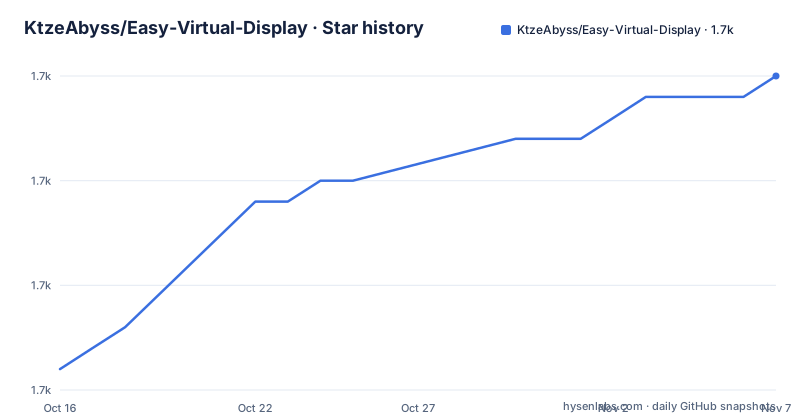
- KtzeAbyss/Easy-Virtual-Display1,715 ★ · +14
| Repository | 2026-10-16 | 2026-11-07 |
|---|---|---|
| KtzeAbyss/Easy-Virtual-Display | 1.7k | 1.7k |
14 Stars in the last 22 days, measured from the daily GitHub snapshot. Compare with other projects
Editorial analysis
Why Easy Virtual Display Targets Headless Windows Machines
Easy Virtual Display solves a Windows-specific hardware and desktop problem: software that expects a monitor may behave poorly on a headless machine. The project presents a virtual monitor as a display without a physically connected screen. Its documented use cases include headless servers, GPU systems, remote desktop and streaming, and adding screen space to a laptop. The driver can also participate in multi-monitor layout testing.
The primary audience is a Windows user who wants a graphical interface rather than a command-line tool. The README says the application requires no Parsec account and includes the driver in its installer. That packaging choice matters because the project builds on the early design of nomi-san/parsec-vdd, while presenting driver installation and monitor management through its own desktop shell.
A second audience is developers or system administrators configuring machines that must expose a screen to remote software. Easy Virtual Display does not provide the remote-control service itself. It supplies the virtual display that such software can use. Users still need a separate remote-access arrangement, and the repository documentation does not describe any built-in remote-control protocol.
The repository description also mentions graphics card spoofing, but the README uses the less promotional term GPU targeting. According to the README, a virtual display can be assigned to a specific parent GPU through Auto, NVIDIA, or AMD choices. This is not the same as controlling an application that tries to detect GPU hardware. The documented feature concerns which parent adapter hosts the virtual display.
Three-Layer Architecture of Easy Virtual Display
Easy Virtual Display separates the interface, desktop shell, and privileged driver control. The renderer is a React 19 and TypeScript application built with Vite. It uses TanStack Query for asynchronous state, react-hook-form and Zod for form handling, Radix primitives for interface controls, Tailwind CSS for styling, and i18next for English and Simplified Chinese localization. Shared TypeScript contracts under src/shared connect renderer-side interfaces to the shell boundary.
The desktop shell uses Tauri 2 and Rust. Based on the repository layout, it owns the window and system tray, startup behavior, keep-awake behavior, fallback-display logic, driver lifecycle, and privilege elevation. It also relies on the operating system's WebView2 runtime for the renderer rather than shipping a separate browser engine as part of the documented architecture.
The native host is written in C# under the native directory. The README identifies DeviceIoControl, SetupAPI, and CfgMgr32 as the Windows APIs used to communicate with the virtual display driver. This host exposes control to the Rust shell through a stdio JSON-RPC protocol. Data therefore moves from interface actions in React, through Tauri commands and shared contracts, into the Rust shell, then through the .NET host to Windows driver-management APIs.
Not every action requires the main application to run as administrator. The README says privileged operations, including driver installation, removal, and writing custom modes, use a dedicated elevated host invocation. This is a useful least-privilege boundary, although installation still triggers UAC and remains a high-trust operation on the host Windows system.
Display Controls and Limits in Easy Virtual Display 0.1.1
The application manages as many as eight virtual displays, based on the README. Displays can be added or removed from the main window or system tray. Each display can receive a resolution, refresh rate, and orientation, with the documented orientation choices covering standard, portrait, and flipped layouts. The UI also exposes driver state, driver version, maximum display count, and the number of active displays.
Custom modes are limited to five. This ceiling makes the custom-resolution feature bounded rather than an unrestricted mode editor. The README does not list the accepted mode strings, supported resolution range, supported refresh-rate range, or behavior when a requested mode is unsupported by the underlying driver and GPU. Teams that need exact timing parameters should inspect the source or test their required modes rather than assuming arbitrary values are accepted.
The project also includes behaviors that matter on unattended or remote machines. It can launch when the user signs in, remain in the system tray when closed, start minimized, keep the screen awake while a display is active, and create a fallback display when the primary monitor disconnects. The README does not explain whether keep-awake uses power requests through Tauri, which Windows power states it overrides, or whether the fallback display follows a particular refresh rate. It also does not document rollback if driver installation fails.
The documentation identifies Windows as the only supported platform because both the driver and application packaging are Windows-specific. There is no documented Linux, macOS, or cross-platform path. The available parent-GPU choices are also narrower than the operating system's hardware universe: Auto, NVIDIA, and AMD do not cover a documented Intel selection.
Installing Easy Virtual Display and Running the First Development Build
For evaluation without a source build, the README directs users to the GitHub Releases page for prebuilt installers. It says the driver is bundled, and installation requires a UAC-elevated action from the application. The documentation does not provide a silent installation command or checksum, so scripted deployment would require information not present in the repository documentation.
Building the source requires Windows, Node.js with npm, a stable Rust toolchain, and the .NET SDK. Based on the documented build scripts, the workflow publishes a framework-dependent win-x64 .NET host before invoking the Tauri build. This is relevant for contributors because installing only npm dependencies is not sufficient for a full desktop build.
From the repository root, install the JavaScript and TypeScript dependencies with:
npm installThe lockfile is present at the repository root, so this is the documented dependency installation command. After dependency installation completes, start the Tauri development application with:
npm run tauri:devThis command runs `tauri dev`, which opens the desktop shell in development mode. The README does not describe the first-click sequence for adding a display, so it does not confirm what the window looks like before driver installation or which status text appears at each stage.
Before building an installer, the documented checks are:
npm run typecheck
npm run test
The first command invokes the TypeScript compiler with the repository's web configuration. The second runs the Vitest suite. A production-oriented Windows installer is produced by:
npm run tauri:buildThe README says this publishes the .NET host and produces an NSIS installer containing the renderer, Rust shell, and driver. This workflow is not a documented Linux build path, even if parts of the renderer can be developed there.
Privileged Driver Installation and Windows-Specific Boundaries
Easy Virtual Display's main operational risk is the Windows driver lifecycle. Even though the normal application can avoid persistent administrator privileges, installing or removing the driver crosses into an elevated native host. Users must trust the bundled binary, its integrity, and the permissions granted during UAC. The repository documentation does not state whether the installer supports Group Policy deployment, whether uninstall removes all registry entries, or whether Windows restore can return the system to its previous driver state.
There is also a licensing boundary that an engineering reviewer must resolve before redistribution. The repository has no declared license in the available project metadata. The README does not identify a license for the application, the bundled driver, or vendor sources. That absence matters for internal modification, redistribution, and source-derived builds. It should not be interpreted as permission to copy or redistribute the code, and the license file must be checked in the upstream repository before any such use.
Maintenance activity is visible but the project is still early. Version 0.1.1 was released on 2026-06-05, and the last push was on 2026-10-16. The earlier 0.1 release dates to 2023-09-19. This establishes recent work on the current line, but it does not answer upgrade compatibility, long-term driver support, or migration from version 0.1.
The README does not document automatic application updates, a version-to-version migration policy, or rollback procedures. Because both a Rust application and a Windows kernel-adjacent driver are involved, an evaluator should not assume that installing a newer application release will leave an existing driver configuration untouched.
Easy Virtual Display Compared with parsec-vdd Workflows
Easy Virtual Display is a direct alternative to using the underlying parsec-vdd project as a command-oriented driver workflow. The README explicitly credits the early concept of nomi-san/parsec-vdd, and the repository includes vendor/parsec-vdd as the bundled virtual display driver installer. The difference is the control surface and packaging model.
A driver-centered workflow generally centers on installing the driver and issuing display operations directly. Easy Virtual Display places a native Windows desktop application around that work. It provides per-display configuration, up to five custom modes, parent-GPU selection, tray controls, driver status, launch-on-login behavior, a fallback display, localization, and theme selection. It also separates privileged operations from the ordinary app process.
That GUI is useful for an operator who changes display settings occasionally or does not want to use a terminal. It also creates a larger application stack to build and package: React and TypeScript in the renderer, Rust in the Tauri shell, and C# in the native host. Someone who needs only driver installation and basic display creation may prefer the smaller underlying driver workflow, if that is acceptable for their requirements.
Easy Virtual Display is not a remote desktop client. Its relevance to remote control is providing a monitor target for separate software. Likewise, custom display modes do not imply support for every possible resolution and refresh-rate combination. The actual mode catalog comes from the bundled driver and attached GPU environment, but the README does not enumerate that catalog.
Editorial conclusion
Easy Virtual Display fits Windows users who need a GUI to manage a bundled virtual monitor driver from headless, remote-access, or multi-display setups. It is a poor fit for non-Windows systems, developers who only need a command-line virtual display driver, or organizations that cannot approve an unknown license or elevated driver installation. Before adoption, verify the repository license, confirm that the Windows and GPU environment is supported, and review how the elevated install and display-removal flows behave on the target machine.
Frequently asked questions
What operating systems support Easy Virtual Display?
Easy Virtual Display supports Windows only. The README identifies Windows as a prerequisite because the virtual display driver and application packaging are Windows-specific.
How many virtual displays can Easy Virtual Display manage?
The application can add, remove, and manage up to eight virtual displays. Its interface also reports the maximum display count and active display count.
Do I need Rust and .NET to build Easy Virtual Display from source?
Yes. The documented prerequisites include Node.js, npm, a stable Rust toolchain, and the .NET SDK in addition to Windows.
Official sources
Add this badge to your README
If you maintain this project, the badge below links readers to this analysis and shows its maintenance status from the daily GitHub snapshot. Paste the markdown into your README; add ?metric=license or ?metric=stars to the image URL for a different field.

[](https://hysenlabs.com/projects/ktzeabyss-easy-virtual-display)Star history chart for your README
[](https://hysenlabs.com/projects/ktzeabyss-easy-virtual-display)Was this useful?