Presenton: bring your own model for deck generation, on a Docker setup that publishes an OAuth port
Open-Source AI Presentation Generator and API (Gamma, Canva, Beautiful AI, Decktopus, Presentations AI Alternative)
At a glance
- What is it?
- Presenton is an Apache 2.0 project that turns a prompt, a document, or your own PowerPoint design into an editable PPTX or PDF deck, run either self-hosted in Docker or as a desktop app. The generation path is broad and the export is editable, but every published tag is a beta and the compose file ships with a few sharp edges.
- Who is it for?
- Presenton is worth a look when deck generation has to stay on your own infrastructure and your own model keys, and when the output has to open in PowerPoint and be edited by a person afterwards rather than handed over as a flat image set. It is the wrong tool if you need a stable release contract, a native build for Windows on Arm or a non-deb Linux distribution, or a template change that survives a container restart without a rebuild.
- Can I use it commercially?
- Yes. Apache-2.0 is a permissive licence: you can use, modify and sell software built on it, as long as you keep its copyright and licence notices.
- Is it still maintained?
- Yes. The repository last received commits 9 days ago.
- What is it written in?
- Mainly TypeScript, according to GitHub's language statistics.
Answers come from the project's GitHub data, last synced on November 14, 2026, and from our analysis. They are not legal advice.
Star history
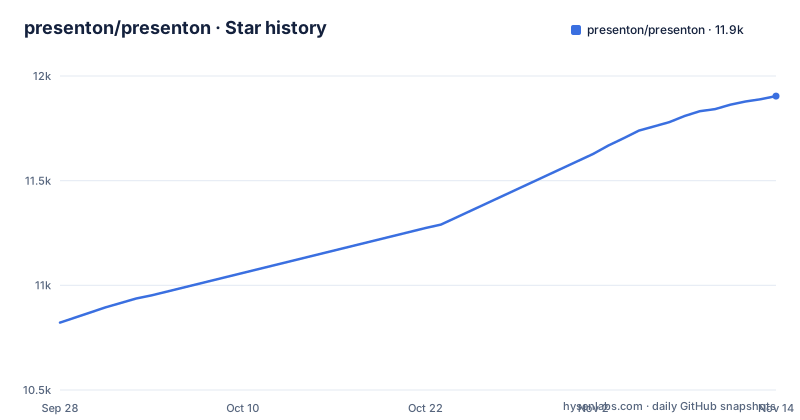
- presenton/presenton11,904 ★ · +1,082
| Repository | 2026-09-28 | 2026-11-14 |
|---|---|---|
| presenton/presenton | 10.8k | 11.9k |
1,082 Stars in the last 47 days, measured from the daily GitHub snapshot. Compare with other projects
Editorial analysis
The repo is TypeScript at the top, but the generation server is Python
The top of the tree looks like a Node project. The root package.json is named presenton, declares type module, and carries only two dependencies: @llamaindex/liteparse at ^1.5.2 and sharp at ^0.35.5. Everything below it is not Node. The Dockerfile has a stage built FROM python:3.11-slim-trixie working in /app/servers/fastapi, and a separate stage FROM node:22-bookworm-slim working in /app/servers/nextjs. The repository root also holds electron/, servers/, templates/, docs/, layouts.json, start.js, nginx.conf, a Dockerfile.dev, test-local.sh and test_server.py.
So a contributor has three toolchains to reason about: a Python service installed with uv and locked through uv.lock, a Next.js frontend, and an Electron shell. The root package.json is not the application manifest, it is a thin wrapper whose scripts are mostly about template conversion and export syncing.
The consequence is that a language summary of this project will mislead you. If you came for the TypeScript source, the logic that turns a prompt into a slide lives under servers/fastapi, and changes there need the Python toolchain, not the Node one.
Docker defaults to linux/amd64, and the published image line is commented out
The compose file has one service, named production, and two decisions in it that matter before anything runs. The first is the platform. It reads platform: ${PRESENTON_DOCKER_PLATFORM:-linux/amd64}, so the default target is amd64 no matter what machine you build on. The second is that the pull line is inert: the image reference ghcr.io/presenton/presenton:latest sits there as a comment, and the active block is build with context . and dockerfile Dockerfile. Out of the box you compile the image locally instead of pulling a published one.
Those two facts interact on Apple Silicon and on ARM servers, where the amd64 default means the build and the running containers go through emulation rather than native execution. The escape hatch is the environment variable itself, setting PRESENTON_DOCKER_PLATFORM to your native platform string before you bring the stack up.
Worth comparing against the desktop path: the platform table in the README lists a macOS .dmg for Apple Silicon and Intel, so the same project has native ARM coverage on the desktop and an amd64 default in the container. If you care about which architecture actually runs your deck generation, that variable is the only place it is expressed.
The host port map publishes 1455 so a browser callback aimed at localhost can land
Two ports come out of the container. One is the app itself, mapped from ${PRESENTON_HTTP_HOST_PORT:-5001} to port 80 inside, with a comment telling you to set PRESENTON_HTTP_HOST_PORT to change the host port. The other is bare:
services:
  production:
    platform: ${PRESENTON_DOCKER_PLATFORM:-linux/amd64}
    # image: ghcr.io/presenton/presenton:latest
    build:
      context: .
      dockerfile: Dockerfile
    ports:
      # Set PRESENTON_HTTP_HOST_PORT to change the host port.
      - "${PRESENTON_HTTP_HOST_PORT:-5001}:80"
      # Required for Codex OAuth callback (OpenAI redirects browser directly to localhost:1455)
      - "1455:1455"
    volumes:
      - ./app_data:/app_data
      - ./servers/fastapi/templates:/app/servers/fastapi/templates:ro
The comment explains why: it is required for the Codex OAuth callback, because OpenAI redirects the browser directly to localhost:1455. That design assumes the browser and the app share a machine, which is true of the desktop build and false of a server. The mapping has no bind address on either side, so the port is published on the host's interfaces, and the compose file carries no note about who is allowed to reach it.
For a self-hosted deployment the practical consequence is that whatever process answers on that port during an OAuth handshake completes an authorization for your instance. If you expose your Presenton host to a network, that port is part of the surface you have to think about.
Linux gets a .deb only and Windows gets x64 only
The desktop table is short and specific. macOS is listed for Apple Silicon and Intel with a .dmg package. Windows is listed for x64 with a .exe. Linux is listed for x64 with a .deb. That is the entire matrix, and the Docker route is the only listed way to run the web version, alongside the Railway and DigitalOcean deploy buttons.
Read as a support matrix, the gaps are specific rather than general. There is no rpm, no AppImage and no tarball for Linux, so a distribution that does not consume .deb packages is not covered by the desktop download, and the container path becomes the option rather than the fallback. There is no arm64 Windows build, so Windows on Arm is outside the table. There is no ARM Linux build either. macOS is the only row with both architectures named.
The consequence for a reader is that the download page is the place where compatibility is decided, and it is decided by architecture and package format rather than by a documented support statement. A Windows on Arm user and a Fedora user both fall outside the table.
Templates are mounted read-only, so in-container template edits do not survive
State and templates are two different volumes, and only one of them is writable by the container. ./app_data is mounted normally and is where persistent data goes, backed by the MIGRATE_DATABASE_ON_STARTUP=true flag that runs a migration at startup. The templates path is mounted with :ro, read-only, pointing at ./servers/fastapi/templates on the host and /app/servers/fastapi/templates inside the image.
That distinction decides how you customise. The README advertises custom templates and themes built with HTML and Tailwind CSS, and a route to create an AI-ready template from an existing PPTX, and a built-in set of six named designs: Momentum for sales reports and strategy decks, Dynamic for proposals and visual stories, Executive for leadership updates, General for adaptable business and education layouts, Modern for startup pitch decks, and Standard for professional reports. The README says a built-in design can be customised with Copy to custom, which places it under Custom templates in the template editor; the compose file separately mounts the host templates directory read-only.
If you point the volume at your own directory, the host copy becomes the source of truth. If you edit inside the image, the change dies with the container. PRESENTON_COMMUNITY_ENABLED is also passed through with a default of true, and the compose file carries no comment about what that switch governs.
Every published tag is a beta, and the export bundle carries its own version
The release list is entirely beta: v0.9.12-beta, electron-v0.9.12-beta, and electron-v0.9.11-beta, with the root package.json sitting at version 0.9.12-beta. No stable tag appears among the recent releases. The versions are recent, with the 0.9.12 pair published on 26 October 2026 and the repository's last push dated 2 November 2026, and the project is not archived, so work is still landing.
Next to the package version sits a second number, presentationExportVersion, currently v1.0.51. The export component is versioned apart from the app, and the root scripts exist to keep the two in step:
"test": "npm run test:template-converter && node --test scripts/package-metadata.test.mjs scripts/desktop-export.test.mjs scripts/sync-presentation-export.test.mjs scripts/user-config-env.test.mjs scripts/export-permissions.test.mjs scripts/document-parser-security.test.mjs scripts/sync-document-dependencies.test.mjs",
"convert:template": "node scripts/convert-template.mjs",
"convert:presentation-template": "node scripts/convert-presentation-template.mjs",
"sync:presentation-export": "node scripts/sync-presentation-export.cjs",
"sync:presentation-export:force": "node scripts/sync-presentation-export.cjs --force",
"check:presentation-export": "node scripts/sync-presentation-export.cjs --check-only"
The check-only mode is the interesting one: it runs scripts/sync-presentation-export.cjs with --check-only, while the force variant passes --force. The consequence for a reader is that an export regression can come from either the app or the export bundle, and the two move on separate version lines, so when a PPTX renders wrongly you have to find out which one changed before you start bisecting.
PPTX rendering assumes a Chromium inside the image, and model caches are baked in at build time
The export story leans on a headless browser, and the compose file says so directly with PUPPETEER_EXECUTABLE_PATH=/usr/bin/chromium. A browser path is hard-coded to a location in the image, so any image you build yourself has to put a Chromium at that path or rendering has nothing to drive.
The build goes further and prepares model data ahead of runtime. The Python stage creates a virtual environment without pip, installs uv, exports a frozen lockfile, and then installs a spaCy model wheel straight from a GitHub release URL for en_core_web_sm-3.8.0, with a comment explaining that mem0 and spaCy BM25 lemmatization load it at runtime and that the runtime image has no pip to fall back on. It sets HF_HOME and PRESENTON_FASTEMBED_ICON_CACHE_DIR, then runs scripts/warm_fastembed_cache.py, with a comment noting the caches are warmed into the image rather than a BuildKit cache mount so the weights travel with the layer.
Two consequences follow. Building the image requires reaching that model wheel URL and the model sources behind those two cache directories, so an air-gapped or restricted build host will fail at a step that looks like a network detail. And because the caches are in the layer, the image is larger and slower to rebuild than a bare Python slim base would suggest.
Provider configuration is one key variable plus one model variable per vendor
The environment block in docker-compose.yml follows a consistent shape, and the extra variables tell you what each hosted platform actually demands. LLM is the selector. OpenAI gets OPENAI_API_KEY and OPENAI_MODEL. Google gets GOOGLE_API_KEY and GOOGLE_MODEL. DeepSeek gets DEEPSEEK_API_KEY and DEEPSEEK_MODEL plus DEEPSEEK_BASE_URL. Vertex gets VERTEX_API_KEY and VERTEX_MODEL, and also VERTEX_PROJECT, VERTEX_LOCATION and VERTEX_BASE_URL. Azure OpenAI gets AZURE_OPENAI_API_KEY and AZURE_OPENAI_MODEL plus AZURE_OPENAI_ENDPOINT, AZURE_OPENAI_BASE_URL and AZURE_OPENAI_API_VERSION.
The README names a wider set than this env block shows: Ollama, LM Studio, OpenAI, Gemini, Vertex AI, Azure OpenAI, Amazon Bedrock, Fireworks, Together AI, Anthropic, or any other OpenAI compatible provider. The compose environment block lists key and model variables for OpenAI, DeepSeek, Google, Vertex and Azure OpenAI.
Editorial conclusion
Presenton is worth a look when deck generation has to stay on your own infrastructure and your own model keys, and when the output has to open in PowerPoint and be edited by a person afterwards rather than handed over as a flat image set. It is the wrong tool if you need a stable release contract, a native build for Windows on Arm or a non-deb Linux distribution, or a template change that survives a container restart without a rebuild. Before committing, read the compose file for the host port mapping and the 1455 callback, decide whether the amd64 platform default is what you want on your hardware, and pin a beta tag rather than tracking the main branch.
Frequently asked questions
What is Presenton?
An open-source AI presentation generator and API, licensed under Apache 2.0, that builds decks from a prompt, an uploaded document, or your own PowerPoint design and exports them as fully editable PPTX or PDF. It runs self-hosted through the Docker package or as a desktop app.
Which AI providers does Presenton support?
The README names Ollama, LM Studio, OpenAI, Gemini, Vertex AI, Azure OpenAI, Amazon Bedrock, Fireworks, Together AI and Anthropic, plus any other OpenAI compatible provider. The compose environment block sets key and model variables for OpenAI, DeepSeek, Google, Vertex and Azure.
How do I install the Presenton desktop app?
From presenton.ai/download, with a .dmg for macOS on Apple Silicon and Intel, a .exe for Windows x64, and a .deb for Linux x64. The web version is installed through the Docker package instead.
Does Presenton export editable PowerPoint files?
Yes, the export is described as a fully editable PPTX, with PDF as the other output. That export component is versioned separately from the app as presentationExportVersion, currently v1.0.51.
Does Presenton have an API?
It ships an AI Presentation Generation API and a built-in MCP server, so presentations can be generated over Model Context Protocol as well as through the interface.
Official sources
Where this project is recommended
Add this badge to your README
If you maintain this project, the badge below links readers to this analysis and shows its maintenance status from the daily GitHub snapshot. Paste the markdown into your README; add ?metric=license or ?metric=stars to the image URL for a different field.

[](https://hysenlabs.com/projects/presenton-presenton)Star history chart for your README
[](https://hysenlabs.com/projects/presenton-presenton)Was this useful?