MQTTX: a desktop, CLI and WebSocket MQTT 5.0 client from EMQ
A Powerful and All-in-One MQTT 5.0 client toolbox for Desktop, CLI and WebSocket.
At a glance
- What is it?
- MQTTX bundles a chat-style desktop client, a headless CLI and a browser build into one Apache-2.0 toolbox. It suits engineers who need to see MQTT 5.0 traffic while debugging, and it is overkill if you only need a single publish in a shell script.
- Who is it for?
- Adopt MQTTX if you need to inspect MQTT 5.0 sessions interactively and also want a CLI that can run the same checks in a terminal or container. Skip it if you only need a one-line publish from a shell script, since a small library client will do.
- Can I use it commercially?
- Yes. Apache-2.0 is a permissive licence: you can use, modify and sell software built on it, as long as you keep its copyright and licence notices.
- Is it still maintained?
- Yes. The repository last received commits 2 days ago.
- What is it written in?
- Mainly TypeScript, according to GitHub's language statistics.
Answers come from the project's GitHub data, last synced on November 14, 2026, and from our analysis. They are not legal advice.
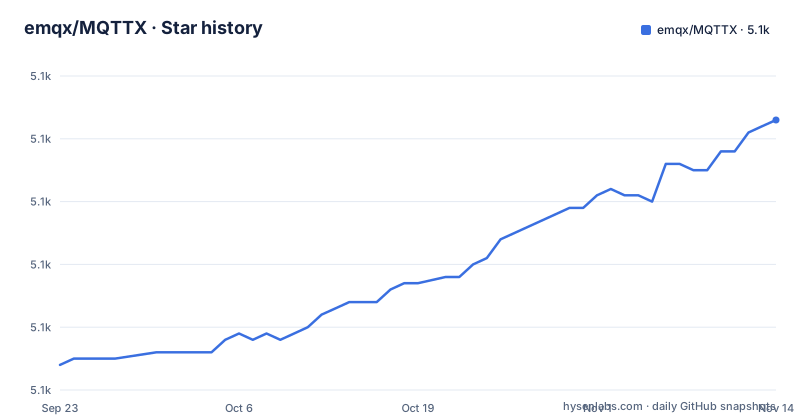
Star history
- emqx/MQTTX5,103 ★ · +39
| Repository | 2026-09-23 | 2026-11-14 |
|---|---|---|
| emqx/MQTTX | 5.1k | 5.1k |
39 Stars in the last 52 days, measured from the daily GitHub snapshot. Compare with other projects
Editorial analysis
What MQTTX is for, and who ends up using it
MQTT is a publish/subscribe protocol built for constrained devices and unreliable networks. Testing against a broker therefore means holding a session open, subscribing to a topic, publishing to another, and watching what actually arrives. MQTTX wraps that loop in a chat-like interface: the README describes a chat-style interface for multiple connections and subscriptions, with the desktop and CLI supporting MQTT 3.1, 3.1.1 and 5.0 over TCP, TLS and WebSocket.
The audience is narrow but real. Firmware and IoT engineers debugging a device that only speaks MQTT. Backend engineers checking that a broker routes retained messages and will messages the way they expect. Support engineers who need to reproduce a customer topic tree without writing code. The desktop build is the default entry point, the CLI covers machines without a display, and the web build covers the case where you cannot install anything.
It is not a broker. MQTTX connects to something else, and the README points at EMQX or the public broker at broker.emqx.io on port 1883 (TLS on 8883) for testing. If you need the server side, this is the wrong repository.
Three distributions behind one repository
The repository layout makes the split explicit: src/ holds the Electron desktop app, cli/ holds the command line client, web/ holds the browser build, and skills/ holds an agent skill definition. The desktop app is Vue and Electron, built through vue-cli-service with electron-builder, and package.json ships separate build targets for Windows, Linux and macOS. That is why the repository is large and why a source build pulls in Electron tooling rather than a single runtime.
The practical consequence is that the three surfaces do not share a release cadence in the way a single binary would. The Docker images referenced in the README are published separately as emqx/mqttx-web and emqx/mqttx-cli, so a team that standardises on the CLI in CI is depending on a different artifact from the one a colleague installs on a laptop.
MQTTX also ships an agent-facing path that most clients do not: the MQTTX CLI skill lets external AI agents run MQTT tests and diagnostics, and the desktop app has a built-in MQTTX Agent. If your workflow already has an agent driving terminal commands, that is a genuine differentiator rather than a marketing line.
Installing MQTTX and running a first publish/subscribe round trip
The README lists several install routes. macOS users can take the App Store or Homebrew, Linux users get Snap and Flathub, and everyone else can download from GitHub Releases or the EMQ download page. On macOS the cask is the shortest path:
brew install --cask mqttxAfter that, MQTTX appears as a normal application. For the GUI the README's flow is three steps: click + in the left sidebar and fill in the required fields, enter your broker address and click Connect, then subscribe to a topic and publish a JSON message to the same topic. If you have no broker of your own, the README gives the public EMQX Cloud broker with host broker.emqx.io, TCP port 1883 and SSL port 8883.
For a headless check, the CLI is the faster route: the README installs it with `curl -fsSL https://emqx.sh/mqttx | sh` on macOS and Linux or `irm https://emqx.sh/mqttx.ps1 | iex` in Windows PowerShell, and points to the installation docs for Homebrew, npm, Docker and standalone binaries.
Once the CLI is present, the README's own round trip is a subscriber in one terminal and a publisher in another: `mqttx sub -h broker.emqx.io -t 'mqttx/quickstart'` and `mqttx pub -h broker.emqx.io -t 'mqttx/quickstart' -m '{"temperature":23.5}'`, with the subscriber receiving the JSON message.
Where MQTTX gets in the way
The desktop client is an Electron application. That means a bundled Chromium and Node runtime and a build pipeline that runs on yarn and electron-builder. For a quick protocol check on a build server, that is the wrong shape entirely, and the CLI or a library client is the better answer.
The README is honest about the dependency it does not ship: you need a broker. Nothing in the repository starts one, so the first run always involves either a local EMQX deployment, another broker, or the public test broker. Teams in restricted networks will find that the public broker is not an option and will need their own endpoint before MQTTX is useful at all.
There is also a documentation boundary worth noting. The README covers installation, a three-step GUI flow and a feature list that names the payload codecs (Plaintext, JSON, Base64, Hex, CBOR, MsgPack, Protobuf and Avro schemas) and MQTT 5.0 user properties, and points to https://mqttx.app/docs/cli for more CLI commands. If your acceptance criteria depend on a specific MQTT 5 property or a particular payload codec, the README alone will not settle it.
MQTTX against a plain MQTT library client
The obvious alternative is not another GUI. It is a protocol library used directly: Eclipse Paho, or the client bundled with whichever broker you run, driven from a short Python or Go program. The difference in approach is where the state lives. A library client gives you one connection, one script and full control over reconnect logic, but every new inspection means editing code and re-running it.
MQTTX inverts that. The connection is a saved object in the app, the topic tree is visible, and switching between two brokers is a click rather than a code change. That is the whole value proposition, and it is why the chat-style layout exists: the README describes a chat-style interface for multiple connections and subscriptions.
The trade-off is reproducibility. A shell script with a Paho client is diffable and can run in CI unchanged. An MQTTX desktop session is a local artifact. The CLI narrows that gap because it is a binary you can invoke from a pipeline, but the README lists desktop connection import/export and CLI save/load of connection options as separate features, so do not assume a connection saved in the GUI can be replayed headlessly without checking the manual.
Maintenance, licence and upgrade cost
The repository is not archived, and the last push was on 2026-11-02. Release v1.13.2 landed on 2026-10-26, v1.13.1 on 2026-09-20 and v1.13.0 on 2026-01-23. Read that cadence carefully: v1.13.1 and v1.13.2 came about five weeks apart after a gap of roughly eight months since v1.13.0, so a team that pins a version should expect irregular updates rather than a fixed schedule.
Upgrade cost is dominated by which surface you use. Desktop users reinstall through Homebrew, Snap, Flathub or the App Store and inherit whatever Electron version the release was built against. CLI users replace a binary or pull a new image. Anyone building from source pays the full cost: yarn install pulls Electron and the project runs several patch scripts on postinstall, so a source build is a real dependency-management exercise rather than a quick compile.
MQTTX is Apache-2.0, and the LICENSE file sits at the repository root. Apache-2.0 permits commercial use and modification and includes an explicit patent grant, with the usual obligations around notices and stating changes. If you are bundling MQTTX into a product or shipping it internally, read the LICENSE text and your own distribution policy rather than treating this paragraph as legal advice.
Editorial conclusion
Adopt MQTTX if you need to inspect MQTT 5.0 sessions interactively and also want a CLI that can run the same checks in a terminal or container. Skip it if you only need a one-line publish from a shell script, since a small library client will do. Before committing, verify which of the three distributions you actually need (desktop, mqttx-cli or mqttx-web), confirm the payload codecs and MQTT 5 features you rely on appear in the manual, and read the Apache-2.0 LICENSE file for the terms that apply to your redistribution.
Frequently asked questions
How do I install MQTTX?
The README lists several routes: the macOS App Store, Homebrew with brew install --cask mqttx, Snap and Flathub on Linux, or a download from GitHub Releases and the EMQ downloads page. For the CLI, the README gives an install script (curl -fsSL https://emqx.sh/mqttx | sh on macOS and Linux, irm https://emqx.sh/mqttx.ps1 | iex on Windows) and points to the installation docs for Homebrew, npm, Docker and standalone binaries.
How do I use MQTTX?
Open MQTTX, click + in the left sidebar and fill in the required fields, enter your broker address and click Connect, then subscribe to a topic and publish a JSON message to the same topic. The README suggests the public EMQX Cloud broker at broker.emqx.io on port 1883, or SSL port 8883, if you have no local broker.
What does MQTT stand for?
The README states that MQTT stands for MQ Telemetry Transport, describing it as a publish/subscribe, lightweight messaging protocol designed for constrained devices and low-bandwidth, high-latency or unreliable networks.
Official sources
Add this badge to your README
If you maintain this project, the badge below links readers to this analysis and shows its maintenance status from the daily GitHub snapshot. Paste the markdown into your README; add ?metric=license or ?metric=stars to the image URL for a different field.

[](https://hysenlabs.com/projects/emqx-mqttx)Star history chart for your README
[](https://hysenlabs.com/projects/emqx-mqttx)Was this useful?