Kubernetes Secrets Store CSI Driver for external secret mounting
Secrets Store CSI driver for Kubernetes secrets - Integrates secrets stores with Kubernetes via a CSI volume.
At a glance
- What is it?
- The Kubernetes Secrets Store CSI Driver connects Kubernetes pods to external secret stores through a CSI volume. It suits workloads that need secrets, keys, or certificates mounted as files, with provider-specific configuration required at cluster setup.
- Who is it for?
- Adopt this driver when a workload must read external secret material as files and the cluster can operate provider infrastructure and a SecretProviderClass. Do not adopt it if direct Kubernetes Secret references are sufficient or if provider authentication and lifecycle management are unacceptable.
- Can I use it commercially?
- Yes. Apache-2.0 is a permissive licence: you can use, modify and sell software built on it, as long as you keep its copyright and licence notices.
- Is it still maintained?
- Yes. The repository last received commits 3 days ago.
- What is it written in?
- Mainly Go, according to GitHub's language statistics.
Answers come from the project's GitHub data, last synced on November 7, 2026, and from our analysis. They are not legal advice.
Star history
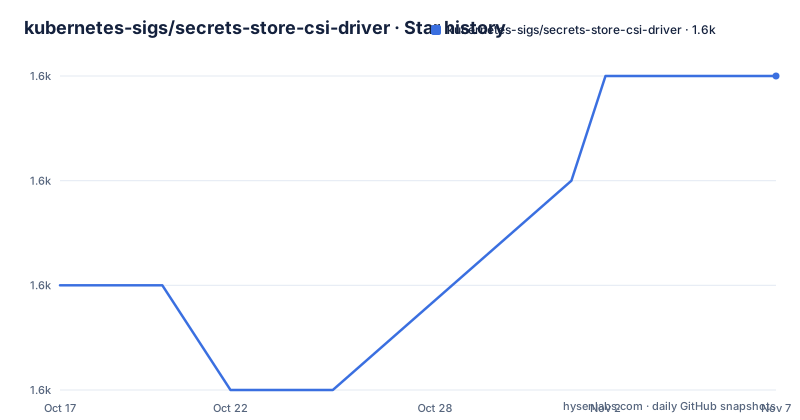
- kubernetes-sigs/secrets-store-csi-driver1,567 ★ · +2
| Repository | 2026-10-17 | 2026-11-07 |
|---|---|---|
| kubernetes-sigs/secrets-store-csi-driver | 1.6k | 1.6k |
2 Stars in the last 21 days, measured from the daily GitHub snapshot. Compare with other projects
Editorial analysis
Why the Secrets Store CSI Driver exists
This project solves the gap between external secret stores and the file-based interfaces commonly used by applications. A database connection string, signing key, or certificate may need to appear as a file inside a container, even though the source is an enterprise secret manager rather than a Kubernetes Secret object. The driver gives those applications a filesystem mount while keeping the source material in an external store. The README identifies Kubernetes pods as the consumer and describes support for mounting secrets, keys, and certificates from enterprise-grade external stores. That makes it relevant to platform teams and application teams whose workloads already depend on AWS Secrets Manager, Azure Key Vault, Google Secret Manager, HashiCorp Vault, or another supported provider. The project also supports multiple secrets stores in one cluster and allows several secrets store objects to be mounted through a single volume.
The CSI mount path from pod to secret store
The architecture is based on the Container Storage Interface, with the driver identified as `secrets-store.csi.k8s.io`. According to the README, a Kubernetes workload uses an Inline CSI volume. The CSI driver handles that volume request, coordinates with a configured provider, and makes the requested objects available under a volume path. The data is then mounted into the container's filesystem. This mechanism is different from putting a value directly in a Kubernetes Secret and mounting that object as a conventional Kubernetes volume. The driver is specifically concerned with material held outside the cluster and delivered through a provider integration. The repository layout includes `provider/`, `pkg/`, `controllers/`, `config/`, and deployment-related directories, which is consistent with a driver that includes runtime code, provider integration points, controllers, and deployment assets. The README does not specify the internal RPC sequence or the on-disk transformation rules, so those details should be checked in the linked concepts documentation before depending on a particular file layout.
SecretProviderClass and provider configuration
The README says pod portability is supported through the `SecretProviderClass` CRD. In practical terms, this CRD is the configuration point that tells the driver how a pod's external secret request should be interpreted. The project documentation links to its concepts page for CRDs and core components, but the README does not include a complete `SecretProviderClass` example. It therefore does not confirm the exact schema, field names, secret references, file names, or authentication parameters that a particular provider requires. That omission matters during adoption because installing the driver alone does not create a usable integration. A provider must also be deployed, and provider-specific resources or identity configuration must be prepared. The repository topics include AWS Secrets Manager, Azure Key Vault, Google Secret Manager, and HashiCorp Vault, but the README does not claim that every provider has identical configuration or identical support for every secret type. Provider-specific behavior belongs in each provider's documentation and manifests.
Installation and a first Kubernetes mount
The project directs new users to its installation instructions and says to deploy both the Secrets Store CSI Driver and providers. It also points users to the concepts documentation before configuring a workload. The first practical use should follow this sequence: deploy the CSI driver, deploy the provider for the external secret store, create the provider-specific identity and access configuration, define a `SecretProviderClass`, and then reference the resulting CSI Inline volume from a pod. The pod should mount the requested secret objects and expose the resulting files where the application expects them. The driver supports Linux and Windows containers, but the README does not document whether every provider supports both operating systems. That compatibility boundary must be checked for the selected provider before deploying the first workload.
Multiple stores, portability, and Secret synchronization
Three project capabilities affect design decisions. First, multiple secrets store objects can be mounted as a single volume. This is useful when an application needs related values from more than one configured source, although the exact object mapping is left to the provider and `SecretProviderClass`. Second, multiple providers can run in the same cluster at once. That supports heterogeneous environments where teams use different secret stores, but it also expands the set of upgrade and access-control surfaces that must be managed. Third, the project supports synchronization with Kubernetes Secrets. That offers a path for applications that cannot consume mounted files or for operational processes that require Kubernetes Secret resources. Synchronization should not be treated as interchangeable with the CSI mount. The README does not state whether synchronization is enabled by default, how updates are propagated, or how conflicts are handled, so those points require verification in the linked documentation. For applications that can use mounted files, the CSI volume is the primary mechanism. For applications that require Kubernetes API objects, synchronization is the more relevant feature.
Where the CSI approach is a poor fit
The driver adds infrastructure between a Kubernetes workload and a secret store, so it is the wrong tool when direct Kubernetes Secret consumption is enough. A small application that already accepts mounted Secret data may gain little from a provider integration. The approach also introduces responsibilities outside the pod, including deploying a provider, granting access to the external store, defining a `SecretProviderClass`, and monitoring the mounted volume. The README does not explain secret rotation behavior, file permission defaults, propagation timing, cleanup semantics, or recovery after provider failure. Those are not minor details for a certificate or signing workload. The driver also does not automatically remove the need to protect secret data inside the container. A mounted file can still be read by processes running as that user, and the project description does not claim that the driver solves application-level access control. Provider compatibility, authentication boundaries, rotation guarantees, and cleanup behavior should therefore determine whether this design fits the workload.
Secrets Store CSI Driver versus native Kubernetes Secrets
The practical alternative is to store the required material in Kubernetes Secrets and mount those objects through the native Kubernetes volume mechanism. The difference is the source and control plane. Native Kubernetes Secrets keep the secret material as Kubernetes API objects and avoid requiring a separate secrets-store provider for the basic use case. The Secrets Store CSI Driver reads from external stores through provider integrations, which is the appropriate direction when an organization already manages credentials centrally outside Kubernetes or needs several provider-backed objects presented in one workload. The README also documents synchronization from the driver path to Kubernetes Secrets. That creates a bridge, but it does not erase the design difference. A native Secret is a Kubernetes resource. A CSI volume is a filesystem projection backed by an external-store integration. The choice should follow ownership, provider requirements, rotation procedures, and the application's required file interface, rather than the number of available features.
Maintenance, upgrades, and the Apache-2.0 license
The repository is not archived, and the last push was on 2026-10-15. Recent releases include `v1.6.1` on 2026-09-09 and `v1.5.7` on 2026-09-15. Those dates indicate recent project activity, but they do not establish compatibility for any particular cluster or provider. The `Makefile` identifies `v1.6.0` as the current supported release for the driver and as the image version used by its build variables. The module requires Go `1.26.0`, and its dependency list includes Kubernetes libraries at `v0.36.1`, controller-runtime, CSI libraries, gRPC, and observability packages. Upgrading the driver therefore needs attention to Kubernetes, Go build requirements, provider versions, and deployed manifests, not just the driver image. The repository is licensed under Apache-2.0. That license provides the stated permissions and conditions for use, modification, and distribution, while organizations still need to account for their own compliance, provider terms, and operational policies.
Editorial conclusion
Adopt this driver when a workload must read external secret material as files and the cluster can operate provider infrastructure and a SecretProviderClass. Do not adopt it if direct Kubernetes Secret references are sufficient or if provider authentication and lifecycle management are unacceptable. Verify provider support, CSI installation, permissions, and synchronization behavior before enabling it for production workloads.
Frequently asked questions
What does the Kubernetes Secrets Store CSI Driver do?
It integrates external secret stores with Kubernetes through a CSI volume. The README says multiple secrets, keys, and certificates can be mounted into pods as a volume.
Does the Kubernetes Secrets Store CSI Driver support Kubernetes Secret synchronization?
Yes. The README lists sync with Kubernetes Secrets as a supported feature. It does not provide the configuration, default behavior, or propagation details.
Can multiple secrets stores be used with the Kubernetes Secrets Store CSI Driver?
Yes. The README states that multiple providers can run in the same cluster simultaneously, and it also supports mounting multiple secrets store objects as a single volume.
Which platforms does the Kubernetes Secrets Store CSI Driver support?
The README states that the driver supports Linux and Windows containers. It does not state that every external provider supports both platforms, so provider-specific documentation should be checked.
How is a Kubernetes Secrets Store CSI Driver installation configured?
The README directs users to the project installation instructions and to the concepts documentation for CRDs and core components. It does not include exact installation commands or a complete `SecretProviderClass` example.
Official sources
Add this badge to your README
If you maintain this project, the badge below links readers to this analysis and shows its maintenance status from the daily GitHub snapshot. Paste the markdown into your README; add ?metric=license or ?metric=stars to the image URL for a different field.

[](https://hysenlabs.com/projects/kubernetes-sigs-secrets-store-csi-driver)Star history chart for your README
[](https://hysenlabs.com/projects/kubernetes-sigs-secrets-store-csi-driver)Was this useful?