Flux v2: GitOps Continuous Delivery for Kubernetes, Reviewed
Open and extensible continuous delivery solution for Kubernetes. Powered by GitOps Toolkit.
At a glance
- What is it?
- Flux v2 keeps Kubernetes clusters in sync with Git repositories and OCI artifacts through a set of composable controllers. Here is how the GitOps Toolkit is structured, how to bootstrap it, and where it stops being the right tool.
- Who is it for?
- Adopt Flux v2 if your delivery model is declarative, your cluster configuration already lives in Git, and you want reconciliation driven by Kubernetes custom resources rather than an external pipeline runner. Do not adopt it if you need imperative, one-shot deployment steps, or if you cannot give the controllers read access to a Git repository or OCI registry.
- Can I use it commercially?
- Yes. Apache-2.0 is a permissive licence: you can use, modify and sell software built on it, as long as you keep its copyright and licence notices.
- Is it still maintained?
- Yes. The repository received new commits within the last day.
- What is it written in?
- Mainly Go, according to GitHub's language statistics.
Answers come from the project's GitHub data, last synced on November 14, 2026, and from our analysis. They are not legal advice.
Star history
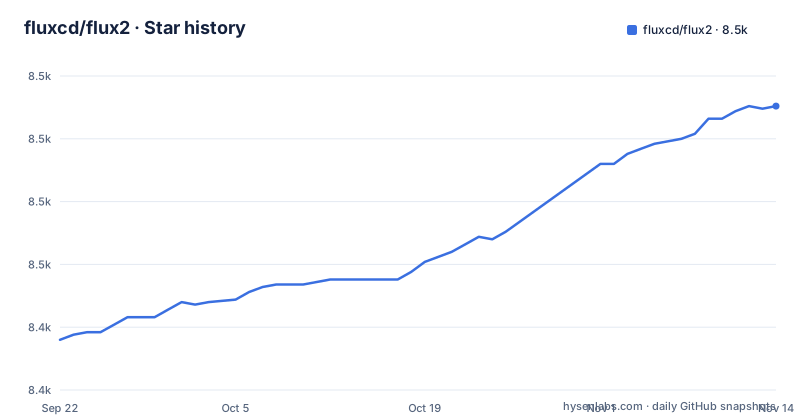
- fluxcd/flux28,513 ★ · +93
| Repository | 2026-09-22 | 2026-11-14 |
|---|---|---|
| fluxcd/flux2 | 8.4k | 8.5k |
93 Stars in the last 53 days, measured from the daily GitHub snapshot. Compare with other projects
Editorial analysis
The problem Flux v2 solves, and for whom
Kubernetes clusters drift. Someone edits a Deployment with kubectl, a Helm release is upgraded by hand, a manifest in Git and the object in the cluster stop matching. Flux v2 exists to close that gap continuously rather than at deploy time. The README describes it as a tool "for keeping Kubernetes clusters in sync with sources of configuration (like Git repositories and OCI artifacts), and automating updates to configuration when there is new code to deploy."
The audience is platform and infrastructure engineers who already treat Git as the record of what should run. Flux v2 is not a build system and not a test runner. It takes configuration that already exists, watches the place it is stored, and applies it. If your deployment currently depends on a CI job holding cluster credentials and running kubectl apply at the end, Flux moves that responsibility inside the cluster, where the controllers run as pods and pull from the source instead of being pushed to.
Version 2 is a rewrite rather than an increment. The README states it is "built from the ground up to use Kubernetes' API extension system," and that it adds multi-tenancy and the ability to sync an arbitrary number of Git repositories. Those two changes define who the tool now fits: organisations running more than one team or more than one repository on shared clusters.
How the GitOps Toolkit controllers divide the work
Flux v2 is not a single binary doing everything. The README calls the GitOps Toolkit "a set of composable APIs and specialized tools for building Continuous Delivery on top of Kubernetes," and the components list shows the split clearly.
Source Controllers own the question of where configuration comes from. The custom resources are GitRepository, OCIRepository, HelmRepository, HelmChart, Bucket, ExternalArtifact and ArtifactGenerator. Each represents an external location, and the controller's job is to fetch it and expose the result as an artifact other controllers can consume.
The Kustomize Controller takes a Kustomization resource and applies the manifests it points at. The Helm Controller does the equivalent for HelmRelease resources, so Helm charts are reconciled by a controller rather than by a helm upgrade command in a pipeline. The Notification Controller handles Provider, Alert and Receiver resources, which is how events leave the cluster. The Image Automation Controllers (ImageRepository, ImagePolicy, ImageUpdateAutomation) cover the loop where a new container image is detected and a commit is written back to Git.
The practical consequence of this decomposition is that a failure is scoped. If the source controller cannot reach a repository, the Kustomize controller has nothing new to apply, and you can see which stage is stuck by looking at which resource is not Ready. The trade-off is that a working setup involves several kinds of custom resource, and debugging means reading status conditions across them rather than reading one deployment log.
Installing the flux CLI and bootstrapping a cluster
The README points to the Get Started guide for bootstrapping Flux on Kubernetes and deploying a sample application. The repository also ships a Dockerfile that builds a flux-cli image from alpine:3.24, copying in a kubectl binary and the flux binary, with ENTRYPOINT set to flux. That image is an option when you want the CLI available as a container rather than installed on a workstation.
The documented path is the bootstrap flow. The flux CLI is the entry point; the bootstrap command installs the controllers into the cluster and connects them to a repository. The exact flags are described in the Get Started guide, and the README does not reproduce them, so treat the guide as the source of truth for the command form.
After bootstrap, the first useful check is whether the controllers are running and the source resource has reconciled. The CLI exposes status output for the Flux installation and for individual resources, which is how you confirm that the bootstrap actually took effect rather than assuming it did.
The repository's own build tooling is separate from user installation. The Makefile defines test, build, e2e and setup-kind targets, and setup-kind creates a kind cluster named flux-e2e-test with a kubeconfig at /tmp/flux-e2e-test-kubeconfig. Those targets exist to validate the project itself, not to install it for you.
Where Flux v2 is the wrong tool
Flux reconciles desired state. It does not sequence imperative steps. If a deployment requires running a database migration, waiting for it, then flipping a feature flag, that ordering is not something the Kustomization or HelmRelease resources express. You can wrap such steps in a Job manifest that Flux applies, but the ordering guarantee then lives in the Job, not in Flux.
The second boundary is credentials. Flux pulls from Git repositories and OCI registries, which means the controllers need read access to those sources, and the image automation controllers need write access to commit back. In an environment where no cluster-resident component is permitted to hold repository credentials, the pull model is a blocker rather than a preference.
The third is scope. Multi-tenancy is a stated feature of v2, but multi-tenancy in Flux means separating tenants through Kubernetes RBAC and namespaces. A team that wants a hosted control plane with per-team isolation handled for them is not the audience for a self-managed controller set.
Finally, the README does not document rollback. Reconciliation moves a cluster toward the state in the source. Reverting a bad change means reverting the commit, and how quickly that propagates depends on the reconciliation interval configured on the resource.
Flux v2 compared with a push-based pipeline
The real alternative for most teams is not another GitOps controller but the pipeline they already have: a CI system that runs tests and then applies manifests to the cluster with kubectl or helm, holding cluster credentials as secrets.
The difference is the direction of the connection. A push-based pipeline reaches into the cluster from outside, so the cluster needs an endpoint the CI runner can authenticate against, and the credentials live in the CI system. Flux inverts this: the controllers run inside the cluster and reach out to the source. There is no inbound path required for reconciliation, and the credentials live in the cluster as Kubernetes secrets.
The second difference is when reconciliation happens. A pipeline applies once, at the end of a run. Flux reconciles on an interval, so a manual kubectl edit is corrected without anyone triggering anything. That is the property that makes drift visible, and it is also the property that surprises people: a change made directly in the cluster will be reverted, which is the intended behaviour but not always the expected one.
The third difference is what counts as a deployment record. In a push pipeline the record is the CI run. In Flux the record is the Git commit plus the status conditions on the Flux resources.
Maintenance, releases and licence
Flux v2 is licensed under Apache-2.0, and the repository carries an SPDX-identifiable LICENSE file at the top level alongside a DCO file, which indicates contributions are signed off rather than assigned. Apache-2.0 permits commercial use and modification and includes a patent grant; it also requires that notices be preserved. That is a summary of the licence text, not legal advice, and anyone embedding Flux in a distributed product should read the LICENSE file directly.
The release cadence is visible from the tags: v2.10.0 on 2026-10-26, v2.9.6 on 2026-10-01, v2.9.5 on 2026-08-31. Releases arrived roughly every four weeks in that window. The last push to the main branch was on 2026-11-01, so the repository is not archived and is receiving commits.
Upgrade cost is concentrated in the custom resource APIs. The go.mod file pins controller API modules such as kustomize-controller/api at v1.10.1, helm-controller/api at v1.7.1 and source-controller/api at v1.10.1. Those module versions are what the CLI is compiled against, and a cluster running older controller versions than the CLI expects is the usual source of friction. The repository's own CI runs unit tests with the unit build tag and a separate e2e suite against a kind cluster, which is the project's validation path, not a guarantee about your cluster.
Editorial conclusion
Adopt Flux v2 if your delivery model is declarative, your cluster configuration already lives in Git, and you want reconciliation driven by Kubernetes custom resources rather than an external pipeline runner. Do not adopt it if you need imperative, one-shot deployment steps, or if you cannot give the controllers read access to a Git repository or OCI registry. Before bootstrapping, verify three things: that your cluster version is supported by the controllers referenced in go.mod, that you have decided between Git and OCI as the source of truth, and that you understand that flux bootstrap commits to your repository and that the README does not document an automated rollback of that commit.
Frequently asked questions
What is Flux v2 used for?
It keeps Kubernetes clusters in sync with sources of configuration such as Git repositories and OCI artifacts, and automates updates to configuration when there is new code to deploy. It is built on the GitOps Toolkit, a set of composable APIs and controllers.
How do I use Flux v2?
The README directs you to the Get Started guide, which covers bootstrapping Flux on Kubernetes and deploying a sample application in a GitOps manner. From there, the guides cover repository structure, Helm releases, image updates and SOPS-managed secrets.
How do I install Flux v2?
The documented route is the flux CLI and the bootstrap flow described in the Get Started guide, which installs the controllers into the cluster and connects them to a source. The repository also provides a Dockerfile that builds a flux-cli image with the flux binary as its entrypoint.
Official sources
Add this badge to your README
If you maintain this project, the badge below links readers to this analysis and shows its maintenance status from the daily GitHub snapshot. Paste the markdown into your README; add ?metric=license or ?metric=stars to the image URL for a different field.

[](https://hysenlabs.com/projects/fluxcd-flux2)Star history chart for your README
[](https://hysenlabs.com/projects/fluxcd-flux2)Was this useful?