Monolithic puts every LAN party CDN behind one container
A monolithic lancache service capable of caching all CDNs in a single instance
At a glance
- What is it?
- Monolithic is the Docker image from the LanCache.net project that caches several game CDNs in a single instance, with its behaviour set almost entirely through environment variables. The build is a thin configuration layer on top of the lancachenet/ubuntu-nginx base image, and the repository ships no tagged releases.
- Who is it for?
- Monolithic is worth adopting for a LAN party or a shared internet connection where players are pulling the same game content from different CDNs at the same time, and where you want one container rather than a fleet. It is the wrong tool if you need a versioned, reproducible release artefact, because the repository publishes no GitHub releases, or if you want to run one CDN type in isolation.
- Can I use it commercially?
- Check first. The repository uses a licence we do not classify automatically, so read its LICENSE file before any commercial use.
- Is it still maintained?
- Yes. The repository last received commits 30 days ago.
- What is it written in?
- Mainly Shell, according to GitHub's language statistics.
Answers come from the project's GitHub data, last synced on November 7, 2026, and from our analysis. They are not legal advice.
Star history
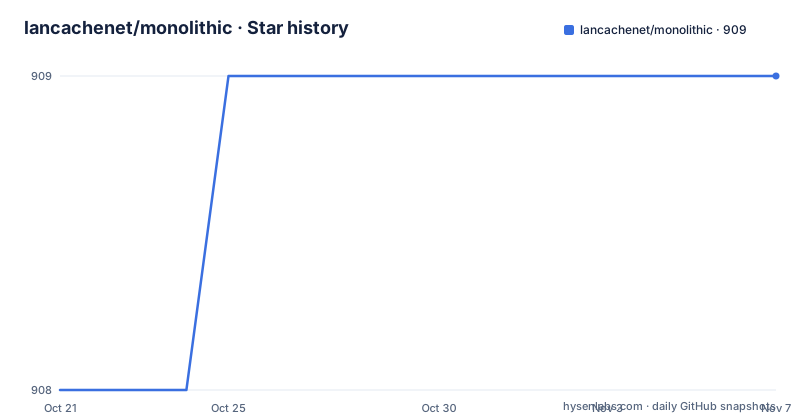
- lancachenet/monolithic909 ★ · +1
| Repository | 2026-10-21 | 2026-11-07 |
|---|---|---|
| lancachenet/monolithic | 908 | 909 |
1 Stars in the last 17 days, measured from the daily GitHub snapshot. Compare with other projects
Editorial analysis
The problem: a dozen publishers, one saturated uplink
At a LAN party, the pattern is predictable. Everyone arrives, everyone launches the same game, and the upload link that was sized for voice traffic suddenly has to serve gigabytes of launcher downloads. The publishers involved do not share infrastructure, so a single proxy that knows how to serve one of them tells you nothing about the rest.
Monolithic answers that by collapsing the problem into one container. The project describes itself as a monolithic lancache service capable of caching all CDNs in a single instance, and the image tags shown in the README cover a DNS component, a SNI proxy component and a generic component alongside the monolithic image itself. The point of the monolithic build is that one deployment covers the range of CDNs a party will actually hit, rather than requiring the operator to stand up and configure each cache separately.
The audience is therefore the person running a LAN, a gaming event, a hotel conference network or any other shared connection where bandwidth is the scarce resource. It is a deployment tool rather than a library. There is no API to call and no code to write; the work is in the image, its environment variables, and the network plumbing that puts the cache in front of the clients.
The image is Ubuntu, nginx and a copied overlay
The Dockerfile is short and its structure says most of the design. The build starts from a prebuilt base image:
FROM lancachenet/ubuntu-nginx:latest
LABEL version=3
LABEL description="Single caching container for caching game content at LAN parties."
LABEL maintainer="LanCache.Net Team <[email protected]>"
Everything that distinguishes this container from a plain nginx server arrives through the COPY of the overlay directory:
COPY overlay/ /The overlay is copied to the root of the image, which is a common trick for baking configuration and scripts into a base image without rewriting the base Dockerfile. The rest of the build then adjusts the nginx installation that came from the base image. It removes the site and stream configuration that the base image ships with, deletes a gzip configuration, creates the data directories for the cache, the info directory, the logs and the nginx temporary path, and then links a specific set of configuration files into the nginx site and stream directories:
    ln -s /etc/nginx/sites-available/10_cache.conf /etc/nginx/sites-enabled/10_generic.conf; \
    ln -s /etc/nginx/sites-available/20_upstream.conf /etc/nginx/sites-enabled/20_upstream.conf; \
    ln -s /etc/nginx/sites-available/30_metrics.conf /etc/nginx/sites-enabled/30_metrics.conf; \
    ln -s /etc/nginx/stream-available/10_sni.conf /etc/nginx/stream-enabled/10_sni.conf; \
Those four links are the real architecture in a nutshell: an HTTP cache site, an upstream definition, a metrics endpoint, and a stream-level SNI configuration. The metrics link in particular tells you the container is expected to expose some measurement surface, which matters for an operator who wants to see whether the cache is actually absorbing traffic.
Cache size, slice size and age are environment variables
There is no configuration file to hand edit in the usual sense. The Dockerfile declares a block of environment variables with defaults, and the overlay reads them at startup. The defaults below are the ones baked into the image:
ENV GENERICCACHE_VERSION=2 \
    CACHE_MODE=monolithic \
    WEBUSER=www-data \
    CACHE_INDEX_SIZE=500m \
    CACHE_DISK_SIZE=1000g \
    MIN_FREE_DISK=10g \
    CACHE_MAX_AGE=3560d \
    CACHE_SLICE_SIZE=1m \
    UPSTREAM_DNS="8.8.8.8 8.8.4.4" \
    BEAT_TIME=1h \
    LOGFILE_RETENTION=3560 \
    CACHE_DOMAINS_REPO="https://github.com/uklans/cache-domains.git" \
    CACHE_DOMAINS_BRANCH=master \
    NGINX_WORKER_PROCESSES=auto \
    NGINX_LOG_FORMAT=cachelog
Reading those defaults tells you a lot about the intended operating envelope. The cache is allocated 1000g of disk with a 500m index, and slices are 1m, so the unit of stored content is a one megabyte slice. Entries are kept for 3560 days, which is effectively never expiring, and log files are kept for 3560 units of the log retention setting. The container also insists on keeping 10g of free disk, and asks for upstream DNS resolution through 8.8.8.8 and 8.8.4.4 rather than using whatever resolver the host happens to have.
CACHE_MODE is set to monolithic in the default configuration, which is the switch that tells the image to handle multiple CDN types in one pass rather than a single one. BEAT_TIME of 1h and NGINX_WORKER_PROCESSES of auto are the kind of knobs you would adjust for a specific event rather than a starting point you leave alone forever.
The list of cacheable domains is fetched from a git repository at runtime
Two variables decide where the container learns what it is allowed to cache. CACHE_DOMAINS_REPO points at https://github.com/uklans/cache-domains.git and CACHE_DOMAINS_BRANCH selects master. The build also clones that same repository into the image, and the Dockerfile creates a /data/cachedomains directory at build time, so the domain list is present inside the container from the start.
This design has an obvious upside. The set of CDNs a publisher operates changes over time, and pulling the list from a maintained git repository means an operator does not have to hand maintain a list of hostnames in the container. It also has an obvious cost: the container trusts an external repository to decide what it treats as a cacheable origin, and a network with a restricted or filtered egress path may be unable to reach git at all. The upstream DNS setting has the same character, since it assumes the container can query public resolvers rather than an internal one.
For a locked down site with a filtered uplink, those two defaults are the first things to check before blaming the cache for missing content.
One container instead of four: the trade-off against the split images
The README shows pull badges for lancachenet/monolithic, lancachenet/lancache-dns, lancachenet/sniproxy and lancachenet/generic. Those images represent the split approach: a separate container per component, each with its own configuration and its own network path. Monolithic exists to collapse them.
The difference in approach is real, not cosmetic. With split containers, the operator decides how traffic reaches each component and can size and monitor them independently. A dedicated DNS container means the resolver sits where you want it, and a dedicated SNI proxy can be tuned for the TLS interception that CDN caching requires. With the monolithic image, all of that has to live in one network namespace, one configuration set, one log stream and one failure domain. The upside is a single container to deploy, which is a large saving in time at an event where there is no time.
The trade-off is granularity. Anyone who wants to change one behaviour of one component, or who wants to scale the cache and the proxy differently, ends up either rebuilding the overlay or dropping back to the split images. For a weekend, one container wins. For a service that has to run for months, the split arrangement is easier to reason about.
The build ships with a Goss test harness and a local build script
Testing is not bolted on afterwards. The repository root contains goss.yaml and goss_wait.yaml, which are configuration files for Goss, a server validation tool, plus run-tests.sh to run them and build-locally.sh to build the image on a workstation. There is also a .circleci/ directory, so the same checks are wired into a CI system.
That combination is worth noting for two reasons. First, it tells you the container has a definition of correct that can be checked automatically, which matters for something that touches network traffic for an entire event. Second, the goss files are part of the repository, so the expected state of the running container is inspectable before you deploy it, rather than being buried in a wiki page.
The practical caveat is that the configuration of Goss is written against a specific expected environment. If you override environment variables, you are changing the state that the validation files were written for, so an override that is entirely reasonable in production can still make a test fail. Read goss.yaml against your own overrides before assuming a red test means the image is broken.
No GitHub releases, and a licence that needs reading twice
The repository has no GitHub releases at all. There is no version history to cite and no changelog entries to check, so the only version marker in the image is the Dockerfile label, which reads version=3, alongside the GENERICCACHE_VERSION=2 environment default. The base image reference lancachenet/ubuntu-nginx:latest is also unpinned, which means the tag you build from can change underneath you without the monolithic repository recording it. The last push was on 2026-10-09, so the work is still happening, but it is happening on a branch rather than on a published release line.
The licence field on the repository says a custom licence that GitHub cannot classify, and there is a LICENSE file in the root. The README, however, prints the MIT licence text in full, with a copyright line naming Jessica Smith, Robin Lewis, Brian Wojtczak, Jason Rivers and James Kinsman. The README also credits the original configs from ansible-lanparty and the community at /r/lanparty. If you are redistributing the image or running it in a commercial venue, read the LICENSE file itself rather than trusting the summary in either place, because the two descriptions do not obviously agree.
Support runs through the support page at lancache.net before you open an issue on GitHub, and the project documentation lives on lancache.net, with a dedicated page for this container at lancache.net/docs/containers/monolithic/.
Editorial conclusion
Monolithic is worth adopting for a LAN party or a shared internet connection where players are pulling the same game content from different CDNs at the same time, and where you want one container rather than a fleet. It is the wrong tool if you need a versioned, reproducible release artefact, because the repository publishes no GitHub releases, or if you want to run one CDN type in isolation. Before deploying, read the configuration defaults in the Dockerfile, confirm that the machine can hold the CACHE_DISK_SIZE you intend to set, and check that the container's traffic is reached through the DNS arrangement described in the LanCache.net documentation rather than by pointing clients at it directly.
Frequently asked questions
What is the Monolithic container used for?
It is a caching service from the LanCache.net project that can cache all CDNs in a single instance, so game content is served from a local cache rather than the uplink during a LAN party.
How do I configure the Monolithic container?
Through environment variables defined in the Dockerfile, such as CACHE_MODE, CACHE_DISK_SIZE, CACHE_SLICE_SIZE, CACHE_INDEX_SIZE and CACHE_MAX_AGE. The defaults are baked into the image, and the overlay reads them at startup.
Where does Monolithic get the list of cacheable domains?
From the git repository set in CACHE_DOMAINS_REPO, which points at https://github.com/uklans/cache-domains.git on the branch set in CACHE_DOMAINS_BRANCH, and the build clones that repository into the image.
How do I build the Monolithic image locally?
The repository root contains a build-locally.sh script for building the image on a workstation, and run-tests.sh for running the Goss validation files goss.yaml and goss_wait.yaml.
What licence is Monolithic released under?
The README prints the MIT licence text with a copyright line naming five contributors, while the licence field on the repository says a custom licence GitHub cannot classify. The LICENSE file at the repository root is the authoritative text.
Official sources
Add this badge to your README
If you maintain this project, the badge below links readers to this analysis and shows its maintenance status from the daily GitHub snapshot. Paste the markdown into your README; add ?metric=license or ?metric=stars to the image URL for a different field.

[](https://hysenlabs.com/projects/lancachenet-monolithic)Star history chart for your README
[](https://hysenlabs.com/projects/lancachenet-monolithic)Was this useful?