Recon-ng copies the Metasploit console but only does web-based open source reconnaissance, and its Docker image ships without the code
Open Source Intelligence gathering tool aimed at reducing the time spent harvesting information from open sources.
At a glance
- What is it?
- Recon-ng is a Python reconnaissance framework under GPL-3.0 with a Metasploit-style look. This review covers its stated scope, the three entry scripts, the Docker Compose stack with Redis, and what the repository leaves undocumented.
- Who is it for?
- Use Recon-ng if you do OSINT work and want a modular Python framework with a Metasploit-style console, and be ready to learn the setup from the wiki because the repository README has no install command. Do not use it to exploit or to phish, since its own README sends those jobs to other tools.
- Can I use it commercially?
- Yes, with conditions. GPL-3.0 is a copyleft licence: if you distribute software that includes it, you must release that software's source code under the same licence. Running it internally without distributing it does not trigger that obligation.
- Is it still maintained?
- Yes. The repository last received commits 52 days ago.
- What is it written in?
- Mainly Python, according to GitHub's language statistics.
Answers come from the project's GitHub data, last synced on November 25, 2026, and from our analysis. They are not legal advice.
Star history
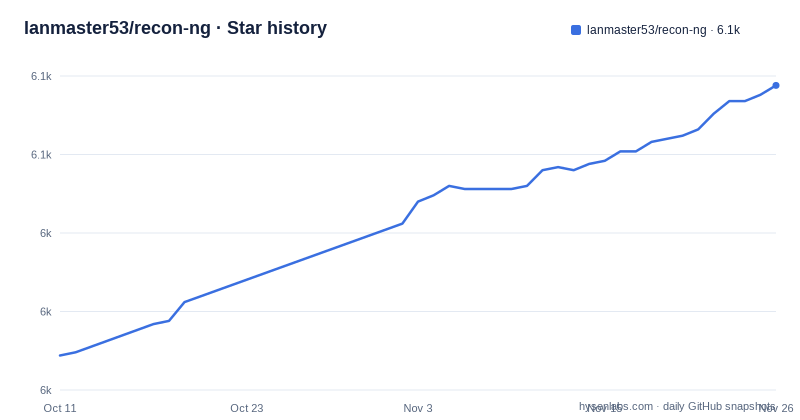
- lanmaster53/recon-ng6,069 ★ · +83
| Repository | 2026-10-11 | 2026-11-25 |
|---|---|---|
| lanmaster53/recon-ng | 6k | 6.1k |
83 Stars in the last 45 days, measured from the daily GitHub snapshot. Compare with other projects
Editorial analysis
A Metasploit-style console with a deliberately narrow remit
Recon-ng borrows the look and feel of the Metasploit Framework so that anyone who has used that console has less to learn. The README then draws a hard line: Recon-ng is not intended to compete with existing frameworks, and it is designed exclusively for web-based open source reconnaissance.
The README splits the work into three jobs and names a tool for each. To exploit, use the Metasploit Framework. To social engineer, use the Social-Engineer Toolkit. To conduct reconnaissance, use Recon-ng. The repository description repeats the goal in other words: an open source intelligence gathering tool aimed at reducing the time spent harvesting information from open sources.
The consequence is a clear boundary for what you can expect. A reader looking for payload delivery, credential testing or phishing will not find those functions described anywhere in the repository. The scope is collection from public web sources, written in Python, and the project says so in its first paragraph.
Modules are the unit of work, and the wiki holds the Development Guide
The README calls Recon-ng a completely modular framework and says even the newest Python developer can contribute. The code for that lives in the recon/ directory at the repository root, and the Development Guide on the project wiki explains how to build and maintain modules.
That sentence marks where the repository stops explaining itself. The README does not list which modules ship, which data sources they query, or which of them need an account or API key. The answers sit in the wiki and in the recon/ tree, not in the README.
For a team choosing a tool, this means the module inventory has to be checked against your own sources before you commit. A framework whose value is in its modules is only as useful as the modules that cover the sites you care about, and the only place to count them is the directory itself.
Three entry scripts sit at the root: recon-ng, recon-cli and recon-web
The repository root holds three executable entry points named recon-ng, recon-cli and recon-web, next to the recon/ package, a REQUIREMENTS file and a VERSION file. The names suggest an interactive console, a command-line interface and a web interface, but the README does not explain any of the three. The only one whose invocation is visible anywhere is recon-web, which docker-compose.yml starts with `python3 ./recon-web --host 0.0.0.0`.
Two practical points follow. First, the web interface is a supported way to run the tool, since the Compose file builds a whole service around it. Second, the --host 0.0.0.0 argument binds it to every network interface, and the Compose file publishes port 5000 on the host. The README documents no login for recon-web. If you start it this way on a shared network or a cloud host, anyone who can reach port 5000 can reach the tool, so put a firewall or a reverse proxy in front before you try it.
The Compose stack runs a web service, an rq worker and Redis
docker-compose.yml defines three services. The web service builds the local Dockerfile, tags the image recon-ng, names the container recon-ng, maps port 5000 and runs the recon-web command above. The worker service reuses the same image and runs `rq worker -u redis://redis:6379/0 recon-tasks`, which means module runs are queued in Redis and executed by a separate process. The third service is the stock redis image.
Both the web and worker services set REDIS_URL to redis://redis:6379/0 and mount two paths: the checkout at /recon-ng and ~/.recon-ng at /root/.recon-ng. The second mount is where your data directory persists between container restarts, and it is written by a process running as root inside the container.
The worker depends on redis and web, and the web service depends on redis. If you lose the Redis container, queued work goes with it. The README itself never mentions Redis, rq or port 5000, so this Compose file is the only description of how the web mode is meant to be deployed.
The Docker image contains dependencies but not Recon-ng itself
The Dockerfile starts from python:3.7-alpine, creates /recon-ng, and copies only the REQUIREMENTS file into it. It then installs gcc, libc-dev and libxslt-dev as a temporary build group, installs libxslt permanently, runs `pip install --no-cache-dir -r REQUIREMENTS`, and removes the build tools again.
No line copies the source tree. An image built from this file holds Python 3.7, the packages from REQUIREMENTS and an empty /recon-ng working directory. The code reaches the container only because docker-compose.yml mounts the checkout at /recon-ng with `.:/recon-ng`. Running the image with plain docker run and no volume gives you a container with nothing to start.
The base image is pinned to Python 3.7. If you use the Compose route, that is the interpreter your modules run under, whatever Python you have on the host. Packages in REQUIREMENTS must resolve on that version, and a module that needs newer language features will fail inside the container while working on your desktop.
No install command, no GitHub releases, and a version tracked in a file
The README gives one instruction for getting started: see the wiki. It prints no pip command, no git clone line and no package name. The repository has no GitHub releases, so there is no tagged download to point at. What it does have is a VERSION file at the root, which is where the version number is recorded, and a REQUIREMENTS file listing the Python dependencies.
Kali Linux, Ubuntu and Termux are not mentioned in the repository. Anyone installing it follows the wiki, or builds from a clone using the Dockerfile and Compose file described above.
On upkeep, the repository is not archived and the last push landed on 2026-10-05. The licence is GPL-3.0, so a modified copy you distribute must carry the same terms. Since no release tags exist, record the commit you installed so you can reproduce the same state later.
Sponsorship by Black Hills Information Security and PayPal donations
The last two README sections are about money. The sponsor is Black Hills Information Security, shown as a logo linked to its site. The Donations section says Recon-ng is free software, but that large amounts of time and effort go into its continued development, and asks supporters to send a donation through PayPal to an address given in the README.
This matters for planning more than for features. The framework has one named sponsor and a donation address, and the README says nothing about a team, a funded roadmap, a support contract or a security contact. A company that wants Recon-ng inside a workflow should plan to maintain its own fork or pin a commit, because there is no release channel and no stated service level.
The free software claim is backed by the GPL-3.0 licence file in the repository. Free here means free to run and modify, and the licence terms apply to anything you redistribute.
Editorial conclusion
Use Recon-ng if you do OSINT work and want a modular Python framework with a Metasploit-style console, and be ready to learn the setup from the wiki because the repository README has no install command. Do not use it to exploit or to phish, since its own README sends those jobs to other tools. Before exposing the web interface, check how you will restrict access to port 5000, because nothing in the repository documents authentication.
Frequently asked questions
What is the recon-ng tool used for?
Recon-ng is a reconnaissance framework designed for web-based open source reconnaissance. Its README says to use it for reconnaissance, Metasploit to exploit and the Social-Engineer Toolkit to social engineer.
How do I use Recon-ng?
The README points to the project wiki on GitHub to get started and to the Development Guide for building modules. The console is styled after the Metasploit Framework, which reduces the learning curve.
How do I install Recon-ng?
The README has no install command and the repository has no GitHub releases. It ships a REQUIREMENTS file, a Dockerfile and a docker-compose.yml, and the README sends readers to the wiki to get started.
Official sources
Add this badge to your README
If you maintain this project, the badge below links readers to this analysis and shows its maintenance status from the daily GitHub snapshot. Paste the markdown into your README; add ?metric=license or ?metric=stars to the image URL for a different field.

[](https://hysenlabs.com/projects/lanmaster53-recon-ng)Star history chart for your README
[](https://hysenlabs.com/projects/lanmaster53-recon-ng)Was this useful?