Laudspeaker: an AGPL-licensed customer engagement platform that is no longer maintained
📢 Laudspeaker is an Open Source Customer Engagement and Product Onboarding Platform. Open Source alternative to Braze / One Signal / Customer Io / Appcues / Pendo . Use Laudspeaker to design product onboarding flows and send product and event triggered emails, sms, push and more.
At a glance
- What is it?
- Laudspeaker is an open source, event-triggered messaging platform with a visual journey builder, covering email, SMS, push and webhooks. Its README states the project is no longer under active development, so the decision is about running existing code, not adopting a roadmap.
- Who is it for?
- Laudspeaker fits teams that need an event-triggered journey engine on their own infrastructure and can accept that the README states the project is no longer under active development. Teams that need vendor support, SSO/SAML or data warehouse sync should not adopt it: those items sit in the roadmap as unstarted, and the roadmap itself stops at Q1 2025.
- Can I use it commercially?
- Check first. The repository uses a licence we do not classify automatically, so read its LICENSE file before any commercial use.
- Is it still maintained?
- Yes. The repository last received commits 107 days ago.
- What is it written in?
- Mainly TypeScript, according to GitHub's language statistics.
Answers come from the project's GitHub data, last synced on October 25, 2026, and from our analysis. They are not legal advice.
Star history
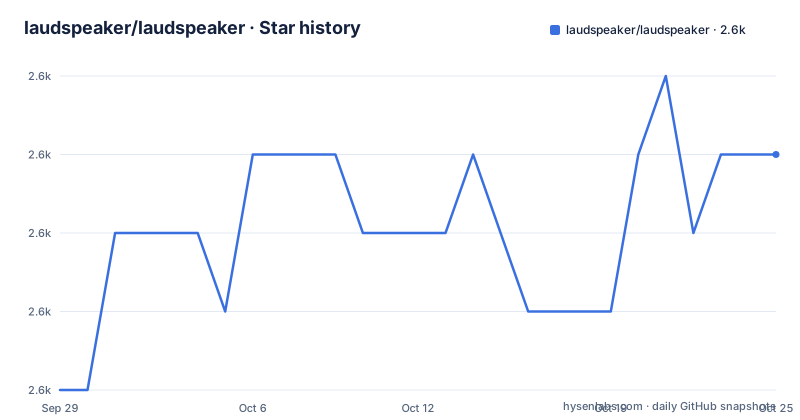
- laudspeaker/laudspeaker2,629 ★ · +3
| Repository | 2026-09-29 | 2026-10-25 |
|---|---|---|
| laudspeaker/laudspeaker | 2.6k | 2.6k |
3 Stars in the last 26 days, measured from the daily GitHub snapshot. Compare with other projects
Editorial analysis
What Laudspeaker solves, and for whom
Product and growth teams usually want messaging that reacts to what a user did, not to a calendar. A user drops off before finishing setup, and you want an email two hours later, then an SMS a day later if nothing changed. Braze, OneSignal, Customer.io, Appcues and Pendo all cover parts of that, but they are hosted services. Laudspeaker's README positions it as an open source alternative to those five, with the same shape of product: a visual journey builder, a segment builder, multiple channels, and A/B tests with liquid templating and external API calls for personalization. The audience is a team that wants that workflow on hardware it controls, and that has engineers who can run a Node and TypeScript stack. The README also states the project has been used to send over 500 million messages, which is a scale claim from the maintainers rather than an independent measurement. The repository is TypeScript, and the workspace layout in package.json splits the product into packages/client, packages/server and packages/tests.
How the journey engine is put together
The topics list on the repository names a finite-state machine and a state machine, and the server package is NestJS. That combination explains the design: a journey is a state machine, and an event moves a user from one state to the next. The README describes journeys as event triggered, so the trigger is a user action rather than a scheduled send, and the segment builder filters on attributes, completed actions, and prior campaign interaction. Delivery fans out across push, email, SMS and webhooks. The docker-compose.yml shows the supporting services: redis:7-alpine on port 6379, a postgres service built from Dockerfile.postgres with database laudspeaker on port 5432, and bitnami/pgbouncer:1.23.1 in transaction pooling mode on port 6432, capped at PGBOUNCER_MAX_DB_CONNECTIONS=100 and PGBOUNCER_MAX_CLIENT_CONN=1000. A comment in that file also notes ClickHouse settings, date_time_input_format: 'best_effort' and output_format_json_array_of_rows: 1. The Q4 2024 roadmap entry says rabbitmq was introduced and mongo deprecated, so a queue sits between event ingestion and channel senders. The Dockerfile builds the frontend with node:20, runs npm install --legacy-peer-deps, then npm run build:client, and the top-level package.json exposes build, build:client and build:server as the workspace-wide entry points.
Installing Laudspeaker and sending a first event
The repository ships a docker-compose.yml at the top level, and the Dockerfile header gives both build and run commands. The build command names the image laudspeaker/laudspeaker:latest, and the run command maps port 80 and reads environment from packages/server/.env. That env file is not in the repository; the top level has env-server-example and env-client-example instead, so copy one of those before starting.
docker build -f Dockerfile -t laudspeaker/laudspeaker:latest .
docker run -it -p 80:80 --env-file packages/server/.env --rm laudspeaker/laudspeaker:latest
The compose file defines the dependencies the server expects: redis, postgres, pgbouncer and ClickHouse. Postgres credentials come from POSTGRES_USER and POSTGRES_PASSWORD, defaulting to postgres and password, with the database fixed as laudspeaker. Bring the stack up before the application container so the connection strings in your env file resolve.
docker compose up -d redis postgres pgbouncerFor development rather than a container run, the root package.json is an npm workspace over packages/client, packages/server and packages/tests, so a single install at the root covers all three. The scripts there include build, lint, format and test, each with client and server variants.
npm install --legacy-peer-deps
npm run build
npm run test
The repository also contains script_events.js at the top level and a scripts/ directory, which is where the event-sending example lives. The README does not walk through that script, so read it in the repository before running it against your own instance. Once the instance is reachable, the first real use is the sequence the README describes: define a segment from attributes or completed actions, build a journey that starts on an event, attach an email, SMS or webhook node, and then fire the event.
The maintenance question dominates every other consideration
The first line of the README states that Laudspeaker is no longer under active development or being supported. The last push to the repository was on 2026-07-10, and the most recent release listed is v.1.7.0 from 2024-06-06, with v.1.6.0 in 2023 and v1.5.0 in 2023. A repository that receives commits but has not cut a release in over two years is a specific situation: fixes may land on the staging default branch without ever reaching a tagged artifact, and the container image you build from the Dockerfile is whatever the branch holds at that moment. Treat the README line as the governing fact and the push date as a secondary signal, not a contradiction of it. The roadmap reinforces the point: the Q1 2025 column lists data warehouse syncing, approval flows and advanced permissions, multi-workspace support, SSO/SAML and two mobile features, all marked with the unstarted symbol, and there is no column after it. The status checklist still shows Public Beta checked and Public unchecked, so even by the project's own scale it never reached the production-ready state it defined.
Where Laudspeaker is the wrong tool
If your organization needs a support contract, an SLA, or a vendor to call when a send fails at 2am, this is the wrong choice. The README points paid self-deployed enterprise interest at a calendar booking link, but with development stopped there is no evidence in the repository of an active support organization behind it. The same applies to SSO and SAML: it is listed in the roadmap as unstarted, so a company that requires single sign-on for internal tooling cannot get there from the code as described. Data warehouse sync is in the same unstarted column, which matters if the reason you wanted a self-hosted tool was to keep customer data flowing to and from your warehouse. Operationally, the compose stack is not small: PostgreSQL behind pgbouncer, Redis, ClickHouse and a message queue all need to be running and monitored, and the pgbouncer transaction pooling mode with PGBOUNCER_IGNORE_STARTUP_PARAMETERS covering lock_timeout, statement_timeout and idle_in_transaction_session_timeout is a configuration that punishes teams without database experience. Finally, the licence is AGPL-3.0. If your business model involves offering a modified Laudspeaker to third parties over a network, the copyleft obligations are the kind of thing your counsel should read in LICENSE rather than something to infer from a summary.
How it differs from hosted engagement suites
The obvious alternative is Braze, OneSignal, Customer.io, Appcues or Pendo, the five the README names. The difference is not feature parity, it is where the data and the runtime live. With a hosted suite you get onboarding, deliverability work, mobile SDKs and support as part of the bill, and you accept that user events and profiles sit in someone else's system. With Laudspeaker you run PostgreSQL, Redis, ClickHouse and the queue yourself, which means the event stream and the profile store stay on your infrastructure and the cost is engineering time rather than a subscription. The trade is that every one of those operational concerns becomes yours, and the project's own README says it is not being supported. There is a second, more interesting difference in the architecture: because journeys are state machines driven by events, the same engine can be pointed at internal product events, not just marketing sends. A hosted marketing suite is usually priced and shaped around campaigns, so using it to drive in-product onboarding steps is awkward. Laudspeaker's topics list includes onboarding and product-adoption alongside email-marketing, which tells you the intended scope is wider than campaigns.
Licence and the cost of keeping it running
The README states the project is released under AGPL-3.0 with the exception of the ee directory, which it says is currently empty and will fall under the Laudspeaker Enterprise Edition licence. The LICENSE file is at the repository root. The practical implication of AGPL-3.0 for a self-hosted deployment is that modifications you make and expose to users over a network carry source distribution obligations; whether that touches your deployment depends on whether you modify the code and who can reach it, which is a question for your own counsel rather than something this article can settle. On upgrade cost, the repository gives you little to work with. There is no migration or rollback documentation in the README, and the release cadence stopped after v.1.7.0 in June 2024. The realistic maintenance model is therefore to pin the commit you build from, keep the Dockerfile and compose file under your own version control, and treat any upstream change on the staging branch as something to review rather than pull. Budget for the database layer specifically: pgbouncer, PostgreSQL and ClickHouse all need backup and upgrade plans that the project does not document.
Editorial conclusion
Laudspeaker fits teams that need an event-triggered journey engine on their own infrastructure and can accept that the README states the project is no longer under active development. Teams that need vendor support, SSO/SAML or data warehouse sync should not adopt it: those items sit in the roadmap as unstarted, and the roadmap itself stops at Q1 2025. Before committing, verify that the docker-compose stack builds on your host, that the AGPL-3.0 terms in LICENSE match your distribution model, and that the ee directory is still empty as the README claims.
Frequently asked questions
Is Laudspeaker still maintained?
No. The README states that Laudspeaker is no longer under active development or being supported. The last push to the repository was on 2026-07-10, and the most recent release listed is v.1.7.0 from 2024-06-06.
What channels does Laudspeaker support?
The README lists push, email, SMS and webhooks as supported channels, and says more channels are on the roadmap. Journeys trigger those channels based on user events rather than a fixed schedule.
What licence is Laudspeaker released under?
The README states the project is released under AGPL-3.0, with the exception of the ee directory, which it says is currently empty and will be under the Laudspeaker Enterprise Edition licence. The LICENSE file sits at the repository root.
How do I install Laudspeaker?
The Dockerfile header gives a build command producing laudspeaker/laudspeaker:latest and a run command that maps port 80 and reads packages/server/.env. The top-level docker-compose.yml defines the redis, postgres and pgbouncer services the server depends on.
Official sources
Add this badge to your README
If you maintain this project, the badge below links readers to this analysis and shows its maintenance status from the daily GitHub snapshot. Paste the markdown into your README; add ?metric=license or ?metric=stars to the image URL for a different field.

[](https://hysenlabs.com/projects/laudspeaker-laudspeaker)Star history chart for your README
[](https://hysenlabs.com/projects/laudspeaker-laudspeaker)Was this useful?