JHipster 9.4: A code generator that locks your stack choices in early
JHipster is a development platform to quickly generate, develop, & deploy modern web applications & microservice architectures.
At a glance
- What is it?
- JHipster generates full-stack web apps and microservices from a single command, but its opinionated defaults and version constraints mean you adopt its stack decisions, not your own.
- Who is it for?
- Adopt JHipster if you need a working monolith or microservice skeleton fast, you accept its frontend and backend defaults, and you can live with its tested Java and Node version pairs. Do not adopt it if you need a custom build pipeline, a non-standard frontend framework, or if you prefer to assemble your own stack.
- Can I use it commercially?
- Yes. Apache-2.0 is a permissive licence: you can use, modify and sell software built on it, as long as you keep its copyright and licence notices.
- Is it still maintained?
- Yes. The repository received new commits within the last day.
- What is it written in?
- Mainly TypeScript, according to GitHub's language statistics.
Answers come from the project's GitHub data, last synced on November 13, 2026, and from our analysis. They are not legal advice.
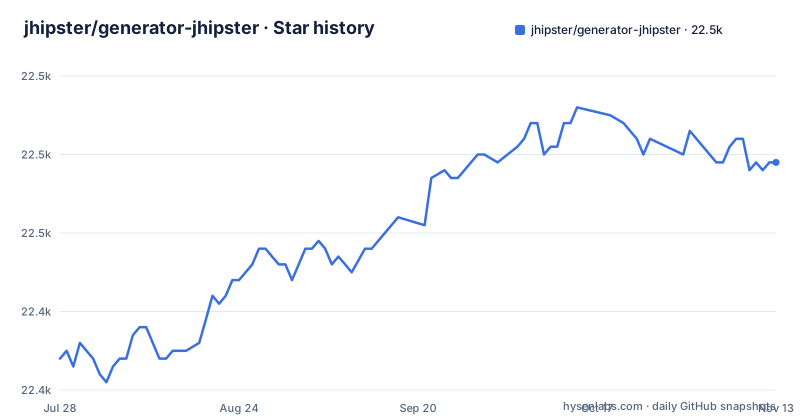
Star history
- jhipster/generator-jhipster22,459 ★ · +25
| Repository | 2026-07-28 | 2026-11-13 |
|---|---|---|
| jhipster/generator-jhipster | 22.4k | 22.5k |
25 Stars in the last 108 days, measured from the daily GitHub snapshot. Compare with other projects
Editorial analysis
What JHipster actually generates and who should care
JHipster is a command-line generator that produces a complete web application or a microservice architecture. The README positions it as a platform to quickly generate, develop, and deploy modern web applications and microservice architectures. The practical output is a Spring Boot backend, a frontend in Angular, React, or Vue, and the glue between them: build files, Docker configuration, and deployment scripts. The target user is a Java developer who wants a working full-stack app without hand-wiring the frontend to the backend. It is also aimed at teams starting a microservice project who want a consistent set of services from day one. If you are a frontend developer who prefers to own the build tooling, JHipster will feel like it is making decisions for you. The generator's value is speed and consistency. The cost is that you inherit a specific stack, and that stack is fixed at generation time.
The generation mechanism: one command, many outputs
The standard usage is to run jhipster in an empty directory and answer interactive prompts. The generator then writes the application structure. The repository layout shows a generator built in TypeScript, which means the tool itself runs on Node. The generated backend is Java with either Maven or Gradle, and the frontend is one of the three supported frameworks. The README's daily build matrix reveals the core dimensions: frontend (Angular, React, Vue), build tool (Maven, Gradle), and database type (SQL, NoSQL, or none). There is also a Docker image build pipeline and a no-database option. This matrix is not marketing. It is the set of combinations the project builds daily. If your preferred combination is not in that matrix, you are on your own.
Version constraints you must accept before you start
The README states a specific supported Java and Node combination: Java 21 or 25, with Node 22 or 24. These are the versions verified by GitHub Actions. That is a real constraint. If your organization standardizes on Java 17 or Node 20, JHipster 9.4 will generate code that may not run in your environment. The release history shows v9.4.0 released on 2026-09-18, v9.3.0 on 2026-08-30, and v9.2.0 on 2026-07-10. That cadence suggests active maintenance, but it also means you will need to track major version changes. The daily builds exist to catch regressions, but they do not guarantee that upgrading a generated project is painless. You should plan to regenerate or manually migrate when you upgrade JHipster itself.
Microservices and monoliths: two paths with different trade-offs
The daily build matrix includes separate pipelines for monoliths with OAuth 2.0 and microservices with JWT or OAuth 2.0. That tells you JHipster supports both architectures, and it treats security as a first-class concern. The trade-off is that microservices add operational complexity. You need to handle inter-service communication. JHipster generates the code, but it does not operate the infrastructure. If you choose microservices, you are committing to a distributed system with all its debugging and deployment overhead. For a small team or a simple CRUD app, a monolith is the safer choice, and JHipster supports that too.
Getting started: what you need to install and run
The project is an npm package named generator-jhipster, so the standard way is to install it globally with npm install -g generator-jhipster. After installation, you run jhipster in an empty directory. The generator prompts you for choices: frontend framework, build tool, database type, and authentication method. The daily build matrix shows that Maven and Gradle are both supported, so you pick one. The Node version requirement is strict, so verify your Node installation first.
Where JHipster is the wrong tool
JHipster is opinionated, and that is its main limitation. If you want to use a frontend framework other than Angular, React, or Vue, the generator will not help you. If you need a custom build process, or if you want a backend other than Spring Boot, JHipster is not the right choice. The README's daily build matrix shows no support for other frontends or backends. Another failure mode is the version lock. The supported Java and Node versions are narrow, and the README does not state what happens if you use an unsupported version. The generator may produce code that compiles, but you will not get the tested guarantee. If you are on an untested combination, you are the test.
A real alternative: starting from Spring Initializr and adding a frontend manually
The closest alternative is Spring Initializr (start.spring.io), which generates a Spring Boot backend without a frontend. You would then add Angular, React, or Vue yourself, using the framework's own CLI. The difference in approach is that Spring Initializr is minimal: it gives you a build file, a main class, and dependencies. You choose the frontend, the build tool, and the deployment strategy. JHipster gives you all of that plus a frontend, authentication, and Docker setup. The trade-off is control versus speed. With Spring Initializr, you have full control over every dependency and configuration, but you spend time wiring the frontend to the backend. With JHipster, you get a working app quickly, but you inherit its choices. For a team that values reproducibility and speed, JHipster wins. For a team that needs a specific stack, Spring Initializr is more flexible.
Maintenance cost and license considerations
JHipster is licensed under Apache-2.0, which is permissive and allows commercial use. The generated code, however, is a different matter. The generator produces code that may include third-party libraries with their own licenses. You should audit the generated project's dependencies before shipping. Maintenance cost comes from the fact that generated code is not a one-time artifact. When JHipster releases a new major version, your generated project may need regeneration or manual updates. The daily builds show that the project is actively maintained, but that also means the tool evolves. You need to track releases and decide when to upgrade. The v9.4.0 release in September 2026 is recent, so the project is alive. Plan for regular upgrades, and verify that your generated app still builds after each JHipster version bump.
Editorial conclusion
Adopt JHipster if you need a working monolith or microservice skeleton fast, you accept its frontend and backend defaults, and you can live with its tested Java and Node version pairs. Do not adopt it if you need a custom build pipeline, a non-standard frontend framework, or if you prefer to assemble your own stack. Before committing, verify that your target Java and Node versions match the supported matrix (21/25 with Node 22/24), check the generated code's license compatibility with your project, and review the daily build status for your chosen frontend and build tool combination, since those pipelines reveal which combinations are actually exercised.
Frequently asked questions
What is JHipster used for?
It generates Spring Boot applications paired with an Angular, React or Vue front end, as monoliths or microservice architectures, with build tool, database and authentication chosen at generation time. The package describes it as Spring Boot + Angular/React/Vue in one handy generator, and full documentation lives at jhipster.tech.
Which Java and Node versions does JHipster support?
Java 21 or 25 with Node 22 or 24 is the combination tested and verified by GitHub Actions, and it is the only row in the supported versions table. The project also pins a Node version in .nvmrc and in generators/init/resources/.node-version, the file its container build reads.
Is it safe to run JHipster on a project I did not write?
Not without reading the file first. SECURITY.md documents a trust model for .yo-rc.json: its properties become part of the generated application, and blueprints declared in it are executed on your machine, so an unfamiliar .yo-rc.json changes both your output and what runs during generation.
What does the JHipster Docker image give you?
A container built from eclipse-temurin:21-noble with the generator installed as a global npm package, a jhipster user, and the working directory, Tomcat port and React and Vue development ports exposed. The password for that user is written into the build, so treat the image as a development shell.
Official sources
Add this badge to your README
If you maintain this project, the badge below links readers to this analysis and shows its maintenance status from the daily GitHub snapshot. Paste the markdown into your README; add ?metric=license or ?metric=stars to the image URL for a different field.

[](https://hysenlabs.com/projects/jhipster-generator-jhipster)Star history chart for your README
[](https://hysenlabs.com/projects/jhipster-generator-jhipster)Was this useful?