MelonLoader: A Universal Mod Loader for Unity Games on Mono and Il2Cpp
The World's First Universal Mod Loader for Unity Games compatible with both Il2Cpp and Mono
At a glance
- What is it?
- MelonLoader is an Apache-2.0 mod loader that injects into Unity games built on either the Mono or Il2Cpp scripting backend. This review covers how it loads mods, how to install it, and where it falls short.
- Who is it for?
- MelonLoader is the right choice if you are modding a Unity game and the existing modding community for that game already targets it, since mods are distributed as DLLs that expect its plugin and mod folder layout. It is the wrong choice if you want to modify a game without touching its installation directory, or if the game is not a Unity title at all.
- Can I use it commercially?
- Yes. Apache-2.0 is a permissive licence: you can use, modify and sell software built on it, as long as you keep its copyright and licence notices.
- Is it still maintained?
- Yes. The repository received new commits within the last day.
- What is it written in?
- Mainly C#, according to GitHub's language statistics.
Answers come from the project's GitHub data, last synced on November 15, 2026, and from our analysis. They are not legal advice.
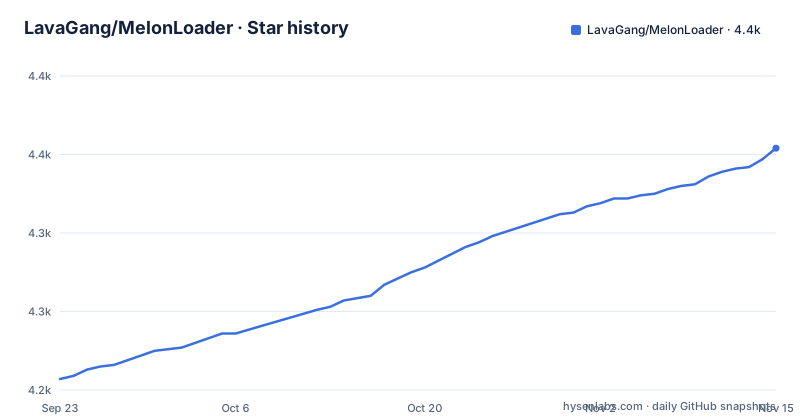
Star history
- LavaGang/MelonLoader4,354 ★ · +147
| Repository | 2026-09-23 | 2026-11-15 |
|---|---|---|
| LavaGang/MelonLoader | 4.2k | 4.4k |
147 Stars in the last 53 days, measured from the daily GitHub snapshot. Compare with other projects
Editorial analysis
What MelonLoader Solves and Who It Is For
Unity games ship in two broad flavours. Mono games compile C# into managed assemblies that a loader can hook with relative ease. Il2Cpp games compile C# ahead of time into native C++ and then into a binary, which strips the managed metadata a normal .NET mod would rely on. MelonLoader's stated purpose is to be a universal mod loader that works with both, so a mod author does not have to maintain two separate injection strategies for the two backends.
The audience is narrow but well defined. It is for people who want to run community mods in a specific Unity game, and for mod authors who want a loading framework that handles the injection, the log plumbing and the plugin lifecycle for them. The README points mod authors at two example repositories, TestPlugin and TestMod, which is a signal that the intended workflow is: write a C# assembly, drop it in a folder, let MelonLoader discover it. If you are not working with a Unity game, or you want a general-purpose runtime patching tool for arbitrary native binaries, this is not aimed at you.
How the Loader Injects Itself and Organises Mods
The repository layout is the clearest description of the architecture. MelonLoader.Bootstrap and MelonLoader.NativeHost sit alongside the main MelonLoader project, with BaseLibs, Dependencies and UnityUtilities as supporting directories. The manual install instructions confirm the injection mechanism: you extract version.dll and dobby.dll into the game's installation folder.
Once running, MelonLoader creates three folders inside the game directory. Plugins holds plugin assemblies, Mods holds mod assemblies, and UserData holds state. Logs go to MelonLoader/Logs.
Configuration lives in UserData/Loader.cfg, which only appears after MelonLoader has run at least once. The file is TOML and mirrors the command-line launch options. For example, disable = false is equivalent to the --no-mods launch option, and debug_mode = true is equivalent to --melonloader.debug. That dual surface is deliberate: you can flip a setting permanently in the config, or override it for a single launch with a flag.
Installing MelonLoader and Running a First Mod
There are two routes. The installer is a standalone binary published per platform, with separate downloads for Windows, Linux and macOS. The README links MelonLoader.Installer.exe, MelonLoader.Installer.Linux and MelonLoader.Installer.MacOS.dmg from the installer repository's latest release. The installer handles install, update, re-install and uninstall, and the README defers the detailed steps to the installer repository's own guide.
The manual route is short enough to do by hand. The README's requirements section states that Il2Cpp games need the .NET 6.0 Desktop Runtime, and notes that on Windows it will be installed automatically. Close the game first, then extract the MelonLoader folder and the two proxy DLLs into the game's installation directory. The README describes this as extracting the MelonLoader folder from the archive, then extracting version.dll and dobby.dll from the same archive.
After the first launch, the config file appears. If you want to start the game with mods disabled without uninstalling anything, the README documents the loader flag:
[loader]
# Disables MelonLoader. Equivalent to the '--no-mods' launch option
disable = false
Setting disable = true, or launching with --no-mods, gives you a clean game session. To confirm the loader attached, look for the MelonLoader/Logs folder in the game directory after the game starts.
Mods themselves go into the Mods folder and plugins into Plugins, both created in the game's installation folder. Launch the game and check MelonLoader/Logs for entries naming your assembly.
Where MelonLoader Breaks Down
The proxy DLL approach is the main structural weakness. Because MelonLoader depends on version.dll being loaded from the game directory, anything that interferes with DLL search order will break it.
Anti-cheat is the harder limit. Injecting a proxy DLL into a game with kernel-level anti-cheat is a well-known way to get banned. That is not a MelonLoader bug; it is a consequence of how any DLL-injection loader works. If the game has anti-cheat, treat MelonLoader as unusable.
Platform support is uneven. Linux is supported through Wine, Steam Proton or natively, and the README links to a dedicated wiki section for it. Android and Oculus Quest are marked WIP in the README, which means they should be treated as experimental rather than production-ready. macOS has an installer, but the README's requirements section only calls out the .NET 6.0 Desktop Runtime for Il2Cpp games generally, so verify platform-specific prerequisites on the wiki before assuming parity.
Finally, configuration is thin. The README lists loader and console options. The README's manual update procedure is uninstall then install. If a new release breaks a mod, your recovery path is to re-download the previous archive manually.
MelonLoader Versus BepInEx
BepInEx is the obvious comparison and the one most Unity modders will already know. The difference in approach is in scope and backend handling. MelonLoader's stated pitch is universality: one loader that handles Mono and Il2Cpp, which is why the repository carries dedicated NativeHost and Bootstrap projects and a PortablePdbToMdb utility for debugging symbols.
The practical difference for a user is which ecosystem the game's mods already target. If a game's modding community publishes BepInEx plugins, installing MelonLoader will not make them work, and vice versa. The two loaders use different plugin base classes and different folder conventions, so a mod written for one does not load in the other without a rewrite. Choosing between them is therefore less about technical merit and more about which one the mods you want were built for. MelonLoader's advantage is that a single install covers both Unity backends; its disadvantage is that it is the less common choice in some communities, so the mod selection may be smaller.
Maintenance, Licensing and Upgrade Cost
The last push to the master branch was on 2026-10-29, and the most recent tagged release is v0.7.3 from 2026-05-14. The repository is not archived. That combination suggests the project is still receiving commits, but the release cadence is measured in months, not weeks: v0.7.2 landed on 2026-03-03 and v0.7.1 on 2025-06-21 and was labelled an Open-Beta. Nightly builds are published for three branches (master, alpha-development and universality), so users who need a fix ahead of a tagged release have a path, at the cost of running untested code.
Upgrading is not in-place. The README's manual update procedure is uninstall then install, and the installer repository documents update and re-install as separate operations. Because mods live in folders that the uninstall step marks as optional to remove, a full uninstall can delete your Mods, Plugins and UserData directories. Back those up before running a full uninstall if you care about your mod configuration.
The licence is Apache-2.0. That is a permissive licence with an explicit patent grant and a requirement to preserve notices; the repository carries both LICENSE.md and NOTICE.txt, which is consistent with that. It does not impose copyleft on mods that merely load through MelonLoader, but if you redistribute MelonLoader itself or a modified build, read LICENSE.md and NOTICE.txt rather than assuming. This is a description of the licence text, not legal advice.
The upgrade cost is low for end users and moderate for mod authors. A mod author tracking nightly builds of the universality branch is signing up for API churn that tagged releases do not expose.
Editorial conclusion
MelonLoader is the right choice if you are modding a Unity game and the existing modding community for that game already targets it, since mods are distributed as DLLs that expect its plugin and mod folder layout. It is the wrong choice if you want to modify a game without touching its installation directory, or if the game is not a Unity title at all. Before committing, verify that your specific game is supported by checking the MelonLoader wiki and the game's modding community, confirm the game is closed before installing, and check whether the .NET 6.0 Desktop Runtime is present for Il2Cpp titles.
Frequently asked questions
What is MelonLoader used for?
It is a mod loader for Unity games that works with both the Mono and Il2Cpp scripting backends. It injects into the game, creates Mods and Plugins folders, and loads assemblies placed there.
Can I trust MelonLoader?
The project is licensed Apache-2.0 and its source is public on GitHub, so the loader itself can be inspected. Injecting a proxy DLL into a game with anti-cheat carries a ban risk regardless of the loader's own trustworthiness.
How do I get rid of MelonLoader?
Close the game, then remove version.dll and the MelonLoader folder from the game's installation directory. The README lists removing the Plugins, Mods and UserData folders as optional additional steps for a full uninstall.
Why won't MelonLoader work?
The README states that the game must be closed before installing and that Il2Cpp games require the .NET 6.0 Desktop Runtime.
How do I install MelonLoader?
You can use the standalone installer for Windows, Linux or macOS, or install manually by extracting the MelonLoader folder plus version.dll and dobby.dll into the game's installation folder while the game is closed. Il2Cpp games also need the .NET 6.0 Desktop Runtime, which the README says installs automatically on Windows.
How do I use MelonLoader on Linux?
The README links to a dedicated Linux section of the wiki covering Wine, Steam Proton and native support. The installer is also published as a Linux binary in the installer repository's releases.
Official sources
Add this badge to your README
If you maintain this project, the badge below links readers to this analysis and shows its maintenance status from the daily GitHub snapshot. Paste the markdown into your README; add ?metric=license or ?metric=stars to the image URL for a different field.

[](https://hysenlabs.com/projects/lavagang-melonloader)Star history chart for your README
[](https://hysenlabs.com/projects/lavagang-melonloader)Was this useful?