Arch keeps entities in 16KB chunks and lets you drop the API
A high-performance C# based Archetype & Chunks Entity Component System (ECS) with optional multithreading.
At a glance
- What is it?
- Arch is an Apache-2.0 C# archetype and chunk Entity Component System for game development, targeting .NET Standard 2.1, .NET 6 and .NET 8 so it runs under MonoGame, Unity, Godot or Stride. The interesting choice is the optional Pure-ECS mode, where generic API calls disappear and the entity type carries no data.
- Who is it for?
- Adopt Arch if you are writing a C# game with a data oriented design and want archetype storage with multithreaded queries without adopting a full engine framework, since it runs on MonoGame, Unity, Godot and Stride alike. Do not adopt it if you want batteries included: the project's stated promise is bare minimum with no overengineering, and the things most teams want, systems, tools, source generators and debuggers, live in separate extension repositories.
- Can I use it commercially?
- Yes. Apache-2.0 is a permissive licence: you can use, modify and sell software built on it, as long as you keep its copyright and licence notices.
- Is it still maintained?
- Yes. The repository last received commits 6 days ago.
- What is it written in?
- Mainly C#, according to GitHub's language statistics.
Answers come from the project's GitHub data, last synced on October 23, 2026, and from our analysis. They are not legal advice.
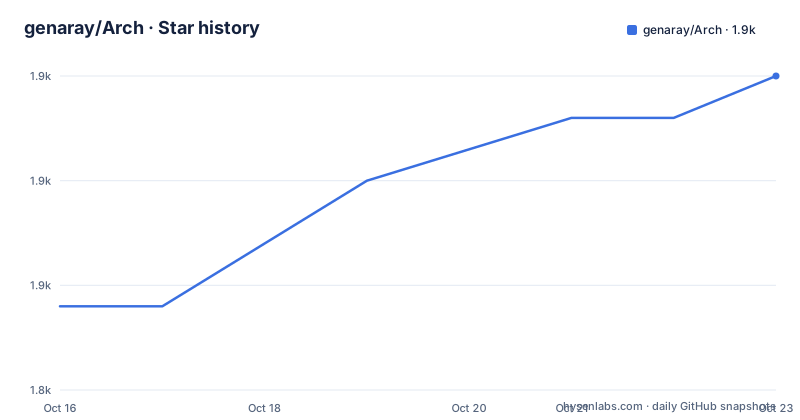
Star history
- genaray/Arch1,860 ★ · +11
| Repository | 2026-10-16 | 2026-10-23 |
|---|---|---|
| genaray/Arch | 1.8k | 1.9k |
11 Stars in the last 7 days, measured from the daily GitHub snapshot. Compare with other projects
Editorial analysis
Six lines of code and a moving entity
The quickstart is the shortest thing in the README, and it shows the whole shape of the library.
using Arch;

// Components
public record struct Position(float X, float Y);
public record struct Velocity(float Dx, float Dy);

// Create a world and an entity with position and velocity.
using var world = World.Create();
var adventurer = world.Create(new Position(0,0), new Velocity(1,1));

// Enumerate all entities with Position & Velocity to move them
var query = new QueryDescription().WithAll<Position,Velocity>();
world.Query(in query, (Entity entity, ref Position pos, ref Velocity vel) => {
    pos.X += vel.Dx;
    pos.Y += vel.Dy;
    Console.WriteLine($"Moved adventurer: {entity.Id}");
});
Components are `record struct`, so they are value types with generated equality. `World.Create()` returns a disposable world, and `world.Create(...)` creates an entity from the components passed in.
The query is a `QueryDescription` built with `WithAll<Position, Velocity>()`, passed by `in` so the description itself is not copied. The lambda takes `ref` parameters, which is how a component is written back in place rather than into a copy, and the `Entity` parameter is passed by value because you only read its id.
The README notes that there are more features beyond this example, including queries without a lambda and an API without generics, and points to the documentation at arch-ecs.gitbook.io for both.
That last detail matters for what follows. The lambda form is the friendly one; the rest of the library is built for the case where you have outgrown it.
Archetypes, 16KB chunks, and why the entity stays small
The storage model is named in the project title: archetype and chunks. The feature list states archetypes with 16KB large chunks for massive worlds, and incredibly small Entity size.
That combination is the reason for the design. Entities that share the same set of component types are grouped into an archetype, and each archetype's components are stored contiguously in 16KB chunks. A query then walks the chunks in memory order and touches components with no pointer chasing per entity.
The entity itself carries no component payload. It is an identifier into the storage, which is why its size stays small and why `entity.Id` is the thing you log in the example above.
The consequence people hit first is structural change. Adding or removing a component moves an entity between archetypes, and the library's answer to that is bulk and batch entity operations plus CommandBuffers, which let you stage structural changes and apply them at a controlled point rather than during iteration.
Events are in the list too, alongside enumerators. A chunk based store has no natural place to hang per entity event queues, so how Events are implemented is worth reading in the documentation rather than assuming.
The claim about allocation speed and cache efficiency is made in terms of comparison with other C# ECS libraries and with C++ and Rust libraries, with a link to an external benchmark repository by a third party. That is a claim to verify with your own workload rather than accept, and it is a benchmark of a different project, so treat it as a starting point.
Pure-ECS is the mode that removes the conveniences
The feature list includes optional `Pure-ECS` for maximum performance and efficiency, and it is the most interesting option because of what it takes away.
The README also lists high performance queries, multithreaded queries, enumerators, a generic and non generic API, and AOT friendliness. Those are the ergonomics. Pure-ECS is the mode where the API layer is not there, and the entity type carries no data beyond the identifier.
That is the trade the project is offering: cache layout and dispatch cost bought with the type safe, discoverable API. For a hot inner loop with a known component set, the lambda closure and the generic indirection are overhead you can remove. For everything else, you have given up the part that makes the library pleasant.
AOT friendliness is a separate and more concrete concern. A generic and non generic API is the usual escape hatch: the generic path for the editor and hot reload, the non generic path for constrained targets.
Read the documentation section on Pure-ECS before turning it on, because the failure mode is not a slower frame rate but code that no longer compiles.
Install line says beta, the release tag does not
The install command in the README is:
dotnet add PROJECT package Arch --version 2.1.0-betaThe recent releases are v2.1.0 on 2025-05-27, 2.0.0 on 2025-03-12 and 1.2.8 on 2024-03-13. So the pinned version in the documented command, `2.1.0-beta`, is not the same string as the newest tag, v2.1.0.
That may mean the README predates the final release, or that a beta is still what the maintainer recommends. Either way, copy the version from the NuGet page rather than from the README so you pin what you actually tested.
The distribution channel is NuGet, and the README also links to a GitHub Packages download. The project targets.NET Standard 2.1,.NET 6 and.NET 8, which is the reason the README can say you may therefore use it with Unity or Godot, and the repository topics list net6, net8, netstandard21, unity, godot, monogame and stride.
Targeting.NET Standard 2.1 is the widest compatibility target and the most conservative choice, and it is what lets the same assembly load under MonoGame on desktop, Unity on desktop and console, Godot through C# and Stride. The cost is that some newer BCL conveniences are unavailable.
Documentation is hosted on GitBook at arch-ecs.gitbook.io/arch, with a wiki on GitHub for the deeper material, and the repository carries `Arch.sln`, a `Directory.Build.targets` file and an `.editorconfig`.
Everything you would actually want is in the extension list
The README's promise section is explicit about what is not here: bare minimum, no overengineering, no abstracted hidden costs, plus a clean, minimal and self-explanatory API.
So the feature list ends where a framework begins. Systems, source generators, tooling and debuggers are all separate repositories, and the extension list names them.
Arch.Extended adds a set of tools and features to save boilerplate code. The Godot Entity Debugger is an entity debugger for Godot. The Stride Entity Debugger is an example of Arch in Stride with an additional entity and system inspector. Arch.Unity is a library that makes integration in Unity easier and adds features. Zinc-Framework is a small engine framework based on Arch with its own source generator for declaring entities declaratively.
That last one is the pattern to note. If your team wants entities declared rather than constructed, the answer is not in Arch and it is not going to be: the project is committed to the constructor call as the primitive.
So the realistic adoption is Arch for storage and queries, plus one or more extensions for the workflow layer, and a decision about which extension locks you into which engine.
The integration guides for MonoGame, Unity and Godot are called out as features in their own right, which tells you how much of the user base arrives through an existing engine rather than on plain .NET.
Where a full engine, or another C# ECS, fits instead
The comparison with a full engine framework is about who owns the update loop. An engine gives you a scene graph, a rendering path, an asset pipeline and a fixed loop, and the ECS inside it is a subsystem you adapt to. Arch is the loop's content and nothing else, which is why the extension list is long and why the engine integration guides matter as much as the API.
If you are on Godot and want an entity debugger, the Godot Entity Debugger in that list is the tool you would reach for; if you are on Stride, the Stride example with its entity and system inspector. Those two entries are the practical difference between Arch and a built in system.
The comparison with another C# ECS comes down to where the work is. An ECS with source generators writes your components and queries for you at compile time, which removes typing errors and lets the compiler optimise the storage. Arch asks you to write the generic calls yourself, and pays for it by not depending on a code generator, which is part of why it can claim AOT friendliness without qualification.
The honest position on performance is that the claims in the README are comparisons against other libraries on someone else's benchmark. Arch's storage design is the right one for cache efficiency, and the number that matters is the one you measure on your own component set, your own update rate and your own hardware.
Editorial conclusion
Adopt Arch if you are writing a C# game with a data oriented design and want archetype storage with multithreaded queries without adopting a full engine framework, since it runs on MonoGame, Unity, Godot and Stride alike. Do not adopt it if you want batteries included: the project's stated promise is bare minimum with no overengineering, and the things most teams want, systems, tools, source generators and debuggers, live in separate extension repositories. Verify first that the version you install is the one you expect, because the README's install command pins `--version 2.1.0-beta` while the latest tagged release is v2.1.0, and check whether you actually need Pure-ECS, since it removes the API surface you will use to debug.
Frequently asked questions
How do I install Arch?
The README's command is `dotnet add PROJECT package Arch --version 2.1.0-beta`, and the package is published on NuGet. Note that the newest release tag is v2.1.0, so check the version on the NuGet page before pinning.
Which platforms does Arch support?
It targets.NET Standard 2.1,.NET 6 and.NET 8, and the README lists integration guides for MonoGame, Unity and Godot. The README lists integration guides for MonoGame, Unity and Godot as features.
What is Pure-ECS in Arch?
An optional mode for maximum performance where the generic API layer is removed and the entity type carries no data. You trade the type safe, discoverable API for lower dispatch cost, so it is not a default to turn on without reading the documentation.
Does Arch include a system or scheduling layer?
No. The stated promise is bare minimum with no overengineering, and systems, tools, source generators and debuggers live in separate extension repositories such as Arch.Extended and Arch.Unity.
What licence is Arch released under?
Apache-2.0, with the licence text in LICENSE.MD at the repository root.
Official sources
Add this badge to your README
If you maintain this project, the badge below links readers to this analysis and shows its maintenance status from the daily GitHub snapshot. Paste the markdown into your README; add ?metric=license or ?metric=stars to the image URL for a different field.

[](https://hysenlabs.com/projects/genaray-arch)Star history chart for your README
[](https://hysenlabs.com/projects/genaray-arch)Was this useful?