LayrKits/Sprite-Pipeline: a review of the 256 x 256 sprite sheet kit
2D Sprite Sheet Creation Pipeline
At a glance
- What is it?
- LayrKits/Sprite-Pipeline turns AI-generated character motion into reviewable 256 x 256 sprite strips, with FFmpeg extraction, matting, a validation report and a browser viewer. It is a production kit for indie devs, and it is deliberately not an asset library.
- Who is it for?
- Adopt it if your animation source is AI-generated video and you need ordered frames, matted cells and a strip you can inspect before anything reaches the game folder. Skip it if you already have a DCC-based animation pipeline, or if you need a rigged skeletal format rather than a strip.
- Can I use it commercially?
- The repository metadata does not identify a licence. Check the project’s published terms and any component-specific licences before reuse.
- Is it still maintained?
- Activity is slowing. The repository last received commits 6 months ago.
- What is it written in?
- Mainly Python, according to GitHub's language statistics.
Answers come from the project's GitHub data, last synced on November 25, 2026, and from our analysis. They are not legal advice.
Star history
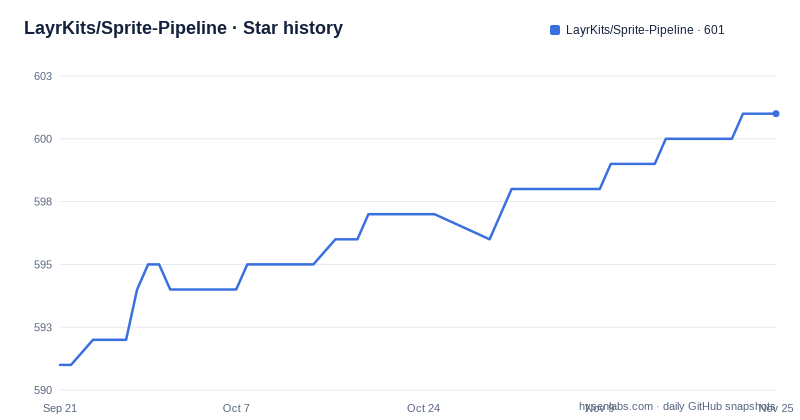
- LayrKits/Sprite-Pipeline601 ★ · +10
| Repository | 2026-09-21 | 2026-11-25 |
|---|---|---|
| LayrKits/Sprite-Pipeline | 591 | 601 |
10 Stars in the last 65 days, measured from the daily GitHub snapshot. Compare with other projects
Editorial analysis
The problem: generated motion that nobody can evaluate
AI video tools produce motion, not game assets. A clip of a character walking is not a sprite sheet, and it is not reviewable frame by frame. LayrKits/Sprite-Pipeline exists to close that gap. The README frames the core before and after directly: rough character motion in, reviewable game-art sprite strip out. The target reader is an indie game dev or an AI art builder who already has generated animation and needs something they can actually look at inside a game workflow. That is a narrow audience, and the kit is shaped around it. It starts from AI-generated motion, Kling clips, or other source animation videos, not from a rig, not from a hand-drawn timeline. The repository also states what it excludes on purpose: generated assets, videos, scratch outputs, demo sheets, and project-specific art. So this is a toolchain, not a content pack, and the empty Videos/, work/, Final Sprite Sheets/ and Cleanup/ folders with .gitkeep files confirm that the repo ships with the expected shape and nothing in it.
How the pipeline moves a clip to a reviewed strip
The flow is a sequence of directories, and each step writes into a named folder. Source videos go into Videos/ or Videos/To Be Processed/. Frames are extracted in order into work/extracted/<character>/<action>/. Light or flat chroma backgrounds are removed into work/matted/<character>/<action>/ when needed. Then tools/animation_pipeline.py packs the frames into transparent 256 x 256 cells and writes four things: a horizontal sprite strip, matching individual frame cells, a preview image, and a JSON validation report. The README is explicit about why the cell size is fixed rather than cropped to content: the pipeline preserves the source video canvas so character scale and empty space stay consistent across animations. That is the design decision that matters most here. A tight crop would make each animation look clean in isolation and inconsistent next to the others; a fixed 256 x 256 cell keeps a walk cycle and an attack cycle in the same visual scale. The cost is wasted transparent area and larger sheets. The default frame count is 24 when no frame count is specified, which is a reasonable animation length and also a constraint: longer clips need an explicit count or they get resampled to 24 cells.
Installing LayrKits/Sprite-Pipeline and building a first sheet
The README gives a copy-paste quick start. Python dependencies are installed into a virtual environment; requirements.txt lists Pillow>=10 and nothing else. FFmpeg is deliberately not a Python dependency, so it has to be installed separately for tools/extract_frames_ffmpeg.py to call the ffmpeg command.
python3 -m venv .venv
./.venv/bin/python -m pip install -r requirements.txt
After that, install FFmpeg with the command for your platform. The README lists brew install ffmpeg on macOS, winget install Gyan.FFmpeg on Windows, and sudo apt install ffmpeg on Ubuntu/Debian Linux.
# macOS
brew install ffmpeg

# Windows, with winget
winget install Gyan.FFmpeg

# Ubuntu/Debian Linux
sudo apt install ffmpeg
With dependencies in place, follow docs/QUICKSTART.md for the ordered commands: extract frames, matte if needed, build the sprite sheet, review the preview and report, open the viewer, and promote only approved outputs. The viewer is a Node script rather than a Python one.
node tools/serve_sprite_viewer.mjsThe server prints a local URL. Open it to inspect the generated sheet or the promoted final sheets. The README also notes that assistants should return a Markdown link to the exact review URL, such as [open sprite viewer](http://127.0.0.1:8000/...) or [open alignment review](http://127.0.0.1:8000/alignment-review?path=...), so the assistant shows a preview card with an Open button. The alignment review page is the part worth noticing: it is a separate route for checking candidate alignment, not just a static image dump.
The viewer, the manifest and the pin list
Two files at the repository root, sprite_gallery_manifest.js and sprite_gallery_pins.json, ship as empty starters. That tells you the viewer is meant to be populated by the pipeline rather than curated by hand, and that the pin list is a separate concept from the manifest: pins persist across regeneration, the manifest describes what currently exists. The server does live sheet scanning, so it can show work-in-progress sheets directly and not only promoted ones. That is the strongest argument for the review step being real rather than decorative. You can look at an unapproved strip, decide it is wrong, and never promote it. The promotion target is explicit: Final Sprite Sheets/<GameName>/<CharacterName>/<animation>/. The asset policy reinforces the same boundary. Normal source videos, extracted frames, matted frames, previews, reports, final sheets, and game/demo art should stay ignored by default. If you want the repository to stay a toolchain, that policy is the mechanism that keeps it one.
Where the kit is thin, and when it is the wrong tool
The matting step is described as removing light or flat chroma backgrounds when needed. That is the whole specification in the README. There is no documented handling for soft shadows, semi-transparent edges, motion blur against a busy background, or hair detail. If your generated clips have any of those, expect to do the cleanup by hand in Cleanup/ before the pipeline is useful. The second limitation is the fixed 256 x 256 cell. It buys cross-animation consistency and it costs sheet area, and the README does not document a way to change the cell size. A large boss character and a small pickup will both land in 256 x 256 cells, so scale is something you control in the source footage, not in the packer. Third, this is the wrong tool if your project uses skeletal or bone-based animation, or if your engine imports individual frames rather than strips. It produces a horizontal strip plus matching cells, and that is the output contract. Finally, the repository has no releases listed and no licence stated in the README, which matters more than usual for a kit you would vendor into a commercial project.
Alternatives and the actual difference in approach
The obvious comparison is a general sprite sheet packer, the kind of tool that takes a folder of PNGs and produces an atlas with a JSON map. Those tools optimise for packed area: they trim transparent margins, rotate and bin-pack, and the output is an atlas for runtime blitting. LayrKits/Sprite-Pipeline optimises for the opposite thing. It keeps a uniform 256 x 256 grid and preserves the source video canvas precisely so frames do not shift between animations. If you feed a general packer a walk cycle and an attack cycle, you get two tightly cropped atlases whose characters sit at different scales and origins. If you feed the same clips to this pipeline, you get two strips on the same grid. The second alternative is doing the extraction and matting by hand in an image editor or a compositor. That gives you better mattes on hard footage, and it gives you no validation report, no repeatable directory layout, and no viewer to hand to a reviewer. The trade is control against repeatability, and the kit is clearly betting on repeatability.
Maintenance, upgrades and the licence question
The last push to the repository was on 2026-05-10, which is more than four months before today's date. The repository is not archived, but the README does not describe a release process, and the repository has no published GitHub releases. Treat upgrades as a git pull rather than a versioned dependency. That is a real cost: the pipeline writes into work/, Final Sprite Sheets/ and Cleanup/, and a change to the frame packing or the report format would land directly on top of your existing outputs. The dependency surface is small, which limits the blast radius. requirements.txt pins only Pillow>=10, so the Python side is unlikely to break on its own; the Node viewer script has no package manifest in the repository, so its dependencies are not something you can audit from here. FFmpeg is an external binary you install yourself, and its version is whatever your package manager gives you. On licensing, the README does not state a licence for this repository. Before you vendor any of it into a commercial build, confirm the licence from the repository itself, and separately confirm the terms that apply to the source videos you generate with Kling or another model, since those terms are not part of this repo at all.
Editorial conclusion
Adopt it if your animation source is AI-generated video and you need ordered frames, matted cells and a strip you can inspect before anything reaches the game folder. Skip it if you already have a DCC-based animation pipeline, or if you need a rigged skeletal format rather than a strip. Before committing, open docs/QUICKSTART.md, confirm the matting step matches your background, and check that tools/animation_pipeline.py output at the default 24 frames lines up with the frame count your engine expects.
Frequently asked questions
What is LayrKits/Sprite-Pipeline used for?
It turns AI-generated character motion into reviewable 256 x 256 sprite sheets. The README describes the flow as extracting frames, matting and cleaning them, building horizontal strips, inspecting them in a browser viewer, and promoting only approved outputs.
How do I install LayrKits/Sprite-Pipeline?
Create a virtual environment, install requirements.txt with pip, and install FFmpeg separately with brew, winget or apt. The README notes that FFmpeg is not installed by requirements.txt, which lists Pillow>=10.
What frame count does LayrKits/Sprite-Pipeline use by default?
The README states that the pipeline defaults to 24 frames when no frame count is specified for tools/animation_pipeline.py.
Does LayrKits/Sprite-Pipeline include any sprite assets?
No. The README says the repo intentionally excludes generated assets, videos, scratch outputs, demo sheets, and project-specific art, and the Videos/, work/, Final Sprite Sheets/ and Cleanup/ folders ship empty with .gitkeep files.
Official sources
Add this badge to your README
If you maintain this project, the badge below links readers to this analysis and shows its maintenance status from the daily GitHub snapshot. Paste the markdown into your README; add ?metric=license or ?metric=stars to the image URL for a different field.

[](https://hysenlabs.com/projects/layrkits-sprite-pipeline)Star history chart for your README
[](https://hysenlabs.com/projects/layrkits-sprite-pipeline)Was this useful?