verifiers: RL environments and evals, installed through a vendor CLI
Our library for RL environments + evals
At a glance
- What is it?
- The verifiers library builds the environments used to train and evaluate LLMs, and it plugs tightly into Prime Intellect's hub, training framework and hosted platform. Its packaging metadata says more about how it is meant to be used than the short README does.
- Who is it for?
- verifiers suits a team already inside the Prime Intellect stack, where the hub, prime-rl and Hosted Training are the destination and the Prime CLI is the entry point. It is a poor fit for a standalone project that only wants environments as a library, since the documented install brings in a vendor CLI and the platform client packages.
- Can I use it commercially?
- Yes. MIT is a permissive licence: you can use, modify and sell software built on it, as long as you keep its copyright and licence notices.
- Is it still maintained?
- Yes. The repository received new commits within the last day.
- What is it written in?
- Mainly Python, according to GitHub's language statistics.
Answers come from the project's GitHub data, last synced on November 13, 2026, and from our analysis. They are not legal advice.
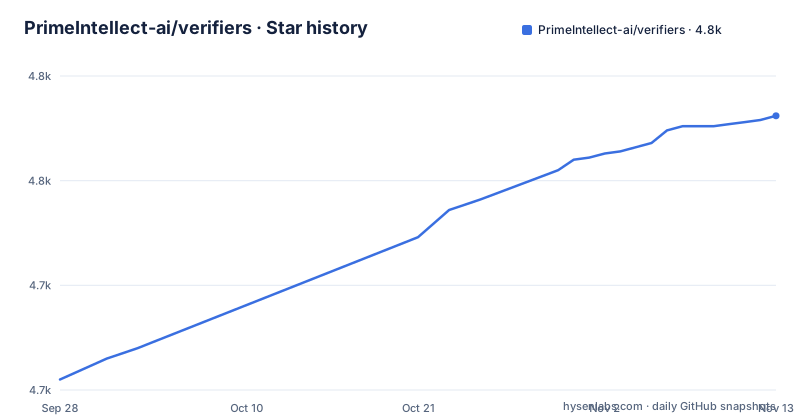
Star history
- PrimeIntellect-ai/verifiers4,781 ★ · +126
| Repository | 2026-09-28 | 2026-11-13 |
|---|---|---|
| PrimeIntellect-ai/verifiers | 4.7k | 4.8k |
126 Stars in the last 46 days, measured from the daily GitHub snapshot. Compare with other projects
Editorial analysis
The documented install is a CLI, and the library is never named in it
The installation section recommends the Prime CLI for interacting with environments, and the snippet it gives installs uv and then that CLI:
# install uv
curl -LsSf https://astral.sh/uv/install.sh | sh
# install the prime CLI
uv tool install prime
Neither line installs verifiers. The consequence is that a reader following the README ends up with a command line tool that talks to the Environments Hub, and no instruction anywhere in it for adding the library to an existing project. Environments are reached through the CLI rather than through Python imports in the documented path.
That is a deliberate shape rather than an omission, since the library is described as tightly integrated with the Environments Hub, with the prime-rl training framework and with the Hosted Training platform. A user who wants the hub's environments gets them through the CLI; a user who wants to write their own environment has to read the docs directory to find out how.
The version is derived from git tags, and one release tag shows the seam
`pyproject.toml` sets the version as dynamic, with a comment saying it is derived from git tags via hatch-vcs, and the build system pairs hatchling with hatch-vcs. So there is no version string in the repository; the number exists only when a tag does.
The recent releases are v0.3.0 from 2026-08-07, v0.3.1 from 2026-08-24 and v0.4.0 from 2026-10-12.
For a user this means version pinning is really tag pinning. The last push was on 2026-11-02, which tells you the branch is active but says nothing about which release a given checkout corresponds to.
Every dependency is a floor except mcp, which is the only exact pin
The dependency list is long and almost entirely open-ended. `anthropic>=1.0.0`, `numpy>=2.1.0`, `math-verify>=0.8.0`, `pydantic>=2.12.3`, `tenacity>=8.5.0`, `gepa>=0.0.6`, `aiohttp>=3.14.1`, `uvicorn>=0.52.0` and others all state minimums and nothing above them. One library carries a ceiling, `openai>=2.54.0,<3.0.0`, and exactly one is pinned to a single version, `mcp==2.2.0`.
mcp==2.2.0
openai>=2.54.0,<3.0.0
Two more entries deserve attention. `renderers[multimodal]>=0.1.13.dev17` asks for a development build of a rendering library, and `gepa` is still at 0.0.x, which is an early version number for something the environments depend on.
The practical upshot is that the metadata alone does not make a reproducible install. What does is `uv.lock`, which sits at the repository root next to the same uv tooling the install snippet uses. Two installations a month apart can resolve to different trees, so the lock file, not the version, is the thing to keep in your repository.
Python is capped below 3.15, and the classifier list matches the cap
The metadata states `requires-python = ">=3.11,<3.15"`, and the classifiers enumerate 3.11, 3.12, 3.13 and 3.14. The two agree, which is not always true of hand-written packaging, but the ceiling is the part to notice: a machine on a newer interpreter is excluded outright rather than warned about.
requires-python = ">=3.11,<3.15"The project also declares itself beta, with a Development Status classifier of 4 - Beta, and its keywords name the intended territory: reinforcement-learning, llm, rl, grpo, environments, multi-turn, agents, agentic-rl, tool-use, train, eval, harness and rlvr. That last acronym, reinforcement learning with verifiable rewards, tells you the environments are built around checks a program can score, and `math-verify` in the dependencies is the obvious place to look for that scoring path.
Packaging is otherwise ordinary: hatchling builds it, MANIFEST.in is present, and the license is MIT with William Brown named as author.
Two model SDKs and a full serving stack arrive with every install
The dependency list pulls in both major model SDKs, `anthropic>=1.0.0` and `openai>=2.54.0,<3.0.0`, which is consistent with an evaluation harness that has to talk to whichever provider a given environment targets. Alongside them sits a serving and messaging stack: `uvicorn>=0.52.0`, `aiohttp>=3.14.1`, `httpx>=0.27.0`, `httpx2>=2.12.0`, `h11>=0.16.0`, `pyzmq>=27.1.0` and `msgpack>=1.1.2`.
Two of those entries are unusual enough to name. `httpx` and `httpx2` appear as separate requirements at different major versions, and the project depends on `mcp==2.2.0`, which is the Model Context Protocol client, matching the tool-use keyword in the metadata.
Whether or not your environment needs any of this, it is installed. A library used for local evaluation therefore brings a web server, two HTTP clients at different major versions and a message queue client into the environment, which is a real cost when the work runs inside a constrained training image.
prime-tunnel, prime-sandboxes and prime-runs tie the library to the platform
Three dependencies carry the vendor name: `prime-tunnel>=0.1.17`, `prime-sandboxes>=0.5.5` and `prime-pydantic-config[toml]>=0.4.3`. They are the concrete form of the integration the overview claims, connecting local environments to the Environments Hub, the prime-rl training framework and the Hosted Training platform.
The consequence for someone who only wants to write environments locally is that these client packages are not optional extras; they install with the library, at version floors that can move under you. The one piece of local configuration in the list is `prime-pydantic-config[toml]`, which suggests settings arrive as TOML validated by pydantic rather than as code.
Whether that coupling is a feature depends on your plans. In a team already running training on the hosted platform, these clients are the transport. Outside it, they are three dependencies whose version floor you now inherit.
Documentation comes in two registers, and one of them targets agents
The further reading section splits the documentation by audience. The `docs/` directory holds short, human-written guides and overviews about the architecture, while `AGENTS.md` and `skills/` are aimed at coding agents and go into more detail. At the root, `.readthedocs.yaml` indicates the docs are built as a site.
That split has a practical effect on where you should look first. If you want the shape of the system, the guides are the shorter read. If you want the details that decide how an environment is wired, the agent-facing files may hold more of them, which is unusual for a library of this size and worth checking before you design around an assumption.
The rest of the tree supports both audiences. `environments/`, `tests/` and `scripts/` sit next to `examples/`, which contains a single named example, `examples/agent.py`. `.pre-commit-config.yaml` and `.markdownlint-cli2.yaml` gate commits and prose, and `uv.lock` pins the tree. There is no homepage beyond the repository itself, and no CHANGELOG.
Editorial conclusion
verifiers suits a team already inside the Prime Intellect stack, where the hub, prime-rl and Hosted Training are the destination and the Prime CLI is the entry point. It is a poor fit for a standalone project that only wants environments as a library, since the documented install brings in a vendor CLI and the platform client packages. Before depending on it, read requires-python, which is capped below 3.15, and commit uv.lock so your environment matches the one you tested.
Frequently asked questions
What is verifiers from Prime Intellect?
It is a Python library for creating environments used to train and evaluate LLMs. Its package description is Verifiers: Environments for LLM Reinforcement Learning, and it is MIT licensed.
How do I install verifiers?
The README recommends installing uv with curl -LsSf https://astral.sh/uv/install.sh | sh and then the Prime CLI with uv tool install prime, using that CLI to interact with environments.
Which Python versions does verifiers support?
The metadata requires Python >=3.11,<3.15, and the classifiers list 3.11 through 3.14. Newer interpreters are excluded by that ceiling rather than supported experimentally.
Can verifiers be used with more than one model provider?
The dependency list carries anthropic>=1.0.0 alongside openai>=2.54.0,<3.0.0, and also mcp==2.2.0, its only exactly pinned dependency.
Where are examples of verifiers environments?
The repository has an examples directory containing examples/agent.py, alongside environments/, tests/ and a docs directory, plus AGENTS.md and skills for coding agents.
Official sources
Add this badge to your README
If you maintain this project, the badge below links readers to this analysis and shows its maintenance status from the daily GitHub snapshot. Paste the markdown into your README; add ?metric=license or ?metric=stars to the image URL for a different field.

[](https://hysenlabs.com/projects/primeintellect-ai-verifiers)Star history chart for your README
[](https://hysenlabs.com/projects/primeintellect-ai-verifiers)Was this useful?