smarGate puts your tunnel entry point on your own phone
An intranet-penetration (NAT traversal) tool implemented in C++, requiring no public IP: small, easy to use, fast and secure, with the best multi-link aggregation (P2P + proxy) mode.
At a glance
- What is it?
- smarGate is an intranet penetration tool whose C++ core builds TCP P2P tunnels between an Android client and a server inside your network. The interesting part is where the access entry point lives, and the awkward part is the NAT table that decides whether your direct tunnel ever forms.
- Who is it for?
- Adopt smarGate if you want a home-lab entry point that lives on a phone you already carry and you can accept relay fallback. Do not adopt it if symmetric NAT on one side meets port-restricted or symmetric NAT on the other, if you need traffic to reach Hong Kong, Macau, Taiwan or overseas addresses through the shared proxy, or if you are deploying the Advance build onto a phone you do not personally control.
- Can I use it commercially?
- Not without permission. GitHub finds no licence file in the repository, and without a licence all rights are reserved by default: you may read the code but not reuse it. Check the README, or ask the authors, before using it.
- Is it still maintained?
- Yes. The repository received new commits within the last day.
- What is it written in?
- Mainly JavaScript, according to GitHub's language statistics.
Answers come from the project's GitHub data, last synced on November 15, 2026, and from our analysis. They are not legal advice.
Star history
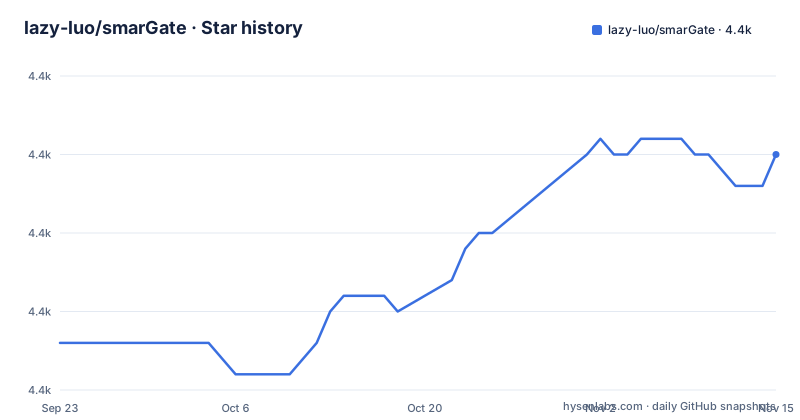
- lazy-luo/smarGate4,370 ★ · +12
| Repository | 2026-09-23 | 2026-11-15 |
|---|---|---|
| lazy-luo/smarGate | 4.4k | 4.4k |
12 Stars in the last 53 days, measured from the daily GitHub snapshot. Compare with other projects
Editorial analysis
The phone is the entry point, not a public hostname
smarGate inverts the usual tunneling premise. Most tools of this kind promote a public endpoint: you point a hostname or a public port at an internal service and anyone who knows the address can try it. The project's own comparison draws the line with a door metaphor, carrying the front door with you instead of leaving it in a public place. Practically, that means the Android client holds the mapping configuration and the tunnel terminates on the handset, so a mapping to ssh, an internal camera or a database is reachable through a port on your own phone.
The server side stays unconfigured while running. The project states this as a design choice rather than a limitation: every mapping is added in the client, and changes take effect without restarting the service, which it calls hot plug. Ports on internal machines can also be mapped to another server's host rather than only to the phone. Support covers IPv4 and IPv6, and UDP is carried as UDP over TCP. Listed CPU architectures run from x86, arm, mips, riscv and LoongArch64, with alpha, PowerPC and SPRAC named for business deployments, and the hp-unix, solaris and AIX minicomputer platforms are listed alongside linux, windows, macos and android. A mini build is listed at roughly 1MB. Since version 0.1.1 the engine is its own network stack rather than a wrapper on an existing one.
Registration returns a user ID you must use within an hour
There is no install command to copy, and no configuration-as-code path. The setup sequence is four manual steps: download the Android app, register, download a server package matching your platform, then configure mappings from the phone. Distribution is by binary, not by package manager. The repository ships linux_x86_64v0.41.3.tar, linux_x86v0.41.3.tar, linux_arm32v0.41.3.tar and windows_x86v0.41.3.tar, plus app-base-release.apk and app-advance-release.apk. One APK carries both client and server, which is why a retired Android phone can act as a node, and the app runs a server mode of its own.
The proxy server configuration is XML, and the README's sample opens like this:
  <?xml version="1.0" encoding="GBK"?>
    <app-config code="PROXY" name="proxy-server">
        <app-parameter>
       </app
Inside the app-parameter element you set the user ID returned at registration and the service port. Custom proxy and certificate elements are optional and default to off. The sample block shipped in the README is itself cut off mid element, so treat it as a shape to copy rather than a file to paste.
The NAT table decides whether P2P ever forms
The core claim is a direct TCP tunnel with no relay and no purchased public IP. Whether you get one is decided before any of your software runs, by the NAT types on both ends. The project publishes its own result table: NAT1 to NAT3 against NAT1 to NAT3 connects; NAT1 or NAT2 on one side connects to NAT4 on the other; NAT4 against NAT4 does not; NAT4 on one side against NAT3 or NAT4 on the other does not. NAT1 is full cone through NAT4 symmetric.
Read that table carefully against the summary line claiming IPv4 support for NAT1 to NAT3 penetration. Symmetric NAT on one end combined with port-restricted or symmetric NAT on the other kills the direct path, and the README is honest about the reason: not every network supports P2P. When the direct path fails, traffic falls through a custom proxy, and failing that to an official shared relay. So the headline feature is conditional.
Port negotiation is dynamic by default and can be pinned to a chosen port so it works with firewall rules. Direct IPv6 support and firewall traversal arrived in v0.14. Users are isolated from one another, and a chain of proxies is supported for multi-level, loop-free setups.
UDP rides inside TCP, and TLS needs openssl on the proxy host
Two implementation choices shape what you can run through the tunnel. First, UDP is not carried natively. It is wrapped as UDP over TCP, which the project presents as a benefit because it avoids the quality of service penalties that hit plain UDP. The cost is that you lose UDP's own congestion behaviour and gain head-of-line blocking across the tunnel, and it shows up most on lossy mobile links.
Second, TLS on a custom proxy is opt-in and fiddly. The proxy server element takes a service port, the owner ID from registration, an optional numeric access token, and a certificate creation flag that defaults to false. Setting it to true makes the proxy generate a certificate itself, and the configuration note states you must ensure openssl is installed. If you already hold a certificate and key you name them instead. The server side needs a matching flag, and if the proxy really is running a secure channel, the server's ssl attribute has to be set to true as well or the flag lies about reality.
The white list controls on the socks and http proxies accept CIDR ranges and wildcard domains. Watch the IP value on the channel entry: it has to be a public address.
The official relay refuses Hong Kong, Macau, Taiwan and overseas targets
The shared fallback proxy carries a restriction that is easy to miss and expensive to discover late: it does not forward data to Hong Kong, Macau, Taiwan or foreign IP addresses. If you rely on the free relay because P2P failed, and your internal service or the destination you want to reach sits outside the mainland, that path simply is not available to you. This is worth pairing with the project's own note that the official proxy shares bandwidth across users, so many people on it get slow throughput. Its stated best practice is to run your own proxy server instead.
Running your own means a cloud host with a public IP, the proxy_server binary on it, and the proxy server configured to accept arbitrary inbound ports. Every byte then goes through infrastructure you control, which is the honest trade for a tool whose selling point is owning the entry point.
The repository carries an unknown licence, so redistribution terms for the client and server binaries are not stated, and the last recorded push is dated 2 November 2026. Neither point changes how the tunnel behaves, but both matter before you build anything on it.
The Advance build carries audio capture, GPS tracking and remote app upgrade
The Android app ships in two product flavours from one codebase, separated by compile time flags and dead code elimination, and the feature table is where you should look before choosing. Both flavours include the proxy tunnel and file management. Only Advance includes audio capture and transmission, GPS location tracking, application upgrade, remote desktop and DLNA/AirPlay screen casting. Screen and camera monitoring is marked unsupported in both.
The deployment note is blunt about the Advance build on Huawei phones: it is identified by default as a fraud program, so you are told to disable the pure mode, switch the phone to airplane mode, then install. A tool whose full build trips vendor anti-fraud classification on install is telling you something about its trust profile, and it is worth weighing that against handing a colleague's phone to your client.
Permissions are not optional. Background running and keeping the network alive during sleep must both be granted, or the system drops the tunnel as soon as the app leaves the foreground or the screen sleeps. Autostart is needed for the Android server mode to launch at boot since v0.30, and the microphone permission is required for voice monitoring. File management against the phone and the server is included in both flavours.
v0.31 opened public-port publishing, which the project calls a violation
The most telling line in the documentation is an admission. Public exposure, added in v0.31, is the mode where an internal service is mapped straight to an external port, which the project labels as counter to its own security design and marks as pushed by other tools in this category. The difference in approach is therefore explicit: smarGate's default model keeps the entry on a private mobile network that outsiders cannot address, while the common public-endpoint model trades reachability for exposure and needs a domain or a static public address.
Server-to-server P2P port mapping also arrived in v0.31, configured through ip@index notation, so a host on server A's network can be mapped to a host on server B without a public hop. Automatic tunnel selection probes P2P first, then your custom proxy, then the official relay, and retries without intervention.
The repository ships client/ and server/ directories next to prebuilt packages, and the README describes the tool as free, with open-sourcing considered once it is stable. Check your NAT types and your destination geography before spending an evening on it.
Editorial conclusion
Adopt smarGate if you want a home-lab entry point that lives on a phone you already carry and you can accept relay fallback. Do not adopt it if symmetric NAT on one side meets port-restricted or symmetric NAT on the other, if you need traffic to reach Hong Kong, Macau, Taiwan or overseas addresses through the shared proxy, or if you are deploying the Advance build onto a phone you do not personally control. Before anything else, check the NAT type on both ends, read the flavor table to know which APK you installed, and confirm the background and doze permissions are actually granted rather than assumed.
Frequently asked questions
What does smarGate use as the access entry point for internal services?
The Android client holds the tunnel and the mappings, so internal ports are reached through a port on the user's own phone. The server runs without mapping configuration.
When does smarGate fail to establish a P2P tunnel?
The published table shows failure whenever NAT4 (symmetric) sits on one side and NAT3 or NAT4 sits on the other, including NAT4 against NAT4. Traffic then falls back to a custom proxy or the official relay.
Which platforms can run the smarGate server?
Prebuilt packages cover linux x86, x86_64 and arm32 plus windows x86, at version 0.41.3. The Android app also carries a server mode, which lets a phone act as the node.
Does smarGate support UDP, and how is it carried?
Yes, UDP is supported and carried as UDP over TCP. The project presents this as avoiding quality of service penalties on plain UDP.
What is the difference between the Base and Advance Android builds?
Both include the proxy tunnel and file management. Only Advance adds audio capture, GPS tracking, application upgrade, remote desktop and DLNA/AirPlay casting, while screen and camera monitoring is marked unsupported in both.
What does the smarGate official proxy refuse to forward?
It does not forward data to Hong Kong, Macau, Taiwan or foreign IP addresses. The project also notes the relay shares bandwidth, and points to a self-hosted proxy as the better practice.
Official sources
Add this badge to your README
If you maintain this project, the badge below links readers to this analysis and shows its maintenance status from the daily GitHub snapshot. Paste the markdown into your README; add ?metric=license or ?metric=stars to the image URL for a different field.

[](https://hysenlabs.com/projects/lazy-luo-smargate)Star history chart for your README
[](https://hysenlabs.com/projects/lazy-luo-smargate)Was this useful?