LearnPrompt: A Chinese-Language AI Tutorial Site Maintained as an MDX Repository
A permanently free and open-source AIGC course, currently covering Claude Code, Codex, Hermes, OpenClaw, Obsidian, prompt engineering, ChatGPT, Midjourney, Runway, Stable Diffusion, AI digital humans, AI voice & music, and open-source LLMs.
At a glance
- What is it?
- LearnPrompt is a free, Chinese-language AI learning path covering prompt engineering, ChatGPT, Midjourney, Stable Diffusion, Claude Code and agent tooling, published as an MDX site repository. Its README is a profile page and a roadmap, not installation instructions, and that distinction shapes what you can actually evaluate here.
- Who is it for?
- Adopt LearnPrompt as a reading resource if you or your team need a Chinese-language entry point into prompt engineering and the current generation of agent CLIs, and treat the repository itself as a content source rather than a dependency. Do not adopt it if you need an English-language curriculum, a versioned release you can pin, or a library with a defined API surface.
- Can I use it commercially?
- Check first. The repository uses a licence we do not classify automatically, so read its LICENSE file before any commercial use.
- Is it still maintained?
- Yes. The repository last received commits 5 days ago.
- What is it written in?
- Mainly MDX, according to GitHub's language statistics.
Answers come from the project's GitHub data, last synced on November 13, 2026, and from our analysis. They are not legal advice.
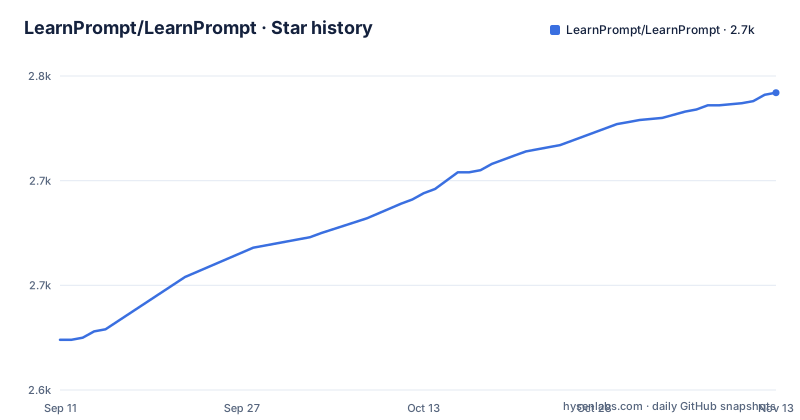
Star history
- LearnPrompt/LearnPrompt2,742 ★ · +118
| Repository | 2026-09-11 | 2026-11-13 |
|---|---|---|
| LearnPrompt/LearnPrompt | 2.6k | 2.7k |
118 Stars in the last 63 days, measured from the daily GitHub snapshot. Compare with other projects
Editorial analysis
What LearnPrompt Is Actually Shipping
The repository serves two purposes at once. It is the default profile README for the GitHub account LearnPrompt, and it is the project repository for the tutorial site at learnprompt.pro. For a first-time visitor to the account, the README explains who the maintainer is and which projects exist. For returning readers of the tutorial site, the same document records where the site is heading next. That dual role is worth naming early, because it means the README reads like a personal index page rather than a project manual. The primary language is MDX, which tells you the content is authored as Markdown with embedded components, and the topics list spans prompt engineering, ChatGPT, Midjourney, Runway, Stable Diffusion, AI digital humans, AI voice and music, open source large models, Claude Code, Codex, Hermes, OpenClaw and Obsidian. The stated audience is people new to AI who want to try one more step and run one more working example, in the maintainer's framing, rather than memorise a list of concepts. The site is described as permanently free and open source, and the README commits to keeping a Chinese learning path as its main line even as the content shifts from tool introductions toward task-oriented material.
The Content Model: MDX Pages Plus Reusable Skills
The mechanism is a content pipeline rather than a runtime. Tutorials live as MDX files in the repository and are rendered at learnprompt.pro. Alongside the prose, the maintainer describes a set of installable Agent Skills that carry the same workflows: Luban for turning a working skill into something installable and verifiable, Paoding for distilling a creator's approach into a content coach, Cailun for turning a conversation conclusion into a shareable page, Afu for moving items from an Obsidian inbox to a calendar, Yugong for looping an agent without manual prompting, Partner for splitting planning and review in Claude Code from implementation in Codex, and an Irasutoya illustration skill. There is also a CC Harness bundle described as installing memory, compression, verification and scheduling with one command. The README states that the next version of LearnPrompt will be maintained by AI workflows themselves, using wiki skills to split topics, update stale content and record tested procedures. That is the interesting architectural claim: the tutorial site and the skills that operate on it are meant to share a repository. Whether that loop is currently running is not something the material confirms. The README describes the intention, and the repository metadata shows a last push of 2026-09-09, but the repository has no published GitHub releases, so there is no versioned snapshot to inspect.
Getting Started With the Repository Itself
What you can do is clone the repository and read the MDX sources directly. The commands would be git clone https://github.com/LearnPrompt/LearnPrompt, then cd LearnPrompt, then git checkout main, since main is the default branch. From there the content lives in MDX files, and any local preview depends on the site framework, which the README does not name. If you want the tutorials as reading material rather than as source, the README points to learnprompt.pro and to learnprompt.pro/skills for the project overview. The skills referenced in the README live in separate repositories under the same account, including luban-skill, paoding-skill, cailun-skill, afu-llm-todo, loop-engineering, partner-skill, carl-irasutoya-illustrations and cc-harness-skills. Each of those has its own README and its own installation path. Anyone evaluating LearnPrompt for a team should treat the tutorial repository and the skill repositories as separate adoption decisions, because installing a skill into an agent harness is a different commitment from reading a tutorial page.
Where the Material Stops Being Useful
The licence is the first hard limitation. The repository metadata reports NOASSERTION, which means GitHub could not map the licence file to a known identifier. For a project that describes itself as permanently free and open source, that is a gap a legal or procurement review will flag. You would need to read the licence file in the repository directly. The second limitation is staleness, and the maintainer states it plainly: many older tutorials are out of date, and the README frames the rebuild as a response to that. A tutorial site covering fast-moving tools accumulates dead instructions, and the material offers no deprecation markers, no last-reviewed dates per page, and no changelog. Third, the README is not a specification. It lists topics the site covers and directions it will take, and those two categories are not visually separated in a way a reader can audit. If you need to know whether the RAG chapter is finished or planned, the README will not tell you. Fourth, there are no releases, so there is no tag to pin, no changelog to diff, and no way to freeze a version of the curriculum for a cohort. That matters if you are assigning this as coursework.
How This Differs From a Conventional Documentation Site
The closest comparison is a project like freeCodeCamp or a vendor's own documentation portal, and the difference is in how content is produced and maintained. Vendor documentation is written by the team that ships the tool, tracks the tool's release cycle, and is usually versioned alongside it. LearnPrompt is written by an independent maintainer who describes the work as hands-on testing and workflow building, and the content is organised around tasks rather than around a product's feature list. That is a real distinction: a task-first curriculum can survive a tool being replaced, because the task outlives the tool. The trade-off is that nothing here is authoritative about any specific product. If you need to know the exact flags for a Claude Code invocation or the current pricing tier of a model, the vendor documentation is the source of truth and LearnPrompt is at best a second opinion. The other comparison worth making is against a static ebook or video course. Those ship once and age in place. LearnPrompt's stated plan is to be continuously updated by agent workflows, which is a different maintenance model.
Maintenance Cost and the Licence Question
If you only read the site, your maintenance cost is zero and your exposure is a bookmark. If you fork the repository and localise the content, you inherit the update problem: MDX files that reference tools which change their interfaces, and no upstream release process to merge from. The repository has a single default branch, main, and no published GitHub releases, so tracking upstream means diffing commits rather than pulling versions. If you adopt the skills instead, the cost profile changes again, because each skill repository has its own README and its own install path, and the CC Harness bundle is described as a one-command install of four capabilities. That is convenient, and it also means one command changes your agent's memory, compression, verification and scheduling behaviour. On licensing, the repository reports NOASSERTION, so the repository does not tell you what you may do with the content. Reusing tutorial text in paid training material, translating it, or bundling it into a product are all questions the material cannot answer. Read the licence file before you reuse anything, and do not assume that the phrase permanently free and open source in a README carries the same meaning as an OSI-approved licence identifier.
Who Should Read This and Who Should Not
The fit is narrow and clear. A Chinese-speaking developer or designer who wants a structured path into prompt engineering, image generation tools and the current wave of agent CLIs has a reasonable starting point here, and the task-oriented framing is more useful than a tool directory for that reader. A team lead who needs to onboard junior staff in Chinese and wants material that maps to real tasks rather than feature tours could use the site as a reading list. The mismatch is equally clear. An English-speaking team gets nothing from the tutorial content, since the README explicitly keeps Chinese as the main line and offers only a README_EN.md translation of the readme itself. Anyone who needs a stable, versioned curriculum for a semester-long course will not find tags or releases to pin. Anyone looking for a library to import will not find one, because the repository is content, not code. And anyone who needs authoritative, current technical reference for a specific vendor's product should go to that vendor. The honest summary is that LearnPrompt is a well-scoped reading resource with an ambitious maintenance plan, and the gap between the plan and the verifiable present state is the main thing to weigh.
Editorial conclusion
Adopt LearnPrompt as a reading resource if you or your team need a Chinese-language entry point into prompt engineering and the current generation of agent CLIs, and treat the repository itself as a content source rather than a dependency. Do not adopt it if you need an English-language curriculum, a versioned release you can pin, or a library with a defined API surface. Before committing time, open learnprompt.pro and confirm which topics are actually written versus planned: the README lists RAG, fine-tuning, digital humans and AI music alongside the older AIGC tutorials, and the same README states that many older tutorials are now out of date and that the site is being rebuilt around real tasks. Check the licence file directly, since the repository reports NOASSERTION rather than a named licence, and verify the current state of the MDX content on the main branch rather than relying on the roadmap section.
Frequently asked questions
Is LearnPrompt free, and what license is it under?
The course is described as permanently free and open source, and the page repeats that it will stay that way as the material changes. The license is another matter: a LICENSE file sits in the repository root while the declared license is NOASSERTION, so neither the file listing nor the metadata settles the terms for anyone who wants to translate or reuse a chapter.
Does LearnPrompt have an English version?
Yes, at the level of the root page: its first line links to README_EN.md and that file is present in the repository root. The course material itself is Chinese, and keeping a Chinese learning path as the main thread is stated as one of the plans for the rewrite.
What does LearnPrompt use to build its website?
Docusaurus is the configured generator, through docusaurus.config.js, sidebars.js and the preset-classic dependencies, and a starlight/ directory points at a second one. Hosting is split between GitHub Pages, which reads the CNAME file at the root, and Vercel, configured in vercel.json.
Can I install LearnPrompt as a package?
No. The manifest is marked private, named promptgineering and held at version 0.0.0, so nothing in this repository is published for use as a library. The installable pieces are separate repositories under the same account, among them luban-skill, carl-skills and cc-harness-skills.
Does LearnPrompt publish releases or version tags?
It publishes neither. The repository has no GitHub releases, and the only version numbers appearing on the page belong to other projects in the same account, such as ai-news-radar going from v0.6 to v0.7.0 inside a single session during its first polishing pass.
Official sources
Add this badge to your README
If you maintain this project, the badge below links readers to this analysis and shows its maintenance status from the daily GitHub snapshot. Paste the markdown into your README; add ?metric=license or ?metric=stars to the image URL for a different field.

[](https://hysenlabs.com/projects/learnprompt-learnprompt)Star history chart for your README
[](https://hysenlabs.com/projects/learnprompt-learnprompt)Was this useful?