ntvdmx64 brings the NTVDM DOS host back to 64-bit Windows
Run Microsoft Windows NTVDM (DOS) on 64bit Editions
At a glance
- What is it?
- Windows 64-bit editions dropped the NTVDM, the component that ran DOS applications, because Microsoft never ported it. ntvdmx64 is a set of patches to the original NT4-era NTVDM source that brings it back, together with a loader that gets the patched binary into the right processes. It is a proof of concept, and the README is careful about the security settings that has to run under.
- Who is it for?
- ntvdmx64 fits a developer with a legacy DOS application that has to keep talking to Windows programs on a 64-bit machine, since the reason DOSBox is not enough is the console integration, and the NTVDM path keeps the original Windows host behaviour.
- Can I use it commercially?
- Not without permission. GitHub finds no licence file in the repository, and without a licence all rights are reserved by default: you may read the code but not reuse it. Check the README, or ask the authors, before using it.
- Is it still maintained?
- Yes. The repository last received commits 23 days ago.
- What is it written in?
- Mainly C, according to GitHub's language statistics.
Answers come from the project's GitHub data, last synced on November 7, 2026, and from our analysis. They are not legal advice.
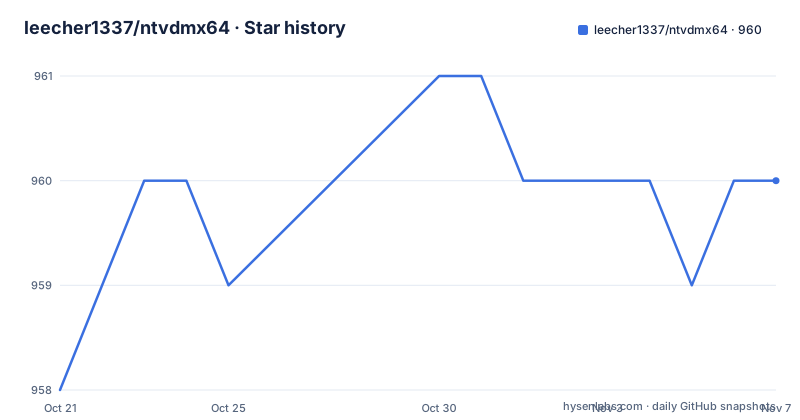
Star history
- leecher1337/ntvdmx64960 ★ · +2
| Repository | 2026-10-21 | 2026-11-07 |
|---|---|---|
| leecher1337/ntvdmx64 | 958 | 960 |
2 Stars in the last 17 days, measured from the daily GitHub snapshot. Compare with other projects
Editorial analysis
What was ported and why
NTVDMx64 is a port of the well known Windows NTVDM, the component Windows uses to run DOS applications, to 64-bit Windows, so that DOS applications can be run there too. The README is blunt about the status of the work. It is a proof of concept that it is possible to run the NTVDM on 64-bit Windows and that Microsoft was, in the author's words, too lazy to port it over and had disabled it for unknown reasons. More specifically, it is a set of patches to the source code of the original Microsoft NTVDM from NT4 in order to work on 64-bit Windows. That framing matters, because it tells you what you are installing. You are not getting a supported operating system component, you are getting somebody's patches to an old NT4-era source tree, with the usual implications for support, security and stability.
Why DOSBox is not the answer
The motivation section answers the obvious question, which is why port the NTVDM when DOSBox works even better and more accurately in 64-bit Windows. There are two reasons. The first is that DOSBox does not have a good interaction with the Windows console, and specifically it is not possible to start Windows applications from within the DOS programs, redirect their output, and perform the other useful interactions that are possible with Windows own NTVDM. The author describes DOS applications that had grown to interact with various Windows applications and interfaces, which would not work with DOSBox. The second reason is the proof of concept itself, to show that it would technically be possible and to encourage Microsoft to take the patches and incorporate them into future Windows releases. The README also keeps the comparison honest, noting that 32-bit is still a lot faster because of V86 mode, and that on machines with lots of RAM there may be use for the x64 version.
The V86 problem and the way around it
The technical heart of the project is a CPU mode problem, and the README describes the discovery process. The author never thought it would be possible at all, since NTVDM on Win32 uses the V86 mode of the CPU for fast code execution, which is not available in x64 long mode. The way out was the leaked Windows NT 4 source code, and the OpenNT project, which not only released the source but patched it and included the build tools so it could be compiled without installing anything but their installation package. Then came the reason the port is feasible at all. Microsoft bought the SoftPC solution from Insignia, a company that specialised in DOS emulators for UNIX systems, and the same SoftPC existed on the MIPS, PPC and ALPHA builds of Windows NT 4, which obviously have no V86 mode like Intel x86 has. Insignia shipped SoftPC with a complete emulated C-CPU, and Microsoft used that for those builds. For V86 mode, Microsoft implemented a facility called Monitor, the piece of software that interacts with the V86 part in the NT kernel, and the source therefore had to be patched to distinguish an i386 build with the CCPU from one with Monitor.
The other obstacles
Beyond the CPU mode, the README lists a series of other problems that have to be overcome. One major one is that NTVDM uses calls to the Console and the CSRSS subsystem which are only used by the NTVDM and therefore do not work out of the box on x64 systems. Page allocation granularity is another, since it poses a problem for the EMM memory management on x64. And the way NTVDM is invoked is rather complicated, because it is done by the loader code of kernel32 or kernelbase, which registers the NTVDM and the requested application with the console server and builds a command line to execute NTVDM with the appropriate parameters. The author notes that further technical detail on that mechanism may come later. It is also worth understanding that the 32-bit code of the original still exists in modern x64 Windows, because Microsoft compiles the same codebase, which is what makes the port possible, with structures having to be converted forward and back between 32-bit and 64-bit as NTVDM runs inside WOW64.
How the patched code gets loaded
The loading mechanism is the part that will decide whether this runs on your machine, and the README is explicit about the cost. Patching the Windows system files directly would be problematic, because those files change with upgrades and Windows has a PatchGuard that does not allow system files to be modified. The chosen approach is therefore a DLL that gets loaded into every process and patches the operating system DLLs in memory right after the application loads, and the patcher has to replicate between 32-bit and 64-bit processes, which is another challenging task. The method selected is two DLLs, one for 32-bit and one for 64-bit, because they need different code for replication and modification, and they are loaded as AppInit-DLLs, which is a Windows mechanism for injecting a DLL into every GUI process. There is a catch. These DLLs now have a signature enforcement in order to get loaded, but that can be turned off in the registry, and as far as the author knows it only works if Secure Boot is off or Windows is in Testsigning mode, which is therefore a requirement for the whole thing to work.
Windows 11, and the console problem again
Windows 11 changed one of the preconditions, and the README explains the consequence. Starting with Windows 11, Secure Boot cannot be disabled out of the box, so the approach changes to the AppCert.DLL loader on Windows 11, and fortunately that loader can also be used under Windows 10, which means it is now possible to use ntvdmx64 without Secure Boot. There is a second problem, which is that AppInit-DLLs are only injected into GUI processes by the CSRSS, but injection is also required into command line processes, because those are even more likely to launch a DOS application. So the AppInit-DLL also has to invade the console server and inject into the console applications created from there, using a WinEvent hook. The README is candid that this is a mess that could all be avoided if Microsoft implemented the required patches in WOW64 and NTDLL, and says further technical detail will come later. The NTVDM executable itself has to reside in the SYSTEM32 and SysWow64 directories, since it is searched and called from 32-bit and 64-bit applications, and because it is a 32-bit application all of its support files have to be in SysWow64, which is the SYSTEM32 directory as a 32-bit application sees it.
Building it, and where the project stands
For the impatient, the README says the autobuild document should be the fastest way to get NTVDMx64 compiled, and the top level of the repository is small, with a readme.txt, a .gitmodules file, an ntvdmpatch/ directory holding the patches and an autobuild/ directory for the build setup. The releases are dated autobuilds rather than semantic versions, with 20260929 for the autobuild of 29.09.2026 published on 2026-08-28, then a long gap back to 20231020 in October 2023 and 20230407 in April 2023, which suggests the project is worked on in bursts rather than continuously. The last push was on 2026-10-15, the repository is not archived, and the language is C, which is what you would expect from a patch set against an NT4-era source tree. The licence field is not recorded, and for a project built on Microsoft source that was never officially released, that is a question a reader should settle before doing anything with it beyond looking.
Editorial conclusion
ntvdmx64 fits a developer with a legacy DOS application that has to keep talking to Windows programs on a 64-bit machine, since the reason DOSBox is not enough is the console integration, and the NTVDM path keeps the original Windows host behaviour. It does not fit a general purpose emulator, because the project is explicitly a proof of concept built on patched leaked source, and it does not fit a machine with Secure Boot enforced, since the loader needs a relaxed signature policy. Before you try it, read the loader section, because the requirement to disable Secure Boot or run in Testsigning mode is not a detail, and note the release state, where the newest tagged build is 20260929 from 2026-08-28 and the last push was on 2026-10-15.
Frequently asked questions
What is ntvdmx64?
It is a set of patches to the source code of the original Microsoft NTVDM from Windows NT4, ported so that DOS applications run again on 64-bit Windows, together with a loader that gets the patched component into the right processes. The project describes itself as a proof of concept.
Why not just use DOSBox?
Because DOSBox does not integrate with the Windows console, so it is not possible to start Windows applications from within a DOS program or redirect their output, and the second reason is to demonstrate that a proper port was possible and to encourage Microsoft to take the patches.
What does Secure Boot have to do with it?
The injected loader DLLs have a signature enforcement that can be turned off in the registry, which as far as the author knows only works if Secure Boot is off or Windows is in Testsigning mode. Since Windows 11 cannot disable Secure Boot out of the box, the AppCert.DLL loader is used there, and that loader also works on Windows 10.
How does the patched NTVDM get into command line processes?
AppInit-DLLs are only injected into GUI processes, so the loader also has to invade the console server and inject into the console applications created from there, which it does with a WinEvent hook. The NTVDM executable itself has to sit in both the SYSTEM32 and SysWow64 directories.
Is ntvdmx64 still updated?
The repository is not archived and the last push was on 2026-10-15. The releases are dated autobuilds, with the newest 20260929 published on 2026-08-28, after a gap back to builds in October 2023 and April 2023, and the licence is not recorded in the project listing.
Official sources
Add this badge to your README
If you maintain this project, the badge below links readers to this analysis and shows its maintenance status from the daily GitHub snapshot. Paste the markdown into your README; add ?metric=license or ?metric=stars to the image URL for a different field.

[](https://hysenlabs.com/projects/leecher1337-ntvdmx64)Star history chart for your README
[](https://hysenlabs.com/projects/leecher1337-ntvdmx64)Was this useful?