vpx-standalone-alp4k: The Config Repository That Runs Pinball on the ALP 4K
Settings and configs for VPX Standalone on the AtGames ALP 4K Pinball
At a glance
- What is it?
- This Apache-2.0 repository holds the table configs, images, and metadata that make VPX Standalone work on the AtGames ALP 4K. It is not a game or an emulator; it is the data layer that the Legends Unchained Table Manager reads to install and launch tables.
- Who is it for?
- Adopt this repository if you run VPX Standalone on an ALP 4K and want a curated, community-maintained set of table configs. Skip it if you expect a standalone installer or a complete table collection; this is a metadata layer, not a distribution.
- Can I use it commercially?
- Yes. Apache-2.0 is a permissive licence: you can use, modify and sell software built on it, as long as you keep its copyright and licence notices.
- Is it still maintained?
- Yes. The repository last received commits 1 day ago.
- What is it written in?
- Mainly VBScript, according to GitHub's language statistics.
Answers come from the project's GitHub data, last synced on October 22, 2026, and from our analysis. They are not legal advice.
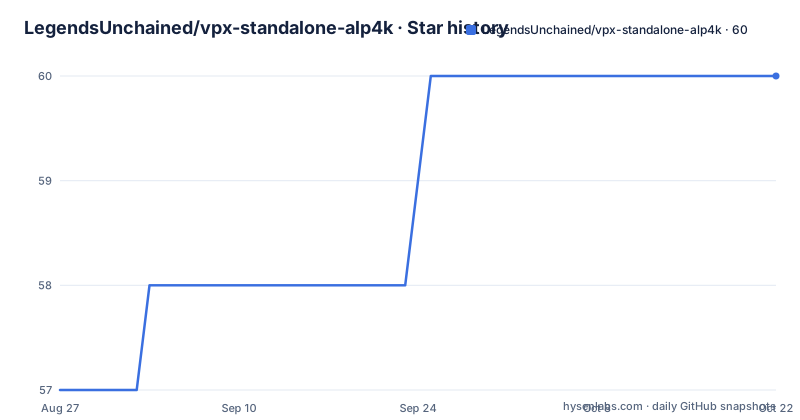
Star history
- LegendsUnchained/vpx-standalone-alp4k60 ★ · +3
| Repository | 2026-08-27 | 2026-10-22 |
|---|---|---|
| LegendsUnchained/vpx-standalone-alp4k | 57 | 60 |
3 Stars in the last 56 days, measured from the daily GitHub snapshot. Compare with other projects
Editorial analysis
What This Repository Actually Does
This is not a pinball game, an emulator, or a launcher. It is a collection of configuration files, images, and metadata that the Legends Unchained Table Manager uses to install and run VPX tables on the AtGames ALP 4K. The README describes it plainly as 'Settings and configs for VPX Standalone on the AtGames ALP 4K.' The intended user is someone who already has the Legends Unchained Loader on their cabinet and wants to add or update tables. The repository provides the per-table files that the Table Manager's wizard reads: a table.yml manifest, launcher artwork, optional PinMAME settings, and sometimes a VPUPatch diff. Without this repo, the Table Manager would have no source for table metadata. It is the data backbone for a specific hardware and software combination.
How the Files Fit Together
Each table lives in its own folder under external/. The required files are launcher.png and table.yml. The launcher.png is a 500 by 750 pixel image that the AtGames Launcher UI displays. The table.yml is a YAML manifest that the wizard parses; it supplies the display name, manufacturer, and year for each table. Optional files add behavior: alias.txt maps PinMAME ROM sets, pinmame.ini provides per-ROM settings like DMD tint and sound, and nvram.nv provides initial NVRAM. A table.dif file is a VPUPatch diff applied with vpxtool patch before installation, which is useful when a table author publishes only a patch. The README notes that table.vbs can replace the built-in VBS file, and use_these_pup_files.zip extracts over an installed PUP pack. The repository layout is the contract: the Table Manager expects these exact filenames, and the README states there are specific naming requirements.
The Team Favorites Mechanism Is a Live Feed
One notable feature is the team_favorites.json file. It backs the Team Favorites page in the Table Manager's Add Tables wizard, and it is read directly from this repository, using the latest release tag and falling back to main. That means an edit to the JSON file reaches cabinets without a new Table Manager release. The file is a plain array of entries, each with a member name, an optional avatar URL, a role string, and a list of table folder names. Cards appear in file order; there is no sorting on the device. The role field uses a slash-separated list, and anyone holding the Wizard role is forced to the end of the list. The README warns to match whole role values, not substrings, so 'Wizard Wrangler' does not count as holding Wizard. This is a simple mechanism, but it shows how the repository is not just static data; it is a live configuration source for the launcher's UI.
Getting It Running: Setup and Validation
The repository does not install anything by itself. You clone it, and the Table Manager on the cabinet reads it. For contributors, the README describes a local validation setup. You need Python 3.11 or newer. On Windows, the commands are: python -m venv .venv, then .\.venv\Scripts\python.exe -m pip install pre-commit, then .\.venv\Scripts\python.exe -m pre_commit install. On macOS or Linux, the equivalent uses python3 -m venv .venv and .venv/bin/python -m pip install pre-commit. The pre-commit hook runs only when a table.yml file is staged. It performs the same metadata validation and YAML linting used by GitHub Actions. The validator relies on VPSDB, so it needs an internet connection. The README explicitly says not to bypass the hook after a validation failure; fix the table.yml error and commit again. If you use VS Code, there are tasks for setting up the hook and validating staged files.
Limitations and Failure Modes
The repository has several sharp edges. A table that is renamed or removed from the manifest is silently skipped, and a team member with no resolvable tables drops off the Team Favorites page. That silence can hide problems. The NSFW badge behavior is another constraint: an adult-content table is listed with an NSFW badge but cannot be clicked through to install unless the viewer has enabled NSFW content in the wizard. Most people will see it greyed out. The README also notes that nvram.nv should not contain high scores from play, and if VPReg.ini includes high scores, the initials must be JSM, CTH, NIX, or VPX. These are small but concrete rules that can break the experience if ignored. The biggest limitation is that this is not a beginner-friendly distribution. It assumes you already have the Legends Unchained Loader and the Table Manager, and that you can navigate YAML and JSON files.
Licensing and Distribution Rules
The repository itself is licensed under Apache-2.0, which permits reuse with attribution. However, the README contains a strong restriction on the Legends Unchained Loader: it is not for sale, and you are not permitted to distribute the software or charge any service fee for assisting users with obtaining it. The loader and Table Manager are copyrighted by Jeff Rebeiro. The repository is public and accepts pull requests for new table configs, but the distribution rules apply to the loader, not necessarily to the configs. The README also directs anyone who wants to contribute to donate to St. Jude instead of paying the developers. This is an unusual arrangement: open-source configs, but a proprietary loader with a no-fee distribution policy. If you plan to build a commercial product around these configs, you need to read the license and the README's terms carefully.
Maintenance and Upgrade Cost
The repository has an active release cadence: v2.0.9 was pushed in August 2026, with v2.0.8 and v2.0.7 in the weeks before. That suggests frequent updates, likely tied to new tables or fixes. The cost of keeping up is low for a user: the Table Manager reads the latest release tag, so you get updates automatically. For a contributor, the cost is higher. You must maintain a table folder with the required files, run the validator, and ensure the metadata matches VPSDB. The pre-commit hook adds a setup step, but it is a one-time install. The README warns that the hook runs only when table.yml is staged, so you can commit other files without validation. The real maintenance burden is keeping the table.yml files accurate as VPSDB changes or as table authors update their work. The repository is not archived, and the last push is recent, which is a good sign, but you should verify that the release tags are stable before depending on them.
Alternatives and the Difference in Approach
The main alternative is the official VPX Standalone distribution or a manual setup where you download tables and configure them yourself. The difference is that vpx-standalone-alp4k centralizes the configuration and automates the install through the Table Manager. Manual setup means you handle the launcher.png, table.yml, and PinMAME settings yourself, and you miss out on the Team Favorites feed and the curated validation. Another alternative is to use the VPX Standalone's built-in table management, but that does not provide the ALP 4K-specific launcher integration. The repository's approach is to treat table configuration as data, not as code. That is a cleaner separation, but it also means the repository is useless without the Table Manager. If you do not use Legends Unchained, this repo has no value for you.
Editorial conclusion
Adopt this repository if you run VPX Standalone on an ALP 4K and want a curated, community-maintained set of table configs. Skip it if you expect a standalone installer or a complete table collection; this is a metadata layer, not a distribution. Before relying on it, verify that your table names match the folder names under external/ and that your Python environment can run the pre-commit validator, since the metadata validation depends on VPSDB and an internet connection.
Frequently asked questions
What are the best visual pinball tables?
This repository ships team_favorites.json, a curated start-here list that backs the Team Favorites page in the Table Manager's Add Tables wizard, shown as one card per team member. Tables are named by their folder name under tables/, and a table already on the cabinet is marked with an Installed badge.
Is visual pinball free?
The README says the Legends Unchained Loader is not for sale, that it may not be distributed in any way, and that no fee may be charged for helping users obtain or use it. It asks for a donation to St. Jude instead, and states no separate licence for VPX itself. This repository is Apache-2.0 licensed.
Which files does a vpx-standalone-alp4k table config need?
Only launcher.png at 640 by 960 pixels and table.yml are required. The other fourteen names are optional and each has a defined role, from alias.txt for PinMAME ROM set aliases and nvram.nv for initialisation, to table.dif as a VPUPatch diff applied with vpxtool patch, and use_these_pup_files.zip which only applies when table.yml sets pupRequired or pupBundled.
How do I add myself to the Team Favorites list?
Add an entry to team_favorites.json with the required member and tables fields, where tables are folder names under tables/ rather than display names. Place it in the position you want because cards render in file order with no sorting on the device, and remember that any entry holding the Wizard role is shown last, matched on whole values.
Why does my commit to vpx-standalone-alp4k get rejected?
A pre-commit hook runs the same table metadata validation and YAML linting as GitHub Actions, and it fires whenever a table.yml is staged. It needs Python 3.11 or newer to install and an internet connection to run, because the metadata validator uses Vwpdb. The guidance is to fix the reported table.yml error rather than bypass the hook.
Official sources
Add this badge to your README
If you maintain this project, the badge below links readers to this analysis and shows its maintenance status from the daily GitHub snapshot. Paste the markdown into your README; add ?metric=license or ?metric=stars to the image URL for a different field.

[](https://hysenlabs.com/projects/legendsunchained-vpx-standalone-alp4k)Star history chart for your README
[](https://hysenlabs.com/projects/legendsunchained-vpx-standalone-alp4k)