This generator assembles a character sprite sheet from layered LPC art
Character Generator based on Universal-LPC-Spritesheet
At a glance
- What is it?
- The Universal LPC Spritesheet Character Generator is a TypeScript web application that layers body, hair, clothing and equipment sprites into a single character sheet, and it ships a credits file listing every artist, licence and source URL for the art it composes. The licence question is the interesting part, because the artwork is not under one licence and the DRM clause in some of them may rule out commercial store releases.
- Who is it for?
- Adopt this generator if you are making a 2D game in the LPC pixel art style and want a character compositor rather than a fixed set of hand-made sprites, since it exists to assemble the layered art other people have contributed. Do not adopt it if you intend to ship on a platform with DRM such as Steam or the iOS App Store and you are not prepared to select only assets whose licences permit encryption, because the CC-BY-SA and CC-BY licences forbid it.
- Can I use it commercially?
- Yes, with conditions. GPL-3.0 is a copyleft licence: if you distribute software that includes it, you must release that software's source code under the same licence. Running it internally without distributing it does not trigger that obligation.
- Is it still maintained?
- Yes. The repository last received commits 11 days ago.
- What is it written in?
- Mainly TypeScript, according to GitHub's language statistics.
Answers come from the project's GitHub data, last synced on November 7, 2026, and from our analysis. They are not legal advice.
Star history
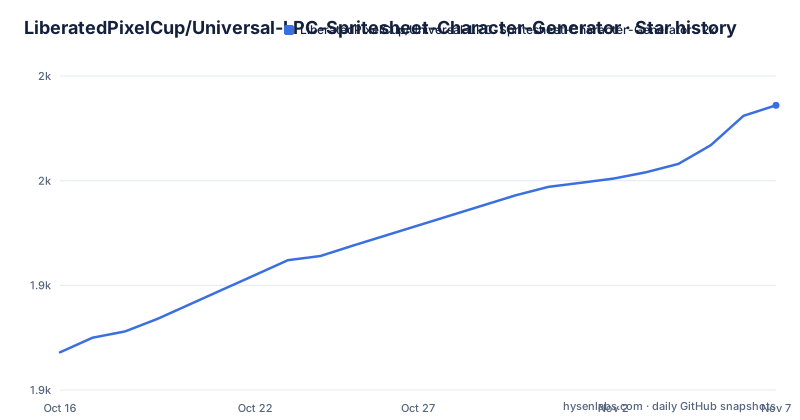
- LiberatedPixelCup/Universal-LPC-Spritesheet-Character-Generator1,986 ★ · +118
| Repository | 2026-10-16 | 2026-11-07 |
|---|---|---|
| LiberatedPixelCup/Universal-LPC-Spritesheet-Character-Generator | 1.9k | 2k |
118 Stars in the last 22 days, measured from the daily GitHub snapshot. Compare with other projects
Editorial analysis
The art is many people's, and the tool is only the compositor
The project is best understood as a community asset pile with a front end. The generator attempts to include all LPC created character art up to now, and the Liberated Pixel Effort is described as a collaborative effort from a number of different artists who produced sprites for the project. The README is explicit that if you wish to use LPC sprites in your project you will need to credit everyone who helped contribute to the sprites you are using. The tool itself does one thing: it takes a set of layered images, one for each body part and garment, and composites them into a single character sheet. The assets live in a `spritesheets` subdirectory, and the repository also holds `sources/`, `sheet_definitions/` and `palette_definitions/` directories, which suggests the sheet layout and the recolouring palette are data rather than code.
The history explains why a generator exists at all
The lineage is unusually well documented. The concept of the Liberated Pixel Cup was introduced by Bart Kelsey and Chris Webber as a competition on OpenGameArt.org sponsored by Creative Commons, Mozilla and the Free Software Foundation, with the aim of creating a body of artwork with a common style. The note that these organisations do not sponsor and are not involved with the generator is a careful piece of housekeeping. The project was originally based on a repository by makrohn that contained an xcf file combining all the assets from pngs, and that repository was included here as a submodule, so it probably represented the first, albeit offline, LPC spritesheet generator. Gaurav0 was the original author of this repository and did not keep up with maintaining it, sanderfrenken maintained the primary fork for many years, and jrconway3 and bluecarrot16 have been the key art focused maintainers.
Five licences, and they are not interchangeable
Each piece of artwork distributed from the project is licensed under one or more of five supported open licences, and the difference between them is not academic. CC0 requires nothing and permits use under any circumstances. CC-BY-SA requires crediting the authors, forbids encrypting or protecting the art, and requires that derivative artwork or modifications be distributed under CC-BY-SA 4.0 or later. CC-BY requires crediting and forbids encrypting or protecting. OGA-BY requires crediting but explicitly permits encrypting in DRM protected games. GPL requires that derivative artwork or modifications be distributed under GPL 3.0 or later. CC-BY-SA is called the most restrictive of the licences for art supplied by the generator, with the note that it does allow use in commercial games, so the restriction that bites is not commercial use but the encryption clause and the share-alike obligation.
The DRM clause is the part that breaks store releases
The footnote on the DRM question is the most practically useful passage in the documentation. It notes that it is unclear whether the no-encryption clause means you cannot release a game on platforms like Steam or the iOS App Store, which use encryption to DRM protect the game. The reasoning offered is that making the assets easily available separately for download might be enough, but the clause does not clearly state this, and a DRM free version available to purchasers might also be enough. The recommendation given is to use CC0 and OGA-BY assets only if you intend to publish on such platforms, and the reason is named plainly: the OGA-BY licence removes the DRM clause for precisely this reason. So a studio shipping on Steam has a concrete constraint, and the tool can help meet it since the licence is tracked per asset.
Attribution comes with the sprite sheet
The generator handles the credit obligation for you, which is a real piece of work given the number of artists involved. When you use the generator you can download a text file, as csv or plain text, containing all the licence information of the selected assets in your spritesheet, and there is also a CREDITS.csv file in the repository that lists the authors, licences and links to the original URLs for every image inside the spritesheets directory. To conform to the attribution requirement you can either distribute the entire CREDITS.csv along with your project, or distribute a composed list containing the credits for the assets you actually use. The file has to be reachable from inside the game or app and reasonably discoverable by users, for instance shown on a credits screen or linked visibly. The README also makes the point that individual licences may impose additional restrictions and that conforming to them is your responsibility.
A Vite app with a wide test matrix
The implementation is a modern TypeScript web application, and the scripts in the package manifest show how seriously the testing is taken. The build is Vite, with a prebuild step that removes everything from the output directory except the spritesheets. The test command runs a node test suite and then a testem browser run in CI mode, and there are separate coverage variants for node and for the browser, the latter enabled through a Vite coverage environment variable. Visual regression tests run through Playwright, with a headed variant for local work, and there is a fixture builder script that reproduces a specific issue from a JSON file of selections. The scripts also include a validate step that regenerates the credits file and parses the z-position data concurrently, which suggests the credits output is generated from the same source as the assets rather than maintained by hand.
Recolouring has its own guide and its own definitions
Two directories and two documents point to a feature that is easy to overlook. There is a `palette_definitions/` directory, a `PALETTE_RECOLOR_GUIDE.md` at the root, and a `CLS.md`, which is presumably about the file format the generator reads for custom layers. That combination suggests the tool can recolour the base artwork through a defined palette, and that the format for describing the layers is documented separately from the generator. The repository also has an ARCHITECTURE.md and a PERFORMANCE_PROFILING.md, which is unusual in a project of this size and suggests that the compositing step has a performance profile someone cared about. For a browser tool that has to composite dozens of layers into a large sheet, that is a reasonable thing to document.
Editorial conclusion
Adopt this generator if you are making a 2D game in the LPC pixel art style and want a character compositor rather than a fixed set of hand-made sprites, since it exists to assemble the layered art other people have contributed. Do not adopt it if you intend to ship on a platform with DRM such as Steam or the iOS App Store and you are not prepared to select only assets whose licences permit encryption, because the CC-BY-SA and CC-BY licences forbid it. Verify first which licence each selected asset carries, use the credits file the generator produces rather than writing your own attribution, and read the LICENSE file for the code separately from the artwork terms.
Frequently asked questions
What does the Universal LPC Spritesheet Character Generator do?
It is a web application that layers individual character sprites, such as bodies, hair, clothing and equipment, into a single character sheet. The artwork comes from the Liberated Pixel Effort, a collaborative project of many artists, and the tool also produces a credits file listing every artist and licence for the assets you selected.
Which licences apply to the LPC artwork?
CC0, CC-BY-SA 4.0, CC-BY 4.0, OGA-BY 3.0 and GPL 3.0 or later, depending on the individual piece of art. CC-BY-SA is the most restrictive, requiring attribution, forbidding encryption and requiring share-alike on derivatives, while CC0 requires nothing and OGA-BY permits DRM encryption.
Can I use these sprites in a game sold on Steam?
Only with care. The CC-BY-SA and CC-BY licences forbid encrypting or protecting the artwork, and the README notes it is unclear whether that rules out release on platforms like Steam or the iOS App Store. Its recommendation is to use CC0 and OGA-BY assets only if you intend to publish on such platforms, since OGA-BY removes the DRM clause.
How do I credit the artists if I use the generated sprites?
You can download a csv or plain text file from the generator containing the licence information of the selected assets, or use the CREDITS.csv file in the repository, which lists authors, licences and source URLs for every image. You must distribute either the whole file or a composed list of the credits for the assets you use, and make it reachable from inside the game.
What is the origin of the LPC spritesheet project?
The Liberated Pixel Cup was introduced by Bart Kelsey and Chris Webber as a competition on OpenGameArt.org sponsored by Creative Commons, Mozilla and the Free Software Foundation, to create artwork with a common style. The generator itself was originally based on a repository by makrohn holding an xcf file that combined all the assets, and Gaurav0 was its first author.
Official sources
Add this badge to your README
If you maintain this project, the badge below links readers to this analysis and shows its maintenance status from the daily GitHub snapshot. Paste the markdown into your README; add ?metric=license or ?metric=stars to the image URL for a different field.

[](https://hysenlabs.com/projects/liberatedpixelcup-universal-lpc-spritesheet-character-generator)Star history chart for your README
[](https://hysenlabs.com/projects/liberatedpixelcup-universal-lpc-spritesheet-character-generator)Was this useful?