LibreDWG/libredwg: C Library for Reading and Writing DWG Files
Official mirror of libredwg. With CI hooks and nightly releases. PR's ok
At a glance
- What is it?
- LibreDWG is a GNU-licensed C library and toolset for DWG file access, conversion, inspection, and limited rewriting. It suits developers working with older DWG versions who need a programmable alternative to proprietary CAD software, but its R2007 and later writing support has documented limitations.
- Who is it for?
- LibreDWG is a reasonable fit for developers who need DWG parsing, conversion, inspection, or rewriting in C and can work with its version-specific limits. It is a poor fit for workflows requiring reliable R2007 through R2018 writing.
- Can I use it commercially?
- Yes, with conditions. GPL-3.0 is a copyleft licence: if you distribute software that includes it, you must release that software's source code under the same licence. Running it internally without distributing it does not trigger that obligation.
- Is it still maintained?
- Yes. The repository last received commits 1 day ago.
- What is it written in?
- Mainly C, according to GitHub's language statistics.
Answers come from the project's GitHub data, last synced on October 23, 2026, and from our analysis. They are not legal advice.
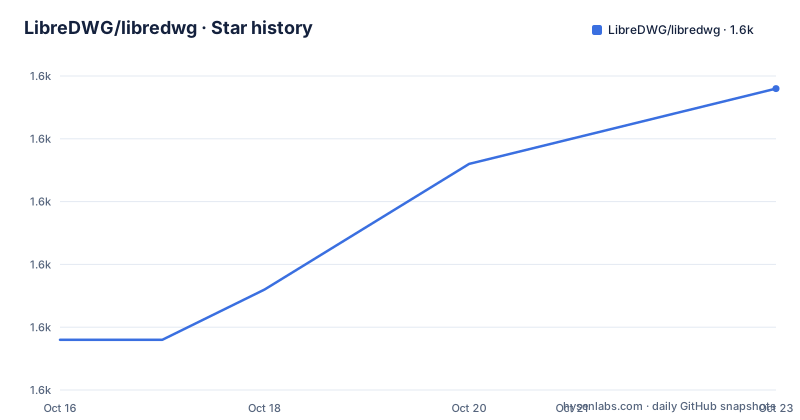
Star history
- LibreDWG/libredwg1,637 ★ · +10
| Repository | 2026-10-16 | 2026-10-23 |
|---|---|---|
| LibreDWG/libredwg | 1.6k | 1.6k |
10 Stars in the last 7 days, measured from the daily GitHub snapshot. Compare with other projects
Editorial analysis
LibreDWG's DWG problem and target users
LibreDWG addresses a specific problem: DWG is a proprietary CAD file format created in the 1970s and used as AutoCAD's native format, but application developers who need to read, inspect, convert, or rewrite those files usually depend on proprietary tooling. The project provides a C library for direct access to DWG data and includes command-line programs built around that library. Its intended audience includes CAD software developers, researchers, format-analysis projects, and developers who need to process drawings without making their core application depend on AutoCAD.
The project does not present itself as a general-purpose CAD editor. Its value is narrower and more technical. It provides mechanisms for decoding DWG files, working with their internal strings and objects, and writing supported formats or DWG versions. The example applications include a reader, writer, rewriter, SVG and PostScript conversion, DXF and JSON converters, `dwggrep` for text searches, and `dwglayer` for listing layers. This makes the library relevant to ingestion pipelines, drawing metadata tools, converters, and experiments that need format access rather than a complete modeling environment.
There is a clear boundary around that audience. The README states that the decoder can read all DWG versions, although some advanced R2010 and later objects may fail and be skipped. The writer is described as sufficient for most older formats except R2007, while R2010 through R2018 writing can still produce CRC errors. A team considering LibreDWG for production conversion needs to test its actual drawings rather than assume that reading and writing have the same compatibility range.
LibreDWG decoder, encoder, and conversion architecture
The repository is organized as a C library with source code under `src/`, public headers under `include/`, command-line programs under `programs/`, and language bindings under `bindings/`. The README identifies the core library as a reader and writer for DWG files, while the example programs expose separate operations such as reading, writing, rewriting, conversion, searching, and layer listing. This separation matters to integrators. An application can link against the library and use the public headers `dwg.h` and `dwg_api.h`, or it can use the installed utilities without building a separate CAD front end.
The decoder processes DWG structures and exposes them to higher-level code. The project also handles text representations, which is more complicated than simply treating every DWG string as UTF-8. The strings API uses UTF-8 internally, including the project's description of WTF-8 behavior for Windows UCS-2 data. Older DWG files may contain strings in roughly 30 code pages, so LibreDWG converts them into its internal Unicode or UTF-8 representation. `libiconv` is optional for code-page conversion, according to the build documentation. Without it, the README says conversion is slower, rather than unavailable.
The conversion surface is modular. The build has switches for DXF, JSON, and GeoJSON, which means a deployment can disable modules that it does not need. The README also lists SVG, PostScript, and other example applications, but it does not document a single command in the named section for using each one. The practical architecture is therefore a C decoding and encoding core plus specialized front ends, bindings, and conversion modules, rather than one universal conversion service.
Building LibreDWG from a Git checkout
For a source checkout, the README directs developers to generate the Autotools files, configure the build, compile the library, run its checks, and install it. The required baseline tools are a C99 compiler such as `gcc` or `clang`, `make`, `autoconf`, `automake`, and `libtool`. Optional dependencies enable additional features, including `libiconv`, `pslib`, `pcre2`, `jq`, Python and Perl bindings, documentation tools, linters, and test utilities.
The following sequence follows the commands printed in the README. Run `sh ./autogen.sh` first when building from Git. The configuration options can remove bindings or documentation, or adjust output precision for DXF and GeoJSON. The README recommends `rfc` precision for those options when a six-place representation is preferred.
sh ./autogen.sh
./configure [--disable-bindings] [--disable-docs] [--disable-shared]
make
make check
sudo make install
A successful `make check` is the point at which the built project runs its own test suite. The README does not claim that this suite proves compatibility with every DWG file, so a first use should also include a representative file from the application. The installation includes the library files, `dwg.h`, `dwg_api.h`, the `libredwg.pc` package configuration file, and the LibreDWG Info documentation. The project also supports CMake and Ninja, and documents Windows builds through MSYS, MinGW, `clang-cl`, and Visual Studio 2019 or later. The README points Windows users to workflow files and build scripts rather than giving one universal Windows command.
First real use with the installed DWG tools
The README names the first-use tools but does not give their complete command syntax in the usage section. It identifies `dwggrep` as a text search program and `dwglayer` as a program that prints a drawing's layers. A real first operation should therefore begin by locating the installed command names and checking their help output, rather than inventing flags. The README states that most tools support a `--verbosity|-v` flag, but it does not provide a complete invocation for either utility.
A developer integrating the library can inspect the installed headers and package configuration through the normal build workflow. The documented installation outputs include `dwg.h`, `dwg_api.h`, and `libredwg.pc`. Applications can then compile against those interfaces, while commands such as `dwggrep` and `dwglayer` can serve as operational checks against a known DWG file. The exact command invocation should come from the installed program's help output because the README does not provide enough syntax to reproduce one faithfully.
For writers and rewriters, version selection is the first verification step. The documentation says that rewriting most DWG files through R2004 usually works fine, but identifies R2007 as unsupported for writing and R2010 through R2018 as susceptible to CRC errors. A first test should preserve the original file, write to a new output, and validate the result with a separate compatible reader or the project's documented cross-check tooling. `ODAFileConverter` is listed as an optional dependency for cross-checks, and `xvfb-run` can suppress its popups, but the README does not give the converter command sequence.
Compatibility limits in advanced DWG objects
The most important limitation is the difference between decoding coverage and writing coverage. LibreDWG's documentation says the decoder can read all DWG versions, yet some advanced R2010 and later objects fail to decode and are skipped. Skipping an object means that a tool may still produce output while omitting content that a downstream CAD application expects. This is especially relevant for drawings containing specialized object types or features introduced in later AutoCAD releases.
Writing has a narrower boundary. The writer is said to work for everything except R2007, while R2010 through R2018 can produce CRC errors. The same README section notes that `--disable-write` exists and that write support works for earlier versions through R2004. This setting is useful for read-only deployments, but a successful build does not imply that every DWG version can be safely rewritten.
CRC errors are not a cosmetic detail for a document pipeline. They can signal that the serialized file is inconsistent, which can affect later readers even if the source file opened before conversion. The README does not describe automatic repair, recovery, or rollback behavior. It also does not document a guarantee that skipped objects can be reconstructed after decoding. Teams should classify their drawings by DWG version and object type before choosing a rewrite workflow.
Licensing, maintenance, and operational cost
LibreDWG is released under the GNU General Public License version 3 or, at the user's option, a later version. That license has implications for distribution and linking that depend on the deployment model, but this article does not provide legal advice. The project is part of the GNU ecosystem, and its repository identifies `COPYING`, `USING_FOREIGN_CODE`, and the project documentation as part of the source tree. Developers distributing a modified or linked library should review those files and the applicable license obligations for their own distribution.
The repository is not archived, and its last push was on 2026-10-13. The listed releases include `0.14.8612` on 2026-10-13, `0.14.8608` on 2026-10-12, and `0.14.8607` on 2026-10-12. The repository description identifies CI hooks and nightly releases. This indicates recent release and repository activity, but it does not mean that every DWG edge case is fixed or that the API is free from upgrade work. The README's list of optional dependencies, bindings, format precision settings, and write limitations shows that deployment choices affect maintenance cost.
An upgrade can require checking decoder behavior, writer compatibility, binding availability, conversion modules, and validation workflows together. The project also has scripts and configuration for several operating systems and toolchains, including `.github/workflows/main.yml`, `build-aux/smoke.sh`, `build-aux/msys2.bat`, and `.appveyor.yml`. That breadth helps integration across build environments, but it also means that supported environments should be tested separately rather than inferred from the GNU build path.
LibreDWG compared with proprietary CAD conversion paths
The main alternative is to use proprietary CAD tooling, such as AutoCAD, or the documented `ODAFileConverter` utility for cross-checking workflows. The difference is architectural. LibreDWG is an embeddable C library with command-line examples, public headers, optional SWIG bindings, and selectable conversion modules. A proprietary CAD application or converter is centered on a complete vendor toolchain rather than a small library API.
That difference affects control and portability. A C application can call the library directly and choose which bindings or conversion modules to build. A proprietary application may provide its own established user interface and format handling, but the README does not describe its licensing, API, or command-line behavior. `ODAFileConverter` is listed only as an optional cross-check dependency, so its presence in the README does not make it a documented LibreDWG replacement. It is better understood as an external comparison tool for checking output.
LibreDWG is therefore most attractive when source-level integration and format inspection matter. It is less attractive when the requirement is guaranteed recent-version writing or a complete CAD editing experience. The decision should be based on version-specific validation, not on the fact that LibreDWG is free or that another converter exists.
Editorial conclusion
LibreDWG is a reasonable fit for developers who need DWG parsing, conversion, inspection, or rewriting in C and can work with its version-specific limits. It is a poor fit for workflows requiring reliable R2007 through R2018 writing. Before adoption, verify the exact DWG versions, object types, and output formats used by the application, then confirm whether the build includes the required bindings and conversion modules.
Frequently asked questions
What is LibreDWG and who is it for?
LibreDWG is a free C library for reading and writing DWG files, the native file format of AutoCAD. It is aimed at CAD developers, researchers, and applications that need conversion, inspection, search, or limited rewriting support.
How do you build LibreDWG from the Git repository?
The README gives the sequence `sh ./autogen.sh`, `./configure`, `make`, `make check`, and `sudo make install`. A source build requires a C99 compiler, `make`, `autoconf`, `automake`, and `libtool`.
Does LibreDWG support writing every DWG version?
No. The documentation says the writer works for older versions through R2004, does not support R2007, and can still produce CRC errors when writing R2010 through R2018 files. Reading is broader, although some advanced R2010 and later objects may be skipped.
Official sources
Add this badge to your README
If you maintain this project, the badge below links readers to this analysis and shows its maintenance status from the daily GitHub snapshot. Paste the markdown into your README; add ?metric=license or ?metric=stars to the image URL for a different field.

[](https://hysenlabs.com/projects/libredwg-libredwg)Star history chart for your README
[](https://hysenlabs.com/projects/libredwg-libredwg)Was this useful?