libsndfile for C audio file I/O: build choices and format support
A C library for reading and writing sound files containing sampled audio data.
At a glance
- What is it?
- libsndfile gives C programs a library interface for reading and writing sampled audio files. Its Autotools workflow is primary, while CMake adds format toggles, cross-platform generators and optional dependencies for Ogg, Vorbis, FLAC, Opus and MP3.
- Who is it for?
- libsndfile fits C or C++ applications that need file-based sampled audio I/O and accept an LGPL-2.1 dependency. It is a poor fit when the application needs real-time device streaming as its primary requirement, or when required codecs are unavailable.
- Can I use it commercially?
- Yes, with conditions. LGPL-2.1 is a weak copyleft licence: you can use it inside commercial and closed-source software, but if you distribute changes to its own files, you must publish those changes under the same licence.
- Is it still maintained?
- Yes. The repository last received commits 52 days ago.
- What is it written in?
- Mainly C, according to GitHub's language statistics.
Answers come from the project's GitHub data, last synced on October 23, 2026, and from our analysis. They are not legal advice.
Star history
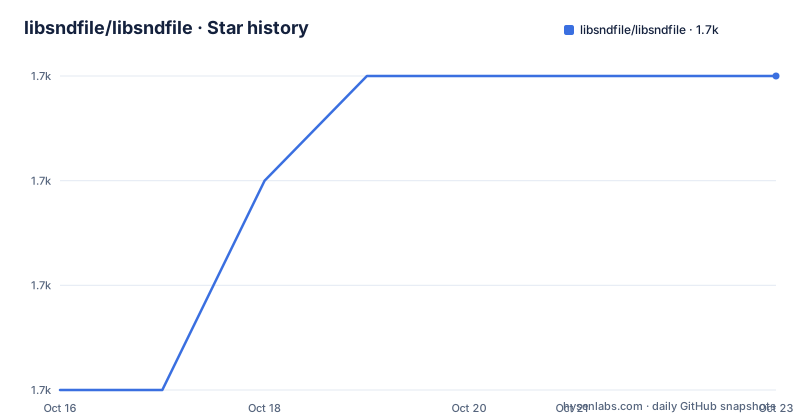
- libsndfile/libsndfile1,725 ★ · +3
| Repository | 2026-10-16 | 2026-10-23 |
|---|---|---|
| libsndfile/libsndfile | 1.7k | 1.7k |
3 Stars in the last 7 days, measured from the daily GitHub snapshot. Compare with other projects
Editorial analysis
libsndfile's file-based audio boundary
libsndfile addresses a specific systems problem: moving sampled audio data between an application and sound files. It is intended for software that needs to open, read, decode, encode or write audio files through a C library interface. The README describes it as a library for files containing sampled audio data, rather than as a complete audio application or a recording framework.
That boundary matters. The repository includes command-line utilities, examples and platform build support, but its central artifact is a library. A desktop editor, command-line converter, game asset pipeline or media-processing service can use it as the file I/O layer. The README does not document live capture, hardware buffering or real-time scheduling, so those capabilities should not be inferred from the presence of ALSA or Sndio development packages. Those packages are documented as requirements for building the `sndfile-play` utility, not as proof that the library provides a complete real-time audio architecture.
The project is not archived, and the last push was on 2026-09-01. The listed releases are 1.2.0 from 2022-12-25, followed by 1.2.1 and 1.2.2 on 2023-08-13. This indicates repository activity after those releases, but the README and release list do not define a long-term support schedule or compatibility guarantee. The current `master` branch is therefore the documented default target when building unreleased source.
Autotools is the primary libsndfile build path
The README calls the GNU Autotools toolchain primary and recommended. On Debian or Ubuntu, the documented build environment includes the compiler and build tools plus development packages for several audio codecs. The library, utilities and tests are then produced through `autoreconf`, `configure`, `make` and `make check`.
For users following the Linux path exactly, dependency installation begins with this package set:
sudo apt install autoconf autogen automake build-essential libasound2-dev \
  libflac-dev libogg-dev libtool libvorbis-dev libopus-dev libmp3lame-dev \
  libmpg123-dev pkg-config python
After the packages are present, configuration and the first build can use the documented sequence:
autoreconf -vif
./configure --enable-werror
make
make check
`autoreconf -vif` prepares the Autotools build system. `./configure --enable-werror` configures the build with compiler warnings treated as errors, while `make` compiles the configured components. `make check` runs the project's test suite. A complete first build should therefore end with the test target completing, rather than stopping after compilation.
This path has a practical consequence: codec support is influenced by which external development libraries and headers are installed. The README says the Debian and Ubuntu package command sets up the build environment for libsndfile, but it does not present that command as a universal installation recipe. It notes that package names may differ on other Linux distributions and BSD systems.
Autotools also offers the clearest source-build workflow for Unix-like environments. Applications that already standardize on Autotools can integrate this sequence into packaging, while developers using native IDE generators are directed toward the CMake route.
CMake exposes libsndfile build and format decisions
CMake is the documented alternative for out-of-tree builds, cross-compilation and platform-specific generators. Its workflow still has two stages: configuration generates native build files, after which the platform build tool compiles the project. CMake can produce Unix Makefiles, Visual Studio solutions, Xcode projects and other generator-specific outputs.
The basic documented CMake sequence creates a separate build directory, configures from the source tree and invokes the selected build interface:
mkdir CMakeBuild
cd CMakeBuild
cmake ..
cmake --build .
The command should be run from the repository's `CMakeBuild` directory. Configuration writes the build files there, and `cmake --build .` compiles the selected generator's targets. With the `Unix Makefiles` generator, the generator can be selected explicitly:
cmake .. -G"Unix Makefiles"The source directory remains separate from `CMakeBuild`, so removing that build directory does not modify the source files according to the README. This arrangement supports several build configurations from one checkout. With Visual Studio or Xcode, developers can open the generated project or solution in the relevant IDE.
Format support is controlled partly through dependency detection. `ENABLE_EXTERNAL_LIBS` enables Ogg, Vorbis, FLAC and Opus support when all relevant libraries are found. `ENABLE_MPEG` enables MP3 support when its dependencies are found. These settings do not create missing codecs; they expose codec support when the build environment already contains the required libraries.
The artifact type is an explicit packaging decision. `BUILD_SHARED_LIBS` is `OFF` by default, so CMake produces a static library unless the option is enabled. Setting it to `ON` produces a shared library, including a DLL on Windows. `BUILD_PROGRAMS`, `BUILD_EXAMPLES` and `BUILD_TESTING` are on by default, although a shared-library build disables testing according to the README. `CMAKE_INSTALL_PREFIX` selects the installation location, while `CMAKE_BUILD_TYPE` accepts values including `DEBUG`, `RELEASE`, `RELWITHDEBINFO` and `MINSIZEREL`, with `DEBUG` documented as the default.
Running libsndfile examples after the first build
The repository includes examples that provide concrete entry points after compilation. `examples/list_formats.c` concerns format discovery, `examples/generate.c` and `examples/make_sine.c` concern generated sample data, `examples/sfprocess.c` concerns processing, and `examples/sndfile-to-text.c` concerns text output. `examples/sndfile-loopify.c` provides an operation related to looped audio, while `examples/sndfilehandle.cc` and `examples/generate.cs` represent C++ and C# entry points.
CMake documents `BUILD_EXAMPLES` as `ON` by default, so a normal configured build includes the examples as build targets unless the developer disables them. The README does not give the compiler commands, API calls or output for each example in this section of the repository documentation, so an article should not invent them. A developer can inspect the example source and build system to see which library artifact and headers each program consumes.
The supported first verification remains the Autotools `make check` sequence. For CMake builds, `BUILD_TESTING` is also enabled by default when building a static library, so the generated test targets provide the corresponding project-level verification route. A shared-library build disables `BUILD_TESTING`, according to the README, which may require a different CI or packaging arrangement if tests are important.
For an application developer, the relevant design choice is whether libsndfile fits the desired file-based workflow. The repository offers several kinds of example, but the README does not document them as a replacement for application-level audio analysis, editing policy or codec negotiation. They are implementation examples, not a complete application framework.
Dependency gaps and libsndfile configuration failures
The clearest failure mode is a successful build that lacks an expected codec because optional dependencies were not found. The README ties Ogg, Vorbis, FLAC and Opus to `ENABLE_EXTERNAL_LIBS`, and MP3 to `ENABLE_MPEG`. It states that each option is enabled when the required dependency libraries are found. An application can therefore compile against libsndfile while missing the file support its user expects.
A second distinction concerns library and utility dependencies. The Debian and Ubuntu package list includes `libasound2-dev`, while the BSD guidance names a Sndio development package. The README identifies those packages with building `sndfile-play`. They should not be treated as mandatory dependencies for every file-processing application unless that utility is part of the intended product.
Experimental code introduces another boundary. `ENABLE_EXPERIMENTAL` is `OFF` by default, and the README explicitly warns readers not to use it if they are unsure what it enables. That makes it a poor default for production packaging. `ENABLE_STATIC_RUNTIME` is also off by default. Its MSVC form is deprecated for CMake 3.15 and newer in favor of `CMAKE_MSVC_RUNTIME_LIBRARY`. For MinGW, the README describes the option as experimental and says clearing `CMakeCache.txt` is necessary after disabling it again because changing that state can otherwise leave stale cache values.
libsndfile is also the wrong tool when an application's primary requirement is continuous microphone capture or speaker output without file storage. The README positions the library around sound files and does not document a real-time buffer or scheduling model. A separate audio I/O framework would be needed for that architecture, with libsndfile limited to file handling if it is used at all.
libsndfile versus direct codec integration
libsndfile takes a different approach from linking each container and codec implementation directly into an application. Its optional dependency model groups Ogg, Vorbis, FLAC and Opus under `ENABLE_EXTERNAL_LIBS`, while MP3 support is controlled by `ENABLE_MPEG`. The project centers these external libraries behind a file-oriented audio library and supplies common utilities, examples and tests around that layer.
Direct codec integration would place responsibility for codec libraries and format-specific processing in the application. That comparison concerns architecture, not a claim that any particular file type is impossible. The README does not publish a complete format matrix, and it explicitly makes several codec features conditional on dependency detection. An adopter must therefore treat required formats as build criteria rather than assume them from the project name.
The build toolchain is another meaningful difference. Autotools remains the recommended path, so CMake adoption is optional. A team with an established Autotools workflow can follow `autoreconf`, `configure`, `make` and `make check`. A team using Visual Studio, Xcode, cross-compilation or another CMake generator can keep the source outside its build directory and generate native project files.
The repository uses the LGPL-2.1 license. Teams distributing a modified or dynamically linked libsndfile build need to examine that license's requirements for their distribution model. This is a compliance consideration rather than a technical build option, and the README excerpt does not provide legal interpretation or linking guidance.
Editorial conclusion
libsndfile fits C or C++ applications that need file-based sampled audio I/O and accept an LGPL-2.1 dependency. It is a poor fit when the application needs real-time device streaming as its primary requirement, or when required codecs are unavailable. Before adoption, verify the intended formats against `ENABLE_EXTERNAL_LIBS` and `ENABLE_MPEG`, confirm the chosen build produces the library type required by the application, and run the generated test suite for the target platform.
Frequently asked questions
How do I install libsndfile on Debian or Ubuntu?
The README documents installing Autotools, a compiler, Python, pkg-config and development packages for FLAC, Ogg, Vorbis, Opus and MP3. It then builds the project with `autoreconf -vif`, `./configure --enable-werror`, `make` and `make check`.
Which audio formats does libsndfile support?
The README explicitly discusses optional Ogg, Vorbis, FLAC, Opus and MP3 support. The exact formats present in a build depend on the corresponding external dependencies and CMake options, and the repository documentation does not provide a complete format matrix in this section.
Should I use Autotools or CMake to build libsndfile?
The README identifies Autotools as the primary and recommended toolchain. CMake is the alternative for out-of-tree builds, cross-compilation and generators such as Unix Makefiles, Visual Studio or Xcode.
Does libsndfile provide real-time audio recording?
The README describes libsndfile as a library for reading and writing files containing sampled audio data. It does not document live capture, hardware buffering or a real-time scheduling architecture, so those capabilities cannot be confirmed from the repository documentation.
Official sources
Add this badge to your README
If you maintain this project, the badge below links readers to this analysis and shows its maintenance status from the daily GitHub snapshot. Paste the markdown into your README; add ?metric=license or ?metric=stars to the image URL for a different field.

[](https://hysenlabs.com/projects/libsndfile-libsndfile)Star history chart for your README
[](https://hysenlabs.com/projects/libsndfile-libsndfile)Was this useful?