DeepDiagram routes a prompt to one of six drawing agents
An open-source AI visualization tool that transforms natural language into Mind Maps, Mermaid diagrams, and Echarts. Turn your ideas into structured visuals instantly.
At a glance
- What is it?
- DeepDiagram AI is a React 19 and FastAPI platform that turns natural language into a diagram by routing the request to a specialised agent, one per notation, with the agent emitting a design concept and a code block that the frontend renders with the matching library. It is an AGPL project with a public demo, a LangGraph orchestrator and a compose file that needs model API keys to run.
- Who is it for?
- DeepDiagram AI fits a team that needs a diagram quickly from a rough description and does not want to learn six separate tools, since the same prompt reaches a mind map, a flowchart, an ECharts configuration, a Draw.io file, a Mermaid diagram or an infographic without changing notation by hand.
- Can I use it commercially?
- Yes, with strict conditions. AGPL-3.0 is a network copyleft licence: if people use a modified version over a network, for example as a hosted service, you must offer them its source code under the same licence.
- Is it still maintained?
- Yes. The repository last received commits 160 days ago.
- What is it written in?
- Mainly TypeScript, according to GitHub's language statistics.
Answers come from the project's GitHub data, last synced on November 7, 2026, and from our analysis. They are not legal advice.
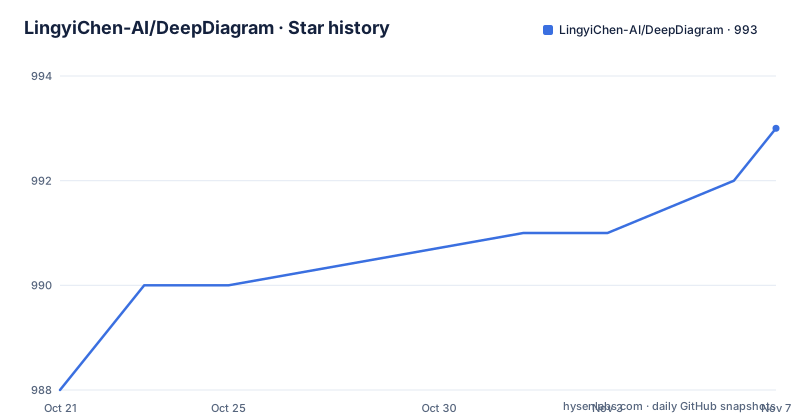
Star history
- LingyiChen-AI/DeepDiagram993 ★ · +5
| Repository | 2026-10-21 | 2026-11-07 |
|---|---|---|
| LingyiChen-AI/DeepDiagram | 988 | 993 |
5 Stars in the last 17 days, measured from the daily GitHub snapshot. Compare with other projects
Editorial analysis
Six agents, six rendering libraries
The platform is described as agentic, with multi-agent orchestration and a LangGraph-powered architecture where specialized agents handle different visualization domains, and the practical shape of that is a list of agents, each bound to the library that draws its output. The mind map agent is powered by mind-elixir and generates four to five level deep interactive mind maps in Markdown format, aimed at knowledge mapping, brainstorming and concept organisation, with real-time preview, editing and export to PNG. The flowchart agent uses React Flow for business process flows with intelligent auto-layout and custom node styling. The data chart agent uses Apache ECharts 6.0 for bar charts, line graphs, pie charts, gauges and more. The Draw.io agent, in the Atlas theme, produces cloud architecture and network topology diagrams on a canvas with auto-centering and sidebar concealment. The Mermaid agent uses Mermaid.js 11.12 with react-zoom-pan-pinch for sequence, Gantt, timeline, state, class and ER diagrams, with SVG and PNG export. The infographic agent uses AntV Infographic and a declarative DSL, and it is the one with a two-phase pipeline, where the model first selects a template from more than fifty options and then a template-specific prompt with syntax rules generates the DSL code.
The router picks the agent for you
What makes the platform more than a menu of six generators is the routing layer, and the documentation describes three signals it uses. The first is explicit mentions, with tags such as @mindmap, @flow and @charts, so you can name the agent directly. The second is intent recognition with full agent capability descriptions, meaning the router knows what each agent is good at and can pick on its own when you do not. The third is conversation context, where the router prefers the last active agent for continuity, so a follow-up question about the diagram you just made does not jump to a different notation. That third rule is the one that changes the feel of the tool. Without it, a conversation would constantly re-decide the format, and with it the router behaves like an assistant that has settled on a medium. Multimodal support fits into the same flow, since you can upload whiteboards, sketches or technical diagrams for digitisation and get structured output back.
XML tags instead of tool calls
The output contract between an agent and the frontend is unusual enough to be worth understanding, because it is what makes the streaming and the parsing work. Each agent outputs a design_concept block followed by a code block, using XML-style tags, directly and without tool calls, and the stated benefit is cleaner parsing and support for multi-line content. Tool calls are the usual mechanism in agent frameworks, where the model asks for a tool and the runtime executes it, and they bring their own overhead in parsing and in failure modes. Emitting the payload inline means the backend can relay it as a stream, and the frontend can split on the tags. The system architecture section confirms the path end to end. The stack is React 19 on the front, FastAPI on the back, orchestrated by LangGraph, with each agent's structured content streamed to the frontend via Server-Sent Events for real-time preview. The mermaid diagram of the system shows the same shape in picture form, with the user request going to the intelligent router, then to the LangGraph orchestrator, then to the specialised agents.
You watch the reasoning arrive
The design concept is streamed to the user rather than hidden, and the feature list describes that as AI reasoning visibility, so you can see the design thinking and architectural decisions in real time. The presentation is a yellow-themed card that auto-expands during streaming and collapses when it is complete, and the content is rendered as Markdown with headers, lists and emphasis. The transport is a dual-stream SSE setup where the design concept and the code stream independently, which is a sensible split because the two have very different shapes, one being prose and the other a block of code that will not parse until it is complete. The execution trace visualisation goes further and shows agent selection tracking, the design concept with its reasoning, the streaming code generation with syntax highlighting, and contextual Render and Retry actions, with clear visual feedback and instant retry when a render fails. A trace like that is genuinely useful when an agent picks the wrong notation, since you can see which agent was chosen and why before you change the prompt.
History, branches and a database behind it
The session features are the part that turns a demo into something you can work in. You can maintain multiple chat sessions with automatic state restoration, including the diagrams and the process traces, and you can retry an assistant response to explore a different visualisation path and navigate between versions with built-in pagination. The branching model is described as git-like, with a turn_index and a parent_id tracked for each message, so a retry does not overwrite the earlier attempt but becomes a sibling of it. Storage is PostgreSQL-backed, and the documentation says that ensures reliability for complex technical traces and multimodal content. The same database holds the analysis results of uploaded documents, which is what makes persistent memory possible, since the AI retains context across sessions rather than starting fresh. In the compose file the database is a postgres:16-alpine service named deepdiagram-db with a named volume for the data directory and the port published to the host, and it is the same instance the backend talks to over the internal network.
Documents in, structured data out
The document analysis pipeline is listed as automatic parsing of uploaded files in PDF, DOCX, XLSX, PPTX, TXT and MD format. For large files it uses concurrent chunking, and the language model extracts temporal data, key entities and relationships, with structured information retrieval on top. The time awareness is a small detail that shows up in the agents, since all agents are aware of the current date and time, which is what makes accurate timeline generation and scheduling possible in a Gantt or timeline diagram. Between the document pipeline and the multimodal path, the input side of the platform is a text box or a file or a photograph of a whiteboard, and the output side is a rendered diagram in one of six notations that you can then edit on the canvas, export as an image, or store in a session.
Running the stack yourself
The repository is laid out as a backend, a frontend, a website and a compose file, and the compose file is the fastest way to see the whole topology. The database is Postgres 16 on Alpine, the backend is a FastAPI service published on port 8000, the frontend is served on port 80 and depends on the backend, and a separate website service runs on port 3000. The backend receives its configuration through environment variables, and the model related ones are the part you have to supply:
    environment:
      - DATABASE_URL=postgresql+asyncpg://postgres:postgres_password@db:5432/deepdiagram
      - OPENAI_API_KEY=${OPENAI_API_KEY}
      - OPENAI_BASE_URL=${OPENAI_BASE_URL}
      - MODEL_ID=${MODEL_ID}
The compose file also passes a DeepSeek key and base URL and sets LANGCHAIN_TRACING_V2 to false, which shows that the platform is prepared for more than one model provider. Two things are worth noticing before you run it. The database password in the compose file is a literal default, so change it before the stack is reachable from anywhere but your machine. And the images are tagged as latest from a registry, so a compose up may run code that is not the code in this repository, which is a consideration for a project that publishes a public demo at deepd.cturing.cn. The licence is AGPL-3.0, the repository is not archived, the last push was on 2026-06-01, and the newest releases are v0.1.29, v0.1.28 and v0.1.27 from late January 2026, so the version numbering is still well below one.
Editorial conclusion
DeepDiagram AI fits a team that needs a diagram quickly from a rough description and does not want to learn six separate tools, since the same prompt reaches a mind map, a flowchart, an ECharts configuration, a Draw.io file, a Mermaid diagram or an infographic without changing notation by hand. It does not fit a team that cannot send its data to a model API, because the compose file passes an OpenAI key, a DeepSeek key and a model id into the backend, and it does not fit anyone who needs to ship the platform under a permissive licence, because the project is AGPL-3.0. Before you deploy it, change the default database password in the compose file, check the model keys the backend expects, and read the licence, since the last push was on 2026-06-01 and the newest release is v0.1.29 from 2026-01-29.
Frequently asked questions
What does DeepDiagram AI do?
It turns natural language and multimodal input into diagrams by routing the request to a specialised agent, with agents for mind maps powered by mind-elixir, flowcharts on React Flow, charts on Apache ECharts 6.0, Draw.io architecture diagrams, Mermaid.js 11.12 diagrams and AntV infographics.
How does DeepDiagram decide which diagram to produce?
An intelligent router uses three signals: explicit mentions such as @mindmap, @flow and @charts, intent recognition with full agent capability descriptions, and conversation context, where it prefers the last active agent for continuity.
What format do the agents output?
Each agent emits a design_concept block and a code block using XML-style tags, directly and without tool calls, which the backend streams to the frontend over Server-Sent Events.
How do I run DeepDiagram locally?
The compose file starts four services, Postgres 16 on Alpine, the FastAPI backend on port 8000, the frontend on port 80 and a website service on port 3000, and the backend expects a database URL, an OpenAI key and base URL, a model id and a DeepSeek key through environment variables.
Is DeepDiagram still being updated?
The repository is not archived and the last push was on 2026-06-01, with the newest releases v0.1.29, v0.1.28 and v0.1.27 published in January 2026, under the AGPL-3.0 licence.
Official sources
Add this badge to your README
If you maintain this project, the badge below links readers to this analysis and shows its maintenance status from the daily GitHub snapshot. Paste the markdown into your README; add ?metric=license or ?metric=stars to the image URL for a different field.

[](https://hysenlabs.com/projects/lingyichen-ai-deepdiagram)Star history chart for your README
[](https://hysenlabs.com/projects/lingyichen-ai-deepdiagram)Was this useful?