linkarzu/dotfiles-latest for macOS and Neovim
My most up to date dotfiles
At a glance
- What is it?
- A personal macOS dotfiles repository centered on the Neobean Neovim configuration, with related settings for shells, terminals, window management, and input tools. It is best suited to users who want to inspect or selectively reuse Link Arzu's setup, rather than install an interchangeable framework.
- Who is it for?
- Adopt this repository if your environment is macOS, your editor is Neovim, and you want to evaluate Neobean without replacing your current configuration. Do not adopt the complete setup expecting a documented, cross-platform package with automated updates or supported pull requests.
- Can I use it commercially?
- Not without permission. GitHub finds no licence file in the repository, and without a licence all rights are reserved by default: you may read the code but not reuse it. Check the README, or ask the authors, before using it.
- Is it still maintained?
- Yes. The repository received new commits within the last day.
- What is it written in?
- Mainly Lua, according to GitHub's language statistics.
Answers come from the project's GitHub data, last synced on November 7, 2026, and from our analysis. They are not legal advice.
Star history
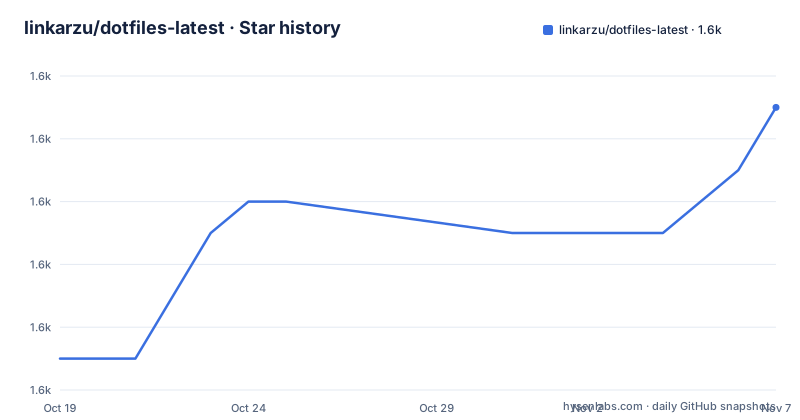
- linkarzu/dotfiles-latest1,561 ★ · +8
| Repository | 2026-10-19 | 2026-11-07 |
|---|---|---|
| linkarzu/dotfiles-latest | 1.6k | 1.6k |
8 Stars in the last 19 days, measured from the daily GitHub snapshot. Compare with other projects
Editorial analysis
What linkarzu/dotfiles-latest actually contains
linkarzu/dotfiles-latest is described as the author's current personal dotfiles, with macOS as the daily-driver operating system and Neovim as the primary editor. The repository is therefore aimed at users who understand Unix-style configuration files and want to inspect the individual decisions behind a working macOS environment. It is not presented as a universal installer or a distribution with compatibility guarantees.
The repository layout shows that Neovim is only one part of the environment. Separate top-level entries cover Ghostty, Alacritty, Kitty, Rio, and WezTerm, as well as tmux. Shell-related directories include `bashrc/` and `zshrc/`. Window and desktop integration is represented by `aerospace/`, `skhd/`, `yabai/`, `sketchybar/`, and `ubersicht/`, while input and automation tools include `karabiner/`, `kanata/`, `mouseless/`, and `hammerspoon/`.
There are also entries for Brew, Claude, OpenCode, VS Code, Vivaldi, yazi, lazygit, fastfetch, colorschemes, sounds, scripts, and bookmarks. Some tools are open source and some are not. This breadth matters because cloning Neobean does not install or reproduce the entire macOS setup. It gives you one editor configuration from a much larger personal workspace.
The Neobean mechanism and NVIM_APPNAME isolation
The documented way to try Neobean is based on Neovim's `NVIM_APPNAME` environment variable. The repository is cloned under `~/.config/linkarzu/dotfiles-latest`, but the documented launch command points `NVIM_APPNAME` at `linkarzu/dotfiles-latest/neovim/neobean`. This lets the documented test use the repository's Neovim configuration without modifying the author's existing Neovim configuration.
That separation is the main technical feature worth noticing. Neobean is not documented here as a plugin distributed through a package registry. It is a configuration directory inside a larger dotfiles repository. The README does not provide the complete lazy.nvim initialization code, keymap inventory, plugin lock file, or compatibility matrix, so those details cannot be inferred from the overview alone.
The first launch is expected to look unusual. According to the README, the screen will appear red and display `-- More --` at the bottom. The documented response is to press Enter several times, then restart Neovim a couple of times. Mason may also install several packages when a file is opened. These are startup-time effects rather than normal editing commands, which means an evaluation should follow those startup steps before judging the configuration.
Cloning Neobean and creating its first alias
The README provides a concrete test procedure that avoids changing the current Neovim configuration. It assumes Git access through GitHub and an existing `nvim` command. First create the configuration directory and clone the repository into its documented path:
mkdir -p ~/.config
git clone [email protected]:linkarzu/dotfiles-latest ~/.config/linkarzu/dotfiles-latest
The clone destination is significant because the launch variable and cleanup commands refer to that exact path. If Git reports an SSH authentication or host-key problem, those are Git transport issues rather than evidence that Neobean failed to load.
After the clone completes, launch the configuration with the documented environment variable:
NVIM_APPNAME=linkarzu/dotfiles-latest/neovim/neobean nvimOn first launch, press Enter when `-- More --` appears at the bottom. The README then instructs the user to restart Neovim several times. Open a file so Mason can perform the package installations it may require. Do not interpret the initial red display or installer output as the configuration's settled state.
For repeated use, the README suggests this shell alias:
alias neobean='NVIM_APPNAME=linkarzu/dotfiles-latest/neovim/neobean nvim'Place that alias in `.bashrc` or `.zshrc`. After the shell loads it, `neobean` performs the same isolated launch. The README does not state whether the clone requires submodules, so it provides no `git submodule` step that should be added.
Removing the isolated Neovim configuration
The documented cleanup is broader than deleting the cloned directory. Removing `~/.config/linkarzu/dotfiles-latest` alone would leave state and cache directories associated with the application name. The README therefore names four locations:
rm -rf ~/.config/linkarzu
rm -rf ~/.local/share/linkarzu
rm -rf ~/.local/state/linkarzu
rm -rf ~/.cache/linkarzu
These are recursive, irreversible deletion commands. The paths are specific to the documented `linkarzu` configuration layout, but reviewers should still inspect them before execution. In particular, `rm -rf ~/.config/linkarzu` removes the cloned repository rather than merely unlinking one Neovim file.
The cleanup procedure does not document rollback for Mason-installed packages. It also does not say whether package binaries or artifacts are shared with another Neovim configuration. That omission matters because the configuration appears isolated through `NVIM_APPNAME`, but the README does not explicitly guarantee that every downloaded artifact is isolated. Users who need a pristine system or reproducible removal should record what Mason installs during the test before running these commands.
There is also no documented update command for Neobean. Since the repository has no GitHub releases, updating would appear to involve the cloned Git repository rather than a versioned package release, but the README does not specify a pull or upgrade procedure.
Why this repository is not a supported macOS installer
The most significant limitation is the project's purpose. It is a snapshot of personal dotfiles, and the README explicitly tells visitors to scavenge through it, select useful pieces, and apply those pieces to their own configuration. The author asks readers not to submit pull requests because they will not be reviewed or accepted. Discussions are welcome, but suggestions are not promised to be implemented.
That policy rules out treating this repository as a community-maintained installation channel. There is no documented compatibility test suite, package-manager entry for installing the complete configuration, or process for reporting a broken component through a pull request. There are also no GitHub releases. The `main` branch is a moving source for the author's current setup, not a versioned Neovim distribution with a stated support policy.
The repository also mixes macOS-specific components with broader Unix and editor configuration. Karabiner, Ghostty, yabai, aerospace, skhd, sketchybar, hammerspoon, and similar entries depend on particular desktop workflows and tools. The README lists them but does not provide one command that installs or validates the complete stack. Copying the whole repository without reviewing each component can therefore produce conflicts with an existing shell, terminal, window manager, or keyboard mapping.
This is also not a Linux distribution recipe. The README mentions a video for multiple distributions, but the documented instructions for installing Neobean are specifically presented as a way to test the configuration without changing an existing Neovim setup. There is no documented guarantee that every top-level directory works on Linux or Windows.
Repository maintenance, licensing, and upgrade costs
The repository is not archived, and the last push was on 2026-10-14. That indicates recent repository activity, but it does not turn personal dotfiles into a supported product or promise that every configuration component remains compatible over time. No GitHub releases are available, so users cannot select a named release based on the information provided here.
The repository license is unknown. The repository metadata does not identify a license file or license identifier, and the repository overview does not state permission to copy, modify, or redistribute its contents. Without an identified license, potential users cannot treat the repository as having the same reuse terms as a conventionally licensed open source project. This review does not provide legal advice, but the missing grant is a concrete adoption constraint.
Upgrade cost depends on what is adopted. A Neobean test is relatively bounded because `NVIM_APPNAME` provides a documented separate entry point and the README includes cleanup commands. Adopting more of the stack means reviewing shell startup files, terminal settings, window-management files, scripts, and input mappings individually. Any divergence from the author's macOS applications, keyboard hardware, or directory assumptions becomes the user's work.
The documented predecessor is `linkarzu/dotfiles-public`. The README says that older repository remains valid for a 2024 macOS workflow video series but is no longer maintained. It is an actual alternative for reproducing the version shown in that series. For current files, the README explicitly directs users to `dotfiles-latest`; the trade-off is version continuity from the videos versus the author's latest personal configuration.
Editorial conclusion
Adopt this repository if your environment is macOS, your editor is Neovim, and you want to evaluate Neobean without replacing your current configuration. Do not adopt the complete setup expecting a documented, cross-platform package with automated updates or supported pull requests. Verify first that the individual shell, terminal, window-management, and input-mapping files match your hardware and software, because the project leaves you responsible for applying changes to your own dotfiles.
Frequently asked questions
Can I test linkarzu/dotfiles-latest without replacing my current Neovim configuration?
Yes. The README uses `NVIM_APPNAME=linkarzu/dotfiles-latest/neovim/neobean nvim` to launch Neobean from the cloned repository without modifying the existing configuration.
What should I expect on the first launch of Neobean from linkarzu/dotfiles-latest?
The README says the initial view will be red and may show `-- More --`; press Enter several times, restart Neovim a couple of times, and open a file because Mason may install packages on first use.
How do I remove the Neobean test configuration from linkarzu/dotfiles-latest?
The README documents removal of `~/.config/linkarzu`, `~/.local/share/linkarzu`, `~/.local/state/linkarzu`, and `~/.cache/linkarzu`. It does not document a rollback for packages installed by Mason.
Does linkarzu/dotfiles-latest accept pull requests?
No. The README explicitly says not to submit pull requests because they will not be reviewed or accepted, although it accepts discussions.
Official sources
Add this badge to your README
If you maintain this project, the badge below links readers to this analysis and shows its maintenance status from the daily GitHub snapshot. Paste the markdown into your README; add ?metric=license or ?metric=stars to the image URL for a different field.

[](https://hysenlabs.com/projects/linkarzu-dotfiles-latest)Star history chart for your README
[](https://hysenlabs.com/projects/linkarzu-dotfiles-latest)Was this useful?